
2026 Canadian Buyer's Guide to Afinia Blank Labels
Could the label roll you just loaded be the silent cause of your next maintenance headache? Many Canadian businesses realize too late that generic media often leads to clogged printheads and wasted ink. When you operate high-performance hardware, the afinia blank labels you select must match the precision of your printer's technology to ensure crisp, smudge-proof results. It's frustrating to watch premium ink fail on incompatible paper or see finished labels peel away in a cold, damp storage centre.
We know that maximizing your production efficiency requires more than just a fast printer. This 2026 guide provides the technical clarity you need to select the perfect material, size, and finish for your specific Afinia model. You'll learn how to navigate core sizes and outside diameters to avoid common loading errors. We'll also show you how to reduce your cost-per-label and maintain a consistent supply through a dedicated Canadian distributor, ensuring your operations stay professional and cost-effective.
Key Takeaways
- Align your label top-coats with Afinia ink chemistry to prevent smudging and protect expensive printheads from premature wear.
- Choose between cost-effective paper or durable synthetic materials based on your product’s exposure to moisture or cold temperatures.
- Master technical specifications like the 3-inch core and outside diameter to ensure your afinia blank labels fit your unwinder without issue.
- Optimize production for high-speed Memjet models like the L801 and L901 by selecting compatible media designed for rapid ink absorption.
- Avoid cross-border duties and logistical delays by partnering with a national Canadian distributor for all your specialized hardware consumables.
Optimizing Your Afinia Color Label Printer with the Right Blank Media
Hardware performance depends on the synergy between the printhead and the substrate. Selecting the correct afinia blank labels isn't just about aesthetics; it's about technical compatibility. Generic third-party media often lacks the precise surface tension required for Afinia’s high-speed output. This leads to ink pooling, smudging, or even physical damage to the printhead from microscopic dust particles found on low-quality rolls. Understanding label printer technology helps you realize that the printhead is a sensitive component that requires debris-free, properly coated media to function at peak efficiency.
You also need to decide between continuous rolls and die-cut labels. Continuous media offers flexibility for varying lengths when used with Afinia label cutters, while die-cut labels provide consistent, peel-and-stick ease for standard sizes. This decision directly impacts your total cost of ownership (TCO). While generic rolls might seem cheaper upfront, the cost of wasted ink, ruined batches, and frequent printhead replacements quickly erodes those savings. Choosing the right media ensures every print is usable, reducing overall waste and protecting your printer warranty.
Inkjet vs. Toner: The Technology Divide
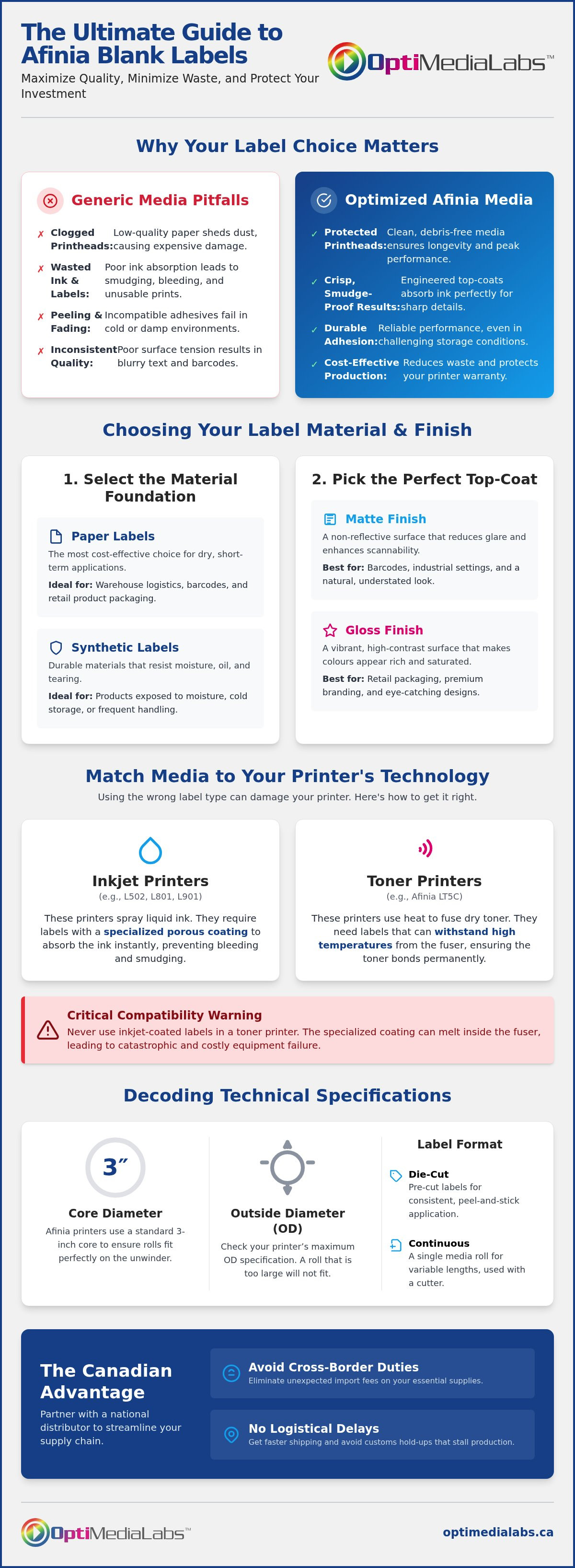
Most Afinia printers, like the L502 or L901, utilize inkjet technology that requires specialized coatings to catch and dry the ink instantly. Without these coatings, the ink will bleed and lose its sharp edges. Conversely, the Afinia LT5C uses a dry toner system. It requires media that can withstand the high heat of the fuser while ensuring the toner bonds permanently to the surface. Using inkjet labels in a toner printer can lead to catastrophic failure if the coating melts inside the machine. Proper media selection ensures the correct ink absorption rates, which directly affects colour vibrancy and drying times.
The Role of the Top-Coat in Label Longevity
A top-coat is the microscopic layer engineered for specific ink adhesion. This layer determines how the ink interacts with the label surface. Matte top-coats offer a non-reflective finish that's excellent for barcode scannability and industrial environments where glare is a factor. Gloss top-coats provide a vibrant, high-contrast effect ideal for retail packaging and premium branding. Both choices affect drying times and smudge resistance differently. Ensuring your afinia blank labels have the correct top-coat for your specific ink set, whether dye-based or pigment-based, is essential for achieving a professional, durable result that won't fade in storage.
Selecting the Best Material: Matte, Gloss, and Specialty Afinia Labels
Selecting the right substrate is a critical step in achieving professional branding. While many buyers focus solely on the face sheet, the combination of material and adhesive determines the label's success in its final environment. Standardizing your inventory with high-quality afinia blank labels ensures that your adhesive choice, whether permanent, removable, or freezer-grade, performs as expected. Freezer-grade adhesives are essential for Canadian businesses in the food and beverage sector where application temperatures often drop below zero.
For premium brands, specialty stocks like Kraft, linen, or silver metallic provide a tactile and visual edge. These materials transform a standard product into a luxury item. Silver metallic stocks are particularly effective for high-end cosmetics or industrial equipment where a metallic look is desired without the cost of traditional foil stamping. If you're unsure which specialty stock suits your printer, you can speak with a technical specialist to request material samples for testing adhesion and colour reproduction.
Paper Labels for High-Volume Efficiency
Paper-based labels remain the most cost-effective solution for dry, short-term applications. Matte white paper is the industry standard for warehouse and logistical barcode applications. It offers high contrast for scanners and resists glare under harsh facility lighting. Gloss white paper is the preferred choice for retail packaging. It provides a vibrant surface that makes colours pop, drawing the eye to the shelf. When applying paper labels to curved surfaces, ensure the grain of the paper runs parallel to the curve to prevent flagging or edge lifting.
Synthetic and Durable Media for Harsh Environments
When durability and moisture resistance are non-negotiable, synthetic materials like BOPP (Polypropylene) and PET (Polyester) are required. BOPP is a versatile choice for the cosmetics and essential oils industry because it resists oils, water, and many solvents. For extreme conditions, Polyester (PET) offers the highest level of durability and is often used for GHS chemical compliance. Following label industry standards ensures that your durable media meets the rigorous testing required for industrial safety. For a deeper look at material science, consult our Professional Guide to Label Printer Consumables: Canada. Using these technical afinia blank labels protects your brand from the damage of fading, peeling, or smudging in damp Canadian storage environments.
Printer Compatibility: Matching Blank Labels to Your Afinia Model
Success in digital label production depends on matching the specific engine technology of your hardware to the chemical properties of your media. Every Afinia model utilizes a distinct printhead architecture that dictates how ink or toner interacts with the substrate. Using incorrect afinia blank labels can lead to expensive downtime, poor image quality, or permanent hardware damage. For industrial-scale production, the Afinia L701 serves as a bridge, utilizing Memjet technology but designed for smaller footprints. It requires industrial-grade media that can handle consistent, high-volume runs without compromising the precision of the 1600 dpi output.
Memjet Technology and High-Speed Media
The Afinia L801 and L901 series are built for speed, reaching production rates of up to 60 feet per minute. At these velocities, standard labels cannot absorb ink fast enough, resulting in tracking and smudging. You must use "fast-dry" labels specifically engineered for Memjet technology. These coatings pull the aqueous ink into the substrate instantly, locking the colour in place before the roll reaches the rewinder. Identifying your specific model on our Afinia Color Label Printers page is the first step in ensuring your media can keep pace with your hardware's throughput.
Versatility with the Afinia L502
The L502 is the "workhorse" of the lineup due to its unique ability to swap between dye-based and pigment-based ink sets. This flexibility allows you to test diverse label stocks, from high-vibrancy retail paper to ultra-durable synthetics. Because the L502 features a rugged industrial construction, it handles thicker media and specialty adhesives better than entry-level machines. It's the ideal choice for businesses that need to produce both high-impact marketing labels and durable industrial tags using the same piece of equipment.
Toner-Based Requirements for the Afinia LT5C
Unlike the L-series inkjet models, the Afinia LT5C uses an LED toner system. This technology requires toner-receptive media that can withstand the high temperatures of the fuser unit. Standard inkjet labels will melt or fail to bond under these conditions. If your business produces food packaging, you must also ensure your material choices align with the FDA's Food Labeling Guide for safety and compliance. The LT5C is particularly effective for printing on dark or transparent substrates using white toner, provided the media is technically rated for dry toner adhesion. Selecting the right afinia blank labels for this system ensures your output remains professional and compliant with Canadian safety standards.
Technical Specifications: Roll Sizes, Core Diameters, and Durability
Precise technical specifications prevent mechanical jams and ensure high-speed registration accuracy. Most industrial Afinia models, including the L801 and L901, standardize on a 3-inch (76mm) core diameter. While smaller desktop units might use 1-inch cores, the 3-inch standard provides the stability required for high-volume afinia blank labels. You must also manage the Outside Diameter (OD) of the roll. Most internal unwinders accommodate a 6-inch or 8-inch OD, but using an external unwinder can expand your capacity to 12-inch rolls, significantly reducing the frequency of roll changes during long production runs.
Registration is another critical factor for professional results. Your printer needs to detect exactly where one label ends and the next begins. This is achieved through label gaps (the space between die-cut labels) or black marks on the back of the liner. If you plan to use post-print equipment, you must decide between "Matrix In" and "Matrix Off". The matrix is the waste material surrounding die-cut labels. Keeping the matrix in provides extra stability during high-speed printing, while removing it (Matrix Off) is necessary for many automated applicators to prevent peeling issues.
Measuring Your Label Requirements
To order the correct media, you need to verify these primary measurements:
- Width: The dimension across the web (from left to right).
- Length: The dimension in the direction of the roll's travel.
- Corner Radius: The curvature of the corners, typically 0.125 inches for standard die-cuts.
For custom shapes or varied sizes, continuous rolls offer the most flexibility, especially when paired with Afinia Label Cutters & Finishers. These finishers allow you to cut any shape on the fly without investing in custom dies.
Durability Standards for Canadian Industry
Industrial applications often require adherence to strict safety standards. GHS compliance is mandatory for chemical and industrial labelling in Canada, ensuring that warnings remain legible under chemical stress. BS5609 is the international standard for pressure-sensitive labels used in marine environments. This certification ensures that the adhesive and the print remain intact even after prolonged immersion in saltwater. If you have specific technical requirements for your facility, contact our technical support team for a detailed specification review to ensure your afinia blank labels match your operational needs.
Sourcing Afinia Blank Labels in Canada: Why OptiMediaLabs is Your Preferred Partner
Managing an industrial print operation requires a predictable supply of consumables. When you source afinia blank labels from a domestic distributor, you eliminate the hidden costs associated with cross-border logistics. International shipments often face unpredictable delays at customs, fluctuating brokerage fees, and volatile currency exchange rates. By partnering with a national provider, you ensure that your production schedule remains intact and your cost-per-label stays consistent. OptiMediaLabs serves as an authorized distributor, providing direct access to factory-certified media and ink without the administrative burden of importing goods.
National Distribution Across Canada
Efficient logistics are the backbone of high-volume manufacturing. We provide reliable shipping to all provinces and territories from our central facility. This national reach reduces lead times for critical production consumables, allowing you to maintain lower on-site inventory levels. For businesses looking to optimize their overhead, OptiMediaLabs offers free shipping on all orders over $500. This policy ensures that even large, heavy rolls of industrial media are delivered cost-effectively. Whether you're operating a single printer or a fleet of high-speed Memjet units, our distribution network keeps your facility running without interruption.
Expert Support for Complex Labelling Challenges
Technical expertise is what separates a mere vendor from a long-term partner. Selecting the right material for unique environments involves more than just picking a size from a list. Our team provides guidance on ensuring your media is fully compatible with Afinia finishers and applicators. This synergy prevents mechanical issues like adhesive bleed or registration drift during the finishing process. We understand the technical requirements of the Canadian industrial sector and help you match your specific hardware to the most resilient substrates available. Browse our full selection of Afinia blank labels here to find the exact match for your printer model.
Procurement is simplified when you can obtain both hardware and consumables from a single source. We maintain a comprehensive stock of Afinia ink cartridges alongside our label inventory. This one-stop approach reduces administrative time and ensures that your ink chemistry and label top-coats are always perfectly synchronized. If you need immediate assistance with a technical specification or a high-volume order, you can reach our Concord office at 1-888-646-0573. Choosing a dedicated labelling specialist ensures that your business benefits from the latest industry standards and a secure, streamlined path to the resources you need.
Scaling Your Production with Professional Afinia Media
Scaling your in-house labelling requires a precise balance of hardware capability and media quality. You've learned that selecting the right afinia blank labels involves more than just picking a size; it's about synchronizing top-coats with ink chemistry to ensure durability. By standardizing on industrial 3-inch cores and managing outside diameters correctly, you protect your printer's health and maximize throughput. These technical choices directly impact your total cost of ownership and the professional appearance of your brand.
Eliminating cross-border friction is the final step in optimizing your production. Working with a national distributor ensures you avoid duties and delays while maintaining a consistent supply of specialized consumables. As an Authorized Afinia Distributor, OptiMediaLabs provides the Specialized Technical Support necessary to navigate complex material requirements. We offer National Canadian Shipping to keep your facility running at peak efficiency regardless of your location. Our expertise ensures your media and hardware work in perfect synergy.
Ready to optimize your labelling workflow? Contact our expert team today to discuss your specific technical requirements or to request material samples. We're here to help you achieve crisp, smudge-proof results with every roll you print.
Frequently Asked Questions
Are Afinia labels compatible with other printer brands like Epson?
Afinia labels are often compatible with Epson and Primera inkjet models if the technical specifications match. Most afinia blank labels feature a universal inkjet coating designed for aqueous inks used by major brands. However, you must verify the roll width and outside diameter to ensure it fits the Epson unwinder. Always check if your specific printer uses dye or pigment ink to ensure the coating provides optimal adhesion and prevents smudging.
Can I use direct thermal labels in my Afinia inkjet printer?
No, you cannot use direct thermal labels in an Afinia inkjet printer. Direct thermal media is chemically treated to react to heat, not to absorb liquid ink. Using it in an inkjet system results in the ink pooling on the surface and never drying. For Afinia L-series hardware, you must use media with a specific inkjet-receptive top-coat to ensure the ink bonds correctly to the substrate and maintains professional print quality.
What is the difference between matte and gloss labels for product branding?
The choice depends on your environment and branding goals. Matte labels provide a non-reflective finish that is ideal for industrial settings or high-glare retail centres. They offer superior barcode scannability and a sophisticated, modern look. Gloss labels maximize colour vibrancy and contrast, making them the preferred choice for premium retail products that need to stand out on the shelf. Both finishes are available in various durable materials to suit your specific application.
How do I know if I need a 3-inch or 1-inch core for my Afinia labels?
Core size is determined by your printer’s internal spindle or external unwinder. Most industrial Afinia models, such as the L701 and L801, require a 3-inch (76mm) core for stability during high-speed production. Smaller desktop units or entry-level models often utilize a 1-inch core. Check your technical manual or look at your current roll's cardboard centre to confirm the required diameter before placing an order to avoid mechanical loading errors or feed issues during production.
Do Afinia blank labels come in custom shapes and sizes?
Yes, you can obtain afinia blank labels in virtually any shape or size. While standard circles and rectangles are common, many businesses use continuous rolls paired with an Afinia label finisher to create custom die-cuts on demand. This approach eliminates the need for expensive custom dies and allows for immediate prototyping of new designs. If you require a specific pre-die-cut shape, technical specialists can assist with custom orders to match your unique packaging needs.
What is the best label material for refrigerated or frozen food products in Canada?
Synthetic materials like BOPP (polypropylene) paired with a freezer-grade adhesive are the best choice for cold environments. Standard adhesives often lose their bond when temperatures drop, causing labels to flag or fall off. In Canada, where storage temperatures vary significantly, using a moisture-resistant synthetic ensures the label remains intact and legible despite condensation or frost. This combination is essential for food safety compliance and maintaining a professional brand presentation in refrigerated displays.
How should I store my blank label rolls to prevent adhesive degradation?
Store your label rolls in a cool, dry environment away from direct sunlight and extreme temperature fluctuations. Ideally, keep them at approximately 20°C with 50% relative humidity. Keeping the rolls in their original plastic packaging until use prevents the adhesive from drying out or absorbing moisture from the air. Proper storage ensures the labels remain easy to peel and adhere correctly to your products, preventing expensive waste and ensuring consistent application during production.
Why are my Afinia labels smudging immediately after printing?
Smudging usually indicates a mismatch between the ink type and the label top-coat. If you use pigment inks on a coating designed for dye inks, the particles may not settle correctly. Smudging also occurs when using generic media that lacks an inkjet-receptive layer. Ensure your media is specifically rated for your Afinia model's ink set. If the issue persists, check your printer settings to ensure the saturation levels aren't exceeding the material's absorption capacity during high-speed runs.