
Afinia Memjet Printer Pricing and Availability for Canadian Buyers
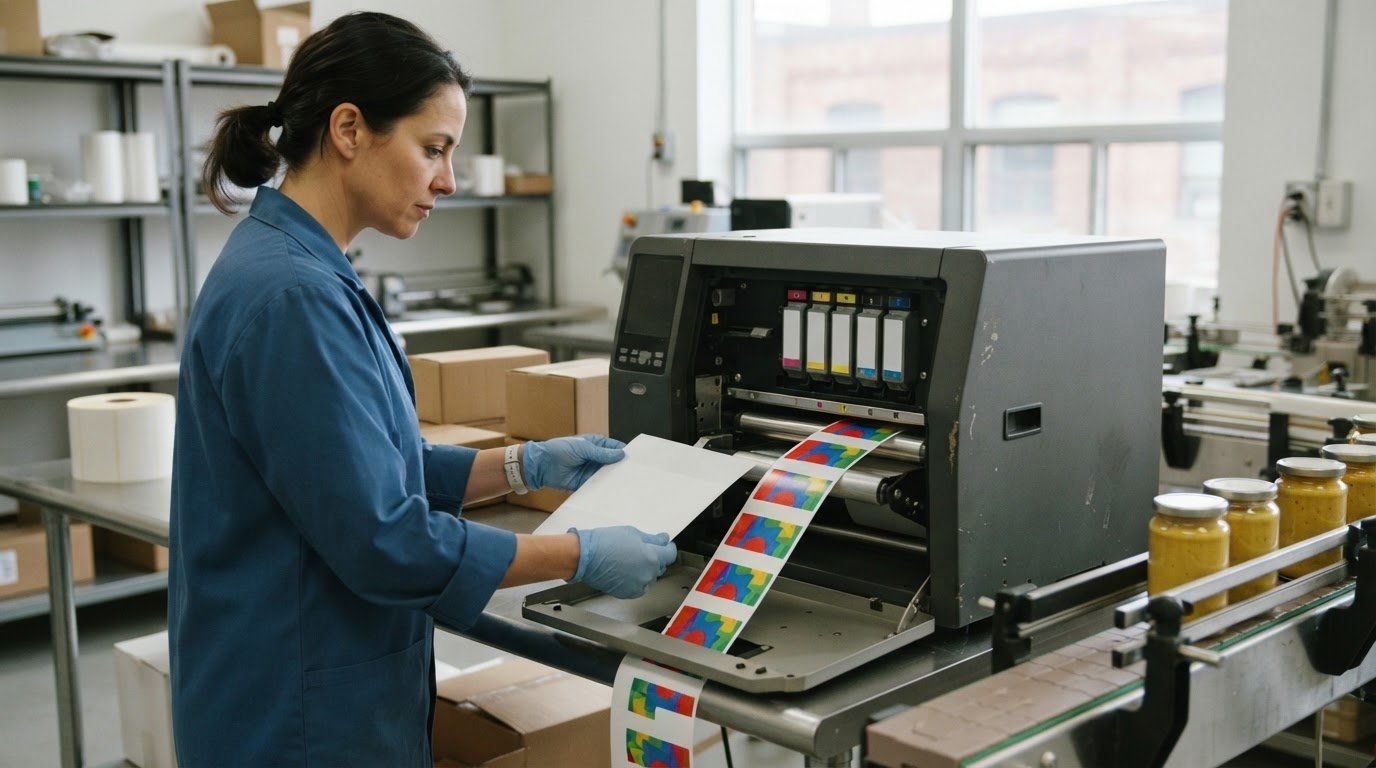
The printhead and media limits tell you more than a headline speed alone. An Afinia Memjet printer such as the L801 Color Label Printer supports print widths up to 8.5 inches, resolution up to 1600 × 1600 dpi, and print speeds from 6 to 12 inches per second. Its CMYKK dye-based ink system uses five 250 mL cartridges.
Those specifications help you assess whether the printer suits your label sizes, materials and production pace. A sound buying decision also depends on how it will fit into your setup and which items are included.
This guide explains Memjet Waterfall technology, print speed, energy use and the L801’s key technical specifications. It also covers Canadian pricing and availability considerations, plus the included accessories to account for when evaluating the complete printer package.
Key Takeaways
- Match the printer’s supported label width, media type and thickness to your production requirements before choosing a model.
- Memjet Waterfall technology uses a stationary printhead, while print speed varies with the selected resolution.
- Assess energy use alongside print volume and operating needs to understand how the printer may fit your workflow.
- Compare Canadian model and package details carefully, including what accessories are included with the printer.
- Explore how label cutters and finishers can complement a colour label printing setup.
Memjet technology and printer partners
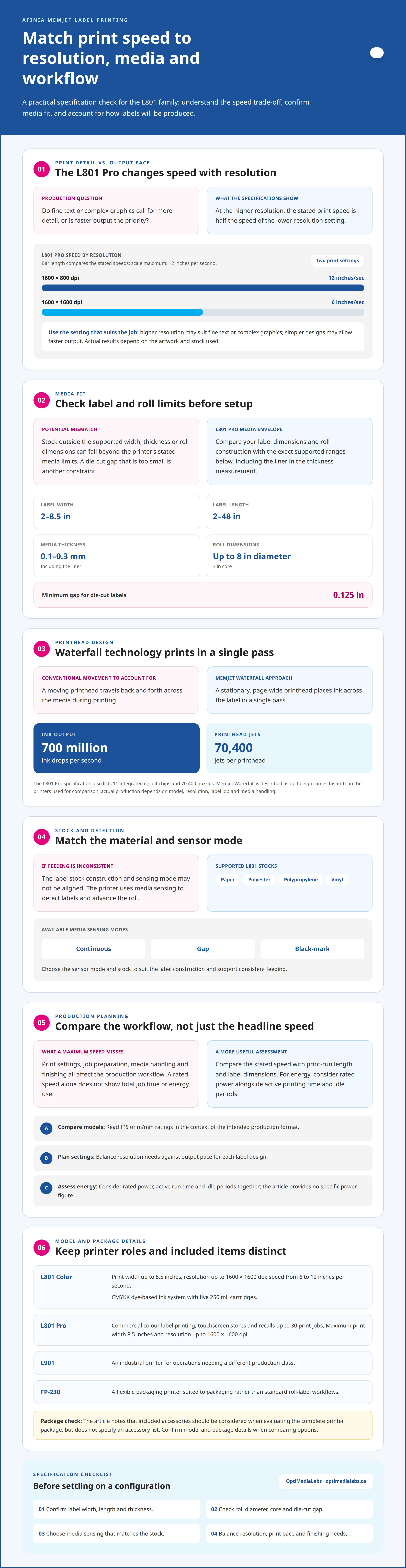
Memjet Waterfall technology uses a stationary, page-wide printhead. It places ink across the label in a single pass, rather than moving the printhead back and forth. The system releases 700 million ink drops per second, with 70,400 jets per printhead. For production, that design supports rapid output while keeping the printhead stationary during printing.
The Afinia L801 and L801 Pro use this approach for colour labels. The L801 Pro combines 11 integrated circuit chips with 70,400 nozzles. Its maximum print width is 8.5 inches, and resolution reaches 1600 × 1600 dpi. At 1600 × 800 dpi, it prints up to 12 inches per second. At 1600 × 1600 dpi, it prints 6 inches per second.
Media compatibility is a key specification, not a minor setup detail. The L801 Pro supports label widths from 2 to 8.5 inches and lengths from 2 to 48 inches. Media thickness must fall between 0.1 and 0.3 mm, including the liner. Rolls can measure up to 8 inches in diameter and use a 3-inch core. Die-cut labels need a minimum gap of 0.125 inches.
The L801 Color Label Printer also supports paper, polyester, polypropylene and vinyl stocks. It handles continuous, gap and black-mark media sensing. These choices affect how the printer detects each label and advances the roll. Match the sensor mode and stock to the label construction to support consistent feeding.
- L801 Pro: Commercial colour label printing, with a touchscreen that stores and recalls up to 30 print jobs.
- L901: An industrial printer for operations needing a different production class.
- FP-230: A flexible packaging printer, suited to packaging rather than standard roll-label workflows.
Set up an Afinia Memjet printer by connecting it to a computer or network, loading compatible media and cartridges, and configuring the driver for the label dimensions and print quality you need. For maintenance, follow the printer’s cleaning guidance and use media within its stated specifications.
Common limitations include media outside the supported width, thickness or roll dimensions, and die-cut gaps below the specified minimum. The L801 Pro has a one-year warranty; use the applicable warranty process for repair options in Canada.
For a production setup, consider how the printer’s media range, print resolution and roll handling fit the labels you need to make. A colour label printer can support in-house printing when label design and stock requirements align with the printer’s specifications.
Argon Technology states that Afinia label printers provide UV, water, and abrasion resistance, adding a durability consideration when selecting a printer and label stock. The Afinia L801 Color Label Printer is listed in its technical specifications as weighing 83 lbs (37.6 kg), a practical detail to consider when planning where the unit will be placed and handled. These points complement the media and production specifications: resistance needs, compatible stock, roll handling and available setup space can all inform the choice of printer configuration.
Print speed and energy efficiency
Rated speed helps estimate throughput, but print settings shape the result. The Afinia L701 reaches up to 8 inches per second. The L901 and L901 Plus reach up to 12 IPS. Those figures help distinguish medium-fast and industrial production needs. They don’t replace testing with the artwork and stock used for actual label printing.
Production format also matters. The X350 Digital Roll to Roll Press prints up to 45 m/min. That speed suits a different workflow from desktop or commercial roll-label printing. Compare the model’s stated speed with the length of each print run, the required label dimensions and the finishing steps that follow. A fast printer cannot remove time spent preparing jobs or handling finished rolls.
Resolution affects the pace of the L801 Pro. Its speed reaches 12 inches per second at 1600 × 800 dpi, and 6 inches per second at 1600 × 1600 dpi. Choose the setting according to artwork detail and production priorities. Fine text or complex graphics may call for higher resolution; simpler designs may allow faster output.
Memjet Waterfall technology is described as up to eight times faster than the printers used for comparison. Treat this as a technology claim, not a guaranteed production result. Actual workflow depends on the model, resolution, label job and media handling. Use the manufacturer’s speed figures as a starting point, then assess output with representative label designs.
Assess energy use separately from print speed. A high output rate alone does not show how much electricity a printer uses over a workday. For a practical comparison, consider rated power, active printing time and idle periods. Their impact depends on your print schedule and job volume. Longer active runs differ from frequent pauses, even when the same printer model is used.
Consider print quality and power use in the context of the job. A higher-resolution setting can affect throughput, while the operating schedule influences energy consumption. During a representative run, record the print mode and time spent printing or idle. This helps you assess a printing solution against your workflow instead of judging it by maximum speed alone.
- Compare models: Use stated IPS or m/min ratings alongside the intended production format.
- Plan settings: Balance resolution needs against output pace for each label design.
- Assess energy: Consider rated power, active run time and idle periods together.
To align printer speed, print settings and job requirements, discuss your label workflow.
Afinia and Memjet collaboration
Afinia Label and Memjet collaborated in 2012 to co-develop a commercially viable narrow-web label printing solution. That partnership brought Memjet Waterfall technology into Afinia’s label printer range. For buyers, the practical point is that “Memjet” describes a printing technology, while “Afinia” identifies the printer brand. The names refer to connected but distinct parts of the equipment.
When assessing a printer for a production need, consider the format and intended use. Narrow-web systems print on rolls of label stock and suit many in-house label workflows. The right model still depends on the media, output volume and finishing steps. A printer designed for roll labels is not automatically the right fit for flexible packaging or industrial production.
Afinia Label’s range includes machines for different applications. The L801 is a commercial label printer, while the L901 is an industrial printer. The FP-230 is designed for flexible packaging. These examples show why buyers should compare the printer’s intended role, not just its brand or underlying technology.
Memjet is not used across every Afinia printer. The LT5C CMYK + White Label Printer uses LED dry toner technology. The F502 Fanfold Color Label Printer supports dye and pigment inks. These alternatives show that model names and print technologies need separate consideration. A decision based only on the word “Afinia” may overlook differences in media format, ink system or application.
Connect printer type to demand before choosing a system. For example, a business producing product labels in-house for retail merchandise or promotional items from suppliers like Rally Towels may prioritize roll handling and colour output. A flexible packaging job points toward a different equipment category, such as the FP-230. High-volume roll-to-roll production has another format, represented by the X350 Digital Roll to Roll Press. Each example serves a distinct workflow.
Use this sequence to narrow the options:
- Define the output: Separate standard labels from flexible packaging or roll-to-roll production.
- Identify the media: Record the stock type, roll format and label dimensions required.
- Match technology: Compare the model’s stated print method with the job’s colour and material needs.
- Plan finishing: Include any cutting or finishing step after printing.
This framework clarifies how Memjet technology fits into a label production setup. The printer’s format and intended use determine whether it suits your needs. Compare those details with your demand before choosing an Afinia model.
Canadian price and availability
Canadian buyers should compare Afinia models by configuration, not by brand name alone. A single price cannot represent every colour label printer or production setup. The L801, L801 Pro and L801 Plus are distinct model names, and a meaningful comparison starts by identifying the exact model being quoted. Keep the currency in Canadian dollars when reviewing a Canadian purchase. Then compare what the stated price covers, rather than treating a printer-only figure as the complete equipment cost.
Build a like-for-like comparison around the equipment your workflow requires. List the printer, consumables, label stock and finishing equipment separately. A setup needing compatible ink cartridges and a cutter, for instance, has different requirements from a printer-only setup. Itemizing each component makes the scope of a quote clearer and avoids assuming that accessories or supplies come with the printer.
Model choice affects the purchase decision. The L801 Pro is a commercial colour label printer, while the L901 is an industrial printer. Their intended production roles differ, so compare the model against your planned label work. Consider label format, daily workflow, required print quality and the finishing process. A lower equipment price would not be useful if the configuration cannot handle the job requirements.
- Identify the model: Use the full model name, such as L801 Pro or L801 Plus.
- Separate components: Distinguish printer, cartridges, media and finishing equipment.
- Compare scope: Check that each price comparison covers the same equipment and supplies.
- Match the workflow: Relate the configuration to your label format and production needs.
Availability is also model-specific. An L801 Pro and an industrial L901 are different choices, so availability for one does not establish availability for the other. Keep the requested model name consistent in purchasing records and quotes. If a production plan depends on a particular printer, align the procurement schedule with the project timeline and the equipment configuration. This avoids treating the product family as one interchangeable item.
Review accessories separately. The items included with a printer may differ from the supplies needed to start production. List the accessories shown for the specific model, then distinguish them from the cartridges, label stock or finishing tools your workflow requires. This is useful when comparing an Afinia purchase with a complete in-house label-printing setup.
For a clear Canadian buying decision, document the model, package contents, required supplies and intended production use together. That record gives your team a consistent basis for comparing pricing and availability across the exact configuration under consideration.
Included printer accessories
Package contents matter because a printer’s specifications don’t establish which separate items arrive in the box. For an Afinia L801 or L801 Pro, distinguish integrated printer features from supplied accessories and consumables. A touchscreen is built into the L801 Pro; it isn’t a separate accessory. Likewise, cartridge capacity describes the ink system, not by itself the package contents.
The L801 Pro uses five 250 mL dye-based CMYKK cartridges, for 1.25 L of total ink capacity. This identifies the cartridge configuration required by the printer. It doesn’t establish how many cartridges are supplied with a particular purchase. Treat cartridge supply as its own line in the package details, separate from the printer itself and any additional consumables.
Use the same distinction for media. The L801 Pro accepts rolls with a 3-inch core and up to 8 inches in outside diameter. Those limits describe compatible label stock, not a roll included with the printer. If production must start immediately, account for suitable labels as a separate requirement. The roll’s core and outside diameter need to match the printer’s supported specifications.
Before comparing offers, separate the package into three practical categories:
- Printer components: Identify integrated features, such as the L801 Pro touchscreen.
- Consumables: List compatible ink cartridges and label stock separately.
- Additional equipment: Itemize any accessory or finishing equipment included with the specific package.
This breakdown helps avoid a common assumption: an item a machine uses does not necessarily come with it. For example, a printer’s five-cartridge configuration describes its ink system, not the cartridges included in the package. Record supplied cartridges separately, and apply the same approach to label rolls and add-on equipment. Note quantities and model compatibility when package details provide them.
For colour label printers, compare a complete, itemized package with your intended workflow. Check that the printer model, cartridge configuration, label media and required finishing equipment appear as separate entries. This helps your team identify what is ready for production and what needs to be planned separately, without mistaking specifications for a packing list.
Before purchasing, organize the package details in one checklist: printer model, supplied consumables, compatible media, included accessories and separately required equipment. Keep product names exact, especially across L801 and L801 Pro configurations. The Afinia L801 ink cartridges page can help identify the cartridge category for the L801 family.
To plan the printer package around your label workflow, contact the team about your accessory requirements.
OptiMediaLabs Canada
OptiMediaLabs offers label production equipment and supplies for Canadian buyers. If you’re evaluating an Afinia Memjet printer, consider how the model, label stock and finishing steps fit your workflow. Its range includes Afinia Color Label Printers, RFID Label Printers, Afinia Label Cutters & Finishers, and Thermal Transfer Ribbons. These products support different parts of a labelling setup, from printing to finishing.
Turn to OptiMediaLabs Canada when you’re narrowing down equipment or planning how a printer will fit into your production process. Share the label application and workflow you’re considering to make the discussion relevant to your needs.
Contact OptiMediaLabs Canada to discuss your label printing requirements.
Plan the right fit for your label workflow
Turn printer specifications into a practical production plan by considering the label types you run, how they move through printing and finishing, and which supplies your workflow requires. This context helps you assess whether an afinia memjet printer suits your operation and what supporting equipment belongs in the setup.
OptiMediaLabs Canada offers Afinia Color Label Printers, pigment ink cartridges, and RFID Label Printers. These product categories can support different printing requirements, while your intended labels and workflow guide the selection. Share those requirements when discussing your options, including how you plan to handle finished labels and replenishment supplies.
Contact OptiMediaLabs Canada to discuss your label printing needs and next steps. A clear plan can help you move forward with confidence.
Frequently Asked Questions
What is an Afinia Memjet printer and how does Memjet technology work?
An Afinia Memjet printer combines Afinia label-printer hardware with Memjet Waterfall print technology. A stationary, page-wide printhead places ink across the label in one pass. This differs from a design that moves the printhead back and forth. The L801 Pro also includes a touchscreen that can store and recall print jobs, helping operators access repeat work without recreating each setup.
What are the specifications and print speeds of Afinia Memjet printers?
Specifications vary by model, so match the printer to your media and workflow. The L801 Pro supports label widths from 2 to 8.5 inches and media thicknesses of 0.1-0.3 mm, including the liner. It prints up to 12 inches per second at 1600 × 800 dpi, or 6 inches per second at 1600 × 1600 dpi. Connectivity and computer operating-system support are also useful comparison points.
How much does an Afinia Memjet printer cost in Canada?
The purchase cost in Canada depends on the printer model and package configuration. Compare the printer separately from consumables, label stock and finishing equipment. A quote that includes cartridges and a cutter covers different items from a printer-only purchase. Compare the same model and package contents to see what each total includes.
Where can I buy an Afinia Memjet printer or get a quote in Canada?
OptiMediaLabs Canada sells Afinia Color Label Printers in Canada. Contact OptiMediaLabs Canada for a quote and describe the label application and equipment configuration you’re considering. You can also call the friendly team for assistance with the purchase process.
What label sizes, materials, and applications do Afinia Memjet printers support?
Supported sizes and materials depend on the model. The L801 Color Label Printer supports paper, polyester, polypropylene and vinyl label stocks. For the L801 Pro, label widths range from 2 to 8.5 inches, and lengths range from 2 to 48 inches. These capabilities suit roll-label production; select media based on the model’s specifications and the dimensions required by your application.
Which Afinia Memjet printer models are available or discontinued?
Canadian price listings include the L801 Color Label Printer and L801 Plus; the L801 Pro is also named as a distinct model.
What are the ink cartridge costs and ongoing operating costs for Afinia Memjet printers?
The L801 uses five 250 mL dye-based CMYKK cartridges. To assess operating costs, consider rated power alongside active printing time and idle periods.