
Barcode Software Comparison Canada: Choosing the Right Professional Solution for 2026
A single manual data entry error in your warehouse doesn't just waste a label; it can halt an entire Canadian production line and trigger costly GHS compliance penalties. You likely recognize the frustration of software that refuses to integrate with your existing ERP or struggles to drive your Afinia and Zebra printers efficiently. Choosing between complex cloud subscriptions and traditional on-premise licenses often feels like a gamble with your operational uptime.
This barcode software comparison Canada guide provides the technical clarity you need for 2026. We'll show you how to move beyond basic design tools to implement a professional middleware solution that automates your labelling workflows. You'll discover the critical differences between BarTender, NiceLabel, and Loftware, focusing on GS1 compliance and seamless hardware connectivity. We'll break down the licensing models and integration capabilities so you can select a platform that secures your supply chain and supports long-term growth. Our objective is to help you realize a faster, more accurate printing environment that eliminates manual bottlenecks once and for all.
Key Takeaways
- Learn how to bridge the gap between your ERP systems and industrial hardware like Afinia or Zebra printers to eliminate costly manual entry errors.
- Use this barcode software comparison Canada to evaluate the 2026 licensing tiers and feature sets of industry leaders like BarTender, NiceLabel, and Loftware.
- Ensure your operations remain compliant with GS1 Canada and GHS standards by choosing software that automates complex regulatory labelling requirements.
- Identify the specific selection criteria needed to integrate professional labelling middleware with existing platforms like SAP, Oracle, or Microsoft Dynamics.
- Discover how a professional labelling audit can help you choose between cloud-based and on-premise solutions to ensure long-term operational stability.
Beyond the Generator: Why Professional Barcode Software is Essential
Professional barcode software serves as the vital middleware connecting your enterprise data to your industrial printer hardware. In a competitive Canadian supply chain, a label is much more than a sticker. It's a precise data carrier that ensures traceability, inventory accuracy, and regulatory compliance across your entire operation. Relying on free online generators for commercial production introduces significant operational risks that professional suites are specifically designed to mitigate. These entry-level tools lack the automation required to handle the high-volume demands of a modern warehouse or manufacturing facility.
The Risk of Using Basic Tools for Industrial Labelling
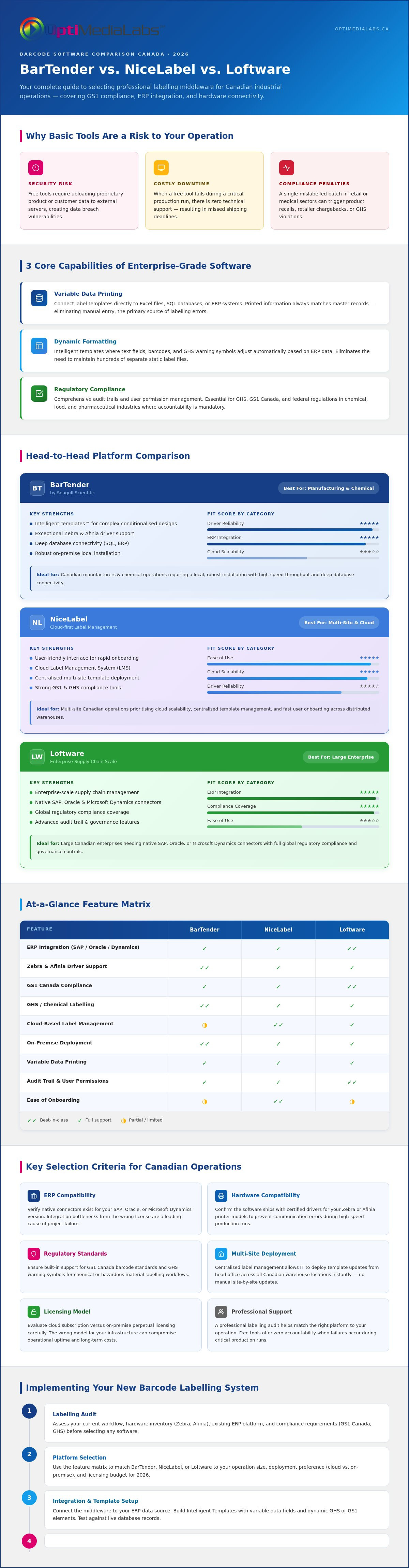
Free online tools frequently require users to upload proprietary product data or sensitive customer information to external servers. This practice creates unnecessary security vulnerabilities and risks potential data breaches. Beyond security, the financial impact of labelling errors in the Canadian retail and medical sectors is substantial. A single mislabelled batch may lead to expensive product recalls, retailer chargebacks, or compromised patient safety. When a free tool fails or generates unreadable codes during a critical production run, there is no technical support available to resolve the issue. This lack of professional accountability often results in costly downtime and missed shipping deadlines.
Core Benefits of Enterprise-Grade Software
Professional suites like BarTender or NiceLabel provide database automation that basic tools simply cannot match. This barcode software comparison Canada focuses on how professional tools streamline multi-site operations through three core capabilities:
- Variable Data Printing: Connect your label templates directly to Excel files, SQL databases, or ERP systems. This ensures that the information printed on the label always matches your master records without the need for manual data entry, which is the primary source of labelling errors.
- Dynamic Formatting: Utilize intelligent templates where label elements, such as text fields, barcodes, or GHS warning symbols, adjust automatically based on the specific data received from your system. This eliminates the need to maintain hundreds of separate static files.
- Regulatory Compliance: Maintain comprehensive audit trails and manage user permissions. These features are essential for meeting strict federal regulations in the chemical, food, and pharmaceutical industries where accountability is mandatory.
Centralized label management is indispensable for Canadian businesses with multiple locations. It enables IT administrators to update a single template at head office and deploy it to every warehouse across the country instantly. This ensures total brand consistency and regulatory alignment without manual intervention at each site. By investing in a professional suite, you move from a reactive labelling process to a proactive, automated workflow that supports long-term growth.
Barcode Software Comparison: BarTender vs. NiceLabel vs. Loftware
Selecting the right platform requires a deep dive into how each suite handles data and hardware connectivity. This barcode software comparison Canada evaluates the three dominant players currently supporting the Canadian industrial market. Each software suite offers distinct advantages based on whether you prioritize driver reliability, user interface, or cloud scalability. Choosing the wrong license can lead to integration bottlenecks, so understanding these core differences is essential for your 2026 planning.
BarTender: The Workhorse of Canadian Manufacturing
BarTender by Seagull Scientific remains a preferred choice for Canadian manufacturing and chemical sectors. Its Intelligent Templates™ allow users to create complex designs that conditionalize data. This reduces the total number of label files your IT team must manage. It provides exceptional driver support for Zebra printers and industrial Afinia models. This ensures high-speed throughput without the communication errors often found in generic drivers. For businesses requiring a local, robust installation with deep database connectivity, BarTender Label Design Software is a dependable choice.
NiceLabel: Streamlining the User Experience
NiceLabel distinguishes itself with a user experience that mirrors modern Microsoft Office applications. The intuitive, Word-like interface significantly reduces the learning curve for floor staff. It functions as an all-in-one designer and print management system, allowing for rapid deployment across a local network. Many small to medium Canadian businesses prefer this interface because it simplifies the design process without sacrificing professional features. If your priority is ease of use and quick setup for your production team, NiceLabel Barcode Software provides a streamlined path to professional production.
Loftware: Scaling to the Cloud
Loftware is the premier solution for complex, global enterprise labelling. It excels at standardizing labelling processes across international borders from a Canadian head office. By utilizing Loftware Cloud Software, organizations can significantly reduce IT overhead. This model eliminates the need for local server maintenance at every site. This barcode software comparison Canada highlights Loftware for its ability to integrate deeply with large-scale ERP systems like SAP or Oracle. It provides a centralized hub for all labelling activities, ensuring every facility uses the same approved templates.
Choosing between these professional suites depends on your specific operational constraints and hardware fleet. If you are unsure which licensing tier fits your 2026 growth plans, you can request a technical consultation to find the most cost-effective path forward for your facility.
Key Selection Criteria for Canadian Operations
Selecting a professional suite requires looking beyond the design interface to evaluate how the software fits into your broader technical infrastructure. A successful implementation depends on how well the platform communicates with your existing systems. This barcode software comparison Canada highlights that top-tier suites don't just print labels; they act as a functional bridge to your ERP environment. Whether your facility relies on SAP, Oracle, or Microsoft Dynamics, your software must pull data in real-time to prevent the discrepancies that lead to shipping delays.
Balance is equally important when considering the different needs of your team. Your IT department requires granular administrative control, security logs, and centralized deployment capabilities. Conversely, floor staff need a simplified "print-only" interface that prevents accidental design changes and reduces training time. Professional suites offer customizable user roles to satisfy both requirements. This division of labour protects your master templates while allowing production to move at full speed without technical bottlenecks.
Database Integration and Automation
Transitioning to a "single source of truth" model is the most effective way to eliminate manual entry errors. In a professional workflow, specific warehouse actions, such as scanning a pallet or closing a work order, automatically trigger print jobs. This level of automation ensures that the correct label prints at the right time without human intervention. By linking your templates directly to a master database, you eliminate the need to maintain hundreds of individual label files for every SKU in your inventory.
Licensing Models: Subscription vs. Perpetual
The labelling industry is rapidly shifting toward Software as a Service (SaaS). Subscription models, such as those available through Loftware Cloud, provide lower upfront costs and automatic updates. However, many Canadian facilities still prefer perpetual licenses for stable, air-gapped environments where long-term ROI is the priority. When calculating your total cost of ownership, consider the number of printer seats required. Licensing by the number of printers rather than individual users often provides a more predictable cost structure as your team grows. If you're managing a high-volume facility, the time saved through automated job routing often outweighs the initial licensing fees within the first year of operation.
Partnering with a local Canadian distributor ensures you receive specialized support tailored to our market conditions. Having access to technical experts who understand both your software and your hardware, such as your colour label printers, prevents the downtime associated with waiting for support from different time zones.
Compliance and Hardware Compatibility in Canada
Operational success in the Canadian market requires strict adherence to federal and industry-specific labelling standards. Professional software acts as the gatekeeper for these regulations. When performing a barcode software comparison Canada, you must ensure your chosen suite supports the complex logic required for GS1 and GHS compliance. These aren't just visual requirements; they involve precise data structures that generic design tools often misinterpret. Selecting a professional solution ensures your labels meet the rigorous demands of Canadian retailers and safety inspectors alike.
Hardware synergy is the second half of the compliance equation. Your software must communicate perfectly with your printer to ensure every barcode is crisp and every warning symbol is vibrant. This connection prevents the scan errors that lead to retailer chargebacks or shipping delays. By utilizing software with native drivers, you guarantee that the data sent from your database is translated accurately onto the physical label media.
GS1 and Industry-Specific Standards
Generating compliant GS1-128 barcodes is mandatory for logistics and retail distribution across Canada. Professional software automates the application identifiers and check digits necessary for these barcodes to scan correctly at every point in the supply chain. For food and beverage producers, meeting nutritional labelling requirements is equally critical. Your software must pull accurate ingredient data and formatting from your master database to comply with CFIA standards. For a deeper look at these requirements, consult our GS1 Barcode Label Software guide to ensure your 2026 operations remain fully compliant.
Driving Professional Hardware
A software suite's ability to drive high-performance Afinia Color Label Printers or Epson Printers is often overlooked. Generic design tools typically use basic Windows drivers that fail to utilize the full print resolution or specialized hardware features of these machines. Professional software provides native drivers that offer granular control over colour profiles and ink usage. This precision is vital for GHS compliance, where specific red and black pictograms must be rendered with absolute clarity to meet safety regulations. Using high-quality ink cartridges alongside optimized software drivers ensures your labels remain durable and legible throughout the product lifecycle.
Pairing your hardware with the correct software license prevents the jagged barcodes and washed-out colours that lead to retail rejections. If you need help matching your specific printer model with the right software tier, contact our technical team today for a hardware-software compatibility audit.
Implementing Your New Barcode System
Successful deployment requires a methodical approach that extends far beyond a simple software installation. This final stage of your barcode software comparison Canada journey involves aligning your technical infrastructure with your physical production environment. A rushed setup often leads to integration gaps that negate the benefits of automation. By following a structured implementation plan, you ensure that your investment in BarTender, NiceLabel, or Loftware delivers immediate operational reliability. This process transforms your labelling from a manual bottleneck into a streamlined, high-speed asset.
Establishing a maintenance schedule and training your floor staff on the new "print-only" interfaces is the final pillar of a stable system. You should select a software tier that accommodates your projected 2026 volume today. It's more cost-effective to license for future growth now than to reconfigure your network permissions and printer seats during a mid-year production surge. Consistency across your templates ensures that every facility in your network adheres to the same Canadian quality standards.
The Audit and Planning Phase
Start by mapping your exact data flow from the ERP host to the printer. You must identify every touchpoint where data could be corrupted or delayed by manual intervention. Consider the physical environment where your labels will reside. In Canada, labels often face extreme temperature fluctuations in transit or high moisture levels in cold storage facilities. These environmental factors dictate your choice of media and adhesive. Consult with a specialist to verify hardware and software synergy before finalizing your template designs. This verification step prevents driver conflicts that can stall production during peak periods.
Expert Support and Procurement
Purchasing your license from a dedicated Canadian distributor like OptiMediaLabs Canada provides a distinct advantage in post-sale support. We understand the specific regulatory landscape of the Canadian market and can assist with complex template configurations that meet federal requirements. Beyond software, we provide access to specialized thermal transfer ribbons and media that are tested to work with your specific software settings. This single-source approach ensures that your ribbons, labels, and software drivers are perfectly synchronized for maximum durability and legibility. Accessing local expertise helps you resolve technical hurdles without waiting for support from different time zones.
Contact OptiMediaLabs Canada to find the perfect software for your Canadian business and secure your labelling workflow for 2026.
Modernize Your Canadian Labelling Workflow for 2026
Transitioning to a professional suite is the most effective way to eliminate manual data entry errors and secure your production line. As this barcode software comparison Canada has shown, platforms like BarTender and NiceLabel act as essential middleware. They connect your ERP data directly to your industrial hardware. Prioritizing seamless integration and GS1 compliance protects your business from shipping delays and regulatory penalties. It's about building a stable foundation for your long-term growth.
OptiMediaLabs Canada is an authorized Canadian distributor for BarTender and NiceLabel. We offer expert knowledge on Afinia and Epson hardware integration. This ensures your software and printers work in perfect harmony. We provide national shipping on all software licenses and consumables to keep your facility running smoothly. Contact our Canadian experts for a barcode software consultation to find the right fit for your specific facility needs. Let's work together to build a more efficient, automated future for your warehouse operations.
Frequently Asked Questions
What is the best barcode software for a small business in Canada?
NiceLabel is often the most efficient choice for small Canadian businesses due to its intuitive, Word-like interface. It allows users to design professional labels without extensive technical training. For those requiring a robust, local installation, BarTender’s entry-level tiers provide a secure path toward automation. Both options ensure your business can scale from basic printing to full database integration as your inventory grows.
Do I need a subscription for BarTender or NiceLabel?
Most modern platforms have transitioned toward subscription models to provide continuous updates and cloud accessibility. BarTender and NiceLabel now primarily offer annual subscription plans that include technical support and maintenance. This model ensures you always have the latest security patches and driver updates. Perpetual licenses may still be available for specific on-premise requirements, but SaaS is the industry standard for 2026.
Can I use professional barcode software with a standard office printer?
You can use professional suites with standard office printers, though industrial hardware is recommended for production environments. Professional software utilizes standard Windows drivers to communicate with laser or inkjet office printers. However, for high-volume manufacturing, pairing your software with Afinia or Zebra printers ensures better durability and lower long-term ink or toner costs. Office printers lack the specialized sensors needed for precision label gap detection.
How do I ensure my barcodes meet GS1 Canada standards?
Utilize the built-in GS1 compliance wizards found in professional software suites to guarantee your barcodes meet Canadian retail standards. These tools automatically format application identifiers and calculate check digits to prevent scanning failures. This barcode software comparison Canada recommends performing regular verification scans with a hardware verifier. This extra step confirms that your printed output adheres to the specific quality grades required by major Canadian distributors.
What is the difference between direct thermal and thermal transfer printing in software?
The software manages these methods through specific driver settings that control heat and speed. Direct thermal printing requires heat-sensitive media and no ribbon, while thermal transfer uses a ribbon for more durable results. Your software allows you to toggle these settings based on the media loaded in your printer. This ensures the print head applies the correct temperature for the specific label material and ribbon type.
Does professional barcode software work with Mac computers?
Most leading barcode design applications are built natively for Windows environments. If you operate on a Mac, you can utilize cloud-based solutions like Loftware Cloud, which runs through a web browser. Alternatively, some users employ Windows emulators or virtual machines to run BarTender or NiceLabel. For most industrial Canadian facilities, dedicated Windows workstations remain the most stable choice for local print management.
How do I integrate my Excel database with my label software?
Connect your Excel files by using the database connection wizard within your software’s design interface. You simply select your spreadsheet as the data source and map specific columns to the corresponding text or barcode fields on your label. This automation ensures that when you update your spreadsheet, the changes reflect on your labels instantly, which significantly reduces labelling errors. For business owners and creators who also require high-quality digital assets for their storefronts, you can check out Avetrix Labs to find professional resources for your brand.
Is cloud-based barcode software secure for industrial use?
Cloud-based platforms like Loftware Cloud utilize enterprise-grade encryption and secure data centres to protect your proprietary information. These systems are designed for industrial use and offer high uptime and robust disaster recovery options. They provide a centralized way to manage labels across multiple Canadian sites while maintaining strict security protocols. This model reduces the burden on your local IT team by handling server maintenance and security updates automatically.