
Calculating Labour Savings from Automated Labeling: A Practical Guide

What if a faster label printer saves machine time but barely changes your labour costs? That’s why calculating labor savings from automated labeling should start with the work people actually do, not a machine’s advertised speed.
Manual label handling can take time across data preparation, printing, finishing and label management, but those hours aren’t always tracked consistently. Time freed up only becomes a labour saving when it can be reduced, avoided or put to productive use. A realistic estimate needs to account for both.
This guide shows you how to build a project-specific business case using your current workflow as a baseline. You’ll identify the tasks automation could change, measure time spent, estimate net hours saved and compare scenarios against implementation costs. You’ll also learn how to document assumptions, including whether freed-up capacity can translate into an actual cost reduction.
Use the results to assess which parts of your labeling workflow may benefit from equipment or software changes, such as label printing, finishing or data preparation. The goal is a transparent estimate your team can review and refine, not a generic savings claim.
Key Takeaways
- Start calculating labor savings from automated labeling with a task-level view of your current workflow, rather than relying on advertised machine speed.
- Use baseline and automated-state time measurements to estimate net annual hours saved, including added support time.
- Separate redeployed capacity and quality improvements from cash savings. Count labour as a cash saving only when staffing, overtime or external labour costs change.
- Compare conservative, expected and higher-volume scenarios using your own operating data, and test assumptions such as training, maintenance and exception rates.
- Match the measured bottleneck to relevant printer, finishing, media or barcode software categories before assessing equipment options.
What labour does automated labeling actually change?
Labour savings are work hours avoided or reassigned after a workflow changes. They don’t automatically mean fewer employees. If a task takes less time but staff use the freed capacity elsewhere, the operational benefit is real, but it isn’t necessarily a cash saving.
That distinction matters when calculating labor savings from automated labeling. A printer’s output rate doesn’t show how much time your team actually recovers across preparation, production and handling. First identify which tasks change, then measure them.
Map the manual labeling workflow before estimating savings
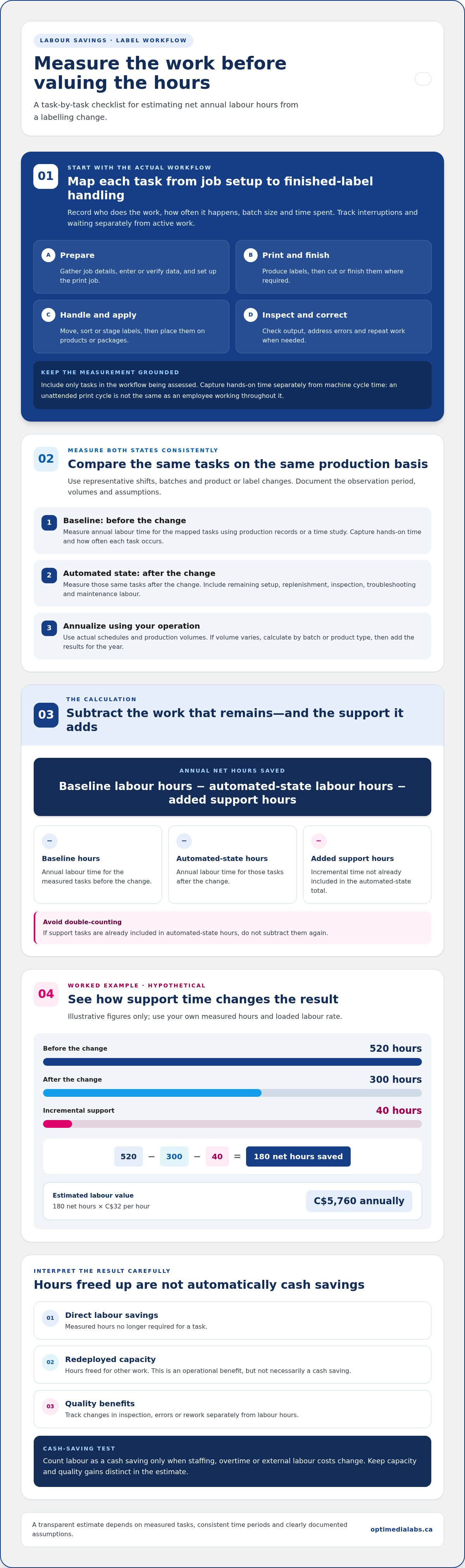
Follow each job from preparation to finished-label handling. Record the task, who performs it, how often it occurs, batch size and time spent. Note interruptions and waiting separately from active work. Include only tasks that are part of the workflow you’re assessing.
- Prepare: Gather job details, enter or verify data, and set up the print job.
- Print and finish: Produce labels, then cut or finish them where required.
- Handle and apply: Move, sort or stage labels, then place them on products or packages.
- Inspect and correct: Check output, address errors and repeat work when needed.
Look for repeated handling, data re-entry, waiting for a batch, inspection and rework. Record the frequency and time for each task. A task that happens infrequently may still matter if it takes substantial time each time it occurs.
Keep the benefit categories separate
Direct labour savings: Measured hours no longer required for a task. Redeployed capacity: Hours freed for other work. Quality benefits: Changes in inspection, errors or rework. Track each separately. Don’t treat capacity or quality gains as labour cash savings by default.
Separate printing automation from label application
Printers produce labels. Application equipment places labels on products or packages. These are distinct steps, so a printer alone shouldn’t be counted as automating every part of a packaging line. The broad purpose of automation includes reducing direct human labour, but a savings estimate still needs to match the specific task that changes.
Printing equipment may affect print preparation and label production. Software may change data entry or job setup, depending on the workflow. Finishing equipment may reduce manual cutting or handling. For example, Afinia label cutters and finishers relate to post-print finishing tasks. Measure each affected step independently, and keep manual application in the baseline unless application equipment is part of the project.
How to calculate labour savings from automated labeling
Use the same task boundaries you mapped in the workflow, then compare labour time before and after the change. A four-step calculation keeps the estimate traceable: measure the baseline, measure the automated state, calculate net hours, then assign a labour value.
Annual net hours saved = baseline labour hours − automated-state labour hours − added support hours
Use consistent units and the same production period on both sides. If automated-state hours already include support tasks, don’t subtract them twice. The formula is a practical way to organize the comparison, not a promise that all freed time becomes a cash saving.
Establish a representative baseline
Measure across representative shifts, batches and product or label changes. Use production records or a time study, and document the observation period, volumes and assumptions. Record active labour separately from machine cycle time: a printer running unattended isn’t equivalent to an employee working throughout that cycle.
For each task, capture hands-on time and how often it occurs. Include setup, replenishment, inspection and interruptions when they form part of the workflow. Avoid relying on an unusually smooth shift or a single batch. The latest MHI Annual Industry Report offers broader supply-chain context, but your operating data should drive the estimate.
Calculate net hours and labour value
Measure the automated state using the same task categories and production basis as the baseline. Include remaining setup, replenishment, inspection, troubleshooting and maintenance labour. Then annualize both states using actual schedules and production volumes. If volume varies, calculate hours by batch or product type, then add the results for the year.
- Baseline hours: Annual labour time for the measured tasks before the change.
- Automated-state hours: Annual labour time for those tasks after the change.
- Added support hours: Incremental time not already included in the automated-state total.
Hypothetical example: A workflow uses 520 labour hours annually before a change and 300 hours afterward. Add 40 hours for incremental support: 520 − 300 − 40 = 180 net hours saved. At an organization-loaded rate of C$32 per hour, the estimated labour value is 180 × C$32 = C$5,760 annually. These figures illustrate the method only. Use your own loaded rate, including relevant employment costs.
When calculating labor savings from automated labeling, report both net hours and labour value. Treat the value as a cash saving only if staffing, overtime or external labour costs actually change. Printer, finishing and software options relate to different workflow tasks, as shown by OptiMediaLabs Canada labeling workflow options.
Which labour savings count, and which benefits should stay separate?
A workflow can become faster without reducing payroll. Separate the benefits before assigning a dollar value: direct labour hours avoided, employee time reassigned, overtime or external labour changes, and quality or throughput effects. This makes calculating labor savings from automated labeling more defensible and helps prevent the same improvement from appearing in multiple places.
Count labour as a cash saving only when paid hours or labour costs actually change, such as through reduced overtime, fewer contracted hours or a staffing change. If employees use freed time for other production work, record it as capacity. It may be valuable, but it isn’t an immediate payroll reduction. A documented plan can show how that capacity will be used and how its value will be measured.
| Benefit type | Evidence to record | Include in core labour calculation? |
|---|---|---|
| Direct labour avoided | Measured task hours no longer required | Yes, when hours are verifiable |
| Redeployed capacity | Hours reassigned and the work completed | No, report separately unless converted into measurable value |
| Overtime or external labour | Payroll, timesheets or supplier records showing a change | Yes, when the cost actually changes |
| Quality and throughput | Reprint, rejection, stoppage or output records | No, unless the labour impact is measured |
Direct savings, redeployed time, and added work
Compare avoided paid hours with time reassigned to other tasks. Don’t combine them under a single “labour saved” figure. Also include work the new process adds. Training, changeovers, replenishment, supervision and exception handling can consume time that wasn’t part of the previous workflow. The net result should reflect the full labour impact, not only the task that became faster.
Productivity gains still matter. If an employee uses a shorter labeling step to complete other scheduled work, document the capacity released and what it enables. Describe the result as increased capacity unless records show reduced paid hours, overtime or external labour.
Quality, downtime, and production capacity
Track reprints, mislabels, rejected work, stoppages and operator interventions where records are available. Keep improvements in those measures separate from labour savings unless you can quantify the labour time they change. For example, fewer reprints may reduce correction hours. Count those hours once as a measured labour effect, not again as a separate quality saving.
Use one category for each observed benefit. Keep throughput gains outside the labour total unless they demonstrably change paid hours or labour costs. That separation gives decision-makers a clearer view of what the project saves, what capacity it releases and what operational improvements it may deliver.
How to test assumptions and build a defensible savings estimate
A useful estimate shows how results may change when operating conditions vary. Build conservative, expected and higher-volume scenarios from your own production records, rather than applying a generic savings percentage. Keep task definitions consistent across scenarios, then adjust the inputs that affect labour demand.
Test batch size, frequency of label changes, production schedule, training time, maintenance, replenishment and exception rates. For instance, a higher-volume scenario should use a volume your operation could reasonably reach, not assume the equipment will run at full capacity. Record the basis for each input so reviewers can see what drives the result.
Run a controlled before-and-after measurement
Compare like with like. Use comparable products, batch sizes, staffing conditions and measurement definitions for the manual and automated workflow. Record operator time separately from machine cycle time, and log stoppages, exceptions and interventions. Repeat the comparison across multiple runs before changing the business case. One unusually smooth run may not represent normal production.
Document assumptions and decision thresholds
Keep a short assumptions register with each data source, rate, measurement period, exclusion and calculation choice. Note which figures are observed and which are estimates. Identify the outcomes that would change the investment decision, such as lower-than-expected net hours or higher support requirements. Apply your organization’s approved payback or return criteria, not an invented industry benchmark.
Calculate payback only after including verified project costs: equipment, consumables, setup and ongoing operating costs. Compare those costs with realistic annual net cash savings, not capacity benefits unless a documented plan converts released time into measurable value. If recurring costs apply, account for them in the annual comparison. Use the same time period and assumptions throughout, and show the source of each cost and benefit.
For calculating labor savings from automated labeling, a defensible estimate is one another decision-maker can reproduce. Keep scenario inputs visible, update them when measured results differ, and report sensitivity: which assumptions have the greatest effect on the outcome?
OptiMediaLabs’ labeling workflow and equipment categories connect measured tasks with relevant printer, finishing or software options.
Match measured labour needs to labeling equipment and next steps
Use your measured bottleneck to guide equipment research. A printer, finishing device or software may address a specific part of the workflow, but the right fit depends on label format, production volumes, workflow and required finishing steps. Start with the task your data identifies, not a general expectation of automation.
Choose equipment by the task your data identifies
If the time study shows that producing product labels in-house is the bottleneck, explore colour label printers, including the Afinia printer range. If staff spend time cutting or converting printed labels, consider whether cutters and finishers match that manual step. Where recurring data entry or print-job preparation takes measurable time, barcode labeling software may be relevant. These categories address different tasks, so assess each against the specific hours in your baseline.
Media matters too. Label dimensions and material requirements can affect which print workflow is appropriate. Treat application as a separate process: printer and finishing equipment do not, by themselves, automate placing labels on products or packages.
Prepare a concise project brief
Summarize the evidence in a short brief before comparing options. Include the people and tasks involved, measured labour hours, batch sizes, production schedule, frequency of label changes and the bottleneck you intend to address. Add label dimensions, material needs, colour requirements and any cutting or finishing steps.
Then compare the proposed workflow with the documented baseline. Specify which tasks equipment or software is expected to change, which remain manual, and what new work may be added, such as replenishment or troubleshooting. Keep the assumptions behind your savings estimate alongside the requirements. That makes it easier to see whether a proposed setup targets the measured constraint or simply shifts work elsewhere.
A disciplined approach to calculating labor savings from automated labeling connects operating data to an appropriate equipment category without treating estimated capacity as guaranteed savings. Revisit the estimate as workflow requirements or production volumes change, and use verified specifications when assessing equipment fit.
OptiMediaLabs’ printer, finishing, media and software options can be considered against your measured tasks and requirements.
Turn measured workflow data into your next step
A sound estimate starts with the tasks your team performs, then compares measured labour before and after a workflow change. Keep direct labour savings separate from redeployed capacity and quality improvements, and test your assumptions against real operating conditions. That gives decision-makers a transparent basis for comparing options, rather than relying on advertised speed or generic savings claims.
Use your measured bottleneck to guide the next equipment review. OptiMediaLabs Canada offers professional colour label printers from Afinia and VIPColor, along with Afinia cutters and finishers and barcode labeling software options including BarTender and NiceLabel. The relevant fit depends on your label requirements and the tasks you want to address. Calculating labor savings from automated labeling is most useful when the workflow estimate and equipment requirements are considered together.
Discuss your labeling workflow with OptiMediaLabs Canada to connect your measured tasks and requirements with relevant printer, finishing, media or software options.
Frequently Asked Questions
How do you calculate labour savings from automated labeling?
Start with measured labour hours for the current workflow, then subtract the hours required after automation, including setup, replenishment, inspection, troubleshooting and maintenance. Multiply verified net hours by your organization’s loaded labour rate to estimate direct labour value. For calculating labor savings from automated labeling, use representative production data and record your assumptions. Keep capacity and quality benefits separate unless their labour impact is measured.
What labour costs should be included in an automated labeling ROI calculation?
Use the labour rate your organization applies to employees performing the affected tasks. Define whether it includes wages, benefits, payroll costs or other approved costs, then apply that basis consistently. Include relevant time for setup, label handling, inspection, rework, replenishment and exceptions. Follow your finance team’s cost rules. Don’t add excluded costs or count the same employee time in multiple categories.
Can automated labeling reduce labour costs without reducing headcount?
Yes. Automation can free employees to complete other production work while staffing remains unchanged. Report those recovered hours as redeployed capacity, not payroll savings. To assign a financial value, document how the time replaces a measurable expense, such as overtime, temporary labour or planned hiring. Keep that value distinct from hours directly removed from the labeling workflow, and state the evidence behind the estimate.
How much labour can automated labeling save?
There’s no reliable universal figure. Results depend on the tasks affected, production volume, changeovers, staffing, equipment setup and exceptions. Measure the current workflow, then compare it with representative runs using the proposed process. Subtract the labour needed to operate and support that process. Build a range from your own operating data rather than relying on a vendor claim or generic industry estimate.
What is the difference between automated label printing and automated label application?
Automated label printing produces labels through a printer; automated application places labels onto products, containers or packages. These are separate workflow steps and may require different equipment. Identify which task uses labour before estimating savings. Don’t attribute application savings to a printer unless the equipment and measured process actually change how labels are placed on products or packages.
How do you measure labour savings accurately before and after automation?
Define each task and use the same timing rules before and after the workflow changes. Record active operator time separately from machine cycle time, waiting and unattended operation. Compare similar products, batches, staffing conditions and schedules, then repeat the measurements across multiple runs. Capture exceptions and keep the source records. This lets reviewers reproduce the estimate and understand its limits.
Should quality improvements count as labour savings from automated labeling?
Count quality improvements as labour savings only when they measurably reduce labour hours, such as time spent inspecting, correcting or reprinting labels. Record those hours separately from direct production time, and don’t count the same rework reduction twice. If the process produces fewer defects but no measured change in labour, report that result as a separate quality benefit rather than adding it to labour savings.