
Digital Label Finishing Compared with Traditional Die Finishing
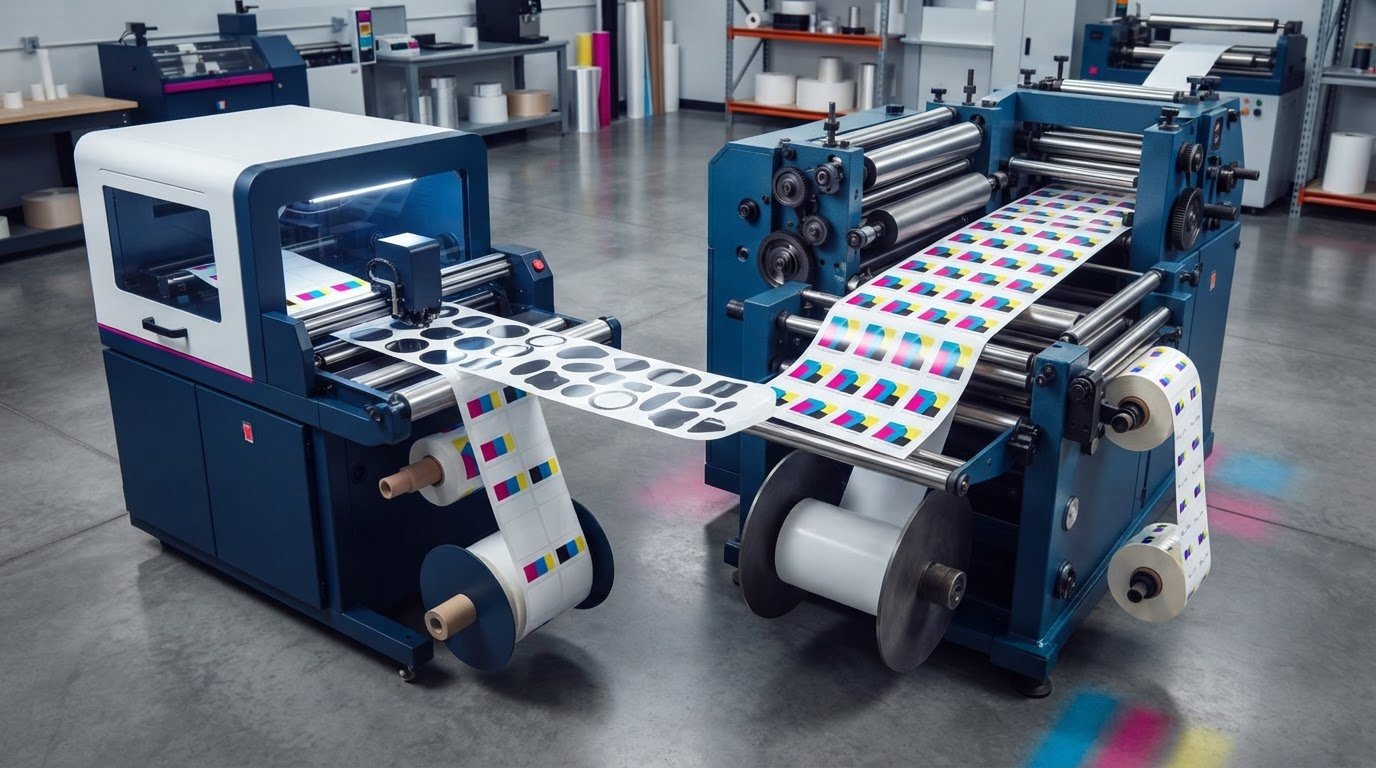
A faster digital print workflow can still be slowed by finishing. A digital label finisher takes printed label material through steps such as cutting, matrix removal, slitting and rewinding, while digital cutting can create custom shapes without a mechanical die. For the comparison discussed, the crossover point between digital and conventional production is around 1,000 linear metres, so the business case for a digital label finisher depends on run length as well as setup and finishing needs.
Traditional die finishing remains practical for repeat production, while digital finishing can simplify short runs and frequent shape changes. The decision is not just about replacing existing equipment: job mix, materials, workflow, and production volume all matter.
This article explains what a digital label finisher does, how it handles short runs, and how it compares with traditional die finishing. You’ll also learn how to assess costs without relying on a single break-even figure, and how OptiMediaLabs’ Afinia Label Cutters & Finishers can fit into a label production setup. Use the comparison to assess your own work.
Key Takeaways
- Map each finishing step, from cutting and matrix removal to slitting and rewinding, to see where a workflow could slow down.
- Assess short-run flexibility by considering how often shapes, materials and job details change between runs.
- Use the stated crossover points as context, not a universal rule: run length and the number of job variations influence the comparison.
- Compare total ownership costs by accounting for equipment, operating needs and service across the purchase or lease term.
- Estimate revenue and profit from your production mix, capacity and workload rather than relying on a single industry-wide figure.
Cutting, laminating, slitting, matrix removal, and rewinding
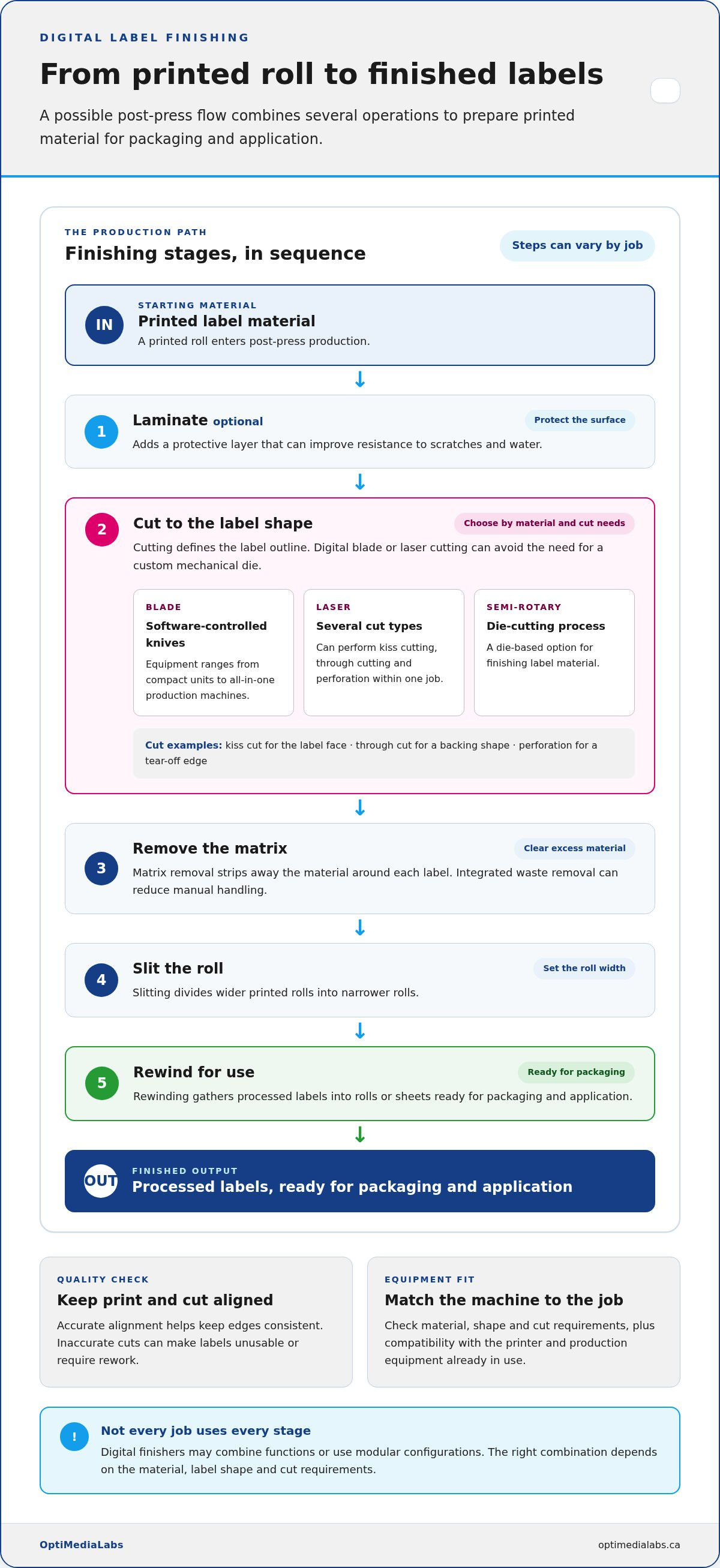
A digital label finisher handles post-press production, converting printed label material into finished labels. Its processes may include cutting, laminating, matrix removal, slitting, and rewinding. When several steps happen in one pass, material does not need to be manually moved between operations. This can streamline production, especially when labels need multiple finishing steps before packaging.
Each operation has a distinct purpose. Lamination adds a protective layer that can improve resistance to scratches and water. Cutting defines the label shape, while matrix removal strips away excess material around each label. Slitting divides wider printed rolls into narrower rolls, and rewinding gathers processed labels into rolls or sheets ready for packaging and application.
The cutting method affects which shapes and materials a machine can handle. Blade systems use software-controlled knives and range from compact equipment to all-in-one production machines. Laser systems can cut materials such as art paper, PP, PET, and VHB tape, and may perform kiss cutting, through cutting, and perforation within one job. Semi-rotary systems use a die-cutting process, while digital blade or laser cutting can avoid the need for a custom mechanical die.
Some digital finishing systems combine cutting methods or add functions through modular configurations. A job might use kiss cutting for the label face, through cutting for a backing shape, and perforation for a tear-off edge. The right combination depends on the material, shape, and cut requirements. Before buying, match these needs to the machine’s capabilities and its compatibility with the printer and production equipment already in use.
Precision matters: inaccurate cuts can make labels unusable or require rework. Accurate alignment between the printed design and cut path helps keep edges consistent, while integrated waste removal can reduce manual handling. These features may reduce operator intervention, but the material and cut settings still need to suit the job. A complex outline on a flexible substrate, for example, calls for a different approach than a simple rectangular label.
Tabletop digital finishers can support kiss cutting, lamination, and rewinding. Compact roll-to-roll machines can process continuous rolls with cutting, laminating, and slitting functions. When assessing equipment in Canada, include applicable workplace and electrical requirements, purchase or lease terms, and tax treatment. Requirements and tax treatment vary by buyer and machine, so include them in the total cost comparison rather than assuming one incentive applies to every purchase.
Short-run and custom label flexibility
Digital finishing suits small and medium runs where label shapes or job details change often. A short run for a seasonal product, limited edition, or regional package can move from printing to cutting without ordering a new mechanical die. This flexibility can help label producers meet specific demand without holding excess stock of one design.
Die-less cutting uses software-controlled tools, such as plotter blades or lasers, instead of custom mechanical dies. An operator can set a cut path for simple rectangles or complex outlines, then change the file for the next job. For example, a producer can finish a round label for one product and a custom-shaped promotional label for another without waiting for a new die.
Job changes can also affect customer service. When a customer revises a label shape, barcode, or quantity, digital finishing can use a new cutting file and an automatic job changeover. Finishing software can integrate job data to help manage these transitions. This can make it easier to produce multiple versions, while variable label data supports barcodes and serial numbers on individual labels.
Digital finishing suits short and medium runs that need frequent design changes, custom outlines, or variable information. Examples include limited product batches, promotional labels, and packaging with distinct versions for different markets. Small and medium-sized businesses, as well as label producers serving customers with varied orders, can benefit when those jobs match the finisher’s material and cutting capabilities.
Rotary die finishing can remain a good fit for repeat jobs that use the same shape and run consistently. Digital cutting offers a different advantage: it avoids ordering a new die for each custom shape. The choice depends on how often shapes change, run length, and whether the substrate and cut requirements suit the machine. Evaluate the full job mix, not just the label count in one order.
For a practical assessment, group recent orders by shape, material, quantity, and frequency of changes. Note how often a job needs a new outline, a variable barcode, or a separate version. Then compare those needs with the finisher’s supported materials and job-change workflow. This clarifies the business case for a digital label finisher: the strongest fit is where custom short runs reduce die requirements and help meet changing customer demand.
To discuss how finishing flexibility fits your label production workflow, share your production requirements.
Digital finishing compared with traditional die finishing
Compared with outsourcing, in-house digital finishing can reduce hand-offs and shorten turnaround when work is ready for production. Costs and quality depend on equipment use, job complexity, materials, and the finishing provider’s workflow.
Digital cutting avoids ordering a custom mechanical die, while traditional die finishing can suit repeat work using the same shape. The right approach depends on run length, change frequency, and production capabilities.
Revenue and profit potential
Revenue and profit potential describe the income and margin a finishing operation can generate from its workload. They matter because equipment value depends on productive use, not just available capacity.
Digital technology can support a varied mix of short and medium jobs, including custom shapes and multiple versions. Profit per employee with digital technology can be up to twice as high as with analog technology. Actual results depend on demand, utilization, materials, labour, and the cost of operating the full production process.
Installation space, utilities, staffing, and workflow
Installation readiness means having suitable floor space, utilities, trained staff, and a workflow that connects printing with finishing. These requirements matter because a finisher must fit the facility and production equipment already in use.
Plan space for the machine, roll handling, material staging, and finished-label packaging. Utility and installation needs depend on the system. Assign responsibility for loading jobs, setting cut paths, monitoring output, and routine maintenance. Connect finishing to digital printing so printed rolls move through cutting and rewinding without unnecessary handling.
Demand and technology obsolescence risks
Demand and obsolescence risks arise when workload or changing capabilities reduce equipment’s productive value. They matter if expected orders may not keep the machine occupied.
Review the actual job mix, including run lengths, materials, shapes, and change frequency. The comparison discussed places the digital-versus-conventional printing crossover at around 1,000 linear metres. For a typical job of 6,000 linear metres across three sorts, the crossover point may exceed 2,500 linear meters. Treat these figures as context, not universal thresholds. Technology risk also depends on compatibility with existing equipment and whether the machine can handle future materials and cutting requirements.
Traditional dies can be efficient for repeat shapes, while digital cutting can suit frequent job changes or custom outlines. Digital printing may lose its advantage if finishing becomes a production bottleneck. Compare the cost of owning and operating finishing equipment with outsourcing, including setup, handling, turnaround, and rework. Quality depends on material compatibility, cut accuracy, and process control, whether work is finished in-house or outsourced.
Digital finishing costs and consumables
Assess a digital finishing investment by total cost of ownership, not purchase price alone. Include acquisition, operating costs, and service over the full lease or purchase term. Digital print production may also need separate finishing equipment when the production route does not use a hybrid system. Include that investment in the same calculation as the printer and other production equipment.
Consumable use depends on the job. A laminated label run uses film as well as label material, while an unlaminated job avoids that layer. Cutting methods also affect costs: a digital system can use software-controlled blades or lasers instead of custom mechanical dies. This can reduce spending on dies and pre-die-cut labels, particularly for orders with custom shapes or frequent design changes.
Volume and job mix affect the cost picture. Repeated runs of one shape place different demands on equipment than multiple short orders with varied cut paths. For example, combining several SKUs in a lane can reduce substrate waste and optimize print time for each run. Track material consumption, waste, finishing time, and job changes to see how production patterns affect operating costs.
Maintenance is another operating consideration. Follow the manufacturer’s schedule, clean components, and replace blades when needed. Blade condition affects cut quality, while cleaning supports consistent operation. Record maintenance alongside production data so recurring service needs and downtime are visible in the cost assessment.
Compare finishing methods against the same job requirements. A traditional die may suit repeat orders with a consistent shape, while digital cutting can support custom short runs without a new mechanical die. Compare setup needs, material waste, consumables, labour, and service. A lower cost for one component does not necessarily mean a lower total cost.
A practical cost model can use these categories:
- Ownership: acquisition or lease payments for the finishing equipment.
- Operation: materials, consumables, labour, and production time.
- Service: scheduled maintenance, cleaning, and blade replacement.
- Waste: unused substrate and material lost during job changes.
- Flexibility: avoided die orders and the ability to accept custom short-run orders.
Compare these categories against your actual production mix, including different materials and cutting requirements. The business case for a digital label finisher is strongest when lower spending on dies and pre-die-cut labels, reduced waste, and added short-run opportunities outweigh ownership and operating costs.
How much revenue and profit can a digital label finishing business generate?
Revenue comes from finishing work sold to customers; profit is what remains after operating costs. For a label producer, income may come from converting printed rolls into finished labels, including custom short runs, repeat orders, or jobs with multiple versions. The amount depends on work sold, the price charged for each job, and the share of available production time used for billable work.
Digital technology can change how much work an employee completes. The stated comparison is that profit per employee with digital technology can be up to twice as high as with analog technology. This is a productivity comparison, not a revenue figure. Faster changeovers or less manual handling may free staff for additional finishing work, but labour, materials, maintenance, and equipment costs still affect profit.
Build an estimate from actual orders instead of assuming every machine hour generates income. For each job, record the finishing task, material, setup effort, run time, waste, and amount billed. A custom-shaped promotional label may need a different workflow from a repeat rectangular product label. Comparing jobs shows which contribute revenue and which use production capacity without a matching return.
Utilization is central to the calculation. A finisher running varied short jobs may generate revenue from a broader customer mix, while idle periods spread ownership and service costs across fewer billable orders. Review demand by job type and season, then compare expected production hours with hours available for sale. Include rework and maintenance time in the capacity estimate.
For a practical forecast, separate the calculation into revenue drivers and profit drivers:
- Revenue: finished orders, job mix, repeat business, and the amount billed per order.
- Capacity: setup time, finishing speed, changeovers, and scheduled production hours.
- Direct costs: substrate, laminating materials, blades, labour, and waste.
- Operating costs: equipment acquisition, service, maintenance, and downtime.
- Productivity: staff time spent on handling, job changes, and rework.
Use these factors to model conservative, expected, and high-demand workloads without assigning unsupported market averages. Compare each model with total cost of ownership over the purchase or lease term. This shows whether added short-run opportunities and employee productivity can cover the equipment’s operating costs.
For a discussion of finishing equipment in your production plan, contact the team about your workflow.
For a sound estimate, assess whether each digital label job suits the substrate, ink or toner, colour gamut, profitability, and productivity requirements. These checks distinguish technically workable orders from jobs that fit the business’s capacity and return goals.
OptiMediaLabs Canada: Afinia Color Label Printers
OptiMediaLabs Canada offers Afinia Color Label Printers and Afinia Label Cutters & Finishers for businesses assessing in-house label production. When comparing equipment, consider the printer and finishing stages together: match intended materials, cutting requirements, and expected job mix to the capabilities of each machine.
For workflows involving RFID labels or thermal transfer printing, OptiMediaLabs also offers RFID Label Printers and Thermal Transfer Ribbons. These products address different production needs, so choose according to the label application and printing method your operation requires.
Use your expected orders, substrates, and finishing steps to guide the equipment decision. Contact OptiMediaLabs Canada to discuss your label production requirements.
Turn your finishing plan into a practical next step
Before committing to a finishing workflow, define the production profile your equipment needs to support. List the label applications, materials, shape changes, and job patterns that matter to your operation. This gives your team a shared basis for comparing equipment capabilities with real production needs, rather than assumptions about future demand.
A business case for a digital label finisher should connect that profile to your wider labelling setup. OptiMediaLabs Canada offers Afinia Color Label Printers, RFID Label Printers, and high-quality ink cartridges. These offerings can support different printing requirements as you plan equipment and consumables for your workflow.
Bring your production requirements into the next conversation. Discuss the applications and equipment you’re considering, then identify the options that fit your label production plans. Contact OptiMediaLabs Canada to continue planning with a clearer view of your needs. A well-defined starting point makes the next decision easier.
Frequently Asked Questions
What is a Digital Label Finisher?
A digital label finisher is post-press equipment that converts printed label stock into finished labels. For example, it can cut label outlines from a printed roll and separate waste material to prepare labels for application. Some systems also laminate or slit rolls. Functions vary by machine, so compare its capabilities with your label format and production workflow.
What is a digital label finisher and what business problems does it solve?
A digital label finisher processes printed labels without requiring a custom mechanical die for every shape. It can address delays from die procurement, manual handling between finishing steps, and bottlenecks after digital printing. For producers handling orders with changing outlines, digital cutting can follow job files. It can also bring finishing tasks into a coordinated production workflow.
What is the typical purchase price of a digital label finishing machine in Canada?
There is no single typical purchase price for every digital label finishing machine in Canada. Investment depends on the cutting method, production capacity, integrated finishing functions, and compatibility with existing equipment. A compact blade system and an automated laser configuration meet different production needs. Compare complete configurations and ownership costs, including operation and service, rather than judging the decision by equipment price alone.
What are the costs to operate and maintain a digital label finisher?
Operating and maintenance costs include materials, labour, energy, service, cleaning, and replacement components such as blades. Job mix matters: laminated labels use different materials from unlaminated labels, while frequent changeovers affect labour and production time. Track material use, waste, maintenance, and downtime by job to clarify recurring costs and identify which orders use capacity efficiently.
What is the break-even point and payback period for a digital label finisher?
Break-even is the production point where savings or added contribution offset the investment; payback is the time needed to recover it. The discussed digital-versus-conventional printing comparison places the crossover around 1,000 linear metres. For a typical 6,000-linear-metre job across three sorts, it may exceed 2,500 linear meters. Estimate payback by comparing equipment ownership and operating costs with avoided dies, waste, labour, and outsourced finishing.