
Durable Equipment Asset Tags for Industrial Equipment
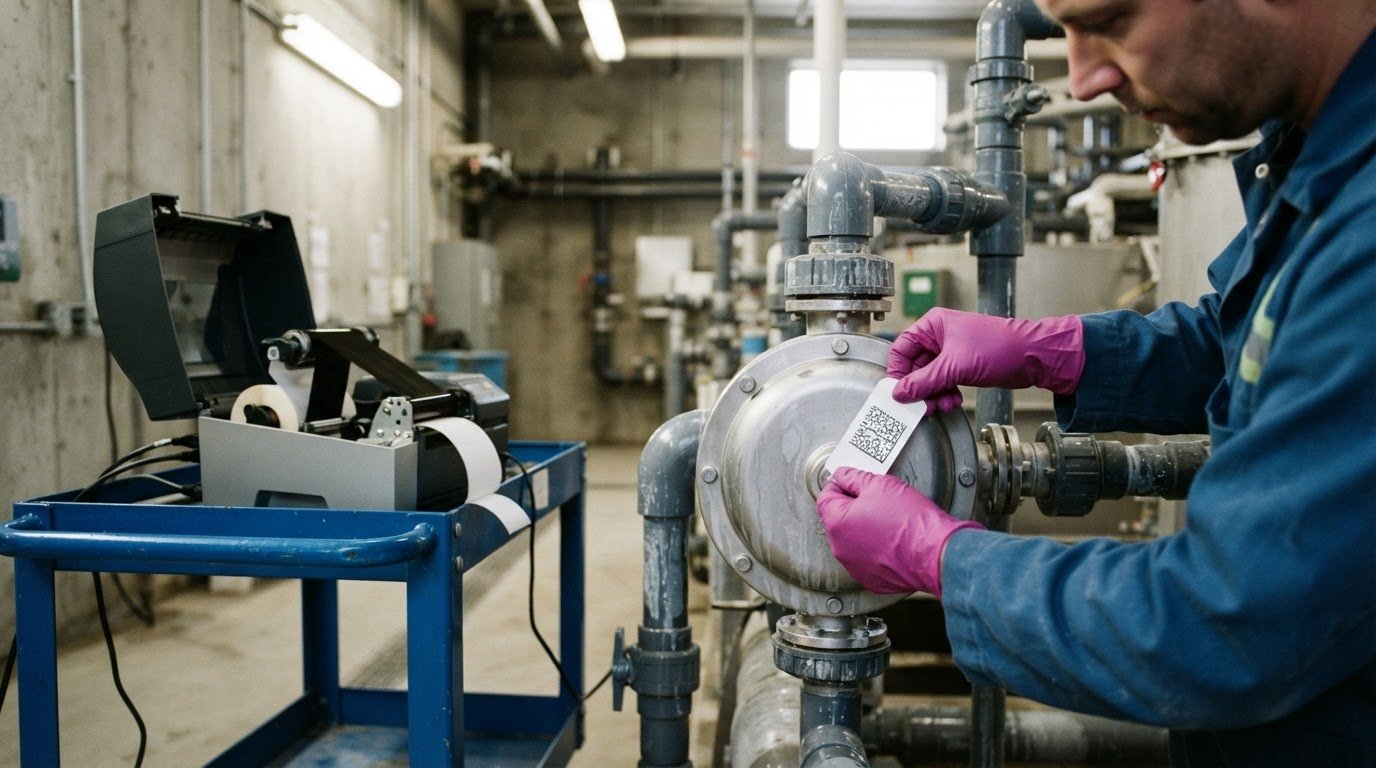
A tag that scans at installation can become unreadable within six months if it isn’t suited to its environment. Durable equipment asset tags for industrial use should withstand the chemicals, abrasion, moisture and UV exposure they’ll encounter. Metal tags such as anodised aluminium, stainless steel and steel can be suitable for outdoor use, depending on the conditions.
Choosing durable equipment asset tags for industrial use means more than selecting a tough material. The adhesive, print method, barcode placement and label information all affect how well a tag supports equipment tracking.
This guide explains how to match tag materials and adhesives to operating conditions, choose custom options and printing methods, and avoid common tracking mistakes. It also explores portable thermal-transfer printing, which can help keep identification consistent when tags need to be produced closer to the equipment. You’ll come away with practical criteria for selecting tags that remain readable and scannable throughout their intended use.
Key Takeaways
- Match tag construction to where equipment operates, from indoor storage to outdoor exposure and theft-prone settings.
- Choose the substrate and adhesive for the actual contact surface, cleaning routine and conditions the tag will face.
- Make each tag useful in the field with readable identification details and a barcode suited to scanning conditions.
- Consider portable thermal-transfer printing when tags need to be produced near equipment or updated as operations change.
- Explore printer and ribbon options that support a consistent equipment-labelling workflow.
Are there standards for asset tag labels?
Choose tags by exposure, surface and identification needs, not appearance alone. Barcodes must stay readable to staff and scanners as equipment moves between work areas. Specify the equipment ID, then select a material, adhesive and print method suited to the environment. A clean indoor cabinet has different needs from an outdoor pump exposed to moisture, abrasion and chemicals.
Aluminium and stainless steel offer rigid metal tag options for demanding sites, while polyester suits protected indoor and outdoor use. Polycarbonate is another durable synthetic option, but its suitability depends on exposure and tag construction. Match the complete tag, including its adhesive and printed surface, to the asset rather than choosing by substrate name alone.
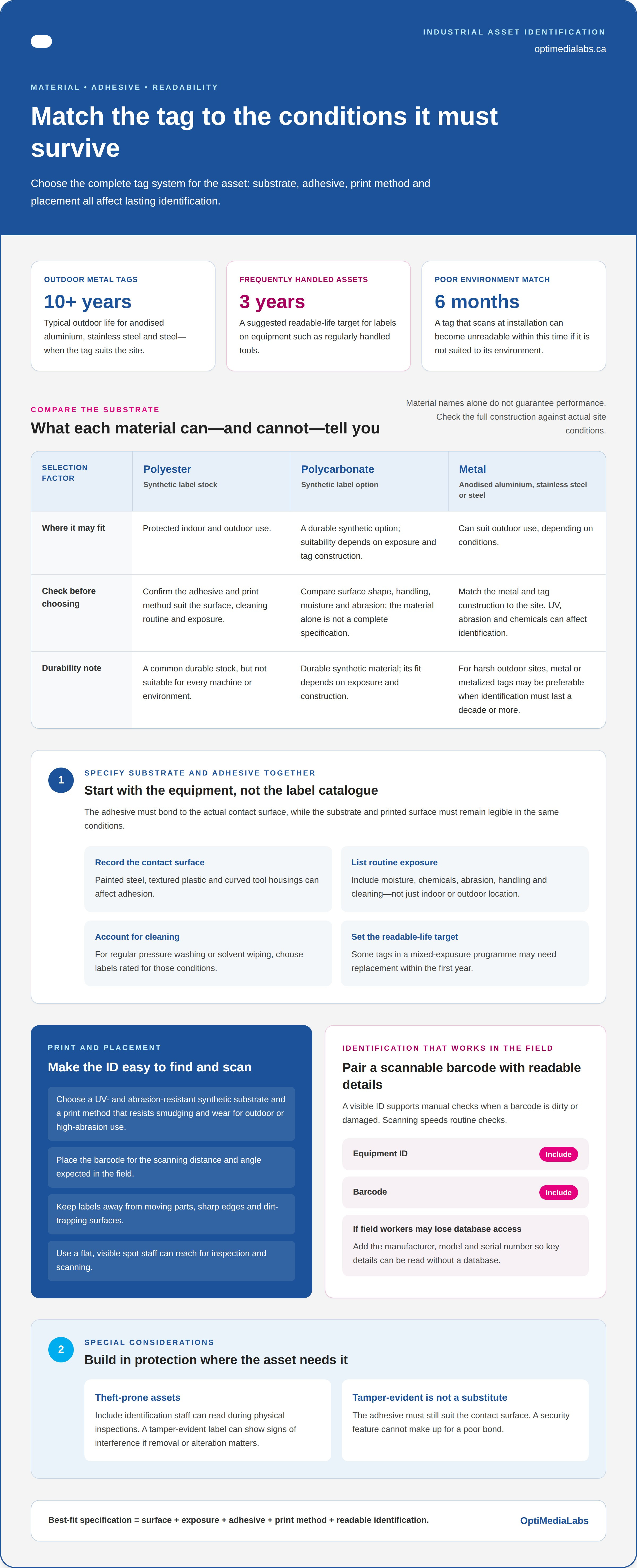
For outdoor equipment, anodised aluminium, stainless steel and steel tags have a typical outdoor life of at least 10 years. That lifespan depends on choosing a tag suited to the site. UV exposure can fade ink and degrade standard adhesives before the equipment reaches retirement. A UV- and abrasion-resistant synthetic substrate with a print method that resists smudging and wear can suit outdoor or high-abrasion use. For harsh outdoor sites, metal or metalized tags may be preferable when identification must last a decade or more.
Indoor assets generally need less protection than outdoor equipment. Set the specification around exposure to moisture, abrasion, chemicals, cleaning and handling. A machine in a controlled production area, for example, may need a different construction from equipment exposed to sunlight and weather. Don’t use one material across assets with different conditions. Some tags in a mixed-exposure program may need replacement within the first year.
For theft-prone assets, make identification useful during physical inspections. Include a company name, equipment ID and barcode that staff can read without a database. If field workers may lose database access, add the manufacturer, model and serial number. Place the barcode for the expected scanning distance and angle. A visible ID supports manual checks when a barcode is dirty or damaged, while scanning speeds routine checks.
In Canada, industrial-grade equipment tags are available from specialist asset-identification and industrial label suppliers. Compare options for material, adhesive and identification format, then match them to indoor, outdoor or theft-prone use.
- For indoor assets, prioritize reliable identification without specifying unnecessary outdoor durability.
- For outdoor or high-abrasion equipment, consider metal tags or UV- and abrasion-resistant synthetic stock.
- Include a human-readable ID and barcode; add manufacturer, model and serial number when field access to records may be unavailable.
- Set barcode size and placement for the scanning distance and angle used in the field.
Matching label substrate and adhesive to equipment conditions
Choose the substrate and adhesive together, based on the equipment surface and operating environment. A label suited to a smooth indoor cabinet may fail on oily machinery exposed to washdowns.
Substrate and Adhesive Selection
Start with the application surface. Painted steel, textured plastic and curved tool housings can each affect adhesion. Then consider moisture, chemicals, abrasion, handling and cleaning. The adhesive must bond to the actual surface, and the substrate must stay legible in the same conditions. Treat the label and adhesive as one system, not separate choices.
Build the specification around the equipment’s routine, not just its location. An indoor machine may still face solvent wiping or repeated handling. A tool carried between work areas may be rubbed, scraped or exposed to residue. Before selecting stock, note the surface, cleaning method and likely chemical contact. For regular pressure washing or solvent wiping, choose labels rated for those conditions.
Polycarbonate and Polyester Labels
Polyester and polycarbonate are synthetic materials used for industrial equipment labels. Compare them against the asset’s surface shape, handling and exposure to moisture or abrasion. Polyester is a common durable label stock; polycarbonate may suit applications requiring a different construction. Neither material suits every machine. Adhesive, printing method and placement also affect performance.
Set a readable-life requirement for frequently handled assets. A tag should remain readable for three years, not merely pass its initial intake scan. A tool label, for example, needs to withstand routine handling while keeping its ID clear. A machinery label may also need to tolerate cleaning. Define “durable” for each asset group by the tasks it faces.
Keep labels away from moving parts, sharp edges and dirt-trapping surfaces. Choose a flat, visible spot that staff can reach for inspection and scanning. On furniture or storage cabinets, avoid places that doors, handles or stored items may cover. Consistent placement helps teams find labels during audits and maintenance.
Security needs call for a different selection criterion. A tamper-evident label can show signs of interference if someone tries to remove or alter it. Consider this for assets where unauthorized movement or substitution matters, such as controlled tools or shared machinery. The adhesive must still suit the surface: a security feature cannot make up for a poor bond.
- Record the surface material and finish before choosing an adhesive.
- Match the label to routine cleaning, chemicals and handling.
- Set a readable-life target for repeatedly handled equipment.
- Use tamper-evident labels where visible interference matters.
How Can Teams Avoid Common Asset Tracking Mistakes?
Reliable asset management takes more than assigning an ID. For a press, torque wrench or mobile cart, the tag, record and scanning routine must agree.
Industrial tags often fail when their material or adhesive doesn’t suit the environment, or when abrasion, chemicals or UV exposure damage the identification. Match construction to operating conditions and establish a routine for finding unreadable, missing or damaged tags.
Duplicate numbering creates another avoidable problem. If two machines share an asset ID, staff may update the wrong record or confuse the equipment. Use a consistent numbering structure, assign each ID once and link it to the correct equipment record. Put the same ID in the human-readable text and barcode so staff can identify the asset if scanning fails.
Poor placement can also undermine machine and tool tracking. A label hidden behind a guard, handle or cable may be hard to find during maintenance. Set a consistent location for each equipment type, such as a visible machine panel or the clear face of a tool case. Keep the barcode accessible for scanning, but away from spots where routine handling will quickly wear it.
Asset tracking software helps organize records around unique identifiers. Connect each scanned ID to useful details, such as equipment type, location, assigned department and maintenance history. Update the record when a tool moves or a machine changes departments. Barcode software can support label creation and data consistency; the linked barcode and label software is one option for preparing that workflow.
RFID offers another way to identify equipment. Choose barcode or RFID based on how staff identify assets and record movements. A machine scanned individually during inspection may suit a barcode process. An RFID workflow needs compatible tags, readers and records, with each asset’s identifier linked to the correct entry.
Good tracking makes equipment easier to locate, audit and maintain. It can also reveal gaps, such as a tool assigned to a department but stored elsewhere. These benefits rely on accurate records and regular updates, not just printed labels. Assign responsibility for recording moves, returns and replacements, then schedule audits to compare equipment with the tracking system.
- Assign a unique ID to each machine and tool, and match it across the tag and record.
- Place tags where staff can find and scan them during routine work.
- Record equipment moves promptly, including transfers between departments.
- Review damaged tags and mismatched records during asset audits.
Build scanning into existing tasks, such as tool checkout or equipment maintenance. A consistent process gives each update a clear place in the workday and helps keep records aligned with physical assets.
Portable thermal-transfer tag printing
Laser engraving and etching mark metal surfaces; thermal transfer prints on compatible label stock using heat and ribbon. Engraving or etching can create a durable mark on suitable metal. Thermal-transfer durability depends on the substrate, ribbon and exposure conditions.
Portable thermal-transfer printing brings label production closer to equipment. It can help produce durable equipment asset tags for industrial use near the assets that need identification, such as newly installed machinery or equipment needing a replacement tag. It can also support a consistent identification process during field work.
Before adopting point-of-use printing, define which asset types need tags and what information each tag must carry. Use a consistent equipment ID, barcode or QR code, and any other required text. Sequential numbering helps maintain unique identifiers; codes generated from customer-supplied data can align printed tags with existing asset records. Keep the human-readable ID consistent with the encoded information.
Match the ribbon and label stock to the equipment’s surfaces and environment. A tag for a plastic tool case may have different needs from one applied to metal machinery exposed to abrasion, weather or chemicals. Thermal-transfer printing uses heat to transfer ribbon material onto compatible stock, so the combined ribbon and substrate matter. The thermal-transfer label printer category supports this print method; the tag’s intended use still determines material selection.
Use a repeatable printing workflow to reduce errors. Load the correct label stock and ribbon, choose the approved template for the asset type and print a test tag. Scan its barcode or QR code, then compare the result with the asset record before printing a batch. Control templates so staff don’t create overlapping ID formats or omit required fields.
Printing near equipment brings practical constraints. Dust, moisture and limited work surfaces can affect handling, while outdoor weather may complicate tag application. Prepare labels in a protected area when conditions are unsuitable. Store printed tags with their adhesive surfaces clean, and apply them to properly prepared equipment surfaces according to their intended use.
- Use sequential numbering to support unique, traceable asset IDs.
- Match ribbon and stock to the tag’s substrate and operating conditions.
- Test a sample barcode or QR code against the asset record before batch printing.
- Keep templates consistent across teams and equipment types.
A workflow for durable equipment asset tags for industrial use must account for more than where tags are printed. Portable thermal transfer is most useful when it produces accurate, readable tags close to where assets are identified. Abrasion, weather and the equipment surface still determine whether the finished tag suits its job.
Engraving or etching can create a durable mark on suitable metal. Thermal-transfer durability depends on label stock, ribbon and exposure conditions, so choose based on the equipment surface and operating environment.
What materials make equipment asset tags durable in industrial environments?
Industrial asset tags must withstand chemicals, abrasion and moisture while keeping identification readable. The right material depends on the equipment’s location, surface and daily use. A stationary indoor control cabinet faces different wear from a tool carried across a worksite. List the conditions each asset encounters, then match the tag construction to them.
Durable vinyl and polyester stock are commonly used for equipment tags. Both provide synthetic options for printed identification, but material alone doesn’t determine performance. The print method, adhesive, surface preparation and placement all affect whether a tag stays legible and attached. A tag on machinery exposed to regular cleaning, for example, must suit both the equipment surface and cleaning conditions.
Metal tags offer another option for assets that need long-lasting identification. Anodised aluminium, stainless steel and steel tags have a typical outdoor life of at least 10 years. For equipment exposed to harsh outdoor conditions, metal or metalized tags may be preferable when identification must remain in place for a decade or more. Choose according to exposure and service life, rather than applying the same construction to every asset.
Tag failure often starts with a mismatch. A label unsuited to its environment may scratch, peel or fade beyond scanner readability within six months. UV exposure can fade ink, and abrasion can wear away printed information. Moisture and chemicals may also affect the tag or adhesive. Specify the material and print method for actual operating conditions, including weather, handling and cleaning.
Apply a practical selection process to each equipment group:
- Identify the exposure: Record indoor or outdoor use, moisture, chemicals, abrasion and UV contact.
- Choose the construction: Compare durable vinyl or polyester stock with metal options for the asset’s demands.
- Match the print: Select a method that resists smudging and wear in the intended environment.
- Inspect readability: Check that the ID and barcode remain clear during routine asset checks.
For a mixed fleet, group assets by operating conditions instead of using one tag material everywhere. A protected indoor instrument, an outdoor pump and a frequently handled tool may need different constructions. Record the specifications in the asset program so replacements match. This makes tag selection repeatable and helps teams catch material mismatches before identification becomes unreadable.
For help aligning tag-printing equipment with your identification workflow, discuss printer and ribbon options.
OptiMediaLabs Canada
OptiMediaLabs Canada helps Canadian teams equip in-house label and asset identification workflows. Turn to its product range when you’re selecting printing equipment or supplies to produce equipment labels and maintain consistent identification. Options include Afinia Color Label Printers, RFID Label Printers, Afinia Label Cutters & Finishers, and Thermal Transfer Ribbons. The right setup depends on your label stock, identification method and production process. For example, thermal-transfer ribbons support printing on compatible label stock, while RFID printers support RFID label printing. Consider how your team will produce, finish and apply labels across different equipment types. Contact OptiMediaLabs Canada to discuss your equipment identification workflow.
Put Your Asset Identification Plan Into Practice
Choosing durable equipment asset tags for industrial use is only the first step. Next, turn material and printing choices into a process your team can maintain. Decide how new assets enter the system, who assigns identifiers and how equipment changes are recorded. A clear workflow keeps identification useful as operations evolve.
OptiMediaLabs Canada offers Afinia Color Label Printers and RFID Label Printers. These products can support teams developing label-printing and RFID identification workflows. The right combination depends on how your organization identifies equipment and manages its records. Set out your process first, then align the printing and identification tools with those needs.
Start with a defined asset group, document its identification requirements and build a consistent approach around it. As the workflow takes shape, you can apply it to other equipment across your operation. Contact OptiMediaLabs Canada to discuss the tools that fit your equipment identification workflow and take the next step with confidence.
Frequently Asked Questions
How Do Teams Choose the Right Tag for Different Assets and Environments?
Group assets by use, operating environment and cleaning routine. A fixed control panel, portable tool and outdoor pump have different identification needs. Note each asset’s surface, exposure to weather or chemicals, handling and scanning routine. Then choose a tag format and placement suited to the group. This keeps specifications consistent without assuming every item needs the same construction.
How do I test tag durability before a big order?
Test samples on representative equipment before approving a larger production run. Apply each sample to the intended surface, then expose it to the actual handling, cleaning and working conditions expected. Check whether it stays attached, readable and scannable. Record the sample material, adhesive and print method alongside the results. This provides a practical reference for production specifications, beyond appearance alone.
What Are Asset Tags and How Do They Improve Tracking?
Asset tags identify physical items so staff can connect equipment with its record. For example, a tag on a maintenance cart can help a technician open the correct asset entry during an inspection. The identifier provides a consistent reference for physical checks, inventory records and maintenance updates. Teams can find the right item in their tracking system without relying on descriptions such as “the cart near receiving.”
What Are the Main Benefits of an Asset Tagging System?
An asset tagging system gives teams a structured way to identify equipment, update records and locate items during routine work. A consistent ID can prevent confusion between similar tools, such as matching torque wrenches stored in separate work areas. Tags also support inventory reviews and maintenance documentation. Their value depends on linking each identifier to a well-maintained record and following the same process whenever equipment moves or changes status.
What information should be included on an asset tag?
Include a unique asset ID and a barcode that matches the equipment record. Add the company name or logo if it helps staff identify ownership. If records may be unavailable where equipment is used, include the manufacturer, model and serial number. Keep printed details concise enough to read on the available tag area. Store longer maintenance or location details in the database, where authorized staff can update them.
What makes an asset tag durable?
Durability depends on how the complete tag performs in its intended setting. The substrate, adhesive, printed information and equipment surface all affect whether identification stays attached and readable. A tag on a frequently handled hand tool faces repeated contact; a fixed cabinet label faces a different routine. Identify the main sources of wear, then select and test the complete tag construction against them.
Which Business Assets Should Be Tagged for Tracking?
Tag assets that need to be located, assigned, maintained or audited. Examples include production machinery, shared tools, mobile carts, test instruments and equipment moved between departments. Critical hardware such as industrial weighing systems also relies on durable tags to track calibration history and scheduled maintenance, as emphasized by equipment specialists like Independent Scale Service. Prioritize items that are easy to confuse, frequently transferred or important to maintenance records. A small, low-value item that stays at one workstation may need a different tracking approach from a shared tool used by several teams.
Will the labels survive pressure-washing and chemicals?
Labels withstand pressure washing or chemical exposure only when their construction is rated for those conditions. Match the label and adhesive to the cleaning method, chemical contact and equipment surface. A general-purpose label isn’t automatically suitable for solvent wiping or regular washdowns. Before choosing production stock, test samples using the site’s actual cleaning process, then check adhesion and legibility.