
Estimate Savings and Payback for an Industrial Barcode Printer

A printer purchase is easiest to justify when its costs connect to a documented operational problem. To understand how to justify an industrial barcode printer investment, compare upfront and ongoing costs with measurable savings, such as fewer label reprints, less time resolving print issues, or fewer workflow interruptions. The payback period depends on which costs the investment removes and how consistently those savings occur.
Equipment cost is only part of the decision. Account for supplies, integration, and the impact on people and processes that rely on accurate barcode labels. If the current workflow causes delays, waste, or avoidable labour, documented costs make a more credible case than projected sales gains alone.
A practical approach to how to justify an industrial barcode printer investment starts by defining the workflow problem and measuring its impact. Estimate savings and payback, organize the figures into a business case, and connect the purchase to issues your operation already recognizes. Assess how the equipment fits production, warehousing, and other barcode workflows.
Key Takeaways
- Build a payback estimate around measurable savings and the full cost of owning and operating the printer.
- Structure the business case around operational facts decision-makers already recognize, not unsupported sales forecasts.
- Connect the investment to specific workflow problems, such as label waste, delays or interruptions, and show what changes after adoption.
- Assess how barcode printing can support production and warehousing needs, including process control and quality assurance.
- Compare printer options by how well they fit your workflow, supplies and integration needs, rather than focusing on purchase price alone.
1. Estimating savings and investment payback
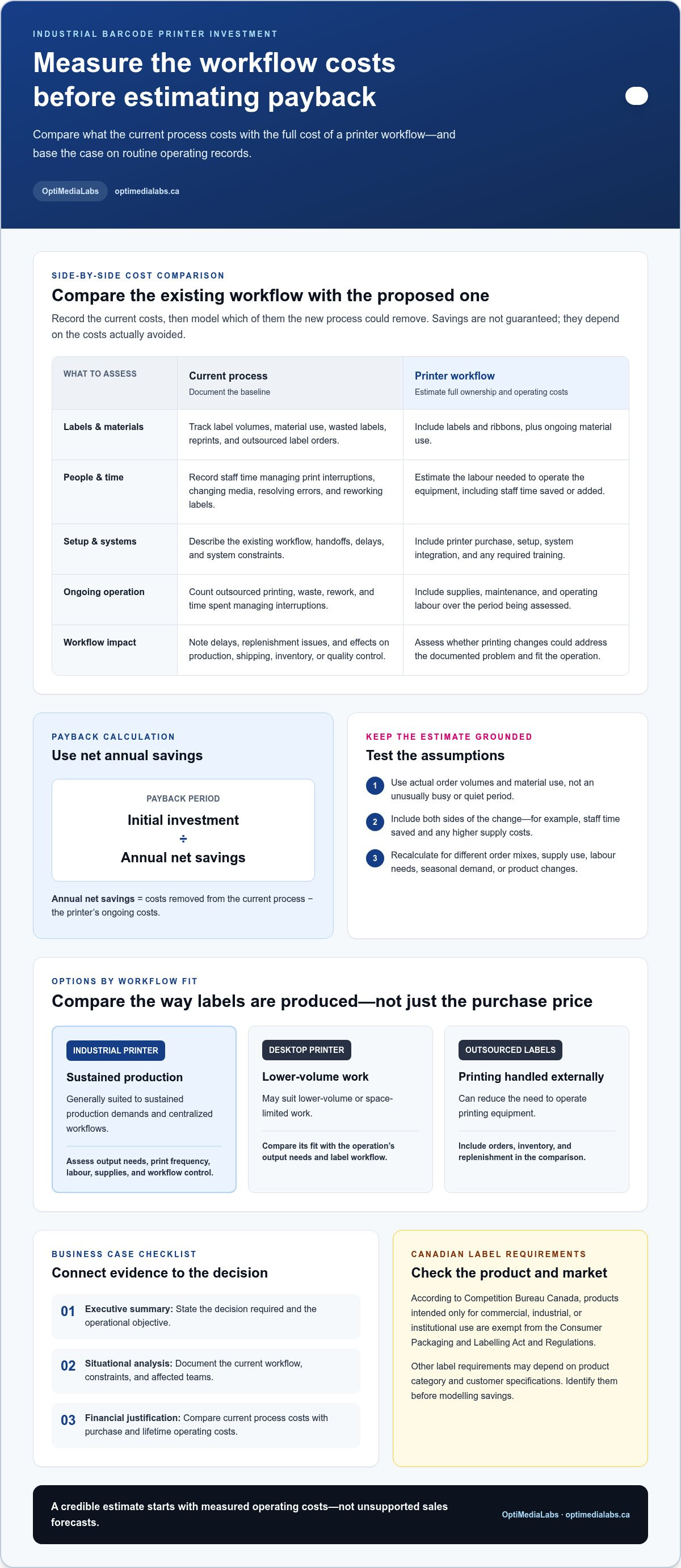
Start with the workflow, not the printer specification sheet. Record how your current process handles each label, from creating print jobs to applying labels and resolving errors. For example, a warehouse might track reprints, staff time changing media, replenishment delays, and outsourced label orders. Use operating records that reflect routine work, not an unusually busy or quiet period.
Separate one-time investment costs from recurring costs. Include the printer, setup, integration with existing systems, and any required training. Then estimate recurring expenses for labels, ribbons, maintenance, and the labour needed to operate the equipment. Compare these with documented costs of the current workflow, including outsourced printing, wasted labels, rework, and time spent managing print interruptions.
Use this calculation: payback period equals initial investment divided by annual net savings. Annual net savings are the costs removed from the current process minus the printer’s ongoing costs. If the printer saves staff time but requires more expensive supplies, include both effects. Base the estimate on actual order volumes and material use, then test whether the result changes with seasonal demand or product changes.
Industrial barcode printers generally suit sustained production demands and centralized workflows, while desktop printers may suit lower-volume or space-limited work. Outsourced label printing can reduce the need to operate printing equipment, but orders, inventory, and replenishment become part of the comparison. Assess output needs, print frequency, labour, supplies, and workflow control before comparing options.
Canadian rules depend on the product and its intended market. According to Competition Bureau Canada, products intended only for commercial, industrial, or institutional use are exempt from the Consumer Packaging and Labelling Act and Regulations. Other label requirements may depend on product category and customer specifications, so identify them before modelling savings.
Total cost of ownership includes the purchase and setup, labels, ribbons, maintenance, and labour over the period being assessed. Compare the full cost with the current process, including outsourced label charges, waste, reprints, and staff time.
- Capture the baseline: Record label volumes, reprints, material use, staff tasks, and delays.
- Estimate net savings: Subtract the printer’s ongoing costs from expenses the new workflow removes.
- Test the assumptions: Recalculate using different order mixes, supply use, and labour needs.
If colour product labels are part of the same operation, assess whether colour label printing addresses a separate workflow requirement. Keep its costs and savings distinct from the barcode printer calculation.
Assess benefit, initial and ongoing expenses, and performance.
The example breaks even after approximately 96 parts; nine prototype parts across three products and three iterations yield 87.6% ROI.
2. Building a business case for equipment investment
A credible proposal connects an accepted operational problem to a practical equipment decision. For an industrial barcode printer, show how the current workflow affects production, shipping, inventory accuracy, or quality control. For example, repeated manual entry between a production system and label printing can create extra handoffs. Explain where the delay occurs, which roles are involved, and what would change. This gives decision-makers a concrete situation to evaluate.
Organize the proposal into an executive summary, a situational analysis, and a financial justification. State the required decision and operational objective in the summary. Document the existing workflow, constraints, and affected teams in the analysis. Compare current process costs with purchase and lifetime operating costs in the financial section. This structure makes it easier to see how the recommendation follows from the problem.
Compare printer specifications with actual label tasks, not isolated headline figures. Print speed matters when output demand creates a bottleneck; resolution matters when content must remain legible at its intended size. Duty cycle should suit the workload, and connectivity should match production systems and networks. Assess media compatibility, label dimensions, print method, and software workflow using representative jobs. These criteria help explain why a particular configuration fits the operation.
Include costs that may sit outside the equipment line. Integration work, operator training, workflow changes, maintenance, consumables, and implementation downtime can all affect the decision. Risks include unsupported label formats, underestimated staff time, and system incompatibility. Address them with an implementation plan that identifies affected systems, assigns an owner, and documents training and performance review. For lifetime cost per unit, the European Commission identifies financing and production costs as relevant factors.
Keep the financial case conservative. Separate measured savings from forecast benefits, using operating records for reprints, wasted stock, staff handling, or outsourced work. Explain which costs the proposed workflow is expected to reduce. If increased capacity or new applications are part of the proposal, present them separately from direct cost reductions. This lets management evaluate the case without treating projected sales as guaranteed savings.
- Executive summary: State the operational issue, decision, and intended outcome.
- Situational analysis: Map the workflow, systems, constraints, and affected roles.
- Financial justification: Compare current expenses with purchase, financing, integration, and operating costs.
- Implementation plan: Assign ownership and document training, system integration, and performance review.
To decide how to justify industrial barcode printer investment, link each proposed benefit to a documented operational need and an accountable owner. If you’re shaping that case around a specific label workflow, discuss your barcode printing requirements with a specialist. Bring representative labels, system details, and the issue the investment needs to address.
3. Solving existing operational problems
Start with a failure point people already recognize. A production supervisor may report delays when operators wait for replacement labels. A warehouse manager may find that handwritten corrections create extra scanning or picking work. Record where the problem occurs, who handles it, and what work is delayed. These details connect a printer proposal to a real workflow instead of presenting equipment as a solution without context.
To assess compatibility with an ERP, WMS, and existing scanners, map how each system creates, sends, prints, and reads label data. Test representative label formats and barcode content through the complete workflow, from the source system to the scanner and its next action.
Follow a label from its source to its destination. For example, trace an ERP work order to its production label, then check whether a floor scanner reads the printed code. In a warehouse, trace a WMS pick task through printing, application, and scanning at the next checkpoint. Note manual re-entry, duplicate label creation, and points where staff switch systems. This map reveals integration needs before installation planning begins.
Choose a problem that can be observed in operating records. Reprints and discarded stock may point to label or print-process issues. Queue interruptions suggest capacity or access problems. Manual data entry can create extra handling and opportunities for errors. For each issue, identify the affected team and operational consequence, such as a delayed shipment or paused production task. Keep the cause distinct from its downstream effect.
- Production: Document label queues, restarts, and waits for replacement labels.
- Quality assurance: Track unreadable codes, relabelling, and checks required before release.
- Warehousing: Map printing and scanning across receiving, picking, and shipping workflows.
- Maintenance: Record print interruptions and the steps needed to resume the affected task.
Then describe the proposed change in operational terms. A printer connected to an established workflow may reduce a manual handoff, while software configuration may determine which data appears on each label. Define who owns label templates, who approves changes, and how operators handle routine print tasks. Clear ownership helps prevent the new equipment from creating another unresolved queue.
For a sound investment case, connect the application, problem, decision owner, and expected process change. Production supervisors may own line interruptions; warehouse managers may own picking and shipping delays. Include the people who manage ERP or WMS data, since their input can reveal dependencies that floor observations miss. Compare the documented workflow before and after adoption using the same operational measures.
This approach helps determine whether an industrial barcode printer addresses an accepted operational issue. If the main problem lies elsewhere, such as inaccurate source data or unclear label approval, equipment alone will not resolve it. Identify the root cause before attributing the expected process improvement to the printer investment.
4. What are the business benefits of industrial barcode printers in manufacturing and warehousing?
In manufacturing, a barcode label connects a physical item with production data. A component label can identify a part as it moves from receiving to assembly and then quality assurance. Printing at the point of use keeps identifiers close to the process they support. Teams can use the label to record a handoff, locate a batch, or associate inspection results with the correct item.
On a production line, reliable label availability supports process control. For example, an operator can print a work-in-progress label when a job reaches a defined station. Scanning it at the next step helps record where the item moves and which task follows. This workflow depends on accurate source data, readable barcodes, and scanner compatibility, not the printer alone.
Quality assurance teams can use barcode labels to link products, lots, or containers with inspection records. If a production issue arises, consistent identifiers help staff narrow their search to relevant items and process stages. Maintenance teams can also label equipment or replacement parts, making it easier to connect a physical asset with service records and maintenance tasks.
Warehouses benefit when labels support receiving, put-away, picking, replenishment, and shipping. A location label, for instance, gives staff a scannable reference for a storage position. An item label supports identification during picking, while a shipping label connects a completed order with its dispatch workflow. Consistent printing across these steps helps reduce reliance on handwritten identifiers and manual lookups. For facilities optimizing their broader warehouse floor alongside tracking systems, equipment advisors like Nortruck Forklifts can assist in aligning material handling machinery with high-volume staging and put-away routes.
- Production tracking: Apply work-in-progress identifiers at the station where items enter or change process stages.
- Quality assurance: Connect product or batch labels with inspection records and release checks.
- Maintenance: Identify assets and parts so staff can associate them with service workflows.
- Warehouse handling: Label products, storage locations, and shipments for scanning at key handoffs.
Industrial barcode printers can support factory automation when printing fits the control systems and production sequence. A printer placed within an established workflow can produce labels near the point of application, reducing unnecessary movement between a central printing station and the line. Where packaging and print stations connect directly to automated transport, facilities often look to material handling specialists like quintecconveyor.com to coordinate physical line layout and sortation. The business benefit depends on sound integration, accurate label data, and a process owners can maintain.
For energy optimization and high-precision manufacturing, assess the printer as one part of the broader operation. Review where labels are generated, how often they are replaced, and whether the workflow supports the required identification steps. A clear application map helps decision-makers connect equipment investment to specific operational outcomes, rather than treating printer capacity as a benefit on its own.
To evaluate the business case, select the production or warehouse workflow where barcode printing has a defined role. Identify the handoffs it supports, the records it connects, and the task that changes after adoption. These details help teams assess process control, traceability, automation, and labour needs against the operation’s priorities.
5. How much do industrial barcode printers cost in Canada?
Budget for an industrial barcode printer by building a complete ownership estimate, not by comparing purchase prices alone. The right configuration depends on the labels, print volume, operating environment, and workflow it must support. A printer serving a production line has different requirements from one used for shipping labels at a warehouse station.
Start by defining the job. List the label material, dimensions, print method, barcode content, and expected output pattern. Then identify where the printer will operate and how it connects to existing systems. A printer that supports frequent production runs, multiple label formats, or ERP-generated data may require a different configuration from one handling a narrower task.
Build the equipment budget around the full setup. Include the printer, required accessories, software, system integration, installation work, and operator training. Then account for recurring labels, ribbons, maintenance, and staff time. If a supplier proposal separates hardware from these other costs, organize each line as one-time or ongoing before comparing options.
The European Commission identifies financing and production costs as relevant components in lifetime cost-per-unit assessment. Apply that principle to barcode printing: estimate full ownership cost over the period used for your internal investment analysis, then divide it by expected usable labels. Include waste and reprints, since they consume supplies and staff time without producing a usable label.
Use the same assumptions when comparing printer options. For example, assess whether a lower-capacity configuration would require additional print stations or more operator handling. Compare that with a setup designed for the actual workflow, including its label requirements and system connections. Purchase price alone will not show how staffing, materials, or integration affect the cost per usable label.
- Hardware and setup: Record the printer configuration, accessories, software, integration, and training.
- Operating inputs: Estimate labels, ribbons, routine maintenance, and labour.
- Usable output: Include waste and reprints when estimating cost per completed label.
- Comparison basis: Apply consistent assumptions across every configuration under review.
For a Canadian budget, keep estimates in Canadian dollars and separate applicable taxes from equipment and operating costs in your internal comparison. Ask for a proposal that distinguishes one-time setup from recurring supplies and maintenance. That format gives finance and operations teams a clear basis for evaluating the purchase and its ongoing demands.
Share your label requirements, output needs, and workflow with the team through a printer investment discussion. A defined application helps shape a relevant equipment comparison without relying on a generic price range.
OptiMediaLabs Canada: Afinia Color Label Printers
OptiMediaLabs Canada offers Afinia Color Label Printers for businesses assessing colour label production alongside barcode workflows. If your investment plan includes RFID identification, RFID Label Printers may also fit the application. For operations that need label finishing, Afinia Label Cutters & Finishers provide another equipment category to consider. Thermal Transfer Ribbons are available for workflows using thermal transfer printing.
Before choosing equipment or supplies, define the label task, print process, and operational issue the investment should address. Match those requirements to the relevant product category, then compare the role it would play in your existing workflow. This keeps the next step focused on your application rather than specifications alone.
Contact OptiMediaLabs Canada to discuss the printing requirements behind your investment decision.
Turn the investment case into a practical next step
Knowing how to justify an industrial barcode printer investment starts with a decision your operations and finance teams can evaluate together. Use the documented workflow to define what needs to change, then align the proposed equipment with that specific need. A focused proposal makes the decision clearer and gives your team a basis for reviewing fit as operations evolve.
OptiMediaLabs Canada offers Afinia Color Label Printers, RFID Label Printers, and compatible ink cartridges. These offerings may be relevant when your printing requirements extend beyond a single barcode workflow or involve different label applications. Keep your evaluation centred on the equipment and supplies that fit your operational requirements.
Share your application, label needs, and workflow priorities with OptiMediaLabs Canada to discuss suitable options. With a clear operational goal and a grounded investment case, you can take the next step with confidence.
Frequently Asked Questions
How to calculate ROI and payback period for an industrial barcode printer investment?
Calculate payback by dividing the initial investment by the net savings over a consistent period. For ROI, subtract the investment cost from the financial benefit, then divide by the investment cost and multiply by 100. Include setup, integration, supplies, and operating labour in the investment and ongoing-cost figures. For example, compare the printer’s annual net benefit with its total cost, using Canadian-dollar values throughout.
How to estimate savings from fewer barcode errors, reprints, and production delays?
Build the estimate from separate records for misreads, reprints, discarded labels, and interrupted work. For each event, capture staff time spent correcting it, supplies consumed, and any documented production or shipping impact. For example, if an unreadable batch label prompts relabelling and a quality review, account for each distinct cost. Avoid counting the same labour or delay twice, and compare equivalent operating periods.
What are the key steps to build a business case for a barcode printer purchase?
Start with an operational owner and a specific workflow, such as receiving, line-side identification, or shipment labelling. Document the current issue and its effect on that team. Then compare suitable printer configurations against label requirements, system compatibility, implementation needs, and full ownership costs. Present direct, measurable savings separately from broader benefits. End with a decision request that identifies who will approve the purchase and who will oversee adoption.