
Financial Model for Switching to In-House Label Printing
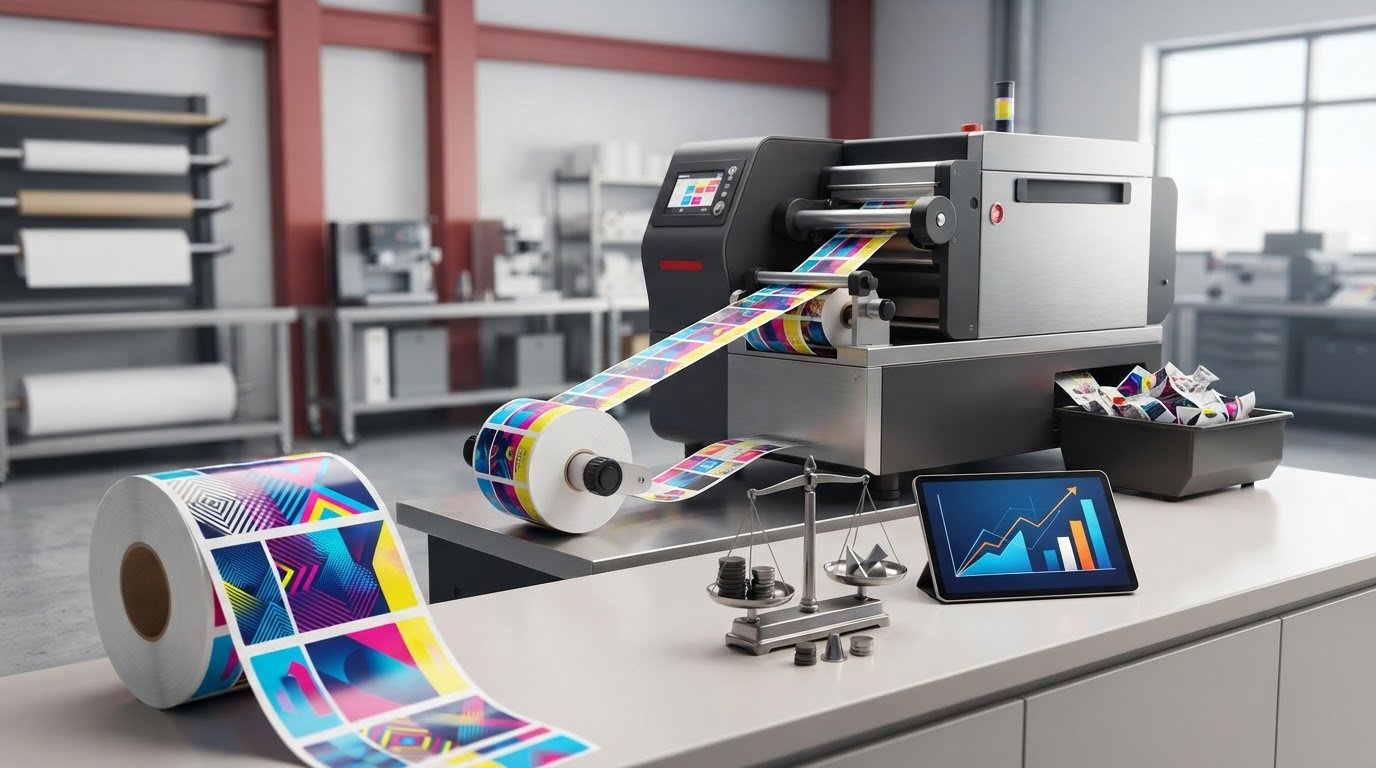
What if the lowest quoted price per label isn’t the lowest-cost option once labour, waste and usable output are counted? A reliable financial model for switching to in-house label printing compares the full cost of each approach, not just an outsourced quote with a printer’s purchase price.
It’s reasonable to question projected savings if they depend on high volumes, smooth production or near-perfect utilisation. A fair comparison uses your actual costs and makes its assumptions visible, so you can see how changes in demand, downtime or rejects affect the result.
This article shows you how to build an editable model using your own inputs. It covers equipment, labour, media, ink, finishing, maintenance and waste. You’ll compare outsourced costs with the cost per usable in-house label, test conservative and expected scenarios, and set a decision rule that considers operational fit as well as payback. Once the business case is clear, you can match its equipment and consumables assumptions to suitable colour label printers, labels, inks and finishing equipment from OptiMediaLabs Canada.
Key Takeaways
- Set a clear scope by matching label specifications, production needs and forecast period before comparing options.
- Build a financial model for switching to in-house label printing with editable inputs and traceable cost assumptions.
- Compare cost per usable label alongside total costs over the same period and demand volume.
- Use scenarios to test how changes in output, waste and operating costs affect break-even volume and payback.
- Turn the results into a practical next step: proceed, gather better data or retain outsourced production while refining equipment and supply needs.
Should you switch to in-house label printing? Define the financial decision
Start with a like-for-like comparison: the cost of producing the same quantity of usable labels through outsourced and in-house production. Usable labels meet your specifications and can be applied as intended. Account for rejects, setup waste and obsolete stock wherever they reduce the quantity you can actually use. Comparing a supplier’s quoted unit price with the cost of blank media alone can make either option look artificially attractive.
A financial modeling approach turns your costs and operating assumptions into a structured comparison. Define the scope before entering figures: the products and SKUs included, label size and material, colour or variable-data requirements, production sites, and forecast period. Keep the scope consistent across both options. If a site or product line has different requirements, assess it separately rather than blending unlike production into one average.
Separate measurable cash impacts from operational benefits. Equipment, labour, media, ink, finishing, waste and outsourced orders can be entered as costs or savings using your business’s records and quotes. Faster revisions, more control over timing and the ability to print smaller quantities may also be valuable, but record them separately unless you can tie them to a measurable financial effect. The decision question is specific: What volume and workflow make in-house production viable for your business?
Which business conditions make a model useful?
A model is particularly useful when label demand recurs, spans multiple SKUs, changes seasonally or includes variable data. In these cases, order size, frequency and revision needs matter alongside annual volume. Stable demand may support more consistent equipment utilization. Irregular orders, long quiet periods or seasonal peaks can leave equipment underused or require capacity for short production windows.
Build the starting picture from actual purchasing and production records. For each label type, note order frequency, quantities per order, supplier lead times and specifications. Include changes in demand throughout the year rather than relying on a single annual total. These inputs help you judge whether the proposed workflow fits the production you need.
What should the financial model answer?
The financial model for switching to in-house label printing should estimate the total cost of producing the required usable output under both operating models. It should also calculate break-even volume, payback period and projected cash impact using the same business-specific inputs. These are estimates, not guarantees. Their usefulness depends on assumptions that reflect actual operations.
Identify which assumptions could change the decision if actual results differ. Lower-than-expected demand may reduce equipment utilization, while higher labour time, waste or consumable use may raise in-house costs. Test these inputs instead of relying on one best-case forecast. If a small change in an assumption shifts the result substantially, gather better data before committing.
What's in a financial model for in-house label printing?
A decision-ready model compares the total relevant cost of outsourced and in-house production over the same period and for the same usable output. Keep the production basis consistent: label dimensions, material, colour requirements, finish and quantity must match. Otherwise, the comparison may reflect different specifications rather than a genuine cost difference.
Group inputs by how they behave. One-time or fixed costs establish the investment required to start and maintain the capability. Recurring and volume-sensitive costs change with time, order frequency or output. This structure helps show whether savings come from lower costs per label, better use of fixed investment or assumptions that may not hold.
Which in-house costs should the model capture?
Build an in-house cost inventory around the proposed workflow. Include printer acquisition, setup and any required finishing equipment. Record the financing method and assumptions separately. Avoid counting the same purchase as both a full upfront outlay and financed principal in the same cash-flow calculation.
- Fixed or periodic: equipment, setup, software or workflow costs that apply to the chosen process, and scheduled maintenance.
- Volume-sensitive: label media, ink or ribbon, labour, setup time and finishing supplies.
- Operational allowances: expected waste, downtime and maintenance events, where business records or estimates support them.
Separate operator time spent preparing jobs, changing materials or handling finishing from time spent running the printer. This makes labour visible instead of hiding it in a broad per-label estimate. Include software only if it’s needed for the planned workflow.
Which outsourced costs and benefits belong in the comparison?
Use supplier quotes that match the label specifications and order quantities in your model. Add applicable setup, shipping, minimum-order and handling charges to the quoted amount. If an order must exceed immediate demand, include inventory costs only when your records support a carrying cost or show that labels may become obsolete before use.
Pair costs by function where possible. For example, compare outsourced setup and order charges with the in-house time and materials required to prepare a run. Don’t automatically treat a minimum order as waste. Include only the portion that remains unused or becomes unusable under your actual purchasing pattern.
Make every input traceable. Label spreadsheet cells with their source, such as a quote, invoice, time study, equipment specification or clearly marked estimate. Record the date and assumptions beside each figure. Keep benefits such as faster revisions or greater production control in a separate section unless you can assign them a defensible value. Once the cost categories and requirements are clear, discuss equipment and supply considerations for your planned workflow with OptiMediaLabs.
How to compare outsourced and in-house label costs fairly
A fair comparison holds the output constant. Use the same label specifications, required number of usable labels, demand volume and forecast period for both operating models. Report two results: total cost for the period and cost per usable label. The unit figure helps compare production economics; the period total shows the cash commitment and the effect of order timing.
Specifications: Record dimensions, material, colour requirements, finish and any variable-data needs for each option. Flag any quote or equipment estimate that doesn’t match.
Usable output: Enter the number of labels that pass quality requirements, not simply the quantity ordered or printed.
Period and demand: Use the same forecast window and demand profile. Show outsourced orders and in-house runs at the timing and quantities your business expects.
Included costs: List each relevant charge or cost in its own row. Mark missing quote details, such as shipping or setup, as unknown rather than assuming they’re included or equal.
How do you calculate cost per usable label?
Use a formula another team member can reproduce:
Cost per usable label = relevant production costs ÷ labels that meet quality requirements
For outsourced production, use the costs associated with the comparable order and the usable quantity received. For in-house runs, include the relevant equipment and operating costs for the period, then divide by accepted output. Subtract documented setup sheets, test prints, rejected labels and other waste from gross print quantity to calculate usable output. Keep the cost inputs and yield figures visible beside the formula. Don’t apply an assumed waste rate without identifying it as an estimate.
How should volume, inventory and timing be normalized?
Model the same forecast demand, but preserve each option’s actual purchasing pattern. An outsourced minimum order may create stock beyond immediate requirements. In-house printing may allow smaller runs, but that doesn’t mean every printed label will be used. Separate labels needed now from inventory held for future demand, and show the purchasing frequency for each scenario.
Keep cash costs distinct from capacity, lead-time and flexibility considerations. Record whether equipment capacity matches the expected workflow, but don’t count unused capacity as a saving. Faster revisions or shorter lead times can matter operationally; assign them a dollar value only when business data supports the estimate.
This structure makes the financial model for switching to in-house label printing more than a unit-price contest. It shows where the options differ, which inputs are uncertain and whether those differences could affect the decision.
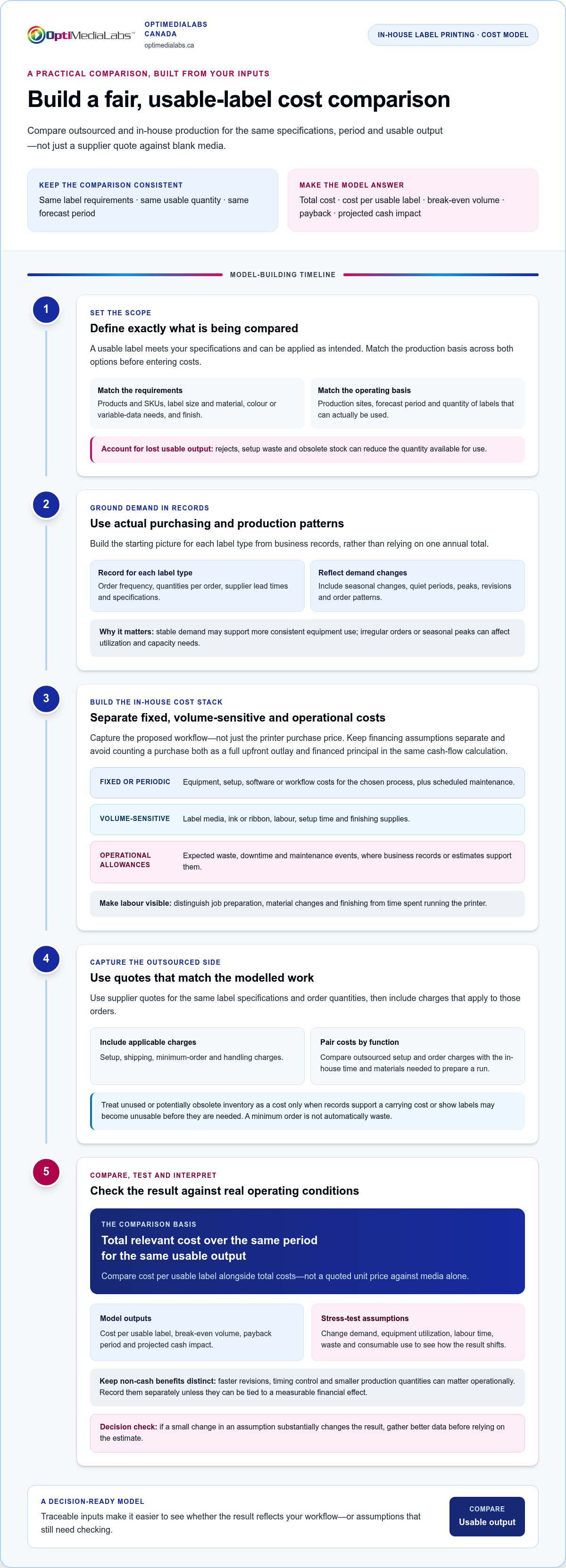
How to build and stress-test the label-printing financial model
Build the spreadsheet so another decision-maker can trace every result back to an input. Separate input cells from formulas and scenario outputs. Label each input, note its source and date, and clearly mark estimates. Use the same forecast period, usable label demand and cost treatment in every case.
Calculate annual net cash impact as outsourced cash costs avoided minus in-house operating costs and investment cash outflows included for that year. State whether equipment acquisition is counted upfront or through financing payments, and apply that method consistently. Payback occurs when cumulative net cash benefits recover the initial investment. Break-even volume is the demand level at which the total relevant costs of the two options are equal over the chosen period. Show the formulas and assumptions behind each result.
Which scenarios and sensitivity tests matter most?
Create conservative, expected and higher-demand cases using your own records, not unsupported industry benchmarks. Vary the inputs that can change the outcome:
- Demand and utilization: test slower demand growth, seasonal dips and lower equipment use.
- Consumables and waste: adjust media and ink use, reject rates and setup waste.
- Workflow: test labour time, setup time and downtime against the expected operating case.
Then change one assumption at a time to see which has the greatest effect on cash impact, break-even volume or payback. If a modest change in demand or waste reverses the result, the model is sensitive to that input. Set a monitorable threshold, such as the minimum usable label volume needed to keep projected in-house costs at or below outsourced costs. Track actual results against it after implementation.
How can you validate assumptions before approval?
Replace estimates with current invoices, comparable supplier quotes, production records and measured workflow times wherever possible. Verify that the proposed printer, media, ink and any finishing equipment suit your label requirements. Check yield, speed and operating-cost assumptions against specifications or measured runs instead of treating estimates as facts. For equipment context, review the Afinia label printer buyer’s guide.
A robust financial model for switching to in-house label printing makes uncertainty visible instead of hiding it in a single forecast. Use validated requirements to refine the equipment and consumables inputs, then discuss your label-printing equipment and supply requirements with OptiMediaLabs.
Using the model to choose an in-house label printing setup
Use the model to make a decision, not to justify a purchase you’ve already chosen. A positive financial result is one consideration alongside workflow fit, label requirements and your team’s ability to manage production internally. Decide in advance what financial threshold, payback period or operating condition would make a switch acceptable, then apply it consistently to each scenario.
What results support switching, waiting, or keeping the current process?
Proceed when in-house production meets your decision threshold under reasonable downside assumptions and your team can support the workflow. Wait if important inputs remain estimates, expected utilization is weak or small changes in demand, waste or labour reverse the result. Use the time to gather better records or validate the production process. Retain outsourced production when the in-house case falls short of your documented threshold. That’s a sound business outcome, not a failed model.
Before implementation, identify what you’ll monitor, such as monthly usable output, consumable use, labour time or downtime. Compare actual results with the model and revisit the decision if demand or production needs change.
Which equipment and consumables should the model evaluate?
Translate the winning scenario into a requirements list before comparing equipment. Consider colour needs, expected volume, label dimensions and material, output requirements, variable data, and whether labels need cutting or other finishing. Then match the printer category, media, ink or ribbon, software and finishing equipment to that workflow. Don’t select a setup based on headline capacity alone if your demand pattern or label requirements don’t use it.
For colour production, compare suitable colour label printers against the specifications entered in your model. Check the label stock too. Afinia labels are one media category to consider when they suit the selected printer and application. Tie each equipment and consumables assumption to a quote or specification before updating the forecast.
A model can show that in-house printing is financially viable while also revealing that a particular setup isn’t an operational fit. Review the expected job mix, run frequency, staff time and finishing steps together. If the printer, media and workflow assumptions don’t align, revise the setup and recalculate instead of treating the first positive result as approval to buy.
Once your model defines the volume and label requirements, discuss your label-printing requirements with OptiMediaLabs to evaluate relevant printers, media, ink and finishing equipment.
Turn your model into a confident next step
A sound decision starts with a like-for-like comparison of usable labels, not a printer price beside an outsourced unit quote. Your financial model for switching to in-house label printing should make assumptions visible, compare total period costs and cost per usable label, and test whether the result holds when demand, utilisation or waste changes.
Use the findings to choose a clear path: proceed when the numbers and workflow fit, gather better inputs when uncertainty could change the outcome, or retain outsourced production if it best meets your business’s requirements. If in-house printing is viable, carry the model’s specifications into equipment and consumables planning.
OptiMediaLabs Canada offers professional colour label printers from top manufacturers, along with labels, inks and finishing equipment. Discuss your label-printing requirements with OptiMediaLabs Canada and use your model to guide the conversation. A transparent business case can help you move forward with greater clarity and confidence.
Frequently Asked Questions
How do you calculate the break-even point for in-house label printing?
Calculate the volume at which total in-house costs equal total outsourced costs over the same period. If in-house production has lower variable cost per usable label, divide the relevant fixed in-house costs by the per-label savings to estimate break-even volume. Include the same cost categories in both options. If in-house variable costs are equal to or higher than outsourced costs, increasing volume alone may not produce a break-even point within the model period.
What costs should a financial model for in-house label printing include?
A financial model for in-house label printing should include equipment, setup, any required finishing equipment, media, ink or ribbon, labour, setup time, waste, maintenance and applicable software or workflow costs. Include downtime where it affects production or cost. Separate one-time and fixed investment from recurring or volume-sensitive costs, and account for financing consistently. For outsourcing, include comparable quote costs and applicable setup, shipping, minimum-order and handling charges.
Is in-house label printing cheaper than outsourcing?
Not in every case. The result depends on demand volume and consistency, equipment utilization, label specifications, labour, consumables, waste and outsourced order costs. Compare both options using the same specifications, forecast period and quantity of usable labels. Test more than one demand scenario: a setup that appears economical at expected volume may cost more if actual use is lower, while frequent revisions or smaller runs may affect the operational value of printing in-house.
What happens if label-printing volume is lower than forecast?
Lower volume can reduce equipment utilization and spread fixed in-house costs across fewer usable labels. That may raise the unit cost and extend payback compared with the original forecast. Recalculate using actual demand, production time, waste and consumable use rather than relying on the original estimate. If volume falls below the model’s break-even threshold, consider whether the current workflow still meets your business needs or whether outsourced production remains a better fit.
Can a financial model include faster turnaround and reduced label waste?
Yes, but distinguish measurable financial effects from operational benefits. Include reduced waste when production records support the expected change and the savings can be calculated. Faster turnaround can also be tracked as an operational outcome, such as the time from a label revision to usable output. Assign it a dollar value only when your business has a defensible method and data to support that estimate. Otherwise, show it separately from cash savings.
How often should a business update its label-printing financial model?
Update the model when a material assumption changes, such as demand, label specifications, equipment requirements, supplier quotes, consumable use or workflow time. After switching, compare actual costs and output with the forecast regularly, such as during monthly operating reviews, so changes are visible early. Revisit the full comparison during budgeting or before major equipment decisions. Keep dated inputs and sources so each update can be traced and compared with earlier scenarios.