
GHS chemical labeling software integration for compliant labels
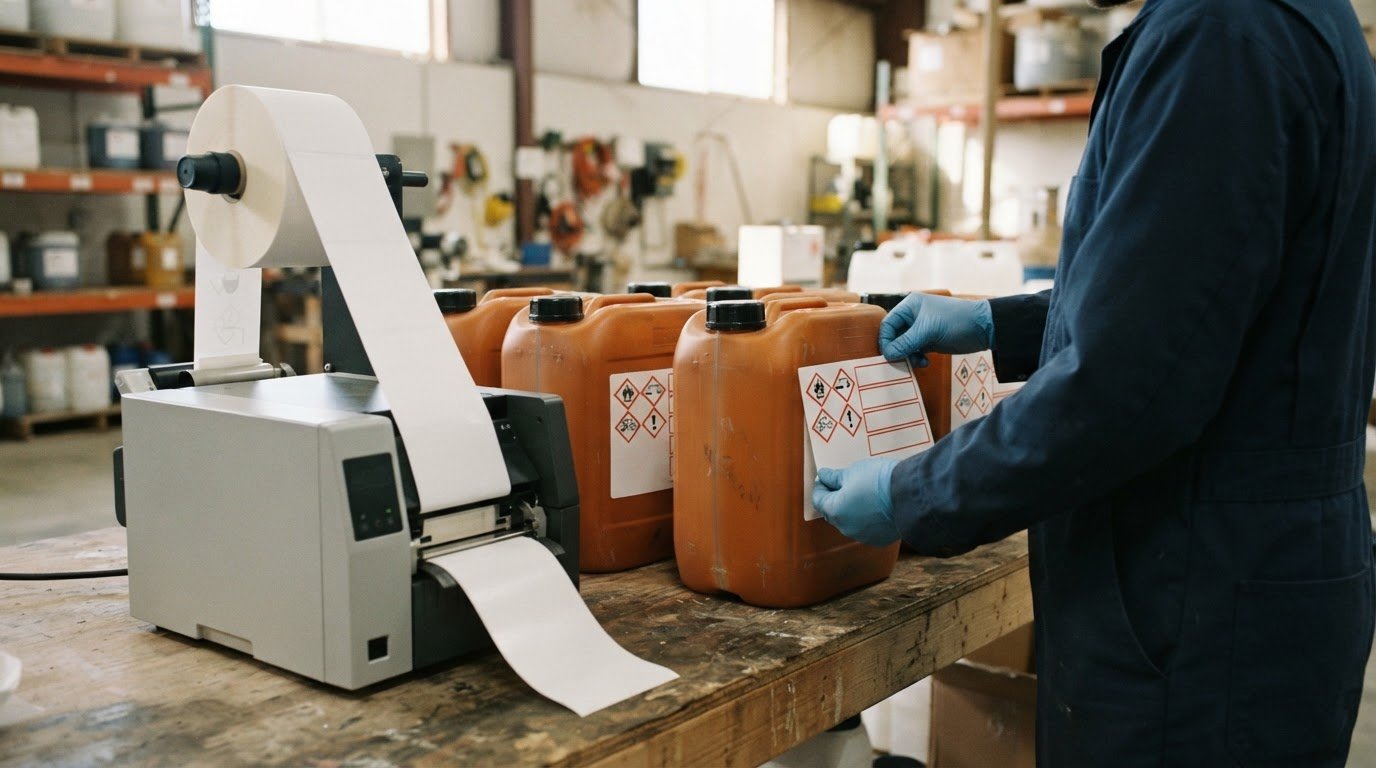
A label can print cleanly and still carry inconsistent hazard information. GHS chemical labeling software integration helps connect chemical and product records with label content, including hazard statements, precautionary statements and pictograms. In Canada, WHMIS is the framework for communicating workplace chemical hazards, and Canada adopted GHS in February 2015 through amendments to the federal Hazardous Products Act and publication of the Hazardous Products Regulations.
Keeping labels and Safety Data Sheets (SDSs) aligned can be demanding when product information, inventory records and compliance requirements are managed across separate systems. The right integration approach brings those details into a more coordinated process, while keeping local requirements in view.
This article explains how connected systems can support hazard information, label and SDS management, and reviews triggered by regulatory changes. It also explains why international alignment does not remove the need to meet Canadian WHMIS requirements. You’ll learn what integration can coordinate, why reliable source data matters, and where label software and printing equipment fit in the workflow.
Key Takeaways
- See how hazard and precautionary statements, signal words, and pictograms work together on chemical labels.
- Understand how regulatory updates can affect label content and why update workflows matter.
- Learn why international alignment still requires attention to Canadian WHMIS requirements.
- Explore how connecting product records with SDSs and label data can help reduce manual duplication.
- Find out what to consider when coordinating labelling software with ERP, LIMS, and inventory systems.
Hazard and precautionary statements
In Canada, WHMIS labels communicate chemical hazards through standardized statements, signal words, and pictograms. Connected label data can help keep these elements aligned with a product’s hazard classification and Safety Data Sheet (SDS).
Standardized hazard and precautionary statements
Hazard statements describe a chemical’s risks, while precautionary statements explain how to reduce exposure and handle it safely. Standardized wording helps workers recognize hazards consistently, including on products from different suppliers.
For example, a label may identify a chemical’s specific health risk and include safer-handling instructions. The product’s classification determines which statements apply, so copying text from another chemical can misrepresent its hazards. Linking approved statements to the correct product record helps keep label content consistent.
Precautionary statements and hazard pictograms
Precautionary statements provide practical safety guidance, while pictograms signal hazards such as toxicity or flammability. Together, the words and symbols communicate risk quickly, including when someone first sees a container.
A pictogram provides a visual hazard cue; the accompanying statements explain the risk and precautions. Labels also use the signal words “Danger” or “Warning” to indicate hazard severity. These elements should follow the chemical’s classification rather than be selected independently. A missing symbol or mismatched precaution can make a label harder to interpret.
GHS classification and hazard communication
The Globally Harmonized System (GHS) uses hazard classification to organize chemical risks and guide their communication. Classification determines which hazard statements, precautionary statements, pictograms and signal word belong on a label.
This relationship makes accurate product data essential. A change to a chemical’s classification can affect several label elements together. For a practical workflow, structured hazard fields can feed a template through barcode and label design software, rather than relying on manually re-entered text.
An SDS supports this communication process. It has 16 sections in a set order, and information from Section 1 should be represented on the GHS label. Labels also identify the hazardous product by name or number and include supplier contact details for inquiries. These details help connect the container to its supporting safety information.
Canada’s WHMIS framework and the United States’ OSHA Hazard Communication Standard both incorporate GHS, but each applies in its own jurisdiction. OSHA’s standard incorporates GHS to improve safety and protect the health of people working with chemicals. For Canadian labels, coordinate hazard information with WHMIS requirements instead of assuming a label prepared for another market automatically meets local needs.
Automatic legislative updates
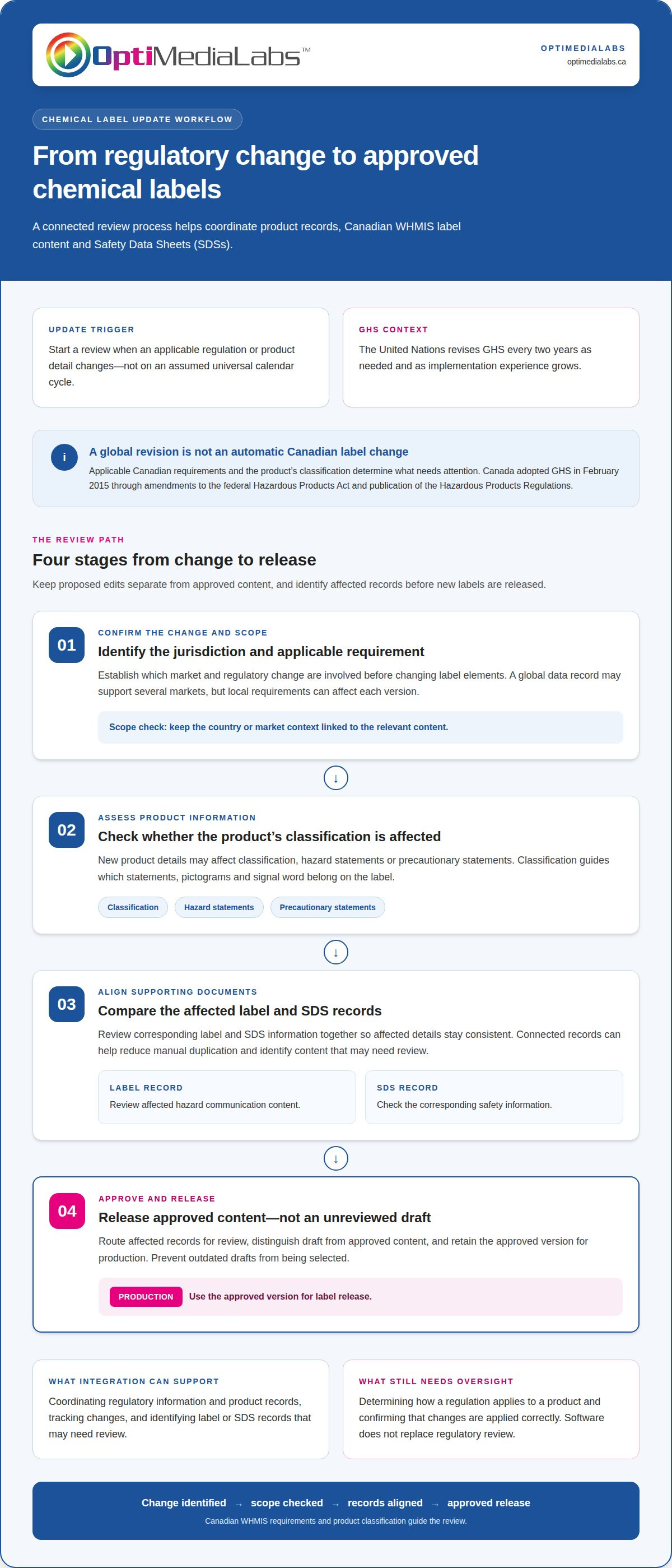
Review Canadian chemical labels and Safety Data Sheets (SDSs) when relevant regulations or product details change. Update affected content to reflect current hazard information. The trigger is the change itself, not a universal calendar cycle.
The United Nations’ Globally Harmonized System of Classification and Labelling of Chemicals (GHS) is revised every two years as needed and as experience is gained in implementation. A revision can affect how chemical hazards are communicated. However, a global GHS revision does not by itself mean every Canadian label needs the same immediate change. Applicable Canadian requirements and the product’s classification determine what needs attention.
Software integration can bring regulatory information and product records into a coordinated review process. It can help track changes and identify label or SDS records that may need review. It does not replace decisions about how a regulation applies to a product or ensure every change is applied correctly without oversight.
A controlled workflow separates an update from its approval and release. When an applicable requirement changes, for example, the workflow can identify affected records, route them for review, and distinguish draft content from approved content. This helps prevent a proposed edit from being treated as a final label or from changing unrelated product records.
Useful review points include:
- Regulatory change: identify the jurisdiction and requirement involved before changing label elements.
- Product detail change: assess whether new information affects classification, hazard statements, or precautionary statements.
- Document alignment: compare the corresponding label and SDS records so affected information stays consistent.
- Approval and release: retain the approved version for production and prevent outdated drafts from being selected.
These steps matter when a product is used in different countries. A global data record may support several markets, but local requirements can affect which elements belong on each version. Keep the country or market context linked to the relevant content instead of assuming one international template covers every destination. A “Warning” signal word or another label element must reflect the applicable classification and rules.
Automatic updates should therefore be understood as support for maintaining and routing information, not as a substitute for regulatory review. A practical setup connects regulatory change management with the product data used for SDSs and labels, and makes it possible to identify affected records before new labels are released. If you’re planning a connected labelling workflow, discuss your labelling setup as a next step.
Employers have an implementation deadline of November 20, 2026, for continued compliance with the updated standard. That deadline can be incorporated into the same controlled process used for regulatory review, with responsibility assigned for checking applicable requirements and documenting decisions. Planning ahead helps keep compliance work distinct from routine edits to product records: identify what needs attention, review the affected content, and approve changes before release. Where no product-specific change is warranted, retain the review outcome rather than making an unsupported alteration. This keeps deadline planning tied to applicable requirements and preserves oversight of the information provided to workers.
International and local labelling compliance
GHS provides a shared international approach, but chemical labels still need to reflect the rules in their destination market. In Canada, that means coordinating classification and labelling with WHMIS requirements.
Comparing integrations and ease of use
Compare chemical labelling software by how it connects product information, inventory records, and safety data documents. GHS tools can integrate with existing systems and support chemical inventory management and SDS authoring. Connected records can reduce the need to re-enter the same product details in separate workflows.
For example, examine how a platform moves information from an inventory system into a label or SDS workflow. Can users identify the right product record and manage its documents without switching between disconnected processes? ERP, LIMS, and inventory integrations are useful comparison points, but the right connections depend on the systems already in use and the data they hold.
Ease of use also depends on how clearly software organizes product records and documents. A workflow that clearly associates safety data with a chemical can help users find the right information for a task. Compare actual functions and processes instead of assuming a broad feature list means every system supports the same connections or workflow.
Comparing compliance features
Compliance features determine how software supports jurisdiction-specific classification and labelling. GHS-compliant labels require six key pieces of information, while Canada’s framework is WHMIS. Canada adopted GHS in February 2015 by amending the federal Hazardous Product Act and publishing the Hazardous Products Regulations. Its implementation was based on the fifth revised edition of the GHS publication.
Check whether a platform can keep market-specific label content distinct and associate it with the appropriate product documents. A product distributed in Canada and another country may need different label versions. The workflow should make the destination and applicable content clear, rather than treating one international template as suitable everywhere.
Canadian enforcement also involves distinct responsibilities. Health Canada enforces federal WHMIS legislation when a supplier’s WHMIS label or Safety Data Sheet is incorrect. Provincial or territorial health and safety authorities enforce WHMIS legislation in their respective jurisdictions. These roles show why compliance is more than a software feature: records and output still need to reflect relevant Canadian requirements.
When comparing platforms, assess supported connections, inventory and SDS authoring workflows, and management of market-specific documents. Tie each function to a practical task, such as retrieving a product record, preparing its Canadian label, and keeping its related safety data accessible.
SDS and label management challenges
Connecting Safety Data Sheets (SDSs) and labels requires keeping product information associated with the correct chemical. A GHS chemical labeling software integration can link those records, but the result still depends on accurate source data and careful management.
Label data and SDS information
A useful label record connects each chemical to its product name or number, supplier contact details, hazard classification, and applicable label elements. The SDS provides supporting safety data, while information from Section 1 should also appear on the label. Linking the right SDS to its product record helps keep documents aligned and makes it easier to locate the correct information.
For example, two products with similar names may have different hazard information. A unique product identifier helps distinguish their records and connect each label to the correct SDS. If a supplier changes a product name, retaining that identifier can help prevent the renamed product from being mistaken for a different chemical.
Field mapping is another challenge: the integration must send each source field to its intended place in the label template. If supplier contact details or product identifiers land in the wrong field, the label may be incomplete or confusing. A GHS chemical labeling software integration should also distinguish approved data from draft changes, so an unreviewed edit does not inadvertently reach label production.
Integration data, cybersecurity, and compliance risks
Integration risks include incomplete, mismatched, or unauthorized data transfers between systems. An incorrect product identifier could link an SDS to the wrong chemical, for example, while uncontrolled editing could change label information without approval. Either situation can affect document accuracy.
Connections between inventory, ERP, LIMS, and labelling software need consistent identifiers and clear field mapping. An internal inventory code may differ from a supplier’s product code. If systems do not map those identifiers correctly, duplicate or mismatched records can result. Defining which system supplies each field helps limit that risk.
Cybersecurity matters because integration moves product and supplier information between systems. Access permissions can limit who may view or change records, while change logs can help trace edits. Appropriate controls depend on the connected systems and the information they handle.
Compliance issues can arise if an update bypasses review or a released document remains tied to outdated product data. A controlled workflow records information sources, routes changes for approval, and links the released label to its supporting SDS. This traceability helps teams see which records informed a label and identify where a correction may be needed.
GHS label management can involve tracking regulatory changes, managing Safety Data Sheets (SDSs), and maintaining accurate labels across products. These responsibilities bring together regulatory information, SDS records, and product labels in one coherent process. Treating them as connected tasks helps teams manage both the information associated with a product and the label that represents it, rather than treating label preparation as an isolated step.
Which chemical labelling software platforms support integration with ERP, LIMS, and inventory systems?
GHS label management tools can integrate with existing systems and support chemical inventory management and SDS authoring. Choose a platform based on whether it connects the data sources your workflow uses and keeps product records identifiable as information moves between systems.
Start by mapping the information flow. An ERP may hold product and supplier records, a LIMS may manage laboratory data, and an inventory system may track stock. Label software can use connected data to support label preparation and SDS workflows. The right connection depends on what each system stores and how its records are matched.
Compare platforms by examining the workflows they support, not by assuming every product offers the same integrations. Look for a clear path from a product record to its associated label and safety documents. If inventory identifies a chemical by an internal code, for example, the labelling workflow needs to associate that code with the correct product and supporting information.
Integration also depends on how systems exchange information. A workflow may transfer selected fields, or rely on a shared record or controlled import. What matters is whether the information remains usable and traceable after transfer. A product name alone may not distinguish similar materials; an identifier can help connect the correct inventory entry, SDS, and label.
Assess these practical points during a platform review:
- Data sources: identify which ERP, LIMS, or inventory records provide product details.
- Field mapping: confirm that product identifiers and supplier data reach the intended fields.
- Document handling: determine how the platform associates SDS records with products.
- Change management: understand how edits to source records reach label workflows.
- Traceability: establish how users can identify which product record informed a label.
These criteria help distinguish a complete workflow connection from a feature that transfers only limited information. An inventory import might populate product names but leave SDS documents managed elsewhere. That can support part of the process, but teams still need to know where each record is maintained and how users access related information.
Software supports coordination; it does not make source data accurate by itself. A clear system of record, consistent identifiers, and defined approval steps help keep transferred details aligned. Review how a platform handles the specific fields and documents your operation needs, including the path from ERP, LIMS, or inventory data to a label.
To discuss how labelling equipment and software fit your workflow, contact OptiMediaLabs Canada.
OptiMediaLabs Canada
OptiMediaLabs Canada helps equip the printing stage of a chemical labelling workflow. Once software coordinates product data and label content, suitable printing equipment and supplies support the production of physical labels for products and containers.
Explore Afinia Color Label Printers, RFID Label Printers, Afinia Label Cutters & Finishers, and Thermal Transfer Ribbons as parts of a broader labelling setup. The right combination depends on your label production process and equipment needs. These products complement software workflows; they do not replace regulatory review or SDS management.
Contact OptiMediaLabs Canada for help choosing printing equipment and supplies for your workflow.
Plan the next step for your labelling workflow
Before changing systems, map how chemical information should move from its source record to an approved label and supporting documents. Identify the systems involved, the records that need to connect, and who is responsible for review and release. This keeps the integration discussion focused on your team’s workflow rather than a feature list alone.
Effective GHS chemical labeling software integration depends on matching the software workflow with the equipment and supplies used to produce labels. OptiMediaLabs Canada offers Epson Ink Cartridges alongside label printing and RFID options to support the physical production side of a labelling setup. The right configuration depends on your workflow and selected equipment.
Bring your integration goals and printing requirements together in one conversation. Contact OptiMediaLabs Canada to discuss integration and take a clear next step towards a coordinated labelling process.
Frequently Asked Questions
What Canadian WHMIS and GHS labelling requirements must chemical labelling software meet?
The workflow should support label content that reflects Canadian WHMIS requirements and the product’s applicable hazard classification. Configure Canadian templates separately from versions intended for other markets, then test how a sample product record fills each required field. Software organizes and outputs information, but it does not independently establish a chemical’s classification or make incorrect source data compliant. Review the generated label against the product’s current safety documentation before release.
How do chemical labeling software integrations connect to SAP, Oracle, Microsoft Dynamics, or other ERP systems?
Integrations can connect product and inventory records with label and SDS workflows, reducing manual re-entry of details. The appropriate connections depend on the systems in use and the data they hold.