
GS1 Barcode Label Software: Compliance and Selection Guide for 2026
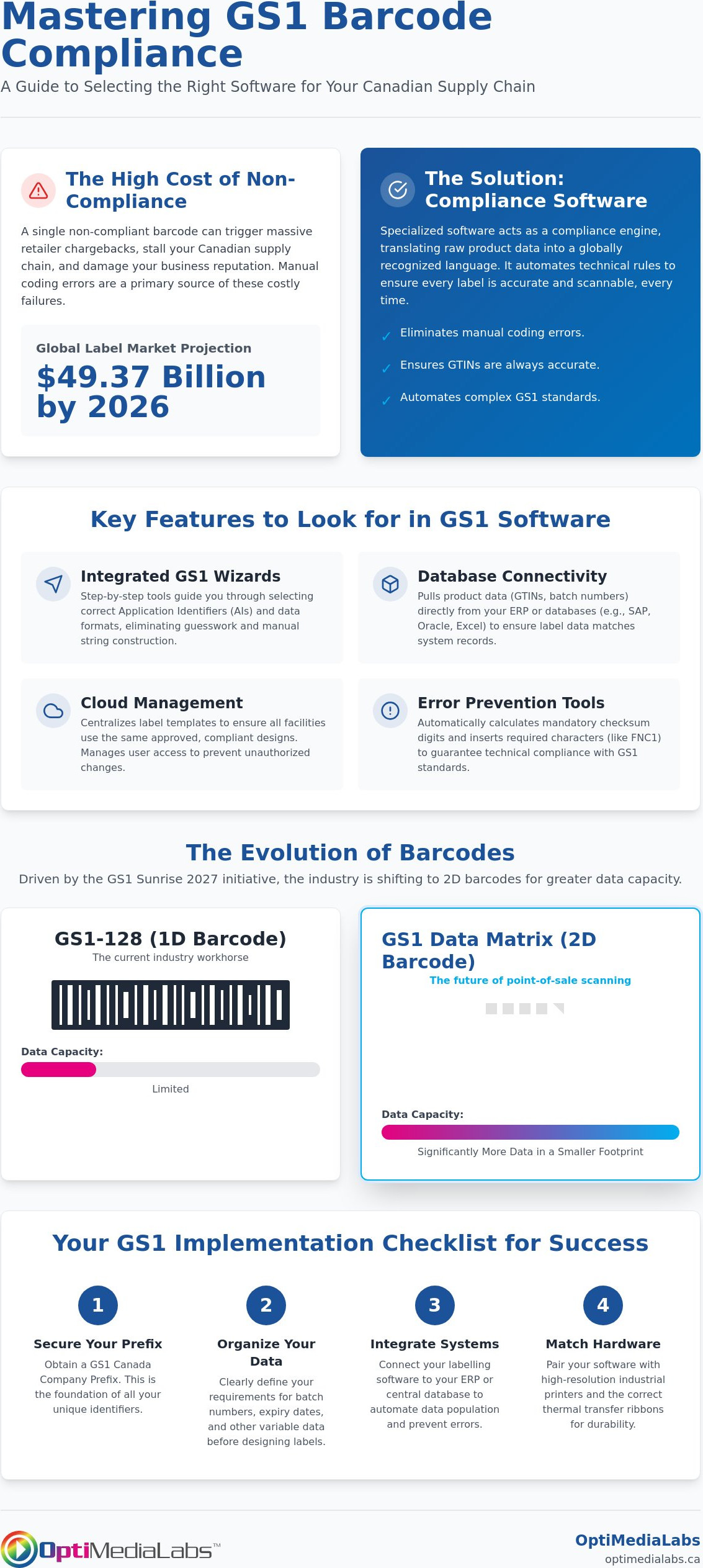
The global label market is projected to reach $49.37 billion by 2026, yet a single non-compliant barcode can still trigger massive retailer chargebacks and stall your Canadian supply chain. You’ve likely felt the frustration of deciphering complex Application Identifiers (AIs) or struggled to get your ERP system to communicate with your printers. It’s a technical headache that eats into your margins and creates unnecessary friction with your retail partners. You need a solution that works as hard as your warehouse team does.
Choosing the right GS1 barcode label software is the most effective way to eliminate these manual coding errors and ensure your GTINs are always accurate. This guide provides a clear path through the complexities of GS1 compliance for your local operations; we help you realize a more efficient workflow. We will examine the latest 2026 standards, compare subscription models for industry leaders like BarTender and Loftware, and help you select the hardware-software synergy that keeps your production lines moving without interruption.
Key Takeaways
- Eliminate manual coding errors by utilizing integrated wizards designed for precise GS1-128 and GTIN generation.
- Compare the subscription models and interfaces of leading GS1 barcode label software to find the best fit for your technical requirements.
- Automate your production line by connecting labelling software directly to your ERP or Excel databases for real-time data population.
- Ensure scannability and durability by matching high-resolution industrial hardware with the correct thermal transfer ribbons.
- Avoid retailer chargebacks by securing a GS1 Canada Company Prefix and organizing your batch and expiry data requirements before printing.
What is GS1 Barcode Label Software and Why is it Essential?
GS1 barcode label software is a specialized compliance engine designed to translate raw product data into a globally recognized language. It's not a standard design tool; it's a technical framework that ensures every barcode follows the precise formatting rules established by the GS1 global standards organization. For Canadian manufacturers, this interoperability is the backbone of the supply chain. It allows a pallet packed in Ontario to be scanned and recognized instantly by a retailer in British Columbia or a distributor in Europe without manual intervention.
Non-compliance carries heavy penalties in modern logistics. Major retailers use automated systems that reject shipments if a barcode fails to scan or contains incorrect data structures. These chargebacks can cost thousands of dollars per instance and damage your reputation. Professional GS1 barcode label software eliminates this risk by automating complex technical requirements. It calculates mandatory checksum digits and inserts FNC1 characters, which act as "start" signals for scanners, ensuring your labels meet the latest GS1 General Specifications, Release 26.0, updated in January 2026.
Understanding GS1 Identifiers: GTIN, SSCC, and More
To maintain a seamless supply chain, you must categorize your data using specific identifiers. Software solutions like BarTender or NiceLabel use Application Identifiers (AIs) to tell the scanner exactly what type of data follows. Common identifiers include:
- Global Trade Item Number (GTIN): The unique identifier for retail products.
- Serial Shipping Container Code (SSCC): A 18-digit number used to identify logistics units, such as pallets or cases.
- Variable Data AIs: Specific codes for expiry dates (AI 17), batch numbers (AI 10), and net weight (AI 310x).
The Importance of GS1-128 in Modern Manufacturing
The GS1-128 barcode is the workhorse of the manufacturing sector. Unlike standard retail barcodes, it handles variable data, making it indispensable for tracking lot numbers and production dates. While 1D barcodes remain common, the industry is currently moving toward 2D barcodes, such as the GS1 Data Matrix. This shift is driven by the GS1 Sunrise 2027 initiative, which aims to make 2D barcodes scannable at point-of-sale globally. Modern platforms like Loftware already support these high-capacity formats, allowing you to encode significantly more data in a smaller footprint while remaining fully compliant with Canadian retail standards.
Key Features to Look for in GS1 Compliance Software
Selecting the right GS1 barcode label software requires looking beyond basic design capabilities. High-performance software acts as a technical gatekeeper for your production line. Integrated GS1 wizards are non-negotiable features. These step-by-step tools guide you through selecting the correct Application Identifiers (AIs), ensuring that variable data like lot numbers or expiry dates are encoded in the exact sequence required by global standards. This eliminates the need for manual string construction, which is where most formatting errors occur.
Database connectivity is another critical pillar for efficient operations. Manual entry is a primary source of label errors and subsequent retailer chargebacks. Your software should pull GTINs and batch data directly from existing ERP systems like SAP, Oracle, or Microsoft Dynamics. This synchronization ensures that the physical label always reflects the digital record in your warehouse management system. For medical device manufacturers, this level of precision is vital for maintaining compliance with FDA UDI Basics, where data accuracy is a regulatory mandate.
In addition to supply chain data, many Canadian enterprises are now automating their back-office finance systems to reduce administrative overhead. To see how autoMEE can streamline your company's posting and reconciliation workflows, click here.
Cloud management has become a standard for Canadian businesses with multiple facilities. Centralizing your label templates in a cloud environment ensures that a facility in Halifax uses the exact same compliant design as a plant in Calgary. Paired with robust user access controls, this prevents unauthorized changes to approved templates. If you're struggling to determine which feature set fits your current volume, contact our technical specialists to review your specific workflow.
Automation and Error Prevention Tools
Scanning failures often stem from incorrect check digits. Professional software includes automatic calculators that verify these numbers before the job reaches the printer. You should also look for "What You See Is What You Get" (WYSIWYG) editors. These allow operators to visualize the final printed label, including dynamic elements, reducing the need for expensive test prints. Pre-formatted templates for major Canadian retailers can significantly reduce your setup time by providing the exact layouts required for inbound shipments.
Scalability for Growing Canadian Businesses
Your software must grow with your production volume. Many businesses start with standalone workstation licenses but eventually require enterprise-level network licensing. This allows for centralized control and easier updates across dozens of printers. Future-proofing is also essential. Investing in scalable GS1 barcode label software ensures you don't have to migrate data every time you add a new production line. As the industry prepares for the GS1 Sunrise 2027 transition to 2D barcodes, your software must be capable of generating Data Matrix codes without requiring a total system overhaul.
Comparing Leading GS1 Software: BarTender vs. NiceLabel vs. Loftware
Selecting the right GS1 barcode label software often comes down to balancing user experience with technical depth. In Canada, three platforms lead the market: BarTender, NiceLabel, and Loftware. While all three ensure your labels meet the GS1 Global Traceability Standard, they serve different operational scales. Buyers must evaluate whether they need a simple workstation solution or a cloud-based enterprise engine that manages thousands of print jobs across multiple provinces. The best value isn't always the lowest price; it's the software that integrates most cleanly with your existing hardware and staff skill levels.
BarTender by Seagull Scientific: The Industry Standard
BarTender is widely recognized for its exceptional driver support and reliability in high-volume environments. It's a natural fit for businesses using Zebra or Afinia hardware because of its seamless communication with printer-specific languages. The software excels at high-speed printing where millisecond delays in data processing can stall a production line. With the release of version 12.3 in June 2026, it remains a versatile choice for manufacturers who prioritize stability and local control. You can learn more about BarTender Label Design Software to see if its automation features match your current hardware setup.
NiceLabel: User-Centric Design and Cloud Innovation
If your staff is more comfortable with Microsoft Office than with complex coding, NiceLabel is often the preferred choice. Its "Office-like" interface significantly reduces the learning curve for new operators. This user-centric design doesn't sacrifice power; it simply makes complex tasks like database linking more intuitive. NiceLabel has moved to a subscription-only model as of version 10.5, reflecting a broader industry shift toward cloud-managed services. Explore NiceLabel Barcode and Label Design Software to understand how its cloud-based designer can streamline your remote labelling operations.
Loftware: Enterprise-Grade Supply Chain Management
Loftware is built for large-scale manufacturers with intricate global requirements. Since its acquisition of NiceLabel, the brand has consolidated its position as the go-to for complex logic and international compliance. It's designed to handle advanced variable data across massive networks, making it the most robust option for enterprise resource planning (ERP) integration. Discover Loftware Cloud Solutions if your business requires a centralized platform that can manage sophisticated label logic and maintain strict security protocols across a global footprint.
For most Canadian SMEs, the choice between price and performance depends on the number of printers in use. While entry-level subscriptions for BarTender offer a lower starting point, the long-term value of a GS1 barcode label software like Loftware Cloud's centralized management might outweigh the initial cost for multi-site operations. Focus on the software that provides the most reliable technical support within your specific time zone and offers the most intuitive interface for your daily operators.
Hardware Synergy: Pairing Software with Industrial Printers
Software excellence is only half of the compliance equation. Even the most advanced GS1 barcode label software cannot compensate for a low-resolution print head or poor-quality consumables. Scannability is determined by the "grade" of the barcode; a measurement of contrast, edge sharpness, and quiet zones. If your hardware produces fuzzy edges or faint lines, your shipments will fail automated retail scans. To maintain high throughput, your software must also utilize native printer drivers. This ensures that data reaches the print head in its most efficient language, preventing the "stuttering" often seen with generic Windows drivers.
Achieving a Grade A or B barcode requires a synergy between the software's rendering engine and the printer's physical output. When you use professional-grade software, you gain access to thousands of optimized drivers. These drivers allow the software to control heat settings and print speeds precisely, which is critical for maintaining the integrity of high-density GS1-128 bars. Without this hardware-software harmony, you risk producing labels that look correct to the naked eye but fail at the retailer's distribution centre.
Afinia and Epson: High-Resolution Color Solutions
Modern Canadian brands often require more than just black-and-white logistics labels. Utilizing Afinia Color Label Printers allows you to integrate branding and colour-coding directly into your compliant GS1 layouts. Models like the Afinia L502 or L801 provide the high-resolution output necessary for complex 2D Data Matrix codes. These printers ensure that even the smallest GS1 identifiers remain crisp and scannable. Similarly, you can browse Epson Industrial Label Printers to find durable, pigment-ink solutions that withstand moisture and abrasion without losing barcode integrity. This colour-coding capability helps warehouse staff identify product categories at a glance while keeping the GS1 barcode in high-contrast black.
Zebra and Thermal Transfer: The Logistics Workhorse
For high-volume shipping and warehouse operations, Zebra remains the industry standard for GS1-128 generation. These printers are built for speed and durability. However, the hardware is only as effective as the ribbons you use. Barcode smudging is a primary cause of logistics failures. You must match your label stock with quality thermal transfer ribbons for Zebra systems. Using a high-grade resin or wax-resin ribbon ensures that barcodes remain legible through the heat and friction of the Canadian shipping environment. If you are unsure which hardware configuration best supports your chosen software, request a technical compatibility audit from our team today to ensure your production line is fully optimized for 2026 standards.
Implementing Your GS1 Solution: A Checklist for Success
Transitioning to a fully compliant labelling system requires a methodical approach to ensure every pallet and product meets retail expectations. Success is not just about installing GS1 barcode label software; it involves aligning your administrative data with your physical production capabilities. Follow this structured roadmap to organize your Canadian operations for 2026 standards.
- Step 1: Obtain your GS1 Company Prefix. You must register with GS1 Canada to receive your unique company identifier. This prefix is the foundation of your GTINs and ensures your products are recognized globally.
- Step 2: Define your data requirements. Determine which Application Identifiers (AIs) are mandatory for your partners. Most logistics units require a GTIN (AI 01), a batch or lot number (AI 10), and an expiry date (AI 17).
- Step 3: Select compliant software. Choose GS1 barcode label software that supports the specific AIs identified in step two. Ensure the platform can handle the transition to 2D Data Matrix codes as required by the GS1 Sunrise 2027 initiative.
- Step 4: Conduct test prints and verification. Print a sample batch and use a hardware verifier to check the barcode grade. Aim for a Grade A or B to ensure seamless scanning at the distribution centre.
- Step 5: Train your team. Establish strict protocols for template management. Staff must understand how to maintain data integrity and realize the importance of checksum verification before starting a high-volume print run.
Common Pitfalls to Avoid During Setup
Scanning failures often result from neglecting "Quiet Zones." These are the mandatory blank spaces on either side of the barcode that allow a scanner to identify the start and end of the data string. If your design is too crowded, the scanner will fail to process the label. Additionally, ensure you are using the correct symbology. Using a standard retail barcode for a variable-data logistics label is a common error that leads to rejected shipments. Finally, always verify that your software is updated to the latest standards, such as GS1 General Specifications Release 26.0, to avoid using deprecated formatting rules.
Support and Resources for Canadian Manufacturers
Our technical specialists are available to help you navigate the nuances of software selection and hardware integration. For a deeper look at the broader software market, consult The Professional Guide to Barcode Labeling Software in Canada for 2026. Leveraging OptiMediaLabs Canada expert technical guidance ensures your labels are scannable, durable, and fully compliant with all major retailers. Contact us today to organize a demo of our professional labelling software and secure your supply chain for the years ahead.
Future-Proof Your Canadian Supply Chain
Achieving total GS1 compliance in 2026 requires more than just a printer; it demands a strategic alignment of your data and your hardware. You've learned that error-free GTIN and SSCC generation depends on automated wizards and direct ERP integration. Whether you choose the user-centric interface of NiceLabel or the high-speed performance of BarTender, the goal remains the same: eliminating retailer chargebacks and ensuring seamless scannability across your network. Precision in your labelling process is no longer optional.
As an authorized distributor for BarTender, NiceLabel, and Loftware, we provide the technical expertise needed to integrate your GS1 barcode label software with industry-leading Afinia and Zebra hardware. We offer national Canadian shipping and dedicated technical support to keep your production lines moving. Don't let complex Application Identifiers or upcoming 2D barcode transitions stall your growth. We're here to help you realize a more efficient workflow.
Request a Consultation for Your GS1 Labeling Needs to see how we can optimize your facility. Your path to a more efficient, compliant warehouse starts with a single technical upgrade.
Frequently Asked Questions
What is the difference between a standard barcode and a GS1 barcode?
A standard barcode merely encodes a string of text; a GS1 barcode follows a strict global formatting standard. GS1 barcodes use specific Application Identifiers to categorize data so any scanner in the world can interpret the product's identity, weight, or batch number. This structure allows for seamless interoperability across the Canadian supply chain and prevents data ambiguity during scanning.
Can I use any label design software to create GS1-compliant labels?
You cannot use basic design tools; you require professional GS1 barcode label software to guarantee compliance. Standard graphics programs lack the specialized logic needed to calculate mandatory checksum digits or insert FNC1 characters. These technical elements are required for scanners to recognize the barcode as a GS1-compliant string rather than a simple text sequence.
Do I need a special printer to print GS1-128 barcodes?
You don't need a specific "GS1 printer," but you do need a high-resolution industrial model. Printers from brands like Zebra or Afinia provide the 300 dpi resolution necessary for crisp, scannable bars. Using the correct thermal transfer ribbons is also vital to prevent smudging, which can lower your barcode grade and lead to retailer rejection.
How do I get a GS1 company prefix in Canada?
You must obtain your prefix directly from GS1 Canada. This organization is the only authorized provider of the unique company identifiers used in Canadian retail and manufacturing. Once registered, you'll receive a prefix that allows you to generate valid Global Trade Item Numbers (GTINs) for all your products, ensuring they are recognized globally.
What are GS1 Application Identifiers (AIs) and why do they matter?
Application Identifiers are numeric prefixes that tell the scanner what type of data follows. For example, AI (01) signifies a GTIN, while AI (10) indicates a batch number. These identifiers allow software to organize complex information into a single, scannable barcode that meets global trade requirements and facilitates automated inventory tracking.
Is cloud-based labelling software better for GS1 compliance?
Cloud-based GS1 barcode label software is often superior for multi-site operations. It centralizes your label templates, ensuring that a facility in Ontario uses the exact same compliant design as a warehouse in Alberta. This model also provides automated compliance updates, which future-proofs your system against evolving standards without requiring manual intervention at every location.
How can I verify if my GS1 barcode is actually compliant?
Verification requires a dedicated barcode verifier, not just a standard handheld scanner. A verifier analyzes the barcode against ISO standards to provide a grade from A to F. This process checks quiet zones, contrast, and edge sharpness to ensure your labels meet the strict requirements of major Canadian retailers and distributors.
Does OptiMediaLabs Canada provide support for BarTender or NiceLabel setup?
OptiMediaLabs Canada provides comprehensive technical support for the setup of BarTender, NiceLabel, and Loftware. We specialize in hardware-software synergy, helping you integrate your labelling platform with Afinia or Zebra printers. Our team ensures your system is configured correctly to realize maximum efficiency and maintain full GS1 compliance for your specific production environment.