
How to Manage Ink and Consumable Inventory and Reorder on Time
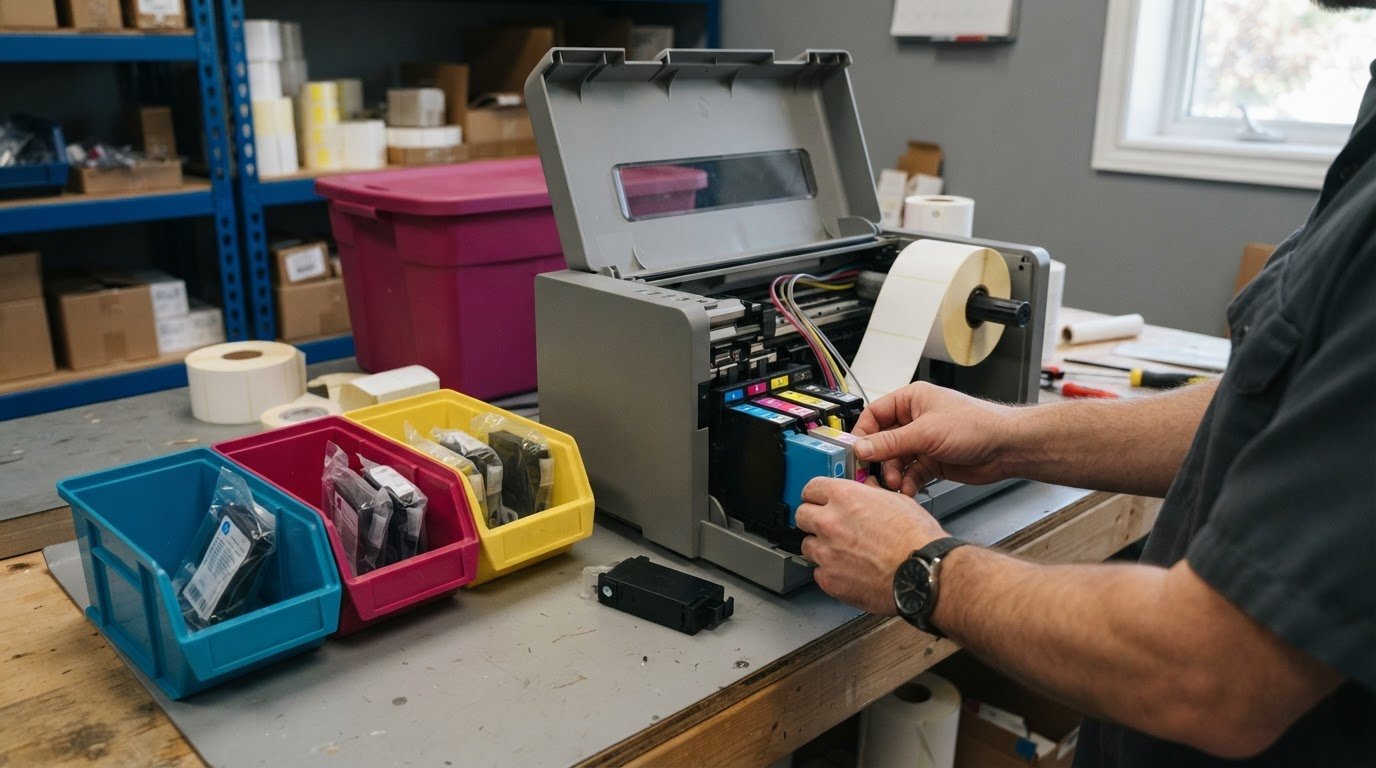
A dedicated inventory system isn’t always the better choice. A spreadsheet can work for a small or medium-sized business, provided stock records are updated when supplies are used and deliveries arrive. To understand how to manage ink and consumable inventory, set reorder points using actual consumption, supplier lead time and safety stock.
A single spreadsheet can be a practical starting point because it is familiar and keeps supply information in one place. The key is choosing a method that fits the printers, supplies, and locations you manage, and makes stock changes easy to record consistently.
This guide explains how to calculate stock levels, coordinate supplies across locations, decide when to reorder, and keep records current. It also covers when a spreadsheet is enough and when inventory software may make tracking easier.
Key Takeaways
- Set stock levels using average usage during supplier lead time, then add a safety-stock buffer.
- Track supplies by location and department so you can see where stock is available before placing an order.
- Record cartridge colours, part numbers and compatible printers to reduce ordering errors.
- Update quantities as supplies are used and deliveries arrive, with one person responsible for routine checks.
- Use a spreadsheet for straightforward tracking; consider dedicated inventory software when coordinating stock becomes more complex.
Calculating stock requirements from usage, supplier lead time, and safety stock
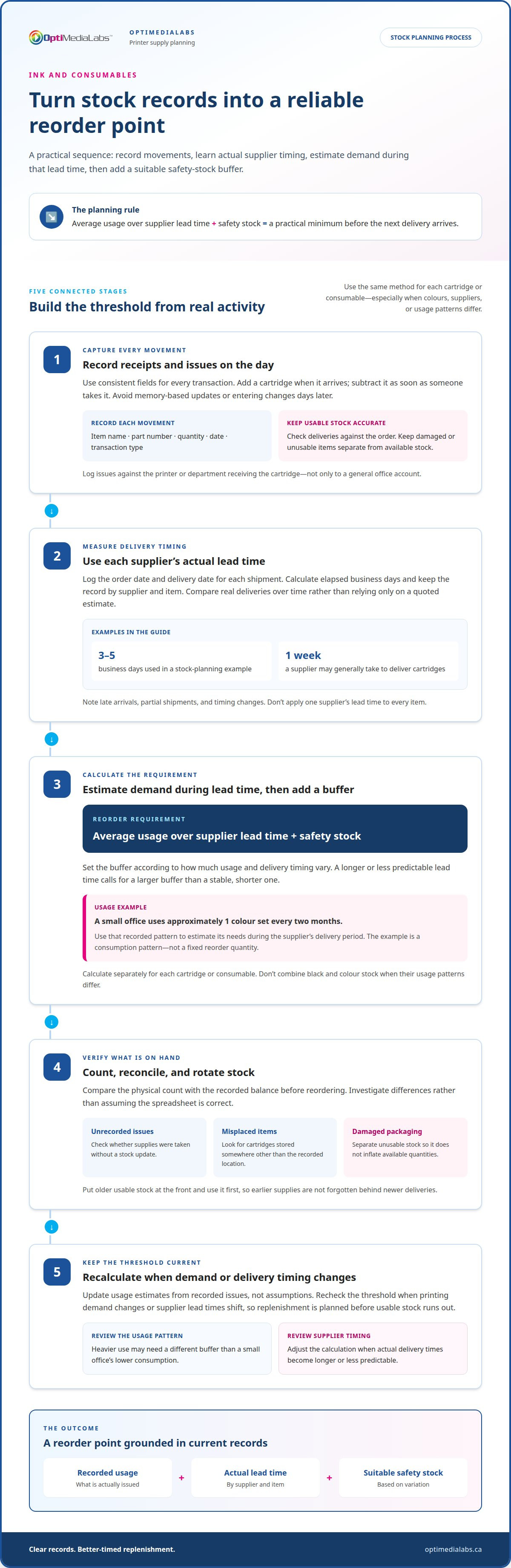
Record each supplier’s actual delivery times, then compare them with your replenishment needs. A supplier may generally deliver cartridges within one week, while a stock-planning example can use 3-5 business days.
-
Track Stock Receipts and Issues
Record each cartridge received or issued on the day it moves. Include the item name, part number, quantity, date, and transaction type. When a delivery arrives, compare its contents with the order and record the usable quantity. When someone takes stock, subtract it immediately. Avoid relying on memory or updating records days later, as delays can make the balance inaccurate.
Use the same fields for every transaction. For example, record a received black cartridge as an addition, then log its issue against the printer or department that receives it. Keep damaged or unusable stock separate from available stock. This prevents a faulty cartridge from inflating the quantity staff believe is ready to use.
-
Track Supplier Lead Times
Log the order date and delivery date for each cartridge shipment. Calculate the elapsed business days and keep the record by supplier and item. One supplier may generally deliver printer cartridges within one week, while a planning example may use 3-5 business days. Compare actual deliveries over time rather than relying on a quoted estimate alone.
When comparing vendors, assess the same cartridge type and delivery measure. Note late arrivals, partial shipments, and changes in delivery timing. These records help show whether your reorder threshold reflects actual supplier performance. Don’t apply one supplier’s lead time to every item, especially when cartridges are ordered through different channels.
-
Calculate Stock Requirements
Estimate average usage over the supplier’s lead time, then add safety stock. This gives a practical minimum requirement before the next delivery arrives. For example, if a small office uses approximately 1 colour set every two months, use that consumption pattern to estimate its needs during the recorded delivery period.
Set safety stock according to how much usage and delivery timing vary. A longer or less predictable lead time calls for a larger buffer than a stable, shorter one. Calculate it separately for each cartridge or consumable. Don’t combine colour and black stock if their usage patterns differ.
- Count the physical stock and compare it with the record. Investigate discrepancies before reordering, including unrecorded issues, misplaced cartridges, or damaged packaging. Put older usable stock at the front and use it first. This rotation helps prevent older supplies from being forgotten behind newer deliveries.
- Review the calculation when printing demand or delivery timing changes. A small office using approximately 1 colour set every two months may need a different buffer from a workplace with heavier use. Update the usage estimate from recorded issues, not assumptions. Recalculate the reorder threshold when supplier lead times shift, so the order arrives before usable stock runs out.
Managing supplies across departments and multiple locations
Use a shared inventory record that identifies where each supply is stored and how it is used. Track consumption by department, site, and printer so transfers and replenishment reflect actual demand.
- Create a consistent location code for every storage point and printer. Record the site, department, room or cabinet, and device with each supply entry. For example, an ink cartridge stored in a supplies cabinet on the second floor needs a location description staff can recognize. Use the same naming format across offices to avoid duplicate or ambiguous records.
- Record each issue against the department and device receiving the item. If a cartridge moves from central storage to a production printer, log the quantity and destination. This shows which devices consume supplies and helps explain why one department’s stock changes faster. Avoid recording withdrawals only against a general office account.
- Keep site-level balances separate, even when locations share one record. List the quantity at each site instead of combining all supplies into a single total. A cartridge at one office may not be quickly available to another. Record transfers as outgoing stock at the sending site and incoming stock at the receiving site.
- Review consumption by department, site, and device before placing a combined order. Compare issue records for the same cartridge type across locations. A high-use department may need a different reorder threshold from a low-volume office. Use actual withdrawals to identify the difference rather than dividing stock evenly among teams.
- Set a clear process for requesting and approving transfers between departments. Each request should identify the item, quantity, source location, and destination. Update both location balances when the transfer takes place. This prevents a shared spreadsheet from showing stock in two places or none at the receiving office.
- Assign a stock contact at each site and a coordinator for consolidated ordering. Site contacts report receipts, issues, and local shortages; the coordinator reviews totals and arranges replenishment. If manual toner and ink tracking becomes time-consuming across locations, managed print services may help centralize supply management.
- Review location records during regular stock counts. Compare the recorded balance with cartridges physically present, then investigate differences by device or department. Correct the transaction history instead of adjusting totals without explanation. To discuss supply needs across locations, contact the team.
When planning, estimate stock requirements separately for each cartridge type and location. Estimate the requirement by adding average usage during supplier lead time to safety stock. Use issue records to calculate average usage, then apply the estimate when reviewing local balances and the consolidated order. This ties replenishment decisions to recorded demand rather than an even allocation among sites.
Keep the assumptions behind each estimate visible to the coordinator and site contacts. When recorded use changes, revisit the estimate and consider whether each location’s reorder threshold still reflects demand. Treat safety stock as part of the requirement, not as ordinary stock for routine distribution. When a transfer changes where cartridges are held, update the location records before planning replenishment. This gives the team a consistent basis for comparing needs across departments and locations.
When Should You Reorder Printer Cartridges?
Set a reorder point above zero, based on cartridge-specific usage and delivery lead time. Keep compatible printer details beside each stock record to avoid ordering the wrong item.
-
Record Printer Models and Cartridge Part Numbers
List each printer model beside the cartridge part number it accepts. Record the device location and compatible cartridge together, so staff can match stock to the correct printer. For example, an ink cartridge record can list IMP-201 and IMP-204 as compatible printers. Verify the part number against the printer’s requirements before ordering. Don’t rely on cartridge colour or appearance alone.
-
Record Cartridge Types, Colours, and Usage
Track black, cyan, magenta, and yellow cartridges separately when applicable. Record each cartridge type, quantity used, and monthly usage by printer. One example office uses four black toner cartridges per month; a small-office example uses 3 black toner cartridges per month. Use the actual issue history to set each item’s reorder point, rather than combining colour supplies into one total.
-
Compare Cartridge Costs by Page Yield
Compare cartridge price with its stated page yield using the same basis for each option. Divide the cartridge price by its page yield to estimate cost per page. Treat this as a comparison measure, not a guaranteed printing cost, because actual output varies with print jobs and coverage. Compare like with like, and don’t treat yield figures based on different testing methods as directly equivalent.
- Set a reorder threshold above zero for each cartridge part number. For moderate demand, keeping 1-2 spare cartridges may be appropriate. The right buffer depends on consumption and delivery timing, so review the threshold when either changes. A small workplace may check printer inventory once or twice a month, then update quantities after use and delivery.
- Link each cartridge issue to the printer receiving it. Record the device, part number, colour, and quantity removed. This helps identify which printer drives demand and makes monthly usage records more useful for planning. If one device uses more black cartridges than others, base its reorder point on its own consumption.
- Keep used cartridges separate from usable stock. In Canada, follow the collection instructions for the specific cartridge and location; don’t assume every cartridge has the same return route. Exclude items awaiting recycling from available inventory so staff don’t mistake used cartridges for supplies ready to reorder.
Treat the reorder point as a trigger for action, not a level to reach after supplies run out. Set it above zero so you can start reordering while cartridges remain on the shelf. Apply the threshold to the specific cartridge being tracked, and review its stock record before ordering. This ties the decision to the item needed rather than a general impression of printer supplies.
Before completing an order, match the listed part number to the printer’s requirements. A printer model may require a specific cartridge, so a similar-looking item or familiar colour alone does not confirm compatibility. Check the record for the intended device and verify its cartridge part number before ordering. Resolve any uncertainty about the match first. Combining a timely stock check with a part-number check helps ensure the reorder is both needed and intended for that printer.
Updating stock records and assigning responsibility
Assign one person to maintain the inventory record and coordinate routine checks. Use clear transaction entries so each change can be traced to a person, item, and location.
-
Assign Responsibility for Stock Records
Name a primary stock coordinator and a backup for absences. The coordinator records receipts, issues, corrections, and follow-up actions. Give staff a simple way to report a cartridge withdrawal, such as a shared form or designated inventory file. Avoid letting several people edit separate copies, where changes can be missed or duplicated.
Set a regular review schedule that suits workplace activity. A small workplace may check printer inventory once or twice a month. The assigned person compares the record with physical stock and follows up on discrepancies. State the person’s role in the inventory instructions so staff know who maintains the official record.
-
Record Lots and Expiry Dates
Record the lot identifier and expiry date when they appear on the cartridge or packaging. Add these details beside the item name, part number, quantity, and storage location. If a delivery contains different lots, record them as separate entries. This lets the stock coordinator identify which units came from each shipment.
Use expiry information to organize stock when applicable. Put usable items with earlier dates where staff can select them first, and keep later-dated units behind them. Don’t invent an expiry date when none appears on the packaging. For example, record “expiry not printed” rather than leaving staff to guess.
-
Handle Obsolete, Expired, or Defective Cartridges
Remove obsolete, expired, or defective cartridges from usable stock immediately. Clearly mark each item and record its quantity, cartridge part number, condition, and reason for removal. Store it separately from ready-to-use supplies. This prevents a damaged cartridge from being issued because the inventory total still counts it as available.
For an obsolete cartridge, record the printer model it no longer supports. For a defective unit, note the observed issue and exclude it from usable stock. Follow the applicable handling or collection process for the item. Keep the removal entry in the inventory history so later counts explain the difference.
- Store usable cartridges in their packaging, in a clean, dry place away from direct sunlight and heat. Keep stock organized by cartridge type and part number, and avoid placing heavy items on boxes. For example, record K can identify the supplies cabinet on the 2nd floor, helping staff return items to the correct location.
- Use a simple status field for each inventory line: available, reserved, or removed. Update the status when a cartridge is set aside for a printer or found defective. The coordinator can then distinguish usable stock from items awaiting review without changing the transaction history.
Using spreadsheets versus dedicated inventory software
A spreadsheet can manage printer consumables for a small or medium-sized business. Choose a method based on how many people, items, and locations the record needs to coordinate. A practical way to manage ink and consumable inventory is to start with the simplest tool staff can keep accurate.
- Start with a spreadsheet if one shared file supports your current workflow. Create columns for item name, part number, colour, compatible printer, quantity, location, and transaction date. Add a status field for available, reserved, or removed stock. For example, staff can filter by printer model to find relevant cartridge records before preparing an order.
- Keep entries consistent with fixed names and formats. Use the same description each time instead of alternating between “black ink” and a cartridge’s part number. Add a separate row for each receipt or issue. Avoid overwriting a previous quantity without preserving the transaction, since that removes the history needed to explain a change in balance.
- Consider dedicated inventory software if shared editing, multiple locations, or frequent transactions make a spreadsheet difficult to maintain. Identify the functions your workflow needs, such as location-level balances or a searchable transaction history. Alerts and reports are useful only when they fit your replenishment process and staff can maintain the underlying records.
- Test both methods against the same practical tasks. Can the stock coordinator find an item, identify its compatible printer, and record a withdrawal? Can staff distinguish stock at one site from stock at another? If routine tasks require repeated manual corrections, document where the process breaks down before deciding whether a different tool would help.
- Trial a new system with a small group of records before transferring everything. Choose a printer, its compatible cartridge, and a known balance. Check whether the new record preserves the part number, location, and transaction history. Correct field names and entry rules during the trial, then transfer the remaining inventory using the agreed format.
- Define who is responsible for updates in either system. One coordinator should maintain the official record, while other staff follow the same reporting process. A spreadsheet is not automatically unreliable, and dedicated software cannot fix missing entries by itself. Choose how to manage ink and consumable inventory based on your workflow, not assumptions about which tool is more advanced.
- Keep the spreadsheet if it provides a clear, current view of stock and reorder needs. Choose dedicated software when coordination across users or locations creates repeated manual work. The decision should reduce friction in routine inventory tasks without adding unnecessary recordkeeping. Discuss inventory software options for your workflow.
OptiMediaLabs Canada
OptiMediaLabs Canada can help when your inventory planning connects to label printing equipment or supplies. If you’re reviewing a production setup, its range includes Afinia Color Label Printers, RFID Label Printers, Afinia Label Cutters & Finishers, and Thermal Transfer Ribbons.
Use your printer models, compatible consumables, and expected usage to guide purchasing decisions. Matching equipment and supplies to the workflow keeps inventory records relevant to the devices in operation. For example, track thermal transfer ribbons separately from ink cartridges.
For help with your label printing equipment and supply needs, contact OptiMediaLabs Canada.
Make Your Next Supply Decision With Confidence
Inventory planning works best when it reflects the equipment your team actually uses. As printing needs change, review whether your supply process still supports the printers, workflows, and locations that depend on it. A clear purchasing plan connects day-to-day stock decisions with longer-term equipment choices.
Your approach to how to manage ink and consumable inventory can also inform future purchasing. OptiMediaLabs Canada offers reliable ink cartridges alongside label printing equipment, including Afinia Color Label Printers and RFID Label Printers. Consider how your equipment and consumable requirements fit together before making your next decision.
Contact OptiMediaLabs Canada to discuss your printing equipment and supply needs. A thoughtful next step can help keep your operation prepared as requirements evolve.
Frequently Asked Questions
Spreadsheet or dedicated tool?
Use a spreadsheet when one controlled record can support purchasing and stock checks. A dedicated tool may be more suitable if simultaneous edits, transaction history, or location-level reporting become difficult to manage. For example, when a count differs from the recorded balance, you should be able to trace the change to an entry. Choose the method your staff can keep current and review consistently.
What Information Should You Track?
Track enough detail to identify each item and explain stock changes. Useful fields include item description, part number, cartridge colour, compatible printer, quantity, storage location, supplier, and transaction date. Add a purchase-order reference when you need to link a delivery to its original order. If supplies come in different package sizes, record the unit clearly so staff don’t confuse individual cartridges with packs. Similar practices apply across other supply-intensive operations; for studios managing specialized tattoo equipment and medical supplies, vendors such as Tatt Lab help simplify stock control with clear product labelling and reliable batch details.