
How to Reduce Label Inventory Waste With Better Control
Unused labels are more than leftover stock; they take up space and may become unusable when product details or packaging change. The practical answer to how to reduce label inventory waste is to audit stock, track usage and write-offs, base reorder decisions on actual demand, and align printer workflows with the quantities and versions you need. Start by identifying where labels accumulate and what causes them to go unused.
It’s easy to focus on each label’s cost and overlook waste from outdated versions, excess orders, or printing more than a production run requires. Clear inventory records connect these everyday issues to purchasing and production decisions. This article explains how to audit label stock, select useful metrics, improve inventory practices, and adjust printer workflows to reduce avoidable waste without disrupting operations.
Key Takeaways
- Separate usable label stock from obsolete, damaged, or excess inventory to see where waste is occurring.
- Use regular cycle counts and clear receiving and issuing procedures to keep stock records aligned with physical inventory.
- Track turnover, write-offs, carrying costs, and stockouts to spot patterns and improve purchasing decisions.
- Set reorder points around lead time and actual demand, then adjust them as usage changes.
- Align label printing with inventory workflows, using barcode labels and suitable printer equipment to support accurate tracking and production.
1. What is Inventory Waste?
Label inventory waste is stock that costs money to buy, store, and manage but cannot be used as intended. It includes excess labels, damaged rolls, obsolete versions, and stock lost through poor tracking. Labels with outdated ingredients or product details may become unusable after packaging changes. The result is a write-off and storage space taken from current stock.
Smaller label orders can cost more per label because setup and production costs are spread across fewer units. But a lower unit cost on a larger order is not a saving if labels go unused or become obsolete. Compare the total order cost with actual usage, storage needs, and the likelihood of content changes. Choose an order size that supports production without creating avoidable excess.
Overstock ties up cash and adds storage and carrying costs, especially when labels move slowly or need replacement. Stockouts create a different problem: required labels may be unavailable when production needs them, disrupting the workflow. Track both write-offs and stockout frequency to understand the trade-off. A restaurant example makes the overordering pattern clear: using 15 kg of onions a week but ordering 25 kg leaves excess at risk of waste. The same principle applies to labels: order against actual consumption, not assumptions.
Excess label stock can stem from inaccurate forecasts, orders that exceed demand, duplicate stock, or unrecorded changes in product requirements. Obsolescence follows when a product name, ingredient statement, barcode, or package changes, leaving old versions behind. Review which versions production uses, then align purchasing and printing with approved, current requirements. Standardized processes can help teams identify inefficiencies and work consistently.
Technology can help maintain control. Barcode inventory labels can reduce manual entry errors and help digital records match physical stock. Record receipts, issues, and remaining quantities, then compare system counts with shelf stock. Clear records support better replenishment decisions and help staff spot discrepancies before they become larger losses.
Staff training matters too. Show employees how to record label use, separate current versions from obsolete ones, and report damaged stock. Clear communication between purchasing, production, and inventory staff can prevent duplicate orders and unrecorded changes. In manufacturing, involve employees in identifying bottlenecks and waste, then standardize effective steps so the process stays consistent.
Store labels in a clean, dry place, away from direct sunlight, moisture, and avoidable handling damage. Clearly identify versions and arrange stock so older, usable inventory is issued first. Check each leftover label’s condition and version before production rather than assuming it is usable. Consistent storage and rotation reduce damage, confusion, and unnecessary reorders.
2. Inventory control procedures and regular audits
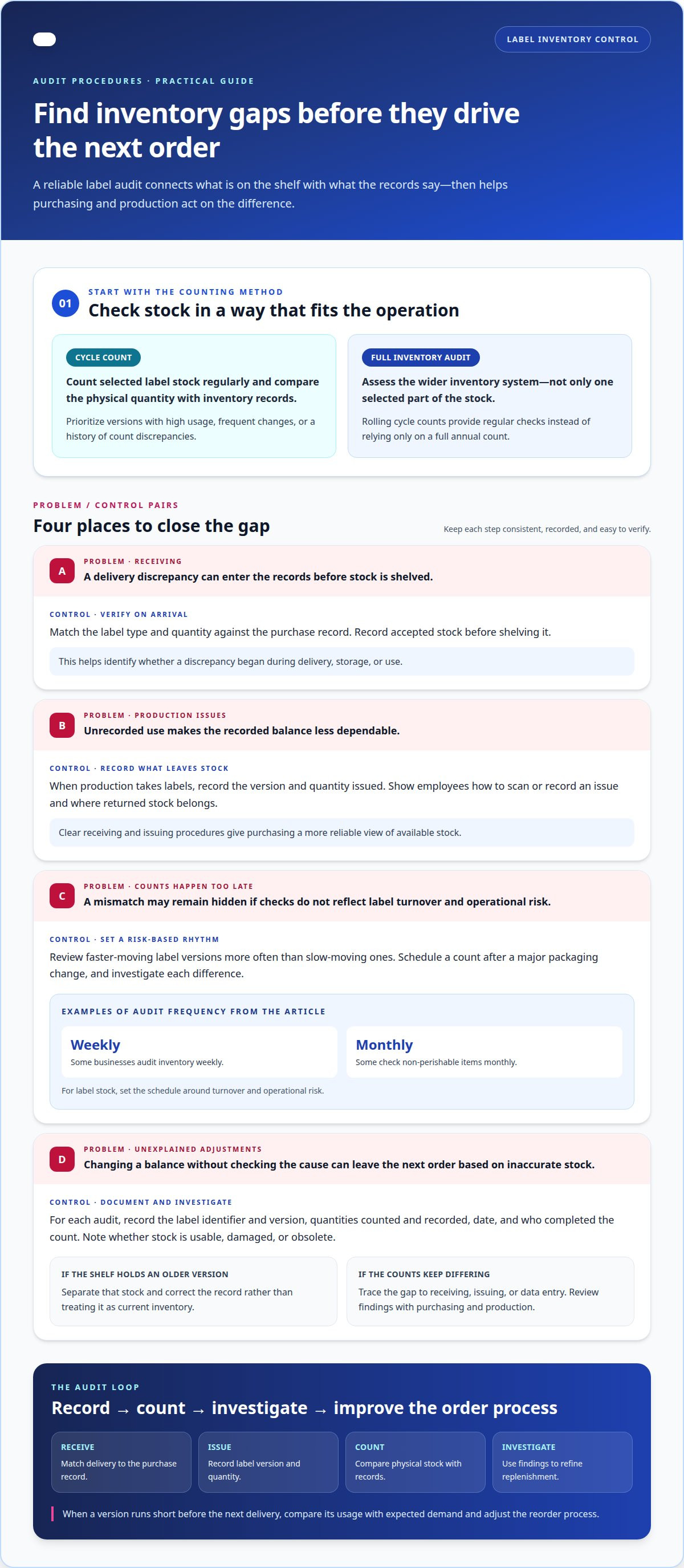
Accurate label records start with consistent receiving and issuing procedures. When a delivery arrives, match the label type and quantity against the purchase record, then record accepted stock before shelving it. When production takes labels, record the version and quantity issued. These steps give purchasing a reliable view of available stock and help pinpoint whether a discrepancy began during delivery, storage, or use.
Cycle counting checks part of the inventory at a time instead of relying only on a full annual count. Count selected label stock regularly and compare physical quantities with inventory records. Prioritize labels with high usage, frequent version changes, or a history of count discrepancies. Targeted counts can reveal mismatches sooner, while a full inventory audit assesses the wider system.
Set the audit schedule around label turnover and operational risk. Some businesses audit inventory weekly and check non-perishable items monthly. For label stock, review faster-moving versions more often than slow-moving ones, and schedule a count after a major packaging change. Compare the physical count with recorded receipts, issues, and write-offs. Investigate each difference instead of adjusting the balance without a reason.
Use a clear audit record so staff can follow the same process. Include the label identifier and version, quantities counted and recorded, the date, and who completed the count. Note whether stock is usable, damaged, or obsolete. For example, if records show a current version but the shelf holds an older one, separate that stock and correct the record. This prevents an inaccurate count from driving the next order.
Training makes these controls practical. Show employees how to scan or record a label issue, where to place returned stock, and how to flag a delivery discrepancy. Practise matching a sample delivery with its purchase record. Staff should also know who can approve record adjustments, so an informal estimate does not replace a verified count.
Review audit findings with purchasing and production. If counts repeatedly show more stock than records, trace the gap to receiving, issuing, or data entry. If a version runs short before the next delivery, compare its usage with expected demand and adjust the reorder process. Regular audits turn isolated errors into actionable patterns, making it easier to connect order quantities with actual stock movement.
Clear receiving and issuing procedures, regular cycle counts, and inventory audits work together to improve inventory accuracy. Rolling cycle counts let businesses review part of their inventory regularly instead of relying on a full annual count. Inventory labels can also help staff identify stock during routine audits, receiving, and restocking.
Restaurants can use digital inventory software to update stock records as items are used or received, reducing errors and saving time. Schedule checks according to ingredient turnover, so review frequency reflects how quickly items move through the operation. These tools work best alongside consistent stock handling and verification.
3. Ongoing analysis of inventory performance metrics
Use a small, consistent set of metrics to assess label inventory. Track inventory turnover, carrying costs, obsolescence, write-off value, and stockout frequency. Together, these measures show how quickly stock moves, what it costs to hold, and where waste occurs. Review them regularly using the same definitions. A change in one measure can prompt a closer look at purchasing, production, or inventory records.
Inventory turnover compares label usage with average stock over a defined period. A low or falling rate can signal excess stock, especially for versions with limited use. Pair turnover with the obsolescence rate to see whether labels sit unused because demand slowed or product information changed. Consider storage space and handling when assessing carrying costs. These measures help distinguish a temporary stock buildup from a recurring issue.
ABC inventory analysis helps focus attention where it matters. Group labels by business importance, value, or impact on production. High-priority labels may warrant closer tracking and more frequent review, while low-use items can have simpler controls. Base the categories on actual usage and operational consequences, not just purchase value. For example, a low-cost label needed for a key production run may merit more attention than its unit cost suggests.
Waste reports reveal what a total write-off figure can hide. Record the label identifier, quantity discarded, reason, and date. Look for recurring causes such as obsolete artwork, damaged stock, or orders that exceeded usage. If the same version appears repeatedly, trace the issue to forecast assumptions, product changes, or inaccurate stock records. Use these findings to improve future purchasing and production rather than treating each write-off as an isolated event.
Sales trend analysis can improve demand forecasts. Compare label usage with product sales across seasons, weekdays, and changing market conditions. Historical sales data can show whether a label is used consistently or linked to a temporary demand peak. A management system or inventory software can bring stock levels, usage, and write-offs together for review. Verify that records reflect actual movements before acting on a trend, since inaccurate inputs weaken forecasts.
Turn each review into a decision. If turnover slows while write-offs rise, reduce replenishment or investigate changing requirements. If stockouts increase despite steady usage, reassess reorder settings and supplier timing. Record the action and its outcome, then compare the next review period. This creates a practical feedback loop: metrics identify an issue, staff trace its cause, and updated decisions address it.
Businesses can assess inventory performance by reviewing turnover, stock levels, carrying costs, and waste. Useful waste-reduction measures include inventory turnover ratio, carrying cost percentage, obsolescence rate, write-off value, and stockout frequency.
Restaurants can review sales trends across menu items and seasons or days of the week to improve ordering decisions. Waste reports can reveal ingredients that are frequently discarded, helping teams adjust order quantities. Businesses can also use historical sales data, market trends, and seasonal patterns to improve demand forecasts and purchasing decisions.
4. Inventory management and waste
Good inventory management connects label purchasing to production demand, supplier lead times, and stock already on hand. Set a reorder point for each label type using average demand during its lead time and the desired service level. Review reorder points quarterly for most products, then adjust them when usage, delivery timing, or production plans change. A reorder setting based on outdated demand can cause excess stock or a shortage. A practical starting point for how to reduce label inventory waste is tying each purchase to current usage and expected production.
Inventory tracking software can improve label stock control by updating records as labels are received or used. It can show stock levels, usage patterns, and product movement, while low-stock alerts help teams avoid unnecessary orders. Automation can reduce manual entry errors, but the records still depend on staff accurately recording each receipt and issue.
Keep label records useful for purchasing. Give each version a distinct identifier and link it to the product or production run that uses it. This prevents a change to one product from making other label stock appear obsolete. Compare supplier orders with actual usage to spot recurring gaps between quantities purchased and consumed.
Spreadsheets can track label purchases, usage, and version changes when staff update them consistently. Because they require manual entry, define who records each transaction and when. A shared inventory system can give teams a clearer view across locations, including where each version is held. Whichever method you use, reconcile recorded stock with physical inventory before ordering.
Manage slow-moving stock before it becomes unusable. Identify labels with little or no recent movement, then determine whether demand has changed or a product update is pending. For usable stock, consider transferring it to a location that needs it or adjusting the next purchase. If a version is obsolete, separate it from active inventory so it does not distort available-stock figures.
Storage and handling should support accurate inventory records. Organize label versions by identifier, keeping current stock distinct from material awaiting review. Record damaged or unusable stock promptly; otherwise, the system may show more available labels than production can use. Clear storage locations and consistent transaction records help staff find the correct version and issue the right quantity.
Coordinate purchasing decisions with production and suppliers. Share changes in demand or delivery schedules early, then update reorder settings to match the revised plan. If low-stock alerts recur despite stable usage, examine lead times and recorded issues before increasing orders. If stock remains high, compare past orders with consumption and reduce future quantities where the pattern supports it. Use these findings to make each order more precise and reduce label waste.
5. Label printers and inventory workflows
Printer workflows affect how much label stock you need to hold. Printing only the quantity required for a production run can reduce excess pre-printed stock. Barcode inventory labels can also reduce manual entry errors and help digital records reflect physical stock. The key is to connect print quantities, label versions, and inventory records.
Digital printing can suit short runs when demand is uncertain, versions change often, or products need different labels. For example, a business launching a seasonal product can print a smaller batch, then adjust the next run based on actual demand. Compare this approach with your operation’s costs and setup requirements before choosing a workflow.
Standardized label sizes and shared design elements can reduce the number of separate stock items. If products can use the same dimensions or common components, purchasing and storage become easier to organize. Keep product-specific information distinct, though. A shared format should never lead staff to use a label with the wrong product details or barcode.
Print-on-demand or just-in-time labelling means printing closer to when labels are needed instead of holding large quantities of pre-printed versions. This can limit obsolescence when product information changes. Link each print request to an approved version and production quantity. That gives operations a clear record of what was printed and helps prevent repeat runs caused by unclear requests.
For perishable goods, labels may carry dates, lot codes, or storage instructions. Connect each print request to the production batch so staff can confirm the correct information before printing. An incorrect batch code can make otherwise usable labels unsuitable for that run. Clear checks at the point of printing help catch errors before labels reach the product line.
No single label material or adhesive has the longest shelf life in every setting. Shelf life depends on the material, adhesive, storage conditions, and intended use, so review product-specific storage and shelf-life guidance before purchasing. Track receipt dates and protect stock from damage. Avoid ordering more than expected usage can reasonably consume.
For unused labels, first separate current, clean stock from obsolete or damaged material. Reuse suitable labels only when their version and product details remain correct. In Canada, recycling acceptance can vary by municipality and material; follow local instructions for label facestock, backing liner, and adhesive. If a material is not accepted, follow local waste-disposal guidance rather than putting it in recycling.
Review your printing and inventory workflow together to find where excess enters the process. Discuss label printer and inventory workflow needs to identify equipment that fits your production approach.
OptiMediaLabs Canada: Afinia Color Label Printers
OptiMediaLabs Canada offers Afinia Color Label Printers for businesses managing in-house label production and inventory workflows. Printing labels as needed can help align output with current production requirements, rather than relying only on large stocks of pre-printed versions. The right setup depends on your label volume, workflow, and how often product information changes.
For related production needs, OptiMediaLabs Canada also offers RFID Label Printers, Afinia Label Cutters & Finishers, and Thermal Transfer Ribbons. These options may suit different labelling processes, depending on the equipment and materials used.
Review your current workflow and label inventory needs, then contact OptiMediaLabs Canada or visit optimedialabs.ca.
Make your next inventory decision measurable
Choose one recurring source of label waste and focus your next improvement on it. It might be obsolete versions, unclear print requests, or a mismatch between recorded stock and physical inventory. Set a baseline using existing records, update the relevant workflow, then review whether the issue continues. This turns label waste reduction into an ongoing operational decision, not a one-time cleanup.
Equipment and consumables should fit the way you produce labels. OptiMediaLabs Canada offers Epson Ink Cartridges for compatible printing workflows, alongside the label printer options discussed earlier. Before making changes, consider how your current setup handles short runs, changing label versions, and inventory visibility.
Start with the bottleneck that creates the most disruption for your team. Contact OptiMediaLabs Canada to discuss your label workflow and take a clear next step toward better control.
Frequently Asked Questions
What is Inventory Waste?
Inventory waste is stock that cannot serve its intended purpose, such as labels made unusable by a product update. For example, if packaging changes the product name, remaining labels with the old name may no longer suit production. Record that stock separately from usable inventory. This helps distinguish a purchasing surplus from losses caused by damage, version changes, or inaccurate records.
How can businesses forecast label demand more accurately?
Build forecasts from label usage tied to actual product sales, then account for seasonal patterns and changes in production plans. For example, do not forecast a label used for a seasonal product at the same rate year-round. Compare forecast quantities with past usage and labels issued to production. Review differences with purchasing and production teams, then update assumptions when sales trends or product requirements shift.