
Industrial Printer Onboarding: Prepare Devices and People

A printer isn’t fully onboarded just because it’s powered on. An onboarding checklist for new industrial printers should cover equipment readiness, a verified handoff, operator training and follow-up goals. It’s for everyone responsible for bringing a printer into production, from operations and IT teams to the employees who will use it.
A smooth start depends on preparing both the equipment and the people who will use it. Before the first print run, confirm the printer’s location, connections, supplies and software are ready. Then document the handoff and walk operators through their tasks. Clear ownership helps prevent setup details from being missed.
This guide covers hardware preparation, handoff checks and the first days of use. You’ll also learn how to set practical goals and gather feedback as operators build confidence. Use these steps to shape an onboarding process that fits your workflow and takes the printer from installation to everyday production.
Key Takeaways
- Prepare the printer’s location, connections, supplies and software before its first production run.
- Use a documented handoff to confirm device readiness, clarify ownership and record any outstanding setup tasks.
- Structure the first days around practical operator training, supervised use and time to address questions.
- Set clear performance goals and use regular feedback to spot training needs and workflow issues.
- Review onboarding progress over time to see whether the printer and its operators are ready for routine production.
Pre-boarding hardware and device preparation
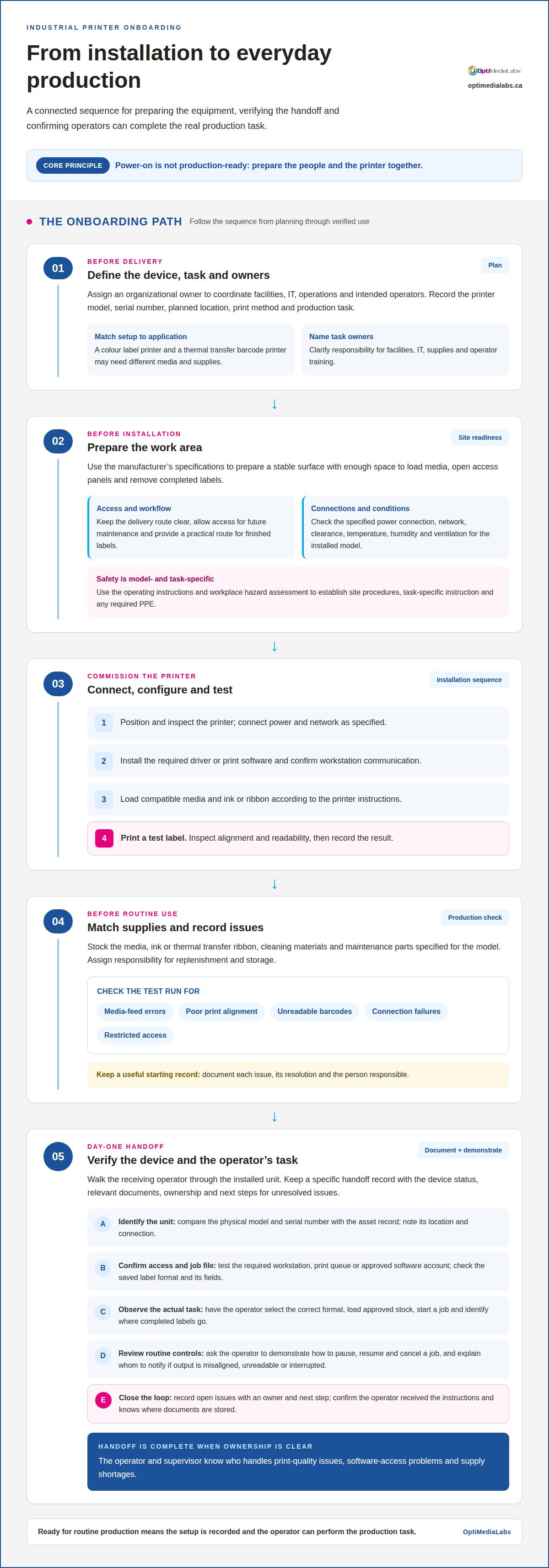
Start the transition before the printer reaches the production floor. Assign an organizational owner to coordinate facilities, IT, operations and the intended operators. Record the printer’s model, serial number, planned location, print method and production task. For example, a colour label printer and a thermal transfer barcode printer may require different media and supplies. These details shape the setup plan and help prevent teams from preparing for the wrong configuration.
Prepare the installation area according to the printer manufacturer’s specifications. Clear a stable surface with enough space to load media, open access panels and remove completed labels. Keep the delivery route to the station clear, along with access for future maintenance. Confirm the location has the required network connection, access to the production system and a practical route for finished labels. A layout sketch can help facilities and operations spot obstructions before delivery.
- Confirm the device and task. Match the printer model to the required label format and production workflow, because setup depends on the equipment and application.
- Prepare the work area. Make room for the printer, media and operator access so routine loading and cleaning can be done safely.
- Gather setup information. Keep the manufacturer’s installation instructions, software details and network requirements with the equipment record.
- Assign ownership. Name the people responsible for facilities, IT, supplies and operator training so each setup task has a clear owner.
For safety, establish site procedures using the printer’s operating instructions and a workplace hazard assessment. Operators should receive task-specific instruction and use PPE selected for identified hazards, such as protective eyewear when the assessment calls for it. Explain safe access to moving parts, hot surfaces or cleaning materials only if those features apply to the installed model.
Electrical, ventilation and environmental requirements vary by printer model. Before installation, have facilities compare the specified power connection, clearance, temperature, humidity and ventilation conditions with the planned location. Keep the unit away from conditions the manufacturer identifies as unsuitable, and don’t assume one printer’s requirements apply to another.
Use a controlled commissioning sequence to identify installation issues before production:
- Position and inspect the printer, then connect power and network as specified.
- Install the required driver or print software and confirm communication with the workstation.
- Load compatible media and ink or ribbon according to the printer instructions.
- Print a test label, inspect alignment and readability, and record the result.
Stock supplies that match the installed printer and the labels it will produce. Identify the compatible media, ink or thermal transfer ribbon, cleaning materials and maintenance parts specified for the model. Assign responsibility for replenishment and storage. During the test run, check for media-feed errors, poor print alignment, unreadable barcodes, connection failures and restricted access to the printer. Record each issue, its resolution and the person responsible to create a useful starting record for routine operation.
Day-one device handoff and verification
Use the first-day handoff to establish clear responsibility for the printer, its records and routine controls. The outgoing installer or project lead should walk the receiving operator through the device, then identify who owns consumables, access permissions and escalation. A signed handoff record gives employees one place to find the printer’s status and the next step if an issue arises.
Keep handoff documents specific to the installed unit. Record its model and serial number, location, network or workstation connection, approved media and the person responsible for daily operation. Include the relevant operating instructions and maintenance schedule. If the team uses a production ticket or asset-management system, attach the documents there rather than relying on an email future operators may not find.
Verify that the operator can complete the actual production task, not just turn on the printer. For example, have them select the correct saved label format, load the approved stock, start a job and identify where completed labels go. The receiving employee should also demonstrate how to pause a job and whom to notify if output is misaligned, unreadable or interrupted. This confirms practical understanding without assuming the employee has used the same interface before.
- Match the equipment record. Compare the physical model and serial number with the asset record so support requests identify the correct device.
- Confirm access. Test the required workstation, print queue or approved software account with the employee who will run production.
- Review the job file. Open the intended label format and check that its fields match the production task, such as product name or barcode data.
- Demonstrate routine controls. Show the operator how to pause, resume and cancel a job, because these actions help contain mistakes.
- Record open issues. Note each unresolved connection, output or supply issue with an owner and next step, so it does not disappear after handoff.
- Confirm acknowledgement. Have the receiving employee confirm they received the instructions and know where the operating documents are stored.
Close the handoff by reviewing the record with the operator and supervisor. Make sure both know who handles a print-quality issue, a software-access problem and a supply shortage. A simple responsibility map prevents employees from losing time redirecting the same issue between teams. If your team needs help aligning its printer requirements with the right equipment, discuss your printer requirements.
Keep personnel onboarding distinct from device acceptance: handle employee paperwork separately, while confirming printer access, task competence and responsibility for open device issues. This personnel step does not replace confirming printer access, task competence or responsibility for open device issues.
First-day and first-two-day activities
Use the first two days to move operators from demonstration to supervised practice. Train each employee on the printer’s routine operating and maintenance tasks, following its instructions. The manager should schedule time at the workstation so learning happens beside the equipment and within the production workflow.
BDC’s new staff onboarding checklist recommends preparing an employee’s workspace to support their transition into the role. For printer onboarding, set out the operating instructions, approved job files and task-specific supplies before the employee arrives. Keep the workstation clear, make the printer controls accessible and identify who can answer process or software questions.
On the first day, introduce the production task. Explain where the printer fits into the workflow, which labels it produces and how the finished output is handled. Show the operator how to select the correct job file and confirm the displayed content before printing. A sample product label helps connect on-screen settings to the physical result.
- Observe a complete print cycle. Have the employee watch a job move from file selection through printing and output review, so they understand the sequence.
- Practise routine controls. Let the operator start, pause and cancel a job under supervision, because each control affects production differently.
- Review print quality. Compare a test label with the approved sample, checking text, placement and barcode readability before routine use.
- Explain supply handling. Demonstrate how the approved media or ribbon is loaded, and show where replenishment supplies are stored.
- Identify escalation steps. Review what to do when a job fails, output is incorrect or the printer displays an error.
On the second day, move from demonstration to a supervised task the operator can complete. Ask them to prepare a routine job, produce a sample and inspect the result. The manager should observe without taking over, then correct misunderstandings as they arise. This shows whether the instructions, access and workflow work together.
Keep training focused on tasks the employee will perform. Cover routine cleaning only as described in the printer’s instructions, and clarify which maintenance actions belong to operators and which to designated support staff. Don’t ask an employee to open panels or make adjustments beyond their assigned training.
At the end of the second day, record completed activities, remaining questions and the next practice task. A short handover note helps the manager coordinate follow-up and prevents different shifts from teaching conflicting procedures. It also gives the next operator a clear starting point as the employee moves toward independent work.
Follow-up, goals, and feedback
A printer onboarding program needs follow-up beyond the first successful test job. Structure the process for at least 90 days, with clear measures for both equipment use and operator readiness. During the first week, the manager and operator can agree on performance measures for goals covering the first 3 and 6 months of employment.
Choose measures tied to the printer’s actual production work. For example, track whether operators can select the correct job file, prepare media, produce an acceptable label and respond appropriately to routine errors. Add equipment-focused indicators, such as recurring print-quality issues or delays caused by supply shortages. These measures help distinguish training needs from workflow or setup problems.
- Check in daily during the first week. Hold a 10-minute manager check-in to review questions, training progress and obstacles from that day.
- Use short feedback conversations. Schedule 10-15-minute conversations with the supervisor and key stakeholders during the first month after the start date.
- Review progress at regular intervals. Use 30-, 60-, and 90-day check-ins to assess confidence, task completion and support needs.
- Track time to autonomy. Record when the operator can complete assigned printer tasks independently and reliably.
- Measure retention. Monitor 90-day employee retention rates as one operational indicator of the broader onboarding experience.
At Day 30, send a five-question onboarding survey. Ask whether instructions were clear, training matched daily tasks, and the operator knows where to get help. The target survey score is at least 4.0 out of 5.0. Review comments alongside the score, since a low result on a specific task can point to a focused training gap.
At 3 months after the start date, conduct a formal, documented progress review. Compare the operator’s performance with the agreed measures, then record completed competencies and remaining development needs. The documented review gives the manager and employee a shared basis for deciding what support comes next.
At the six-month mark, a 360-degree performance and feedback review can include the employee, HR and key stakeholders. Review progress against goals, use the employee’s input, and set performance measures for the following year. This broader view can surface issues a supervisor may not see during routine production.
Keep follow-up practical. If several operators report difficulty with one task, revise that part of the training program or workflow. If output problems persist despite demonstrated operator competence, investigate equipment, media or job-file factors. The goal is a documented path from coached practice to independent work, with feedback guiding each next step.
Importance of structured onboarding
A structured onboarding process connects equipment readiness with operator competence. Without a defined sequence, shifts may use different job files or loading methods. For example, a written procedure can specify who approves a label sample, who releases production and where operators record recurring print issues. This consistency makes the printer’s role in the workflow easier to manage.
The value extends beyond the device. The Society for Human Resource Management reports that organisations with strong onboarding have 82% higher employee retention and 70% higher productivity. These figures concern employee onboarding, not printer performance, but they underline why training and clear expectations deserve attention alongside installation.
Printer installation and onboarding costs in Canada depend on the project scope, including site preparation, software integration, commissioning, training and supplies. A key cost driver is the amount of configuration and workflow integration required before the printer can perform its intended production task.
Before approving a purchase, review the warranty and service terms in writing. Check the coverage period, included components, exclusions, treatment of consumables, support channels, repair process and any applicable service fees. These details clarify what happens if a device fault interrupts production and which maintenance tasks remain the organisation’s responsibility.
A structured plan also creates accountability. Assign a named owner to each transition task, then record its completion and any unresolved issues. For example, the operations lead can own approval of printed output while IT manages access to the print queue. This division reduces handoff gaps and helps managers identify the right person when a task stalls.
- Use one approved workflow. Document how employees select a job, load the correct media, review a sample and release output.
- Keep records with the asset. Store operating instructions, maintenance records and warranty documents alongside the printer’s equipment record.
- Separate training from troubleshooting. Record whether a recurring issue comes from operator technique, job settings, media or equipment.
- Review the process after use. Use operator feedback and production records to update unclear steps, such as label inspection or escalation.
Structured onboarding is especially useful when several shifts share one printer. A consistent procedure helps each employee follow the same controls, while a documented escalation route keeps recurring problems visible. If you’re planning a printer transition, discuss your printer requirements and the workflow you need to support.
Consistency across teams and shifts is vital for maintaining productivity. Companies with inadequate onboarding programs may risk losing new hires within their first year, making early instruction and clear responsibility relevant to retention as well as equipment use. Gallup reports that 12% of employees strongly agree their organisation does a great job onboarding new employees. Gallup also reports that turnover in the first 18 months of employment can reach 50%.
These steps reinforce why onboarding should be an ongoing handoff, not a one-time demonstration. Supervisors can confirm that each operator understands the approved workflow, knows where to find instructions and can raise an issue before production is affected. Keeping feedback and unanswered questions visible helps the organisation adjust training when procedures or staffing change. This supports consistent printer use and clarifies expectations for employees who share responsibility for its output.
OptiMediaLabs Canada
OptiMediaLabs Canada can help organizations align printer and supply choices with their production requirements. Turn to the team when you’re selecting equipment for a new workflow or planning compatible supplies for an existing setup. Its offerings include Afinia Color Label Printers, RFID Label Printers, Afinia Label Cutters & Finishers, and Thermal Transfer Ribbons. The right fit depends on the label task, printing method, workflow and materials your operation uses. Share those requirements to narrow the options and make equipment decisions that support a practical onboarding plan. For help with your printer requirements, contact OptiMediaLabs Canada.
Make the next printer transition easier
Turn lessons from the installation into a repeatable standard for future equipment changes. Record which decisions helped the team, where instructions caused confusion and which handoffs needed clearer ownership. This record can guide later transitions without assuming every printer or production workflow is the same.
Keep the standard useful by reviewing it whenever equipment, materials or production requirements change. Update relevant procedures and ensure the current version reaches the employees who operate the printer. A practical onboarding checklist for new industrial printers supports consistent preparation while allowing for model-specific instructions and workplace needs.
With a clear process in place, your team can approach the next deployment with defined responsibilities and a stronger basis for improvement. Contact OptiMediaLabs Canada to discuss your printer requirements and take the next step with confidence.
Frequently Asked Questions
Who is it for?
An onboarding checklist for new industrial printers helps operations, IT, facilities and production managers coordinate the transition to using new equipment. It also clarifies operators’ tasks and escalation routes. For example, a production manager can coordinate label approval while IT handles access to the print queue. Use the checklist whenever a new device, workflow or operator group needs a coordinated transition into routine production.
What information should an industrial printer onboarding checklist include?
An onboarding checklist for new industrial printers should specify the device’s production role, assigned owners, approved job-file versions and criteria for releasing output. Include where employees can find current instructions, how label-file changes are approved and who receives reports about recurring errors. For a product label with several data fields, identify the source of each field and who approves a revised version before it reaches production.
What site preparation is required before installing an industrial printer?
Prepare a location that supports the full workflow, from receiving the device to moving finished labels into production. Map the printer’s position against nearby workstations, supply storage and the route operators use to handle output. Keep operating instructions accessible at the station, and coordinate installation access with facilities and IT. This planning can reveal practical obstructions that a room or equipment layout alone may miss.
What electrical, ventilation, and environmental requirements apply to industrial printers in Canada?
Requirements depend on the printer model and its operating instructions. Before installation, have facilities compare the specified power connection, clearance, temperature, humidity and ventilation with the planned location.