
Industrial RFID Label Printer Guide: 2026 Solutions for Canadian Enterprise
A single misread RFID tag in a high-volume shipment can trigger a domino effect of compliance fines and inventory discrepancies that erase your profit margins. You likely realize that manual scanning is no longer sustainable for a modern Canadian enterprise. Relying on outdated tracking methods leads to inconsistent data and high labour costs that stall your growth. It's frustrating when technical complexities like ERP synchronization or high label costs prevent you from scaling your operations.
This guide helps you evaluate and implement the latest RFID label printer industrial solutions to modernize your supply chain. You'll discover how to achieve 100% inventory accuracy while meeting major retailer mandates with ease. We provide a clear path to selecting hardware that actually works for your specific workflow. We'll also cover essential 2026 updates, including compliance with ISED Radio Standards Specification RSS-210 Issue 11. Read on to learn about hardware ruggedness, encoding reliability, and the software integration strategies that ensure your asset tracking remains future-proof.
Key Takeaways
- Identify the core differences between desktop units and heavy-duty hardware built for the rigours of 24/7 Canadian warehouse operations.
- Compare thermal transfer and colour inkjet technologies to balance high-volume shipping reliability with the visual demands of brand-heavy retail tags.
- Evaluate the best RFID label printer industrial solutions based on your specific read range requirements and environmental stressors like extreme cold or chemicals.
- Learn how to integrate professional software and middleware to bridge the gap between your printing hardware and ERP data logic.
- Streamline your asset tracking to achieve total inventory accuracy and maintain full compliance with major retailer RFID mandates.
What is an Industrial RFID Label Printer?
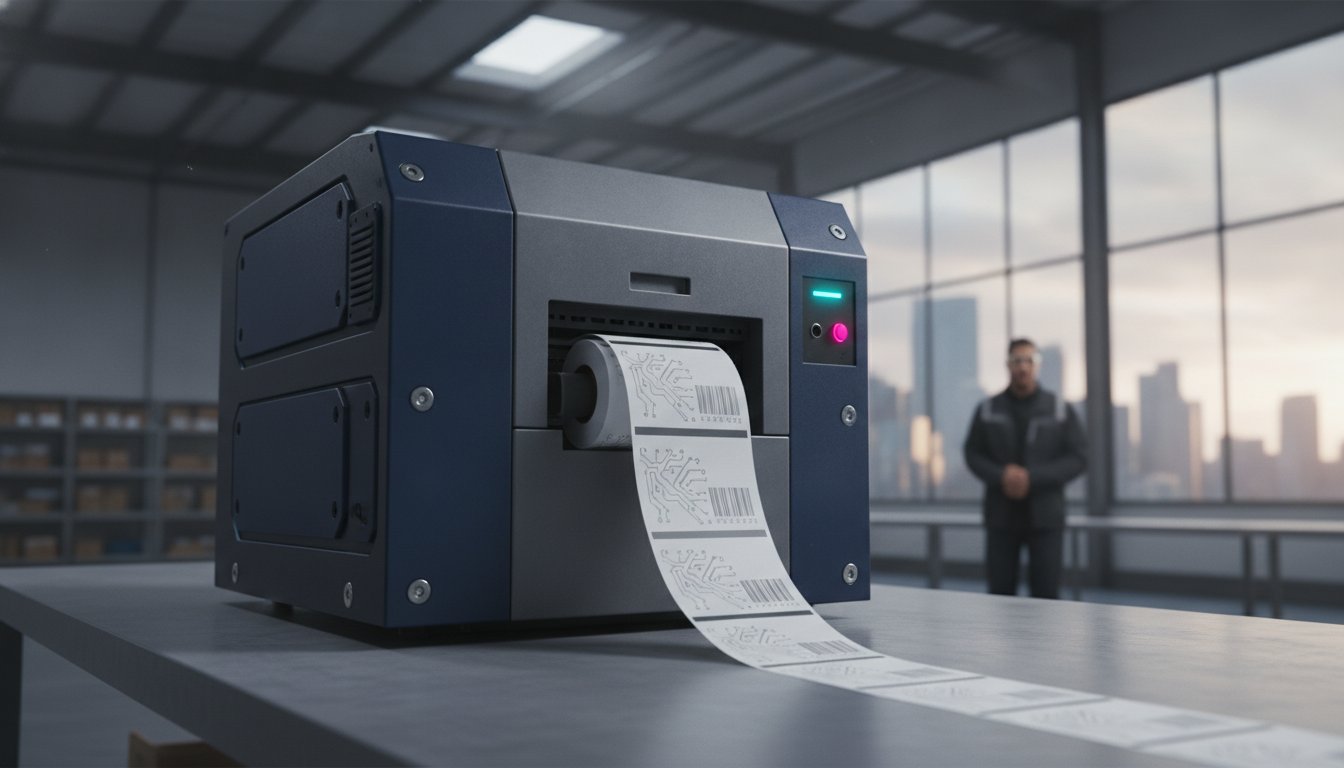
An RFID label printer industrial unit is a high-performance machine engineered for the rigours of 24/7 production environments. It performs two functions simultaneously. First, it prints human-readable text and traditional barcodes onto the label surface. Second, it encodes digital data onto a microchip embedded within the label. This integration of physical and digital data is the foundation of Smart Label Technology, which allows for rapid, non-line-of-sight data collection. Unlike standard barcodes, RFID tags don't require a direct laser path to be read, which drastically accelerates your inventory processing.
Industrial models differ significantly from standard desktop units. While desktop printers handle light duties, industrial-grade hardware features all-metal frames and high-duty cycle components designed for Canadian warehouses. These machines support large label rolls and long ribbons to minimize downtime during busy shifts. They also include "read-after-write" verification. This feature reads the encoded data immediately after writing to ensure the chip is functional. If the tag is defective, the printer identifies the error and prevents it from entering your supply chain. This level of reliability is essential for maintaining a modern, automated warehouse.
The Anatomy of an Industrial RFID Tag
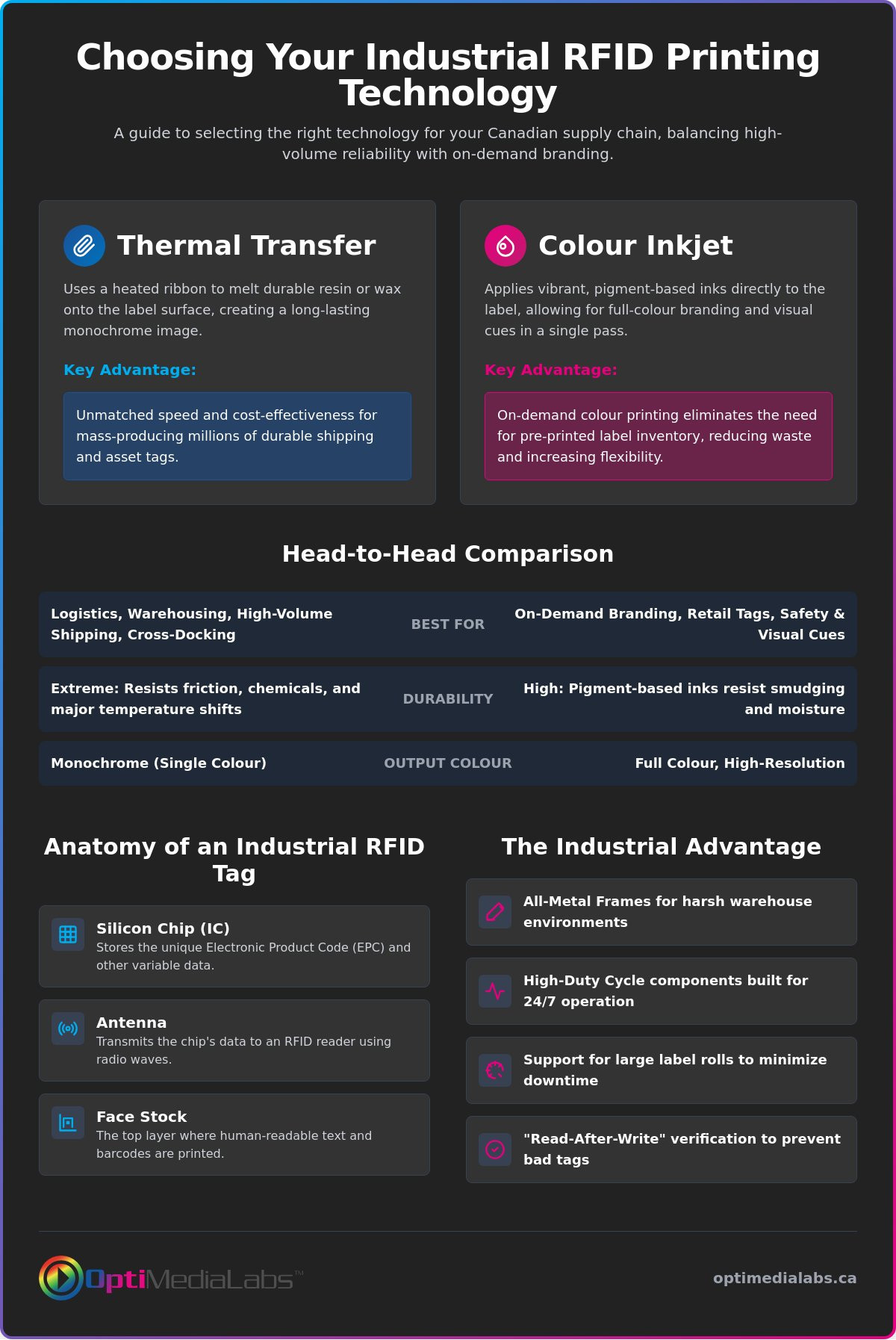
Understanding the hardware starts with the tag itself. An industrial RFID tag consists of three components: the silicon chip (IC), the antenna, and the face stock. The chip stores the unique identifier, while the antenna transmits the signal. The face stock is the top layer where your text is printed. Selecting the correct face stock is vital for durability. Labels used in manufacturing or outdoor storage must resist moisture, chemicals, and abrasion. Most Canadian enterprises utilize Ultra-High Frequency (UHF) tags for long-range tracking, though HF or NFC tags are used for short-range specialized tasks.
Encoding vs. Printing: The Dual Process
The RFID printers used in industrial settings contain a specialized internal encoder. This encoder communicates with the tag inlay using radio waves while the printhead applies heat to the ribbon or label. RFID encoding is the process of writing unique electronic product codes (EPC) to the tag inlay. If an inlay fails to encode, the printer performs a "void" or "overstrike" process. It prints a distinct pattern over the label to signal it is unusable. This prevents bad tags from reaching your customers and ensures your automated systems receive clean data every time.
Thermal Transfer vs. Colour Inkjet RFID: Which Technology Wins?
Choosing between thermal transfer and colour inkjet technology depends on your specific operational environment and data requirements. An RFID label printer industrial unit using thermal transfer technology remains the standard for high-volume logistics. It's built for speed and reliability. Conversely, colour inkjet RFID is gaining traction for applications requiring visual cues alongside digital encoding. Both technologies offer unique advantages for Canadian enterprises managing complex supply chains. You must weigh the need for high-speed monochrome output against the benefits of on-demand colour branding.
When to Choose Thermal Transfer RFID
Thermal transfer is the preferred choice for logistics, cross-docking, and standard warehouse inventory. These printers use a heated ribbon to melt a resin or wax image onto the label. When paired with high-quality Zebra ribbons, the result is a nearly indestructible label that survives extreme friction and temperature shifts. This technology is ideal for high-speed automated applicators where monochrome encoding simplicity drives throughput. It's the most cost-effective method for mass-producing millions of shipping tags without frequent media changes.
The Rise of Colour Inkjet RFID
Colour inkjet RFID is revolutionizing "intelligent labelling." This technology allows you to print vibrant, colour-coded safety information or high-resolution branding and encode the RFID chip in a single pass. Modern Epson printers are leaders in this space, providing pigment-based inks that resist smudging and moisture. This approach eliminates the need to maintain a massive inventory of pre-printed colour labels. You simply print and encode the exact quantity you need on-demand, which significantly reduces waste and prevents label obsolescence.
Durability varies between the two methods. Thermal resin ribbons offer the highest resistance to chemicals and outdoor exposure in harsh Canadian winters. Pigment-based inkjet inks provide excellent indoor durability and professional aesthetics for retail environments. When evaluating these options, consider the FDA guidance on RFID feasibility studies, which highlights how environmental factors impact tag readability and long-term performance. While thermal transfer has a lower cost-per-label for simple monochrome runs, inkjet saves money by reducing the total cost of ownership in custom retail applications. If you aren't sure which technology fits your current infrastructure, talk to our technical specialists for a custom assessment.
Industrial RFID Implementation: Real-World Examples
Moving from technical specifications to actual deployment shows the true value of an RFID label printer industrial investment. Canadian enterprises across various sectors use this technology to solve specific bottleneck issues that traditional barcoding cannot handle. Whether it's managing a sprawling warehouse in Ontario or tracking mining assets in British Columbia, the application of RFID provides a level of visibility that transforms operational efficiency. These real-world scenarios demonstrate how digital encoding bridges the gap between physical goods and enterprise data.
Logistics and Supply Chain Optimization
In a large-scale Canadian distribution centre, manual gate scanning often creates massive delays during peak shipping seasons. Facilities now deploy RFID-enabled industrial barcode printers to automate the check-in and check-out process. When a pallet passes through a reader portal, the system identifies every individual carton simultaneously. This eliminates the need for line-of-sight scanning required by 1D or 2D barcodes. Logistics managers realize significant time savings by moving to bulk RFID reading. This shift allows for rapid cross-docking operations where goods move from receiving to shipping with minimal manual intervention. The result is a supply chain that moves at the speed of data rather than the speed of a hand scanner.
Manufacturing and Quality Control
For heavy machinery manufacturers, tracking work-in-process (WIP) is a complex challenge. RFID tags are applied to components at the start of the assembly line. These tags are designed to survive heat, paint booths, and chemical washes that would destroy a standard paper label. Unlike traditional tracking, these digital identifiers can store assembly history and maintenance records directly on the part. This reduces errors in complex assembly environments where thousands of distinct components move through different workstations. High-memory RFID tags allow technicians to write status updates back to the part, ensuring that every unit meets strict quality standards before it leaves the factory floor. This digital pedigree is essential for high-stakes manufacturing where precision is non-negotiable.
Retail compliance is another major driver for industrial RFID adoption. Major retailers now mandate RFID tagging to support "smart shelves" and rapid inventory cycle counts. This technology allows a single employee to count an entire store's inventory in minutes rather than days. In the energy and mining sectors, tracking high-value equipment in remote locations is equally critical. Industrial RFID solutions provide a reliable way to manage assets like drill bits, safety gear, and specialized tools. These sectors require the ruggedness and encoding precision that only a dedicated RFID label printer industrial solution can provide. By implementing these systems, businesses reduce asset loss and ensure that critical equipment is always accounted for in the field.
Hardware selection is critical, but software provides the intelligence. Without a robust data layer, your RFID label printer industrial hardware is just a stand-alone machine. Software acts as the bridge between your physical inventory and your digital records. It manages the middleware connections required to link your RFID printer with an Enterprise Resource Planning (ERP) system or Warehouse Management System (WMS). This connectivity ensures that every encoded tag reflects real-time data from your central database.
Adhering to GS1 standards is no longer optional for companies involved in global trade. Modern labelling software uses standardized data formats to ensure your tags are readable by partners across the entire supply chain. User-friendly interfaces now replace the need for custom coding. This allows your team to generate compliant labels through intuitive templates, reducing the time spent on technical setup and troubleshooting.
BarTender and NiceLabel for RFID
BarTender software is a staple in Canadian industrial environments because it simplifies complex encoding tasks. Its drag-and-drop interface allows users to map database fields directly to the RFID chip without writing a single line of code. For multi-site operations spanning several provinces, NiceLabel offers superior cloud-based management. This allows you to centralize label design while printing locally at various distribution centres. For a deeper look at these platforms, consult our Professional Guide to Barcode Labeling Software.
Ensuring Data Integrity and Security
Data security is a primary concern for high-value asset tracking. Modern software includes features to lock RFID chips or set password protection. This prevents unauthorized parties from altering tag data once it leaves your facility. It also manages serialization logic. This prevents the accidental creation of duplicate tags, which would otherwise cause critical errors in your supply chain. For regulated industries, these software suites maintain detailed audit trails. These logs document exactly when a label was printed, what data was encoded, and which user authorized the job. This level of transparency is essential for maintaining compliance in a 2026 enterprise environment.
To ensure your software and hardware are perfectly synchronized, request a technical consultation with our integration team.
Selecting Your Industrial RFID Solution in Canada
Selecting the right RFID label printer industrial hardware is the final step in modernizing your tracking infrastructure. This decision should follow a rigorous assessment of your physical workspace and data throughput needs. You must realize that a printer designed for a climate-controlled office will likely fail in a Canadian cold-storage facility or a high-moisture manufacturing plant. Evaluate the read range requirements for your specific use case. While UHF technology offers the long-range capabilities needed for pallet portals, HF or NFC might be more appropriate for close-proximity security tasks or specialized tool tracking.
Volume requirements dictate the class of printer you need. High-performance models are built with all-metal frames and heavy-duty internal components for continuous operation on high-speed production lines. Mid-range models offer a more balanced approach for distribution centres with fluctuating daily demands. Connectivity is also a non-negotiable factor. Ensure your chosen model supports Ethernet for stable warehouse connections or Wi-Fi for flexible deployment in dynamic environments where wired infrastructure is limited.
Why Partner with a Specialized Canadian Distributor?
Working with a specialized distributor provides a streamlined path to implementation. It gives you a single point of contact for your hardware, encoding software, and blank thermal labels. This centralized approach prevents technical conflicts that often arise when sourcing components from multiple vendors. Local expertise is invaluable when navigating Canadian industrial standards and ensuring your equipment remains compliant with ISED regulations. Experts help you select the precise combination of ribbon and tag to ensure 100% read rates in your specific environment, preventing costly hardware-media mismatches.
Final Checklist for RFID Readiness
Success depends on preparation before the first label is printed. Use this checklist to confirm your facility is ready for a full-scale rollout:
- Data Export: Verify your ERP or WMS can generate the unique identifiers required for EPC encoding.
- RF Site Survey: Identify potential interference from metal structures or high-voltage equipment that could block signals.
- Media Validation: Ensure your chosen RFID inlays are compatible with your printer's antenna placement.
- Pilot Testing: Run a small-scale pilot program to test tag durability and read accuracy under real-world stressors.
Planning a pilot program allows you to identify and resolve technical hurdles before committing to a national rollout across multiple Canadian locations. This methodical approach minimizes risk and maximizes the return on your RFID label printer industrial investment. By following these steps, you ensure your supply chain remains resilient, accurate, and fully compliant with the evolving demands of 2026.
Future-Proof Your Canadian Supply Chain
Implementing an RFID label printer industrial solution is more than a simple hardware upgrade. It's a strategic shift toward total inventory accuracy and real-time supply chain visibility. You now understand how the right technology, whether thermal transfer for extreme durability or colour inkjet for on-demand branding, eliminates the manual errors that stall your growth. Success requires a synergy between rugged hardware and professional software logic to maintain compliance and efficiency across every provincial distribution centre.
As an authorized distributor for industry leaders like Zebra, Epson, and Toshiba, OptiMediaLabs Canada provides the reliable resources your enterprise needs. We offer national shipping across Canada and expert technical consultation to ensure your RFID integration is seamless from day one. Don't let technical complexity or inconsistent encoding hold your operations back. Browse our full range of Industrial RFID Printers at OptiMediaLabs Canada to find the perfect fit for your specific workflow. Modernizing your asset tracking today ensures you remain competitive and compliant in the 2026 marketplace. We're here to facilitate your transition to a smarter, more efficient warehouse.
Frequently Asked Questions
What is the main difference between a standard industrial barcode printer and an RFID printer?
An RFID printer contains an internal radio frequency encoder that writes digital data to an embedded chip while simultaneously printing text or barcodes. A standard industrial printer lacks this electronic component and only applies visual data to the label surface. This dual action is the defining characteristic of an RFID label printer industrial unit, allowing for non-line-of-sight data collection that standard barcodes cannot provide.
Can I use regular thermal transfer ribbons with RFID labels?
You can use standard thermal transfer ribbons with RFID labels, provided the ribbon type matches the face stock material. For industrial applications, resin ribbons are the best choice because they provide the durability needed to protect printed data in harsh environments. Always verify that your ribbon width exceeds the label width to prevent premature printhead wear and ensure the ribbon is compatible with your specific printer model.
How much more expensive are RFID labels compared to standard barcode labels in 2026?
RFID labels are more expensive than standard barcode labels because they include a silicon chip and an antenna inlay. While standard labels consist only of paper or synthetic face stock, the added electronic components in smart labels increase the manufacturing cost. Prices vary based on the inlay type, memory capacity, and the volume of labels purchased. Most Canadian enterprises find the higher cost is offset by reduced manual labour and improved accuracy.
Do I need special software to encode RFID tags, or can I use my existing ERP?
Most enterprises require specialized labelling software like BarTender or NiceLabel to manage the complex encoding logic. While some modern ERP systems can export the necessary data, dedicated software provides the specific drivers and design tools required to write to the RFID chip correctly. This ensures your data follows global standards like GS1 without requiring extensive custom coding or manual workarounds that can lead to errors.
What is the typical read range for an industrial UHF RFID tag?
A typical industrial UHF RFID tag offers a read range of 5 to 15 metres under optimal conditions. The actual distance depends heavily on the power of the reader, the size of the tag antenna, and the presence of interference from metal or liquids. In dense warehouse environments, readers are often calibrated to ensure accurate bulk reading as pallets pass through portals or gate systems at high speeds.
Are industrial RFID printers compatible with both Windows and Mac systems?
Most industrial printers are primarily designed for Windows environments using specialized drivers. While some manufacturers offer basic Mac compatibility, the professional software suites required for complex RFID encoding are almost exclusively Windows-based. It's best to consult the technical specifications of your specific RFID label printer industrial model to ensure it fits your existing IT infrastructure and supports the software logic your workflow requires.
How do I handle bad or unreadable RFID tags during the printing process?
The printer handles unreadable tags by performing an overstrike or void process. When the internal encoder fails to verify the data written to the chip, the printer marks the label with a distinct pattern to signal it is unusable. It then moves to the next tag in the queue automatically. This prevents defective labels from being applied to your products and ensures your automated tracking systems only receive clean, verified data.
Does cold Canadian winter weather affect the performance of RFID tag encoding?
Extreme cold doesn't typically affect the digital encoding process, but it can impact the label adhesive and the physical printer hardware. Passive RFID tags function well in sub-zero temperatures once they are applied to a surface. However, you should ensure your printer is operated within its specified temperature range to prevent ribbon stalling or mechanical issues. Using specialized all-weather adhesives is recommended for labels applied in unheated Canadian distribution centres.