
Labeling Solutions for High-Mix Manufacturing Costs
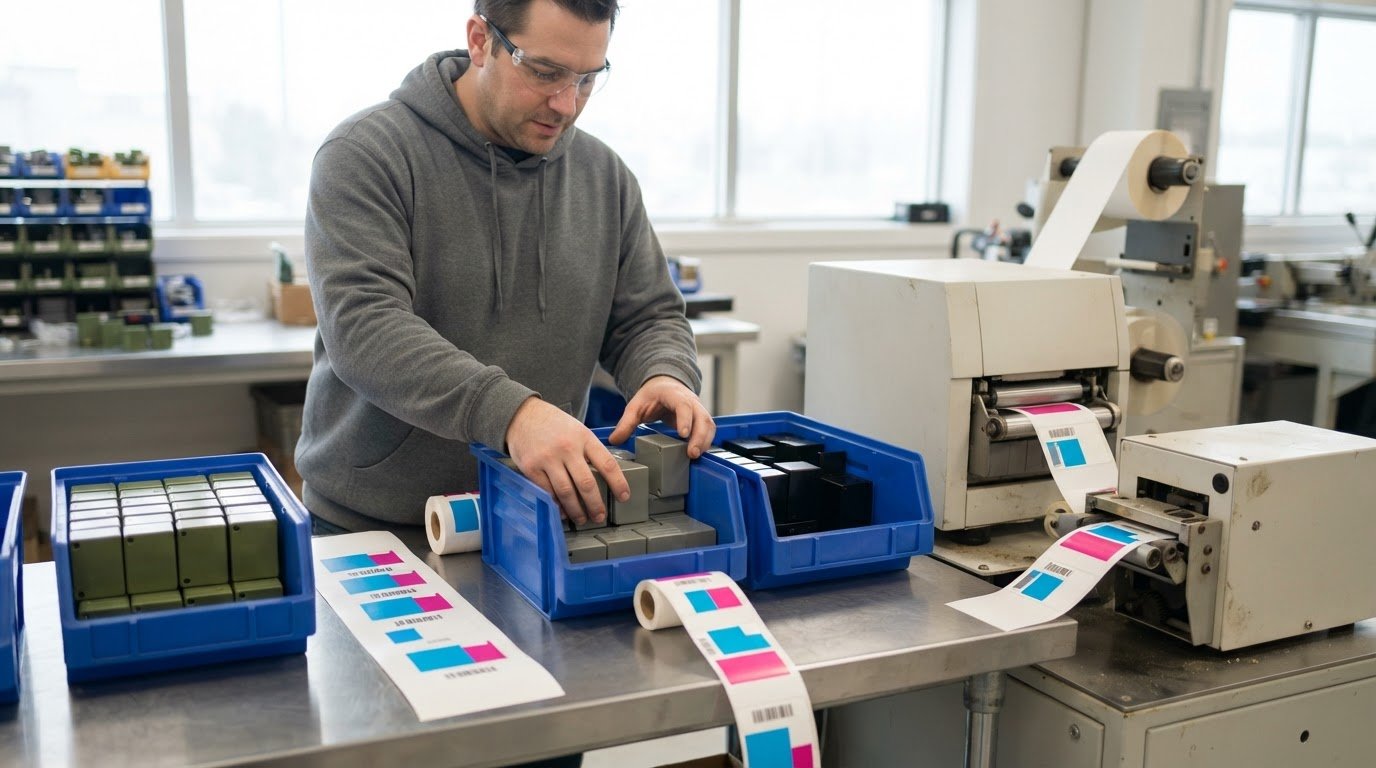
Scaling a high-mix, low-volume line depends on changing products without losing control of identification and production information. In this setting, batches are typically 50 or 100 units before the line switches to another product, so labeling solutions for high-mix manufacturing need to support frequent changes and variant-specific requirements. Effective labeling helps connect each item to the right product details and traceability data while keeping production responsive.
That flexibility has costs to weigh. Printers, labels, ribbons or ink, barcode software, and the time spent managing label data all affect the effort and expense. The right setup depends on how often products change, what each label must communicate, and how labelling fits into existing workflows.
This article explains how labelling supports customization, traceability, and responsive production in Canadian manufacturing. It also covers the equipment and management factors that influence cost, helping you assess where a flexible labelling workflow may help and where added complexity may outweigh the benefits.
Key Takeaways
- Match label content and format to each product variant so changeovers can stay responsive without losing clarity.
- Consider how digital label data connects with production and quality records to support traceability across jobs and shifts.
- Assess equipment, consumables, software, and staff time together to understand the ongoing cost of a labeling workflow.
- Choose a printing or marking method based on label material, operating conditions, and the information each item needs to carry.
- Use barcode, QR code, or RFID approaches according to how products need to be identified and tracked within your operation.
Product customization and customer responsiveness
In high-mix production, each job can change the labelling task: product details, quantities, and priorities may shift between batches. The workflow needs to keep pace while making each variant easy to distinguish.
High-Mix, Low-Volume Production
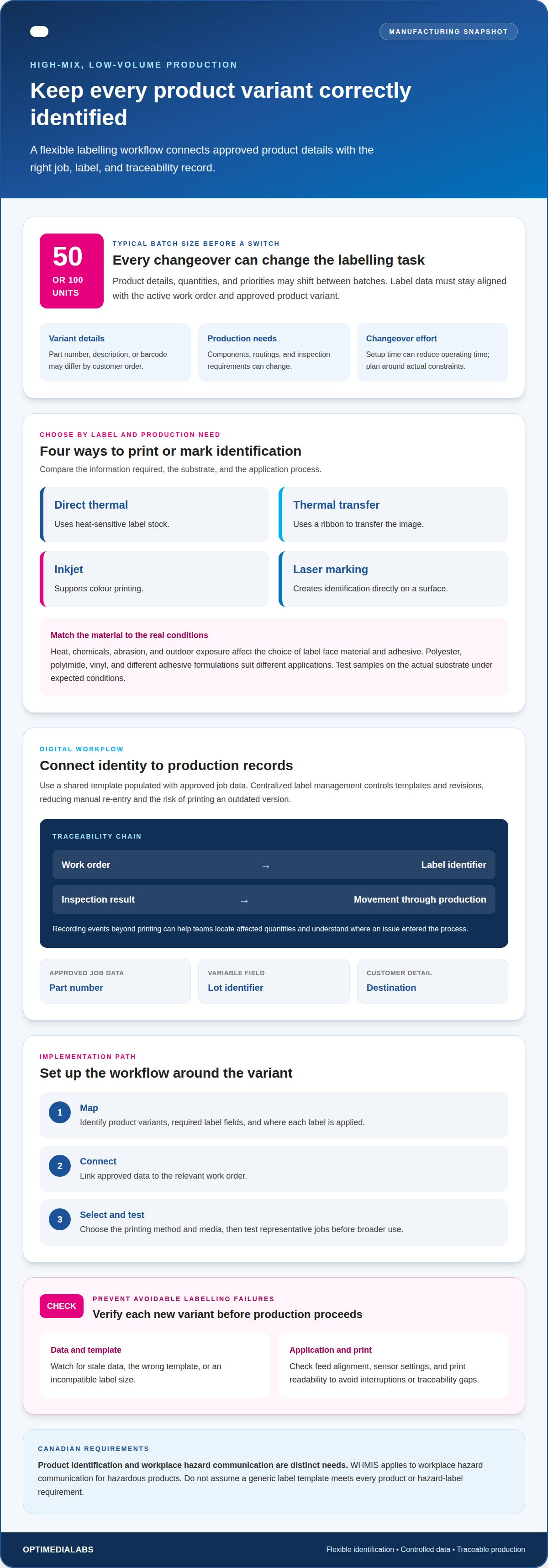
High-mix, low-volume production makes a broad range of products in small batches, often switching after 50 or 100 units. Each change can bring different components, routings, inspection needs, or label information. That variety makes a single fixed label process harder to manage. A clear link between the work order and its label data helps keep identification aligned as production changes.
For a job shop, production planning should account for the setup required at each changeover. If a product receives frequent orders, a dedicated line may reduce repeated setup work and support a steadier process. That approach is less useful when demand is irregular or products need different equipment. Base the decision on order frequency, setup effort, and whether the line can handle the product without constraining other work.
Customer Needs and Product Diversification
Product diversification means offering variations to meet different customer requirements, such as changes to components, configurations, or packaging. A customer-specific order may need a unique part number, description, or barcode. Label data should reflect the approved variant, not rely on a generic template that could carry details from another job. This is where labeling solutions for high-mix manufacturing connect customization with daily production control.
Production planning and inventory management also shape responsiveness. Producing only the quantities needed can limit excess finished-goods inventory, while frequent changeovers can consume setup time and reduce operating time. Inventory or production management software can help coordinate materials, work orders, and finished products. Teams can use cycle-time, setup-duration, and work-in-process data to schedule jobs around actual constraints.
Canadian label requirements vary by product category and label purpose. Product identification and chemical or workplace hazard communication are distinct needs; WHMIS applies to workplace hazard communication for hazardous products. Do not assume a generic label template meets every product or hazard-label requirement.
Start implementation by mapping product variants, required label fields, and where each label is applied. Connect approved data to the relevant work order, select the printing method and media, then test the workflow on representative jobs before broader use.
Manufacturing Label Technology and Materials
Direct thermal printing uses heat-sensitive label stock, while thermal transfer uses a ribbon to transfer the image. Inkjet supports colour printing, and laser marking creates identification directly on a surface. Each method fits different label and production needs. Compare the required information, substrate, and application process before choosing equipment.
For exposure to heat, chemicals, abrasion, or outdoor conditions, match the label face material and adhesive to the actual surface and environment. Polyester, polyimide, or vinyl stocks and different adhesive formulations suit different applications, but no material works for every environment. Test samples on the actual substrate and under the expected conditions before standardizing.
Automated labelling can fail if a job uses stale data, the wrong template, or an incompatible label size. Feed alignment, sensor settings, and unreadable print can also interrupt application or create traceability gaps. Test each new variant to catch these issues before production proceeds.
Digitized workflows and traceability
In high-mix environments, digital label workflows connect product identity with current production information. They help operators and quality teams track the correct variant, work order, and inspection record as jobs move through production.
Variable-data labelling uses a shared template populated with approved job data, such as a part number, lot identifier, or destination. Centralized label management keeps templates and revisions controlled in one place, reducing manual re-entry and the risk of printing an outdated version. Together, these methods can shorten changeovers by avoiding repeated template edits for every product.
Consider a machine shop producing several component variants. The work order can provide the correct identifier and routing details to the label workflow, while the operator confirms the job before printing. A distinct record for each variant helps prevent details from one product carrying over to another batch. This matters when similar components have different inspection criteria or customer instructions.
Traceability also depends on recording events beyond printing. A digital workflow can link a label’s identifier to the job, inspection result, and movement through production. If inspection finds a defect, teams can use those records to locate affected quantities and understand where the issue entered the process. Accurate, timely, organized production information helps reduce avoidable rework.
Shop-floor transparency gives production, quality, and scheduling teams a shared view of job status. For example, teams can communicate a delayed inspection or changed priority before the next operation begins. Clear work instructions and label data support consistent execution across shifts, while approved updates can reflect changing engineering requirements or production constraints.
Flexibility still requires control. Give each template an owner, a defined approval process, and a clear revision status. Operators should be able to distinguish the current version from obsolete files. A test print at the start of a new job confirms that the expected fields appear and remain readable before the production line processes the full quantity.
Useful operational records include job completion, setup duration, work-in-process status, and inspection outcomes. Production teams can review these records to improve scheduling and identify recurring delays. In complex HMLV manufacturing, they also help distinguish a label-data issue from a process or component defect.
Centralized control works best when it fits existing production steps rather than adding duplicate entry. To discuss how a digital label workflow can support your operations, talk through label workflow requirements.
Equipment and management resource costs
In a high-mix operation, labelling costs extend beyond the printer. Equipment, label stock, ribbons or ink, software, setup time, and staff attention all contribute to the total. Separate one-time equipment needs from recurring materials and daily management. For example, a line producing short runs may use less stock per job but require more frequent setup and data changes.
Equipment choice affects both capability and ongoing work. A printer for variable product information must handle the operation’s label formats and output needs. A finishing unit may add value when labels need cutting or other processing, but it also brings space, maintenance, and workflow considerations. A dedicated setup may suit steady demand, while a varied job mix may benefit more from flexible equipment.
Consumables vary with the production mix. Different label sizes, colours, or substrates can mean more stock types to store and replenish. Thermal transfer also requires ribbon compatible with the labels. If demand shifts between product families, excess stock of a slow-moving material can tie up inventory, while a shortage can interrupt a scheduled job. Review actual usage by product family to plan replenishment.
Software and data management require additional resources. A centralized label workflow can reduce repeated edits, but it depends on accurate product records, controlled templates, and staff who understand approval and revision processes. A new component variant, for example, may require updated fields and a test print. Assigning ownership of these changes helps keep outdated files out of everyday use.
Include changeover time in the cost analysis. Each switch may involve selecting the correct material, loading a job, confirming data, and clearing the previous setup. Track setup duration alongside cycle time and work-in-process to identify recurring delays. A frequently produced job may justify dedicated equipment or a standard setup; irregular demand may favour shared equipment and a clear changeover method.
Staff time matters too. Operators may need to resolve misfeeds, replace consumables, or correct print alignment, while supervisors manage revisions and scheduling. Standard procedures for loading materials and checking the first label can reduce avoidable interruptions. Account for training and maintenance time alongside equipment use, especially when multiple processes share a labelling station.
Compare options by matching each resource to demand, product variety, and operating constraints. Assess equipment, consumables, software administration, training, and downtime separately. Then determine whether each item helps you respond to customer changes or adds complexity without improving production. This makes cost trade-offs visible without relying on a single equipment price or assuming every manufacturer needs the same setup.
How do direct thermal, thermal transfer, inkjet, and laser marking compare for manufacturing labels?
Each method creates identification differently, so the right choice depends on the label’s purpose, substrate, and exposure. Direct thermal and thermal transfer print on label stock; inkjet adds colour; laser marking marks a compatible surface directly. For a mixed production line, consider what information changes between jobs and whether the identifier belongs on a removable label or on the component itself.
Direct thermal uses heat-sensitive label material and does not require a ribbon. It can suit workflows needing straightforward variable information, such as a job identifier or shipping detail. The image forms on the label stock, so performance depends on the material and operating conditions. Heat, light, handling, and storage can affect suitability. A thermal label for short-term internal movement has different requirements from one expected to remain readable through extended storage.
Thermal transfer uses a ribbon to transfer print onto compatible label stock. This adds a consumable and a material-matching decision, while offering more options for choosing label constructions. A part label exposed to frequent handling, for example, needs a stock and ribbon combination suited to its surface and conditions. The method can support consistent variable data across product variants when the correct supplies and print settings are used.
Inkjet prints with ink and can produce colour, helping distinguish product families or communicate visual information. In a high-mix environment, colour can make a variant easier to identify, but should support clear text and codes rather than replace them. Match the label stock and ink to the intended use. Test-print on the production material to see whether details remain legible and colour distinctions work under actual lighting.
Laser marking applies identification directly to a compatible part or surface instead of printing a separate label. It can suit components that need a durable mark, but results depend on the material and marking process. A manufacturer handling metal and polymer parts, for example, may need a separate assessment for each substrate. A direct mark is not a separate item to apply, but it also cannot be changed by replacing a label.
Compare the four methods against job requirements, not just printer output. Review these factors for each product family:
- Information: variable text, barcodes, or colour cues.
- Substrate: label stock, component material, and surface.
- Environment: handling, storage, and exposure conditions.
- Workflow: ribbon or ink replenishment, label application, and changeovers.
A representative test run can reveal unreadable codes, poor adhesion, or unsuitable marks before a method is used across production. Document the selected material and settings for each variant to support repeatable results as jobs change.
Which barcode, QR code, and RFID standards apply to manufacturing labels in Canada?
Canadian manufacturers do not use one code format for every product or process. The appropriate specification depends on the sector, customer or trading-partner requirements, scanning environment, and whether identification is needed at item, case, or shipment level. Confirm the required data structure and format using the relevant product and supply-chain documentation before setting up a label workflow.
A linear barcode suits applications where a scanner reads a printed pattern along one direction, such as identifying a component at a workstation. A QR code is a two-dimensional symbol that can hold data in a compact area and be read by compatible imaging equipment. Neither format automatically meets every customer’s requirements. The receiving system must be able to interpret the encoded information.
RFID uses a tag and radio-frequency reader, so the reader does not need a camera or scanner to see a printed code. It can support identification when items pass through a reader zone, provided the tag, reader, and software work together. A printed barcode may still be useful as a visible identifier or alternative scan method. Choose based on the plant’s tracking process, component materials, and receiving equipment.
Before selecting a format, define what the identifier must do. A Canadian manufacturer shipping components to a customer may need to match the customer’s data structure and receiving process. Internal work-in-process tracking may instead use a job or lot identifier linked to production records. In either case, label data should point to the correct product variant and record.
Specify requirements at each packaging or production level. An individual component, container, and shipment may each need distinct identification. Avoid copying the same identifier across levels if the tracking system must distinguish them. Document the required data fields, code format, human-readable text, placement, and scanning point for each label type.
Test the complete workflow, not just the printed symbol. Confirm that production software supplies accurate data, the printer produces a readable code, and the intended scanner or RFID reader captures it. A sample from a new component family can reveal issues related to label size, placement, surface, or surrounding materials. Record approved settings and data rules for repeat jobs.
Barcode software can help manage label templates and variable fields, while RFID label printers support workflows using RFID tags. To align your printer and label workflow with identification requirements, discuss your barcode and RFID needs.
OptiMediaLabs Canada
OptiMediaLabs Canada offers equipment and supplies for changing label needs in high-mix production. Its range includes Afinia Color Label Printers, RFID Label Printers, Afinia Label Cutters & Finishers, and Thermal Transfer Ribbons.
Consider these options when product variants require different colour information, RFID identification, label finishing, or thermal transfer printing. The right combination depends on your label format, production workflow, and identification method. Matching equipment and supplies to these requirements helps you plan a practical setup without treating every job as identical.
If you’re assessing labelling equipment or supplies for your manufacturing workflow, contact OptiMediaLabs Canada to discuss your requirements.
Build a labelling workflow that can adapt
As product variants and priorities change, your labelling workflow should remain manageable for the people using it. Start by identifying the production challenge that matters most: updating product information, maintaining traceability, or matching equipment to different label tasks. This focus can help you plan a practical next step without adding unnecessary complexity.
OptiMediaLabs Canada offers Afinia Color Label Printers, compatible ink cartridges, and RFID Label Printers for manufacturing identification workflows. These products support different printing and tracking requirements as you assess equipment and supplies for your operation.
If you’re ready to discuss equipment or supplies for labeling solutions for high-mix manufacturing, contact OptiMediaLabs Canada. A clear view of your production requirements is a good place to begin.
Frequently Asked Questions
Scaling a high-mix, low-volume line?
Scale by increasing the line’s ability to handle changing demand without creating bottlenecks. Before adding equipment, identify which operation constrains throughput, such as label application, inspection, or material replenishment. A product-process matrix can group variants by tooling, setup, inspection, and handling needs. This helps distinguish products that can share a process from those that may justify a dedicated resource.
What changes with high-mix, low-volume production?
Compared with low-mix volume production, high-mix production involves more product variation, smaller batches, and more frequent changeovers. A single shift may move between components with different routings, inspection criteria, and identification needs. This affects scheduling because setup work competes with operating time. Consistent work instructions also matter: operators need the correct process and quality information for the job in progress.
What labelling solutions work best for high-mix manufacturing?
The right setup depends on what each product needs to communicate and how production applies its labels. A line producing several packaging variants may need flexible colour printing, while component tracking may call for barcode or RFID identification. Match the method to the data, substrate, and scanning process. Testing representative product families can show whether the setup handles the actual range of jobs.
How do print-and-apply label systems handle frequent product and label changes?
Print-and-apply systems print and apply a label to a product or package during production. For frequent changes, job data and application settings need to change with the product variant. For example, a change in package size may require a different label position as well as updated printed fields. Confirm both settings during changeover to help prevent misapplied labels.
What are the costs of industrial label printers, applicators, and software in Canada?
Costs depend on equipment configuration, printing method, application requirements, software, and recurring consumables. An automated applicator brings different considerations from a printer used at a workbench, while software needs depend on how labels connect to production data. For a useful comparison, account for equipment, labels, ribbons or ink, setup effort, and ongoing administration together, rather than focusing on the printer alone.
How can manufacturers integrate labelling systems with ERP, MES, WMS, and production lines?
Start integration by defining which system owns each label field. An ERP may provide order or product data, an MES may track production steps, and a WMS may use identifiers for warehouse movement. Map the required fields and handoffs, then test a sample job from order release through scanning. This can reveal missing data or mismatched identifiers before labels enter routine production.
Which Canadian suppliers offer industrial labelling solutions, service, and support?
OptiMediaLabs Canada supplies labelling equipment, consumables, and barcode software in Canada, including colour label printers, RFID printers, ribbons, and label stock. Its product range serves operations assessing printing or identification equipment for varied production needs. First identify the label type, printing method, and tracking workflow, then discuss relevant products with OptiMediaLabs Canada. This keeps the conversation focused on the equipment and supplies involved.