
Loftware Barcode Software: Capabilities, Fit, and Evaluation Guide

A barcode tool can create a label, but that doesn’t mean it can support the workflow behind it. Loftware barcode software can play a broader role by helping businesses manage label creation and printing across their operations. This distinction matters when you’re comparing a standalone design tool with a platform that may need to work alongside existing printers, business systems and teams.
To assess fit, look beyond the label layout. Deployment, data connections, printer compatibility and day-to-day user access all affect how a solution works in practice, especially when labelling is shared across locations or linked to production and fulfilment processes.
This guide explains Loftware’s role in barcode and label management, outlines workflow requirements to assess, and highlights what to clarify before choosing a solution. Compare software capabilities with your printer fleet, data sources, user access and deployment expectations, not just your design needs. OptiMediaLabs Canada distributes Loftware software alongside barcode printers and related labelling equipment, bringing software and hardware requirements into the same evaluation.
Key Takeaways
- Loftware barcode software can support more than label layouts. Assess how barcode data, templates, print instructions and finished labels fit together.
- Map how product information moves into labels and printers to see where coordinated workflow control could support consistency.
- Compare your label volume, users, template approvals and data sources with the workflow needs the solution must meet.
- Before evaluating options, document label types and fields, printer models, operating environments and relevant business systems.
- Bring these workflow details to OptiMediaLabs, a distributor of barcode software and printing equipment.
What is Loftware barcode software, and what does it manage?
Loftware barcode software helps prepare and manage product identification and barcode label workflows; a barcode printer is the hardware that produces the label. The software side can bring together barcode data, label layouts and print instructions. The printer applies the output to physical label stock using compatible media and supplies.
These are connected parts of a process, but they aren’t interchangeable. Barcode data might include an item number, lot code or other product detail. A label layout determines where the barcode and related text appear. Print instructions define what is sent to a printer and how the job is handled. The finished label is the physical result. For background on the symbol itself, see What is a barcode?
The available tools and workflow options depend on the specific Loftware solution and its configuration. Don’t assume every offering handles template creation, data management and print control in the same way. First list the tasks your operation needs to manage, then compare them with the capabilities of the solution you’re evaluating.
Barcode generation, label design, and print management
A label workflow may use product fields to populate both a barcode and readable text. For example, an item record could provide an identifier for the barcode and a product description for the label. The template sets their placement and presentation; print management covers how the job reaches the printer. These functions are related, but each represents a distinct requirement.
This distinction helps clarify what you need from Loftware barcode software. A business looking to standardize templates has different priorities from one coordinating recurring print jobs across users or locations. Before assessing a solution, identify which steps need to be managed and which data feeds each label.
Who may need Loftware barcode software?
Loftware may suit manufacturers, distribution operations and other businesses that produce recurring product labels or manage changing identification requirements. The need for coordinated processes can grow as teams handle more templates, product data, users or print workflows. A straightforward operation with one stable workflow has different requirements from a business coordinating labelling across processes or locations.
Scale alone doesn’t determine fit. Consider the label types in use, how often product information changes, where that information is maintained and which teams prepare or approve labels. The operating environment matters too. Businesses assessing a cloud-based approach can include Loftware Cloud software in their review of deployment needs, alongside printer and workflow requirements.
OptiMediaLabs distributes Loftware software as part of a broader barcode printing and industrial labelling portfolio. Consider the software alongside the printers and supplies involved in producing labels. Start by defining the work: what information each label must carry, how it’s prepared and how it reaches the printer. Those details provide a practical basis for evaluating the right Loftware solution for your environment.
How Loftware barcode software connects data, labels, and printing
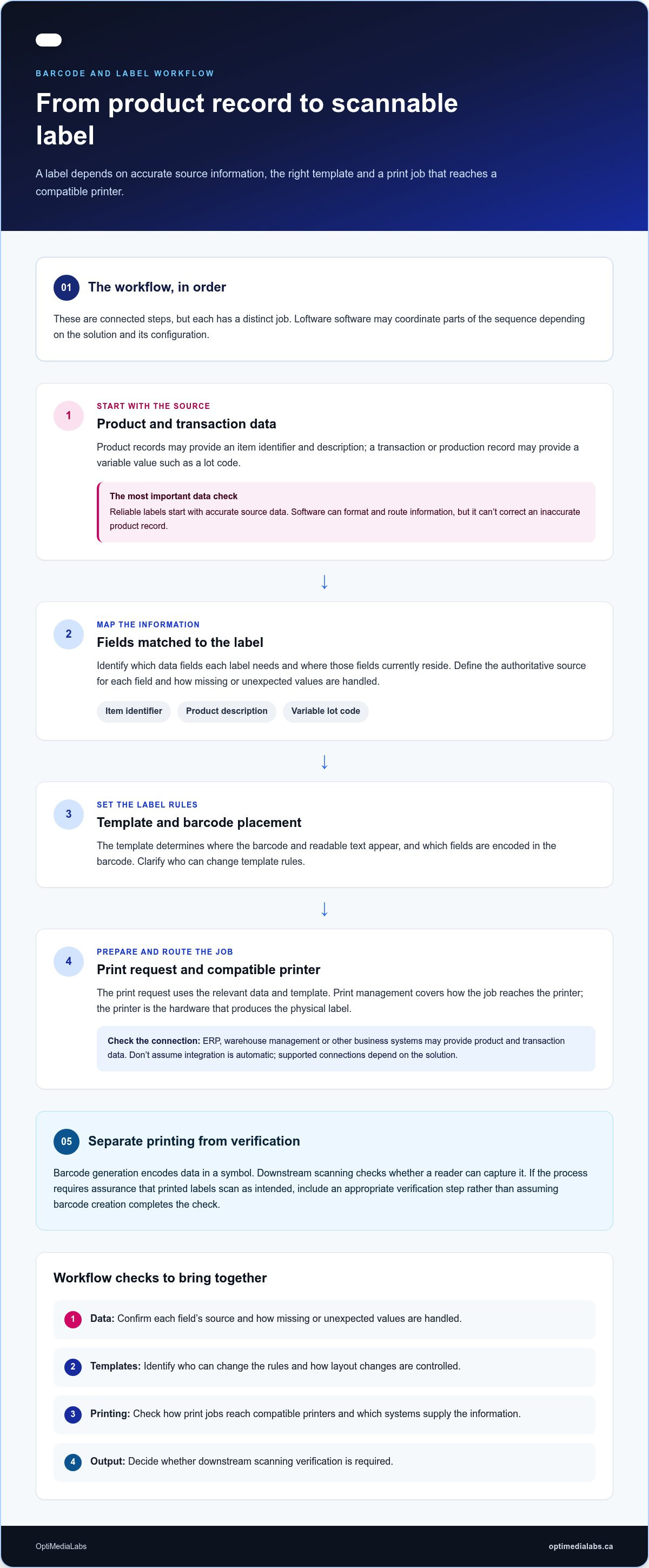
A label workflow starts before a print job. Product information must be available, the right fields must be mapped to a label template, and the finished job must reach a compatible printer. Depending on the solution and its configuration, Loftware barcode software may help coordinate parts of this sequence.
Reliable barcode labels start with accurate source data. Software can format and route information, but it can’t correct an inaccurate product record. If an item identifier or lot value is wrong at its source, a correctly printed label can still carry incorrect information.
From product records to a scannable label
Consider a distribution workflow that prints a label for an item. A product record may contain an identifier and description, while a transaction or production record may provide a variable value such as a lot code. A template sets where those fields appear and which are encoded in the barcode. A print request then uses the relevant data and template to produce the label.
Before printing, define the authoritative source for each field, how missing or unexpected values are handled, and who can change template rules. These checks help prevent stale records, mismatched fields or unintended layout changes from reaching print output. Centralized template and workflow controls can support consistent handling across users or locations when the selected solution and setup provide the controls required.
Printing a barcode isn’t the same as verifying it. Barcode generation encodes data in a symbol; downstream scanning checks whether a reader can capture it. If your process requires assurance that printed labels scan as intended, include an appropriate verification step rather than assuming that barcode creation completes the check.
Integration with business systems and printers
ERP, warehouse management or other business systems may provide product and transaction data. Map the information needed for each label, where it currently resides and when it must be available. Supply chain coordination depends on reliable information moving between process steps; Supply Chain Management principles offer broader context for how those steps connect.
Don’t treat integration as automatic. Supported connections can depend on the specific Loftware solution, its configuration, the business system and its version. Printer compatibility and the route a print job takes matter too. Before assessing the workflow, document the systems involved, the data fields exchanged, operating environments and printer models. Include Loftware Cloud software in a cloud-based deployment review, and compare its deployment and connection requirements with your operation.
To discuss how your data sources, printers and print steps relate to Loftware requirements, share your workflow with OptiMediaLabs. A clear process map helps keep the conversation focused on practical fit.
When is Loftware barcode software a fit for your operation?
Fit depends on what your labelling process needs to support, not simply on the number of labels printed. A single team producing a small set of stable labels may need a different level of control from an operation coordinating many users, changing product data or multiple sites. Assess Loftware barcode software against your actual workflow and the specific solution configuration rather than assuming it fits based on broad capability claims.
Start by mapping the process: how many label types you manage, how often they change, where their data comes from and who approves updates. If labels carry standardized identifiers, compare your requirements with the relevant GS1 Barcode Standards. Standards can inform what a label needs to communicate, but they don’t determine which software configuration suits your operation.
Signs your labelling workflow needs more control
Repeatedly entering the same product details, finding different versions of a template in circulation or relying on unclear ownership are reasons to examine the process. Document where errors or delays occur, who makes changes and how approved updates reach each user. A controlled process can support repeatability and clarify change management, but validate the specific tools for permissions, approvals or distribution against the Loftware solution being considered.
| Need to assess | Question to resolve | Potential fit indicator |
|---|---|---|
| Workflow scope | Is printing handled by one team or shared across users and sites? | Shared processes make coordinated control more relevant. |
| Label volume and variety | How many label types run, and how often do they change? | Frequent changes or varied templates can increase governance needs. |
| Data sources | Where do product and transaction fields originate? | Multiple sources may make data flow and integration important to assess. |
| Approvals | Who reviews and authorizes template or data changes? | Defined responsibility can support repeatable updates. |
Loftware versus a basic label design workflow
A basic, locally managed setup may be sufficient when a small team prints a limited range of stable labels and can manage templates directly. More coordination may be needed when printing spans departments or locations, data comes from business systems, or teams need consistent rules for changes. This is a needs-based distinction, not a claim that one approach is always better.
Use this comparison to identify what needs investigation, not to assume the software will solve every issue. Confirm which controls and connections are available in the specific configuration and whether they align with your operating environment. For wider context on software selection, consult a barcode labelling software guide as part of your research.
The strongest fit is one where workflow requirements, data responsibilities and the operating environment are clearly defined before solution selection. That makes it easier to distinguish a genuine need for coordinated control from a process that can remain simple and locally managed.
How to evaluate Loftware barcode software before adoption
A useful evaluation starts with your current process, not a feature list. Document the labels you produce, where their data comes from, who needs access and what happens between approval and printing. Then compare those requirements with the capabilities and configuration of the specific Loftware solution under consideration. This approach surfaces compatibility questions early and separates essential needs from improvements that can wait.
Build a practical requirements checklist
Start with the labels and people involved. Record the formats and barcode symbologies in use, the fields that change from one job to another, and the users who create, approve or print labels. Specify the intended output, including the information each label must carry and which teams or locations use it.
Use this checklist to organize the review:
- Label types: List formats, barcode symbologies and output requirements.
- Data fields: Identify fixed and variable information, plus its source.
- Users and access: Note user roles, locations and access needs.
- Approvals: Record who reviews changes and how approved updates are handled.
- Workflow: Map the steps from label request through printing, including expected changes.
- Systems: Name relevant business systems and the information needed from each.
- Priorities: Separate essential requirements from optional workflow improvements.
This record gives teams a shared basis for assessment. It can also reveal gaps, such as an unclear approval owner or a field entered manually in more than one place.
Check printer and system compatibility
Inventory each printer’s make, model, connection method and current printing environment. Include the operating systems, drivers and other components involved in sending jobs to the device. If you’re reviewing barcode printer options, compare them with the intended software workflow and required label output.
Next, document the business systems involved, their versions and how label data needs to move between them. Check software, driver and integration requirements against current product documentation for the Loftware solution being evaluated. Don’t assume a connection supported in one configuration will apply to another. Also record deployment expectations, user access needs and planned workflow changes.
With requirements in hand, you can focus the evaluation on real operating conditions rather than assumptions. Discuss your Loftware requirements with OptiMediaLabs, including your label needs, printers, systems and users.
Discuss Loftware barcode software requirements with OptiMediaLabs
OptiMediaLabs distributes barcode software, printers and industrial labelling equipment. Its Loftware offering is part of a broader printing portfolio, so you can consider the software workflow alongside the hardware involved. The goal is to match your documented needs with the relevant Loftware solution, not to assume one configuration suits every operation.
A focused enquiry turns broad goals, such as reducing duplicate entry or coordinating labels across teams, into practical requirements. Describe how labels are produced today, what needs to change and which constraints the solution must work within.
Prepare a useful Loftware software enquiry
Gather representative label examples and describe how each is requested, populated, approved and printed. If samples include sensitive product or business information, use anonymized examples where possible. Note the barcode and text fields, label formats, and differences between routine and exception jobs.
Include the operational details that shape the workflow:
- Printers: Record makes and models, connection methods, locations and the current print environment.
- Data sources: Identify where product, order or production information originates and which fields appear on labels.
- People and access: Describe the user groups involved, their responsibilities and where work is performed.
- Controls: Explain how label changes are reviewed, approved and communicated.
- Constraints: Note relevant system environments, existing processes and planned operational changes.
- Desired improvements: State what you want to make easier or more consistent without prescribing a particular software feature.
This context keeps the discussion focused on the actual workflow rather than an isolated label or printer. It also helps separate immediate requirements from longer-term process improvements.
Explore related software options without repeating a comparison
If you’re considering more than one labelling platform, keep the discussion centred on your requirements: users, data flow, printers, operating environment and the level of workflow coordination needed. A NiceLabel and Loftware comparison can provide a related point of reference, while your documented process remains the basis for assessing fit.
OptiMediaLabs offers Loftware barcode software alongside barcode printing equipment. Bring your workflow notes and representative label examples to make the conversation specific. This provides a practical starting point for matching the Loftware offering to your printing environment and business needs.
Discuss your Loftware barcode software requirements with OptiMediaLabs.
Plan for the next stage of your labelling workflow
A software decision should support how your operation works now while leaving room to reassess as processes evolve. Keep a practical record of workflow ownership, data responsibilities and the reasons behind key requirements. When product information, printers or team responsibilities change, that record provides a starting point for reviewing whether the configuration still fits.
Apply the same discipline when considering Loftware barcode software: connect the intended outcome to a defined business need, then discuss how the relevant offering aligns with that requirement. A focused conversation can turn broad priorities into useful questions about your workflow and printing environment.
OptiMediaLabs distributes Loftware software, barcode printers and related labelling equipment to customers across Canada. Bring your requirements to the discussion and take the next step with clarity. Start a conversation about your Loftware requirements. A well-defined process is a strong foundation for choosing confidently.
Frequently Asked Questions
Is Loftware barcode software cloud-based?
Loftware offers cloud-based software as well as on-premise solutions, so deployment depends on the product selected and your organization’s requirements. A cloud service may suit teams looking for browser-based access and vendor-managed software updates, while an on-premise setup may align with existing IT policies. Compare access needs, security requirements, operating environment and update management before choosing a deployment approach.
Can Loftware barcode software connect to an ERP or warehouse system?
It may connect with ERP, warehouse management or other business systems, depending on the Loftware solution, configuration and system versions involved. Start by identifying which records and fields labels need, such as item identifiers or order details, and when that data must be available. Use current product documentation to validate the specific connection method and technical requirements before planning implementation.
Does Loftware create barcodes for product labels?
Loftware solutions can support barcode creation as part of product labelling, with available functions depending on the particular offering and configuration. A typical use case is encoding an item identifier from a product record and placing it with readable product information on a label. Creating the barcode doesn’t itself confirm print quality or scannability, so include suitable scanning or verification steps where your process requires them.
What printers work with Loftware barcode software?
Printer compatibility depends on the specific Loftware solution, printer model, driver and operating environment. Before selecting or configuring software, record the make and model of each printer, how it connects to the network or workstation, and the print language or driver currently in use. Validate those details against current documentation. This is especially useful if your operation combines different printer models or generations.
Is Loftware suitable for a small business?
It can be worth evaluating for a small business if labelling involves recurring jobs, several users, changing product information or a need for more consistent control. A business printing a few stable labels from one workstation may have simpler requirements. Compare the effort of managing labels today with the controls you need, and consider whether the selected solution’s capabilities match your scale and IT environment.
How much does Loftware barcode software cost?
Loftware pricing is generally subscription-based and quote-only, rather than presented as one universal price. The amount depends on the solution and licensing requirements, so a useful budget discussion starts with the number of printers, users and workflows involved. For planning, document current and expected needs, then review the applicable quote and licensing terms. No single figure applies to every business configuration.
Can Loftware manage label workflows across multiple locations?
Loftware can support centralized label management across locations, subject to the chosen solution, setup and access requirements. For example, an organization may want teams at different facilities to use consistent, approved label templates. Map which locations print, who owns template changes and how local systems connect. Then validate that the planned configuration supports the required workflow and governance across those sites.