
Loftware Spectrum vs. BarTender for Enterprise Cloud Labelling: 2026 Comparison

The right enterprise labelling platform isn’t automatically the one with the most cloud features. A mismatch with your printer fleet, data sources, approval controls or existing templates can create more operational risk than the platform choice itself. That’s why Loftware Spectrum vs BarTender enterprise cloud labeling is less a feature-count contest than a test of workflow fit and migration readiness.
If you’re comparing the two, you likely want clear answers about cloud deployment, production continuity and the effort required to validate templates before making a change. Product naming adds another consideration: from version 5.1, Loftware Spectrum became Loftware Enterprise SP for on-premises installations and Loftware Cloud Enterprise SP for cloud installations.
This comparison looks at how each platform may fit enterprise workflows, what to assess across printers, data and governance, and which migration questions to resolve before committing. It also provides practical criteria for building a shortlist. OptiMediaLabs lists both Loftware and BarTender software for Canadian organizations evaluating labelling options.
Key Takeaways
- Document your essential label workflows, data sources, printer requirements and governance needs before comparing platforms.
- Use the Loftware Spectrum vs BarTender enterprise cloud labeling comparison to distinguish documented product details from items that need testing.
- Assess migration beyond file conversion. Include permissions, integrations, data flows and printer testing in your validation plan.
- Rank requirements as must-haves or preferences, then compare platforms against the needs that matter most to your operation.
- OptiMediaLabs lists both Loftware and BarTender software for organizations evaluating labelling options.
Loftware Spectrum vs. BarTender: What enterprise buyers need to compare
Enterprise labelling software helps organizations create, manage and print labels through controlled workflows. At scale, that can mean coordinating label content across users, sites, business data and printer fleets while maintaining consistent processes. Cloud deployment describes where some or all of the software runs. It doesn’t, by itself, tell you how approvals, access or production workflows are configured.
So Loftware Spectrum vs BarTender enterprise cloud labeling is a fit comparison, not a universal ranking. Start with the work the platform must support. A manufacturer with several sites and shared label rules may prioritize central administration differently from a single facility with local printing and a smaller template library.
- Users and sites: Identify who creates, changes, approves and prints labels, and which locations rely on each workflow.
- Data sources: List the ERP, warehouse or manufacturing systems that supply label data. ERP systems support business processes and information management; see Enterprise Resource Planning (ERP).
- Printer estate: Record the printer models and print environments each workflow must support.
- Governance: Define access, review and change-control practices that the organization needs to follow.
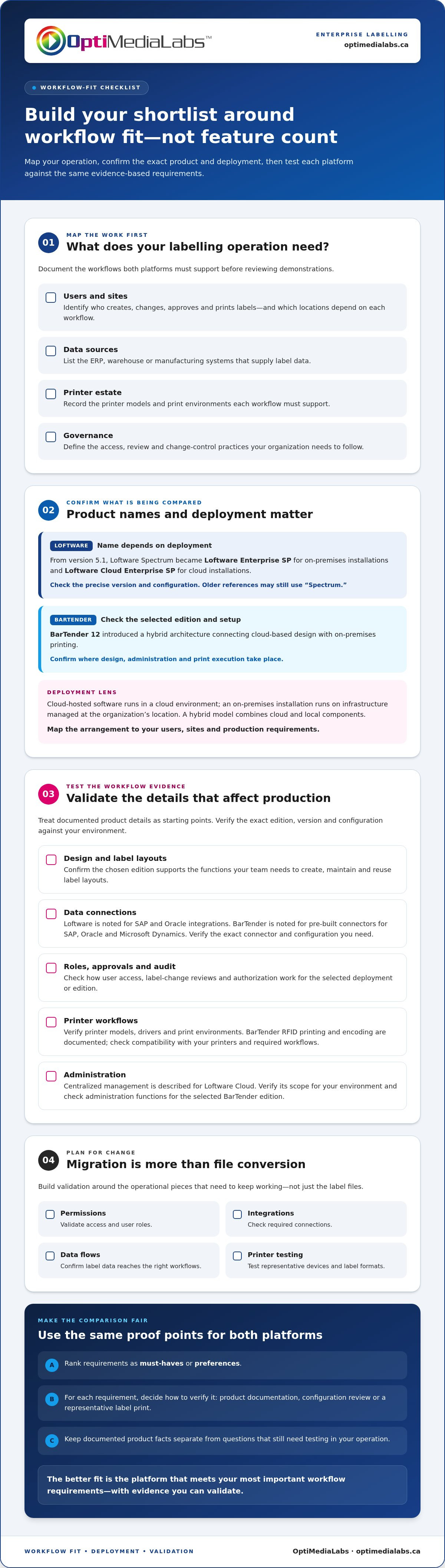
Write these requirements down before reviewing product demonstrations. For each one, note how you’ll verify it, such as checking product documentation, reviewing a configuration or printing a representative label. This gives both platforms the same evaluation criteria and makes open questions visible.
What does enterprise cloud labelling mean?
Cloud-hosted software runs in a cloud environment, while an on-premises installation runs on infrastructure managed at the organization’s location. A hybrid model combines cloud and local components. Vendor materials describe Loftware Cloud Enterprise SP as a cloud installation and Loftware Enterprise SP as on-premises. BarTender 12 introduced a hybrid architecture connecting cloud-based design and local printing. These distinctions affect where work happens, so map each arrangement to your users, sites and production requirements.
Are Loftware Spectrum and BarTender directly comparable?
First, name the products precisely. From version 5.1, Loftware Spectrum was rebranded as Loftware Enterprise SP for on-premises installations and Loftware Cloud Enterprise SP for cloud installations. “Spectrum” may still appear in older references, so don’t assume it names the current cloud option. BarTender 12 is a separate product line with enterprise offerings. Compare the specific edition and deployment arrangement under consideration rather than treating every BarTender installation as equivalent.
Keep product facts separate from evaluation questions. Loftware describes centralized management for its cloud offering, while BarTender 12’s documented hybrid architecture connects cloud design and local printing. How either platform fits your integrations, permissions, printer workflows and governance is an operational question to test against your requirements. OptiMediaLabs lists Loftware Cloud software and BarTender software for organizations assessing labelling options.
Compare Loftware Spectrum and BarTender by enterprise workflow
Compare specific deployment options and editions, not just brand names. The table separates documented product information from items to validate against current vendor documentation and your own environment. An entry marked for verification is a decision point, not a confirmed capability or limitation.
| Workflow area | Loftware | BarTender | What to evaluate |
|---|---|---|---|
| Deployment | Loftware Enterprise SP is the on-premises name; Loftware Cloud Enterprise SP is the cloud name from version 5.1. Verify the precise version and configuration. | BarTender 12 introduced a hybrid architecture connecting cloud-based design with on-premises printing. Verify the selected edition and setup. | Where do design, administration and print execution take place? |
| Design | Confirm available design functions for the selected Loftware edition and version. | BarTender is documented as supporting label design. Verify the required functions in the chosen edition. | Can the team create, maintain and reuse the label layouts it needs? |
| Data | Loftware is noted for SAP and Oracle integrations. Verify the exact integration and configuration. | Pre-built connectors are noted for SAP, Oracle and Microsoft Dynamics. Verify the connector for your edition and system. | Can required data fields populate labels accurately? |
| Controls | Verify user roles, approvals and audit requirements for the selected deployment. | Verify user roles, approvals and audit requirements for the selected edition. | How are label changes reviewed and authorized? |
| Printer workflows | Verify printer models, drivers and print environments. | RFID printing and encoding are documented. Verify compatibility with your printers and required workflows. | Test representative devices and label formats. |
| Administration | Centralized management is described for Loftware Cloud. Verify its scope for your environment. | Verify administration functions for the edition and deployment under consideration. | Who manages users, sites and shared resources? |
Compare deployment, administration and governance
A single-site team may have a straightforward administration model, while a multi-site enterprise may need consistent processes across locations, distinct user responsibilities and clear ownership of changes. List the controls you need for data residency, security and audit records instead of assuming a product’s deployment model covers them. For each requirement, record the product configuration or documentation that addresses it, then test the workflow in the intended environment.
Compare label workflows, data connections and printer support
Build a small, representative test set. Include labels with variable data, the actual source systems, common printer models and less frequent print scenarios. Check template reuse and change handling against the product’s documented functions. A connection listed for a platform doesn’t, on its own, establish that it supports your exact data fields or workflow.
For Loftware Spectrum vs BarTender enterprise cloud labeling, the useful comparison is evidence from your operation, not a blanket winner. OptiMediaLabs provides a contact option for labelling software questions for organizations that have defined their workflow requirements.
Will moving from BarTender to Loftware create migration risk?
It can, but testing templates and complete workflows before production cutover helps make the risk manageable. Converting a label file is only one part of a move. The wider migration may also involve data connections, user permissions, integrations, printer configurations and the operating steps that keep labels available to production teams.
Loftware’s conversion guidance describes support for selected template elements, including text, images, barcodes and page or printer settings. It also warns that conversion may not produce a fully accurate one-to-one match, and some barcode parameters may differ. Treat this as a planning input, not evidence that migration will fail. Confirm the current source-version requirements and conversion coverage for your files before estimating the work. Loftware Cloud software information can help you understand the Loftware option, while migration decisions should be based on your actual templates and environment.
What can template conversion preserve or change?
Conversion can provide a useful starting point, but imported labels still need review. Check barcode type and settings, variable fields, text placement, fonts, images, page dimensions and printer-specific settings. For example, a barcode may appear on the converted label while a parameter that affects its output requires adjustment. Compare the converted design and printed result with the approved original. Confirm exact source-version support and element handling in current Loftware documentation rather than assuming every file or design detail will carry over.
How should an enterprise validate a migration?
Use a staged plan. Start with an inventory, then test representative files and workflows before expanding the scope. Include unusual and production-critical label variants, not only the simplest templates.
- Inventory the environment. Record templates, data sources, integrations, printer models and drivers, user roles, and the locations that depend on each label.
- Select representative templates. Include common labels and complex cases with variable data, barcodes, images or printer-specific formatting.
- Convert and inspect. Review layouts and settings against the originals. Log exceptions, corrections and items that require manual rebuilding.
- Test end to end. Run data through the intended workflow and print on the relevant devices. Compare output for content, readability, placement and barcode behaviour.
- Approve the cutover. Document unresolved issues, assign owners and obtain operational sign-off before moving production workflows.
Keep the existing process available during testing where practical, and define how teams will handle exceptions during the transition. This reduces the chance that a successful file conversion is mistaken for a validated production workflow. In Loftware Spectrum vs BarTender enterprise cloud labeling, migration readiness is separate from feature fit. The evidence comes from tested templates, connected data and printer output, not the conversion result alone.
How to choose between Loftware Spectrum and BarTender for your operation
Start with the work your labelling system must support, then compare both platforms against the same requirements. For Loftware Spectrum vs BarTender enterprise cloud labeling, a structured evaluation separates non-negotiable needs from preferences and product claims that still require verification. Keep the scorecard tied to real workflows, not broad impressions from a demonstration.
Build an enterprise labelling requirements checklist
Document the operating environment before reviewing options. Include users and sites, label volumes, approvals, production-critical workflows, data sources, barcode symbologies, printer models and integrations. Add cloud or local deployment needs, security and governance requirements, and continuity expectations for technical review. Mark each item as a must-have, preference or open question, and identify who will validate it.
A requirement is a must-have if a failure would prevent a critical workflow or conflict with an established business control. Preferences can help distinguish options, but shouldn’t outweigh a core operational need. Keep unverified capabilities in a separate list until current product documentation or a relevant test supports them.
Run a fair platform evaluation
Use the same ordered process for each platform. Include the people who manage label changes and the staff who depend on accurate print output.
- Set the evaluation scope. Select the editions and deployment arrangements under consideration, then list must-haves, preferences and unverified items.
- Prepare shared test cases. Use identical sample labels, representative data, barcode requirements, printer models and print scenarios for both evaluations.
- Score the evidence. Rate each requirement consistently, such as meets, partly meets, does not meet or unverified. Note the evidence behind each rating.
- Assess the whole workflow. Compare usability for relevant roles, administration effort, integration fit and estimated migration work, not just the design screen.
- Resolve gaps before deciding. Assign owners to open questions and identify which need documentation, a technical review or a practical test.
For example, if a specific printer and data source are essential, test them together with a representative label instead of treating separate compatibility statements as proof of an end-to-end workflow. Give must-haves more weight in the decision. A strong preference shouldn’t compensate for an unresolved production requirement.
Record the result in a short decision brief covering confirmed fit, gaps, assumptions and next steps. This gives stakeholders a clear basis for choosing without treating an unverified feature as a commitment. Once your requirements are organized, review your labelling software requirements with OptiMediaLabs.
Plan your enterprise labelling software decision with OptiMediaLabs
Choose based on verified workflow fit, deployment requirements and migration readiness, not a broad brand ranking. Loftware and BarTender can each be part of an enterprise evaluation, but the right option depends on how your teams create, manage and print labels. Keep the product name and edition clear: from version 5.1, Loftware Spectrum was rebranded as Loftware Enterprise SP for on-premises installations and Loftware Cloud Enterprise SP for cloud installations.
OptiMediaLabs Canada lists both Loftware and BarTender software. Its BarTender label design software information can support your product research alongside your documented requirements. A focused discussion is most useful when you can describe the workflows you need to support and the questions that remain after your evaluation.
Prepare for a focused software discussion
Bring practical details that help frame the comparison: your printer list, sample labels, data sources, integration requirements and workflow notes. Identify the exact editions and deployment arrangements under consideration. If migration is part of the decision, note the template versions involved, conversion questions, and the tests needed for data, permissions and printer output. This keeps the conversation centred on product fit and relevant product information.
- Environment: sites, users, printer models and print locations.
- Workflows: label creation, change review, approvals and production use.
- Open questions: edition details, integrations, deployment, template conversion and validation.
Make the next step clear
Neither platform is universally best for every enterprise. A product that aligns with one organisation’s deployment and governance needs may not suit another’s printer environment or migration scope. Use the evidence from your requirements review and representative tests to narrow the choice, then separate established facts from items that still need technical validation. This gives your team a clear basis for the next decision.
For Loftware Spectrum vs BarTender enterprise cloud labeling, compare the specific software options against your operation’s needs and the evidence from your evaluation.
Set your labelling decision up for a confident next step
Turn your shortlist into a practical decision record. Assign an owner to each remaining technical question, note what evidence will resolve it, and agree on who must approve the change before any production transition. This gives operations, IT and procurement a shared basis for moving forward, even if the final choice is to retain the current platform.
The value of Loftware Spectrum vs BarTender enterprise cloud labeling is not a forced winner. It’s a clearer view of what your organization needs to verify, what it’s prepared to change and which workflows should guide the decision. Keep the evaluation focused on requirements that affect everyday label production and the readiness of the teams responsible for it.
OptiMediaLabs lists Loftware Cloud software and BarTender label design software, along with barcode software and related labelling equipment. To discuss the software options against your requirements, contact OptiMediaLabs with your enterprise labelling software questions.
Frequently Asked Questions
Is Loftware Spectrum the same as Loftware Cloud?
No. “Loftware Spectrum” and “Loftware Cloud” aren’t interchangeable current names. From version 5.1, Spectrum was rebranded as Loftware Enterprise SP for on-premises installations and Loftware Cloud Enterprise SP for cloud installations. If an older quote, template guide or system inventory says “Spectrum,” match it to the exact version and deployment before comparing it with a current offering. Product naming alone doesn’t establish feature equivalence or a migration path.
Can BarTender run in a cloud-based enterprise labelling workflow?
Yes. BarTender 12 introduced a hybrid architecture that connects cloud-based design with on-premises printing. That can be relevant when teams want cloud design workflows while print execution remains local. It doesn’t mean every component or printer runs in the cloud. Check current documentation for the specific edition and setup, then map the architecture to how your sites access label designs and send work to printers.
How does Loftware compare with BarTender for enterprise label management?
Loftware is positioned for enterprise label management and is noted for centralized management and integrations, particularly with SAP and Oracle. BarTender is recognized for label design and ease of use, and supports RFID printing and encoding natively. These distinctions can guide your evaluation, but don’t establish a universal winner. Compare the exact editions against your administration model, data connections and print workflows. The phrase Loftware Spectrum vs BarTender enterprise cloud labeling covers different deployment arrangements, not just two brand names.
What happens to BarTender label templates when migrating to Loftware?
Some template elements may be converted, but treat the imported file as a starting point, not an approved production label. Review its appearance and settings, then test it using representative data and the intended printer. Keep a record of changes, such as adjusted barcode parameters or text placement. Also distinguish template conversion from migrating the connected data, permissions and print workflows that teams rely on.
Can Loftware convert every BarTender label template accurately?
No. Loftware’s conversion guidance warns that conversion may not provide a fully accurate one-to-one mapping, and some barcode parameters may differ. Supported source versions and elements can affect what transfers, so verify current documentation for the files in scope. Inspect converted layouts, variable fields, images and barcode settings, then compare printed output with the approved original. Don’t treat a successful import as proof that every design detail or print result is preserved.
Which platform is better for multi-site enterprise labelling?
Neither is automatically better for every multi-site operation. Loftware’s enterprise positioning and centralized management may align with organizations seeking common label management across locations. BarTender’s enterprise options may also fit complex workflows, depending on the edition and architecture. Compare how each candidate handles your required data connections, administration responsibilities and local print environments. A representative test across more than one site can reveal practical differences that a feature list won’t show.
How should a company test labelling software before switching?
Set pass criteria before testing, such as correct label content, barcode settings, layout and print output on required devices. Choose representative templates, including complex or production-critical examples, and use the same test data and printer scenarios for each platform. Include data connections and user permissions in the trial, not just template editing. Record failures and exceptions, resolve them, and obtain approval from the teams responsible for label accuracy and production before rollout.