
NiceLabel Designer vs PowerForms: Database Integration Differences Explained (2026 Guide)
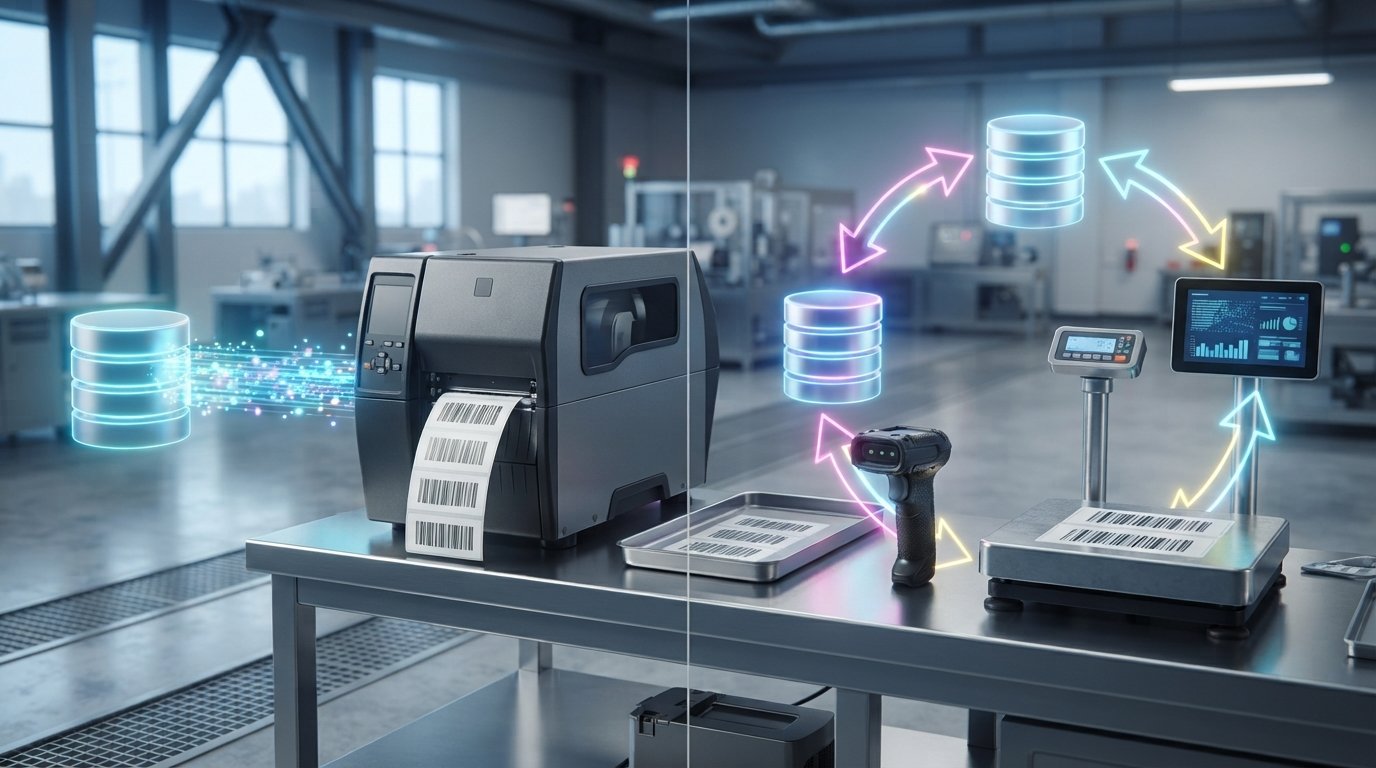
Upgrading your label software will not eliminate costly production floor mistakes if your system only treats your database as a static reference sheet. While both platforms connect to standard sources like SQL Server, Oracle, and Excel, understanding the NiceLabel Designer vs PowerForms database integration differences comes down to one clear architectural split: Designer simply reads data records, whereas PowerForms actively interacts with them to run automated, bidirectional workflows.
You already know the frustration of shipping delays and scrap caused by manual keyboard entry at the print station. You also shouldn't have to decode confusing multi-tier licensing just to connect an industrial barcode printer to your ERP system. This guide clarifies the exact database connectivity capabilities, validation rules, and technical boundaries of each NiceLabel edition. By exploring these core distinctions, you can streamline operator workflows, eliminate data-entry errors, and select the right software deployment for your Canadian facility.
Key Takeaways
- Master the core NiceLabel Designer vs PowerForms database integration differences to determine whether standard read-only queries satisfy your operational needs.
- Discover how PowerForms unlocks bidirectional database writebacks, automated event triggers, and audit logging to eliminate manual workstation mistakes.
- Explore how purpose-built forms interface directly with ERP platforms and hardware peripherals such as industrial scales and barcode scanners.
- Apply practical procurement criteria to evaluate production volume, operator skill levels, and database complexity before upgrading your software tier.
- Ensure complete deployment synergy by pairing genuine Loftware licensing with industrial thermal barcode printers across your Canadian facility.
Core Architecture: How NiceLabel Designer and PowerForms Approach Database Connectivity
Industrial printing operations rely on seamless communication between enterprise databases and thermal production hardware. Choosing the right tier requires a clear grasp of the architectural distinctions between these platforms. Standard label design software handles dynamic data sources, but evaluating the NiceLabel Designer vs PowerForms database integration differences reveals a fundamental split in how data flows across your facility.
NiceLabel Designer operates as a layout engine. PowerForms functions as an interactive application platform. Recognizing this data directionality prevents costly procurement missteps and ensures your Canadian production line maintains uninterrupted throughput.
NiceLabel Designer: Read-Only Data Extraction Mechanics
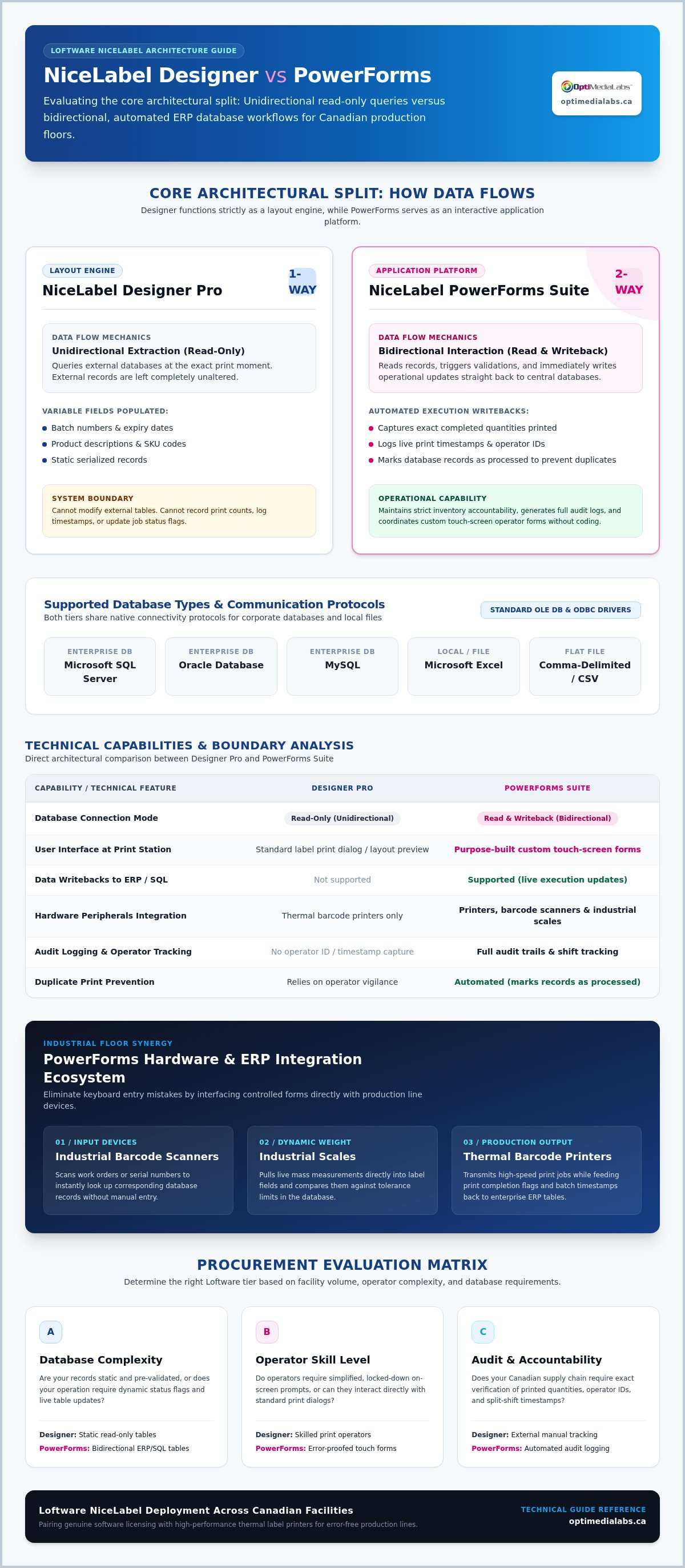
NiceLabel Designer Pro uses unidirectional data extraction. It queries relational databases via standard OLE DB or ODBC protocols to populate dynamic fields at the moment of print. The system pulls variable data seamlessly:
- Batch numbers and expiry dates
- Product descriptions and SKU codes
- Static serialized records
Because Designer cannot modify external tables, it cannot record print counts, log timestamps, or update job flags. It excels on production lines where central databases contain fully validated, read-only data.
NiceLabel PowerForms: Interactive, Application-Driven Database Control
NiceLabel PowerForms Suite transforms label printing through bidirectional database interaction. Built with an intuitive application designer, it creates custom touch-screen forms without requiring programming skills. Operators work through controlled on-screen steps rather than raw design templates.
Bidirectional connectivity allows the system to read records, prompt user checks, and write execution updates straight back to SQL Server or ERP tables. Capturing completed quantities, print timestamps, and operator IDs directly closes the data loop. For facilities deploying NiceLabel software alongside robust thermal label printers, this architecture eliminates manual errors and maintains strict inventory accountability across Canadian supply chains.
Technical Database Integration Differences: Designer vs PowerForms Compared
Evaluating your facility's database infrastructure requires examining how each package processes tables, views, and external queries. While both platforms originate from the Loftware ecosystem, the NiceLabel Designer vs PowerForms database integration differences determine whether your operation relies on static label batching or interactive process automation. Exploring our complete NiceLabel software solutions helps clarify how these features map directly to your production floor.
Supported Database Types and Data Source Protocols
Both Designer Pro and PowerForms Suite connect natively to local files, including Microsoft Excel spreadsheets, Access databases, and comma-delimited text exports. For industrial environments, both tiers communicate with enterprise systems like Microsoft SQL Server, Oracle, and MySQL via standardized OLE DB and ODBC drivers. This baseline connectivity guarantees your item numbers, lot codes, and descriptions align with global supply chain standards without requiring expensive database middleware.
Read-Only Record Retrieval vs Bi-Directional Transactions
Designer Pro handles record retrieval smoothly. It queries selected tables, maps fields to label templates, and transmits the job to the print engine. However, the data stream stops there. PowerForms Suite transforms this process into a full two-way transaction. It updates inventory balances, marks records as processed, and logs complete audit trails right after a label prints. This bidirectional control prevents accidental duplicate printing across split production shifts. You can learn more about managing these operational setups in our professional barcode labeling software guide.
Custom SQL Scripting, Stored Procedures, and Dynamic Filtering
Designer Pro restricts database filtering to visual query builders and fixed WHERE clauses configured during template design. PowerForms Suite gives technical teams complete control over dynamic SQL execution. Applications construct runtime SQL statements based on live operator scans or drop-down choices. PowerForms also executes backend stored procedures with input and output parameter handling, returning verified values straight to the interface. Integrated VBScript and Python logic can reformat raw database strings, calculate check digits, and sanitize inputs before thermal dispatch. If your plant runs complex SQL tables, connect with our technical team to verify your system compatibility.
Print-Time Data Manipulation and Workflow Error Prevention
Production scrap and missed shipments rarely stem from mechanical printer malfunctions. They happen when operators type numbers manually into variable fields at the print station. Examining the NiceLabel Designer vs PowerForms database integration differences reveals how runtime validation protects production lines from human error.
Standard Print Dialogs vs Custom Operator Interfaces
Designer Pro uses standard Windows print dialogues. While functional, this workflow exposes the raw label template. Operators can accidentally alter static elements, change printer settings, or pick incorrect database rows from unfiltered lists.
PowerForms replaces this vulnerability with an encapsulated graphical application. Technical teams lock the underlying design file completely. Production staff only see clear input prompts, oversized touchscreen buttons, and precise label previews, keeping templates secure.
Live Data Validation and Peripheral Integration
Operator mistakes plummet when the software checks inputs against backend tables before releasing a print job. PowerForms runs real-time SQL queries as soon as an operator scans a work order or keys in a batch code.
If the entered value does not match an open database record, PowerForms halts printing immediately. The platform also interfaces with industrial hardware, including handheld scanners and digital floor scales. It captures gross weights directly from scale serial ports and verifies them against expected tolerances. Check our industrial labeling solutions guide to explore compatible print and peripheral hardware configurations.
Audit Trails, Traceability, and Database Status Updates
Regulatory compliance across Canadian supply chains demands verifiable accountability. Designer Pro cannot log operational events back to central systems. In contrast, PowerForms logs print history automatically:
- Operator credentials and workstation identifiers
- Exact print timestamps and batch run quantities
- Unique serial ranges dispatched to thermal print engines
Once a batch finishes, PowerForms writes status updates directly to enterprise tables. It marks work orders as complete, helping Canadian industrial facilities meet strict food, pharmaceutical, and manufacturing traceability standards.
Selecting Between Designer and PowerForms: Practical Decision Criteria
Procuring industrial software requires aligning technical capabilities with day-to-day plant operations. A miscalculation can leave your team with an interface too rudimentary to enforce compliance, or an overly complex tier burdened with unneeded features. Reviewing the NiceLabel Designer vs PowerForms database integration differences through an operational lens ensures strong return on investment across Canadian manufacturing and distribution facilities.
Consider both your current database architecture and your projected production growth over the next five years. Clear boundaries separate static label formatting from dynamic process orchestration.
When NiceLabel Designer is the Ideal Software Solution
NiceLabel Designer Pro satisfies operations where data structures remain straightforward and operators only print pre-verified records. Choose Designer Pro if your workflow matches these criteria:
- Your product catalog lives in stable spreadsheets, text files, or read-only database views
- Operators select jobs from simple drop-down menus without modifying database values
- Your facility handles lower production volumes across dedicated, supervised desktop stations
For standalone stations that need basic template design without application scripting, teams often compare Designer against BarTender design software to meet their localized printing requirements.
When Your Operations Demand NiceLabel PowerForms
NiceLabel PowerForms Suite becomes indispensable when labeling errors directly threaten customer compliance or supply chain velocity. Select PowerForms Suite if your facility requires:
- Immediate database writebacks to adjust inventory counts and prevent duplicate label runs
- Custom touchscreen interfaces that hide underlying label designs from shop-floor workers
- Direct integration with serial hardware such as industrial scales, barcode scanners, and PLC units
- Scalable architecture that links on-premise stations toward enterprise solutions like Loftware Cloud
If production downtime and operator data-entry errors are driving up scrap costs on your line, request a technical consultation with OptiMediaLabs to identify the precise software tier your database requires.
Deploying Your Database-Integrated NiceLabel Solution Across Canada
Implementing an automated labeling environment requires more than software configuration. Print stream performance depends entirely on how your software coordinates with physical print engines. Understanding the NiceLabel Designer vs PowerForms database integration differences ensures you purchase the proper software tier, but pairing that software with certified hardware guarantees your production lines operate without unexpected latency.
OptiMediaLabs Canada serves industrial operations across Canada as an authorized distributor of Loftware NiceLabel software suites. By coordinating software licences alongside industrial print machinery, facilities maintain continuous production uptime from coast to coast.
Hardware Synergy: Industrial Thermal Printers and Native Drivers
NiceLabel utilizes native printer drivers designed to communicate directly with hardware without Windows spooler translation delays. This native communication allows variable data pulled from SQL tables to reach print heads instantly. High-volume manufacturing lines gain maximum throughput by deploying robust Zebra industrial printers built for 24/7 duty cycles.
Durable scannability depends on matching media to the printing environment. Pairing your printers with genuine Zebra thermal ribbons ensures every database-driven barcode maintains sharp edge definition under harsh conditions. Consult our comprehensive label printer consumables guide to match label facestocks and thermal ribbons correctly.
Procuring Genuine Software Licences and Ongoing Supply Support
OptiMediaLabs Canada delivers genuine NiceLabel Designer Pro and PowerForms Suite licences tailored directly to your facility's active printer count. Procuring software through an authorized Canadian source simplifies license administration, renewals, and system expansion as your operational footprint grows.
Consolidating your printing infrastructure under one national distributor eliminates operational friction:
- Genuine Loftware NiceLabel software suites and seat additions
- Industrial thermal transfer and direct thermal label printers from Zebra, Toshiba, and Seiko
- Certified barcode ribbons and durable label stock shipped nationwide
Aligning your backend database operations with proven hardware prevents costly production shutdowns. When you are ready to update your labeling infrastructure or require licensing assistance, contact OptiMediaLabs Canada today to speak directly with an authorized Canadian specialist.
Optimize Your Production Floor with the Right NiceLabel Deployment
Choosing the proper software edition comes down to workflow control. While Designer Pro provides dependable read-only data extraction for standard batch runs, PowerForms Suite delivers the bidirectional data writebacks, custom operator interfaces, and peripheral integration required to eliminate workstation errors. Evaluating the NiceLabel Designer vs PowerForms database integration differences ensures you protect your operational budget while maintaining strict supply chain traceability.
As an authorized Canadian distributor for Loftware and NiceLabel software suites, OptiMediaLabs provides expert technical consultation to match software tiers with your facility's database needs. We pair genuine licensing with a complete nationwide supply of compatible industrial printers, thermal ribbons, and durable media. Contact our Canadian specialists for NiceLabel guidance today to streamline your labeling workflows and build a reliable, error-free printing environment.
Frequently Asked Questions
Can NiceLabel Designer write updated serial numbers or print logs back to our database?
No. NiceLabel Designer Pro only supports unidirectional database communication. It queries and reads database tables to display variable fields on printed labels. It cannot execute writeback transactions such as logging printed serial numbers, recording timestamps, or decrementing inventory quantities. If your facility requires automated database writebacks, upgrading to PowerForms Suite is necessary to establish bidirectional transactions.
Does NiceLabel PowerForms require programming expertise to build custom database input forms?
No advanced coding skills are required to build basic forms in PowerForms Suite. The software includes an intuitive drag-and-drop application builder that lets technical administrators design interactive data-entry screens with buttons, drop-down menus, and data grids. Implementing complex data validation, dynamic SQL queries, or advanced business logic can involve lightweight VBScript or Python scripts to handle specialized database interactions cleanly.
Which database types can connect to NiceLabel Designer and PowerForms out of the box?
Both platforms connect natively to standard file-based data sources such as Microsoft Excel, Microsoft Access, CSV, and plain text files. They also support enterprise relational database management systems, including Microsoft SQL Server, Oracle, and MySQL. When evaluating NiceLabel Designer vs PowerForms database integration differences, both tiers use standard OLE DB and ODBC drivers to connect to almost any structured data repository in your warehouse.
How does PowerForms prevent manufacturing operators from printing incorrect label data?
PowerForms replaces standard Windows print dialogues with locked, customized forms. Operators cannot accidentally alter the label layout or change printer driver settings. The form validates all scanned or manually entered information against live database records before releasing the print job. If a scanned part number or lot code doesn't exist in the database, the system halts execution and alerts the operator immediately.
Can I upgrade my licence from NiceLabel Designer to PowerForms later as my business grows?
Yes, you can upgrade your subscription from NiceLabel Designer Pro to NiceLabel PowerForms Suite as your operational demands expand. Loftware allows seamless licence tier transitions without requiring you to rebuild existing label templates. OptiMediaLabs assists Canadian facilities with license upgrades, helping you preserve existing label designs while unlocking bidirectional database capabilities and custom form functionality when your lines require it.
Does NiceLabel work seamlessly with thermal barcode printers from Zebra and Toshiba?
Yes, NiceLabel features native printer drivers engineered specifically for industrial thermal barcode printers from leading manufacturers like Zebra and Toshiba. These native drivers bypass standard Windows print spooling delays, allowing data-heavy print commands and database queries to transmit directly to the printer hardware. This tight integration ensures maximum printing speeds, crisp barcode resolution, and minimal network latency on demanding production lines.
What is the primary difference between NiceLabel Cloud and on-premises PowerForms editions?
The main distinction centres on infrastructure hosting and deployment architecture. On-premises PowerForms operates locally on your internal servers and workstations, offering complete control over local network data. Loftware Cloud provides centralized browser-based label management and document storage hosted remotely, while still running local print clients. This architectural difference helps Canadian enterprises balance cloud convenience against internal data governance or PIPEDA compliance policies.