
NiceLabel Software Canada: 2026 Comparison and Selection Guide
A single manual data entry error on a GHS compliance label can halt an entire shipment and cost your facility thousands in lost productivity. When you're searching for NiceLabel software Canada, you aren't just looking for a design tool; you're looking for a way to safeguard your production line. We know that managing complex GS1 requirements while juggling hardware from Afinia or Epson can feel like a constant battle against technical friction. It's frustrating when software incompatibility slows down your output or leads to costly reprints.
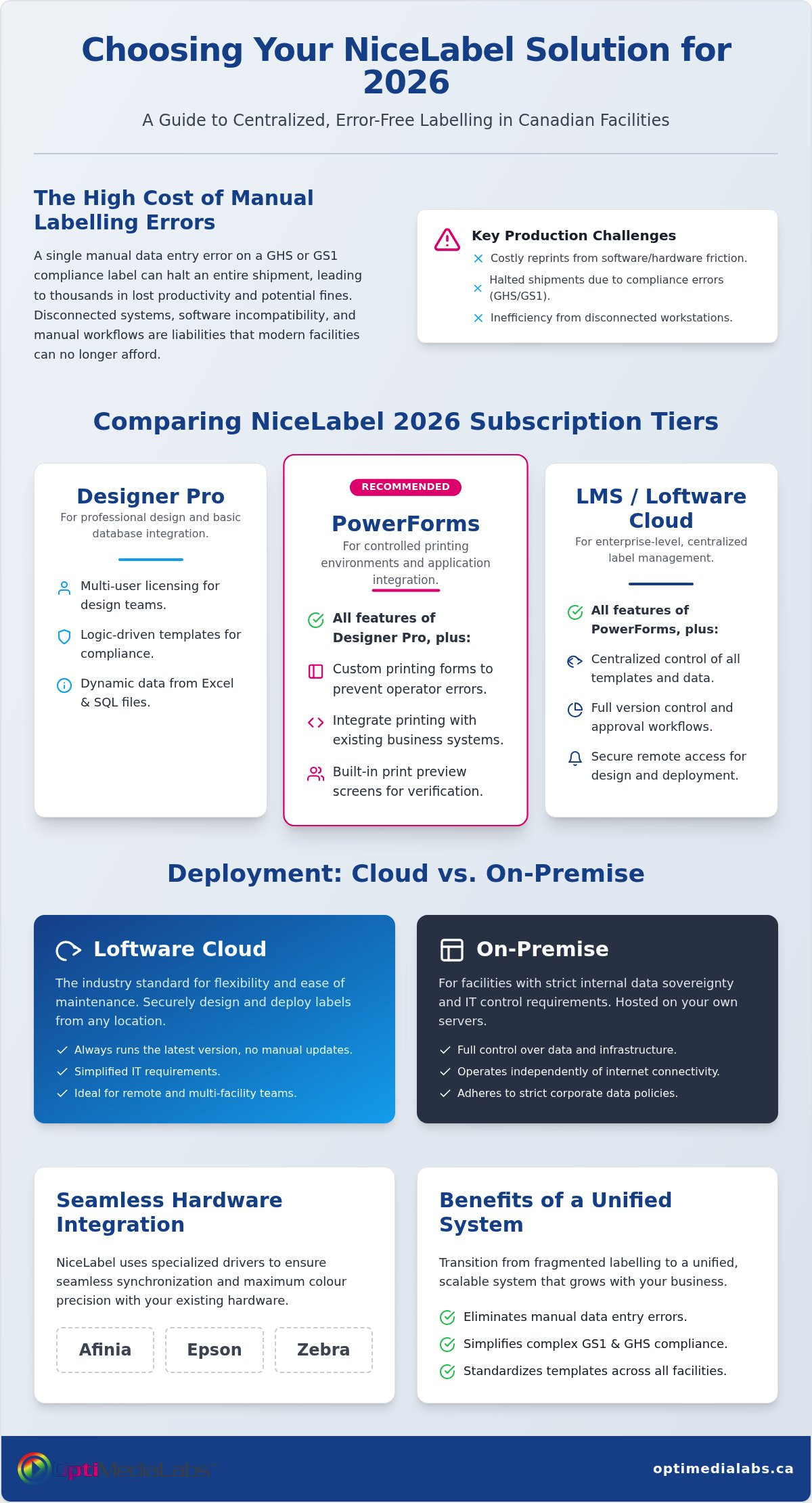
You likely realize that manual workflows are a liability you can no longer afford. This guide will help you compare the 2026 subscription tiers to find the exact barcode management solution that eliminates errors and centralizes your labelling operations. We'll break down the specific features of Designer Pro, PowerForms, and the rebranded Loftware Cloud to ensure your software and hardware work in perfect harmony. By the end of this article, you'll have a clear path to achieving error-free printing and a more efficient, stable facility.
Key Takeaways
- Identify the core differences between Designer Pro, PowerForms, and LMS to select the subscription tier that matches your facility's production volume.
- Compare NiceLabel software Canada against BarTender to determine which interface and ERP integration capabilities best suit your team's technical workflow.
- Learn how to leverage specialized drivers to achieve seamless synchronization and maximum colour precision with Afinia and Epson hardware.
- Discover how centralized label management eliminates manual data entry errors and simplifies complex GS1 and GHS compliance requirements.
- Follow a professional two-step assessment framework to transition from fragmented labelling to a unified, scalable system that grows with your business.
What is NiceLabel Software and Why is it the Standard for Canadian Industry?
NiceLabel has evolved beyond a simple design application. It's now a comprehensive Label Management System (LMS) that centralizes the entire lifecycle of a label, from initial design to final print. For many Canadian manufacturers, NiceLabel software Canada represents the vital bridge between raw production data and compliant physical output. It utilizes sophisticated barcode technology to ensure that every product moving through the supply chain is traceable and accurate.
By 2026, the integration within the Loftware ecosystem is complete. While the core "NiceLabel" interface remains familiar to users, it now operates under the Loftware umbrella. This shift reflects a move away from isolated, disconnected workstations toward a unified, cloud-first approach. It's about stability. It's about security. It's about ensuring your facility doesn't stop because of a software glitch.
Compliance isn't optional in the Canadian industrial sector. Whether you're adhering to GHS standards for chemical safety or GS1 requirements for retail distribution, NiceLabel provides the logic-driven templates needed to stay compliant. It automates the complex math and formatting required for these standards, which significantly reduces the risk of costly regulatory fines or rejected shipments at the border.
Key Benefits for Production Environments
Efficiency in a production facility depends on the elimination of friction. Implementing NiceLabel software Canada allows for a centralized control point that reduces administrative overhead. It achieves this by connecting directly to your existing databases. This connection removes the need for manual data entry, which is the leading cause of labelling errors. When your operators don't have to type in batch numbers or expiry dates, your accuracy rates soar.
- Standardization: Maintain a single "master" template that updates across all Canadian facility locations simultaneously.
- Scalability: The software grows with you. You can start with a single printer on a local station and expand to a national enterprise network without redesigning your entire library.
- Error Prevention: Built-in print preview screens ensure operators see exactly what will print before they hit the button.
The Role of Loftware in Modern Labelling
The 2026 landscape offers two primary deployment paths: cloud-based and on-premise. While on-premise solutions remain popular for facilities with strict data sovereignty requirements, the Loftware Cloud model has become the industry standard for its ease of maintenance. Loftware NiceLabel Cloud's primary advantage for remote teams is the ability to securely design and deploy labels from any location without maintaining local server infrastructure. This flexibility allows your quality control team in Ontario to approve a design that prints instantly in a British Columbia warehouse. It simplifies IT requirements and ensures you're always running the latest version without manual updates.
Comparing NiceLabel Tiers: Designer Pro vs. PowerForms vs. LMS
Selecting the right tier for NiceLabel software Canada depends entirely on your operational complexity. By July 2026, the licensing landscape has shifted completely to a subscription-only model. This change ensures that every Canadian facility receives continuous security updates and immediate access to new features without the friction of manual upgrades. While legacy perpetual licenses may still exist in older environments, new implementations now utilize annual subscriptions that scale with your printer count.
Each tier serves a specific purpose in the production chain. Choosing the wrong one can lead to either unnecessary costs or technical bottlenecks that slow down your shipping dock. If you are unsure which tier fits your current hardware setup, you can speak with a technical specialist to review your requirements.
NiceLabel Designer Pro: For Professional Design
Designer Pro is the baseline for businesses that need more than basic text and barcodes. It supports multi-user licensing and robust database connectivity, allowing you to pull variable data from Excel or SQL files. One of its most valuable features is "EasyForms." This tool allows you to create a locked-down printing interface. It prevents unauthorized users from changing your master templates. For boutique Canadian brands and small manufacturers, this tier provides the stability needed to maintain brand consistency across small batches.
NiceLabel PowerForms: Automating the Print Process
Efficiency increases when you remove the human element from the design process. PowerForms is built for automation. It allows you to create customized printing applications that guide operators through a specific workflow. You can integrate this tier with existing hardware like industrial scales or PLC systems on your assembly line. This is particularly effective for high-volume food or chemical labelling where weight-based data or batch-specific safety information must be accurate. It transforms the labelling station into a controlled application rather than a design suite.
NiceLabel LMS: Enterprise Control and Compliance
Regulated industries require a higher level of oversight. The Label Management System (LMS) tier provides a centralized Document Management System (DMS). This ensures that every facility in your national network uses the exact same approved version of a label. It includes full audit trails and document versioning, which are essential for meeting GS1 Barcode Label Software compliance standards. If your business must prove who printed what and when, LMS is the only viable path. It offers the transparency required for medical, pharmaceutical, and aerospace sectors where traceability is a legal mandate.
NiceLabel vs. BarTender: Choosing the Right Software for Your Workflow
Choosing between these two industry leaders is a critical decision for any Canadian facility manager. It often comes down to your existing IT infrastructure and the technical proficiency of your team. While both provide high-performance output, their philosophies on user experience and data handling differ significantly. You need a solution that fits your specific workflow without creating new technical debt.
NiceLabel utilizes an interface that mirrors Microsoft Word. This makes it immediately accessible to non-technical staff. You won't spend weeks on training. Conversely, BarTender offers a more specialized environment that appeals to IT professionals who prefer granular control over every design element. A major technical advantage for NiceLabel software Canada is its library of over 4,500 "true" Windows drivers. These drivers offload the processing to the printer itself. This keeps your production lines moving at maximum speed by reducing the data load on your local network.
Integration with ERP and WMS systems is where the competition intensifies. BarTender is widely recognized for its ability to hook into complex legacy systems through a variety of automation triggers. It's a stable solution for many established industrial environments. NiceLabel, however, has pivoted toward modern, centralized management. It handles cloud-based data sources with superior efficiency. This makes it the preferred choice for facilities that prioritize remote accessibility and web-based printing across different provinces.
In 2026, the cost of ownership is defined by licensing models. NiceLabel has moved exclusively to a subscription model. This provides a lower entry cost and predictable annual budgeting. BarTender maintains a hybrid approach, still offering perpetual licenses for certain editions. This may appeal to businesses that prefer a one-time capital expenditure, though the subscription model remains the standard for those seeking continuous updates and support.
When to Choose NiceLabel
If your facility operates across multiple sites or requires remote printing capabilities, NiceLabel is the clear winner. Its cloud-first architecture allows for seamless label deployment without local server hurdles. It's the ideal NiceLabel software solution for teams that need to get up and running quickly with minimal IT intervention. It simplifies the design phase so your staff can focus on production rather than troubleshooting software layouts.
When to Choose BarTender
Opt for BarTender if your workflow relies on highly specific industrial automation triggers or deep integration with older, on-premise ERP databases. It remains a powerhouse for complex, localized automation where cloud connectivity isn't a priority. For a deeper dive into these specific capabilities and how they apply to your hardware, read our BarTender software Canada implementation guide.
Hardware Compatibility: Integrating NiceLabel with Afinia, Epson, and Zebra
Hardware is only as good as the software driving it. In a high-volume facility, the synergy between your design interface and your printer determines your total cost of ownership. Using NiceLabel software Canada provides access to a library of over 4,500 native drivers. These drivers are built specifically to communicate with the internal language of your hardware. This direct communication reduces print time. It ensures that what you see on your monitor is exactly what appears on the roll. It eliminates the translation errors common with generic Windows drivers.
If you need help matching software to your specific printer model, consult with our technical support team for a compatibility review.
Optimizing Colour Label Production
Achieving professional results with Afinia Color Label Printers requires precise colour management. NiceLabel allows you to define ICC profiles directly within the software. This ensures that brand-specific colours remain consistent across different media types. You can also manage your Epson ink cartridges more effectively by using design-time ink estimation tools. These tools help you identify high-consumption designs before you commit to a large print run. For facilities using Afinia Label Cutters & Finishers, NiceLabel generates the necessary registration marks and cut paths. This integration automates the transition from printing to finishing, which eliminates the need for manual alignment between steps. It also allows for the management of variable data for high-speed industrial finishers, ensuring each unique cut matches the printed data perfectly.
Thermal and Barcode Precision
Barcode scannability is the lifeblood of logistics. On Zebra or Toshiba thermal printers, even a slight misalignment can lead to rejected shipments. Implementing NiceLabel software Canada ensures your hardware operates at peak efficiency by optimizing thermal head heat settings. This creates crisp edges on every 1D and 2D code. The software also allows you to monitor the status of your thermal transfer ribbons. You can set alerts for low media or ribbon breaks to prevent downtime. If your operation involves RFID, the software provides a drag-and-drop interface for encoding tags while simultaneously printing the visual label. This dual-action process is essential for modern inventory tracking in high-speed distribution centres.
Implementing NiceLabel in Your Production Environment via OptiMediaLabs
Transitioning to a new label management system requires a methodical approach to avoid production downtime. Successful implementation of NiceLabel software Canada involves more than just a software download; it requires aligning your digital workflow with your physical hardware. We follow a structured four-step process to ensure your facility achieves immediate stability and long-term scalability.
- Step 1: Assessing Volume and Compliance: We begin by auditing your current output. Do you manage 500 labels a week or 50,000 a day? Your specific industry compliance needs, such as GHS for chemicals or GS1 for retail, will dictate the complexity of your template logic.
- Step 2: Selecting the Appropriate Edition: Based on the audit, we'll help you choose between Designer Pro, PowerForms, or the LMS tier. We ensure you don't overpay for enterprise features you won't use, or hit technical walls with a tier that lacks necessary automation.
- Step 3: Hardware Synchronization: This is where technical precision matters. We assist with the installation of specialized drivers for your Afinia or Epson printers. We'll ensure the software recognizes specific hardware features like built-in cutters or RFID encoders.
- Step 4: Training and Template Migration: We guide your team through the migration of legacy templates. We'll show your staff how to use the "EasyForms" interface to prevent design errors during high-pressure shifts.
Why Source NiceLabel from a Canadian Distributor?
Procuring NiceLabel software Canada through a domestic specialist like OptiMediaLabs offers several operational advantages. We aren't just software resellers; we're authorized distributors for the hardware that actually prints your labels. This dual expertise means we understand the synergy between a software setting and a physical print head. We provide local Canadian knowledge regarding industrial standards and GHS requirements, which is vital for facilities operating in Ontario, Quebec, or across the Prairies. Our national coverage simplifies procurement for large manufacturing accounts with multiple facility locations.
Next Steps for Your Labelling Project
Don't let manual errors or outdated software slow down your shipments. The path to a centralized, error-free environment starts with a technical review of your current database and hardware setup. Whether you're integrating with a complex ERP or simply looking to standardize templates across two printers, we can provide the necessary guidance.
You can request a software demo to see the interface in action or consult with one of our specialists regarding your specific database integration needs. We'll help you verify which subscription model fits your 2026 budget and production goals. Take the first step toward a more efficient facility today. Explore NiceLabel solutions at OptiMediaLabs and secure your production line.
Future-Proof Your Facility with Professional Label Management
Achieving error-free production in 2026 requires a unified system that connects your data directly to your hardware. You've discovered how selecting the correct subscription tier eliminates manual entry errors and ensures GS1 compliance across your entire network. Whether you're maximizing the colour precision of Afinia equipment or managing high-speed thermal output on Zebra units, the synergy between software and hardware is the foundation of an efficient shipping dock. It's about building a stable environment where your technical resources work in perfect harmony.
OptiMediaLabs is your partner in this transition. As an authorized distributor for Afinia and Epson with deep expertise in industrial barcode compliance, we provide the technical support needed to implement NiceLabel software Canada effectively. We offer national Canadian shipping and support to ensure your facility stays online and compliant. Moving past fragmented workflows allows you to embrace a centralized solution that scales alongside your business growth.
Upgrade your labelling workflow with NiceLabel from OptiMediaLabs
Your path to a more stable, secure, and productive labelling environment is within reach. We're here to ensure your transition is seamless and technically sound.
Frequently Asked Questions
Is NiceLabel software compatible with all label printers in Canada?
NiceLabel is compatible with virtually every industrial label printer used in the Canadian market. It utilizes a library of over 4,500 specialized Windows drivers to ensure high-performance output on brands like Afinia, Epson, and Zebra. These drivers offload processing to the hardware, which prevents network lag. If you use a standard thermal or colour inkjet printer, it's highly likely that NiceLabel supports it natively.
What is the difference between NiceLabel and Loftware?
Loftware is the global developer that acquired NiceLabel to expand its enterprise capabilities. By 2026, the rebranding has fully integrated the software into the broader Loftware ecosystem. While the core product is often referred to as NiceLabel, it's technically part of the Loftware cloud and on-premise portfolio. You still get the same user-friendly interface, but with the added stability and resources of the world's largest labelling software company.
Can I use NiceLabel to print GHS compliant chemical labels?
You can absolutely use NiceLabel to design and print GHS compliant chemical labels. The software includes built-in business logic that handles pictograms, signal words, and hazard statements automatically. This reduces the risk of non-compliance fines in the Canadian industrial sector. It links directly to your chemical databases to ensure that the correct safety information prints for every batch without manual intervention.
Does NiceLabel offer a cloud-based version for remote teams?
Yes, a cloud-based version is available and is now branded as Loftware Cloud. It allows remote teams to design, manage, and print labels from any location with an internet connection. This centralized approach is ideal for Canadian businesses with multiple warehouses. It eliminates the need for local server maintenance while ensuring that every site uses the most recent, approved label versions.
How many printers are included in a standard NiceLabel subscription?
A standard subscription for Designer Pro or PowerForms typically includes support for up to 3 printers. This allows you to print to three unique devices regardless of their physical location. If your facility expands, you can easily add more printer seats to your existing subscription. This flexible model ensures you only pay for the hardware capacity you actually utilize in your production environment.
Can I migrate my existing BarTender templates to NiceLabel?
There is no automated tool to convert BarTender files directly into NiceLabel format. You'll need to recreate your templates within the NiceLabel interface. However, because NiceLabel uses a familiar Microsoft Word-like design environment, this migration is usually straightforward. You can often import existing graphics and data connections to speed up the process. This ensures your new templates are optimized for the latest drivers.
Does NiceLabel support GS1 barcode standards for Canadian retail?
NiceLabel software Canada provides full support for all GS1 barcode standards required for Canadian retail and healthcare. It includes a built-in GS1 wizard that guides you through the creation of Application Identifiers (AIs) and check digits. This ensures your barcodes meet strict global standards for traceability. It's an essential tool for suppliers who need to satisfy the requirements of major Canadian retailers and distributors.
What are the system requirements for NiceLabel Designer Pro in 2026?
For 2026, NiceLabel Designer Pro requires a 64-bit version of Windows 10 or Windows 11. Your system should have at least 8GB of RAM and a modern multi-core processor to handle complex database connections and high-resolution graphics. You'll also need a stable internet connection for subscription activation and cloud features. These requirements ensure the software runs smoothly without lagging during critical print runs.