
On-demand Label Printing vs. Pre-printed Labels: Compare Costs

A cost benefit analysis of on-demand label printing depends on order size and how often label information changes. Pre-printed labels can cost less per label for large orders, while on-demand printing can reduce storage needs and waste from outdated stock. For small runs, on-demand printing may cost more per label.
The key point is that printing labels as needed can still be valuable when each label costs more. It lets you respond to product changes and produce colour labels with variable information, including barcodes, photos, languages, instructions, logos, and symbols.
Choosing between the two approaches means weighing more than unit cost. Compare waste, responsiveness, safety-label costs, order size, and colour requirements to see where each method fits. Consistent messaging and branding also matter, so match your label process to your production needs.
Key Takeaways
- Compare the total cost of each approach, including label storage and the risk of unused stock, not just the cost per label.
- Pre-printed labels can suit large, stable orders; on-demand printing may be a better fit when quantities are small or information changes often.
- For safety labels, consider how frequently instructions or other details change when weighing the risk of outdated stock.
- Assess whether colour, variable details, or multiple versions are important to your labelling process before choosing a method.
- Consistent branding is easier to maintain when label content and printing processes are controlled across users and production runs.
Faster response to product and regulatory changes
On-demand printing lets your team produce labels at its facility when needed, instead of waiting for pre-printed materials to arrive. This can make revisions easier to manage when a product’s ingredients, instructions, barcode, or packaging details change. Update the approved file, print the revised version, and use it for the next applicable run.
For Canadian products, the printing method does not determine label requirements. The product category and intended use guide what information and warnings belong on the label. The Globally Harmonized System of Classification and Labelling of Chemicals (GHS) requires coloured pictograms on labels for hazardous materials. If a hazard label changes, on-demand printing can help you produce a revised version without relying on unused stock bearing earlier information.
Set up a controlled revision process before printing. Decide who approves changes, make the current label file easy to distinguish from superseded versions, and check a sample before production. If a product’s handling instructions change, for example, compare the approved file with the printed sample. Check that the wording, pictogram, barcode, and colour remain legible at the intended label size.
Consider the risks to quality, downtime, inventory, and compliance. Poorly controlled files can produce inconsistent or outdated labels; printer downtime can interrupt production; excess stock can become unusable after a change; and a missed revision can leave incorrect information in circulation. Version control, sample checks, a plan for printer interruptions, and a clear process for removing obsolete labels address different parts of this risk.
| Option | Response to change | Key control | Potential trade-off |
|---|---|---|---|
| On-demand | Print revised labels as needed | Approved files and sample checks | Production depends on printer readiness |
| Pre-printed | Use existing stock until replaced | Separate current and superseded stock | Unused labels may remain after a revision |
Choose based on how often label content changes, how quickly a revised label must enter production, and whether your team can maintain print controls. A stable product with predictable runs may suit pre-printed stock, while frequent revisions can make on-demand production more responsive.
For a practical comparison, map each change from approval to application. Record which label fields change, who authorizes revisions, and how old stock is identified and removed. Check colour on GHS pictograms, then confirm that the final printed label matches the approved version before releasing it to production. This workflow makes responsiveness measurable without treating faster printing as a substitute for compliance review.
Reducing label inventory and waste
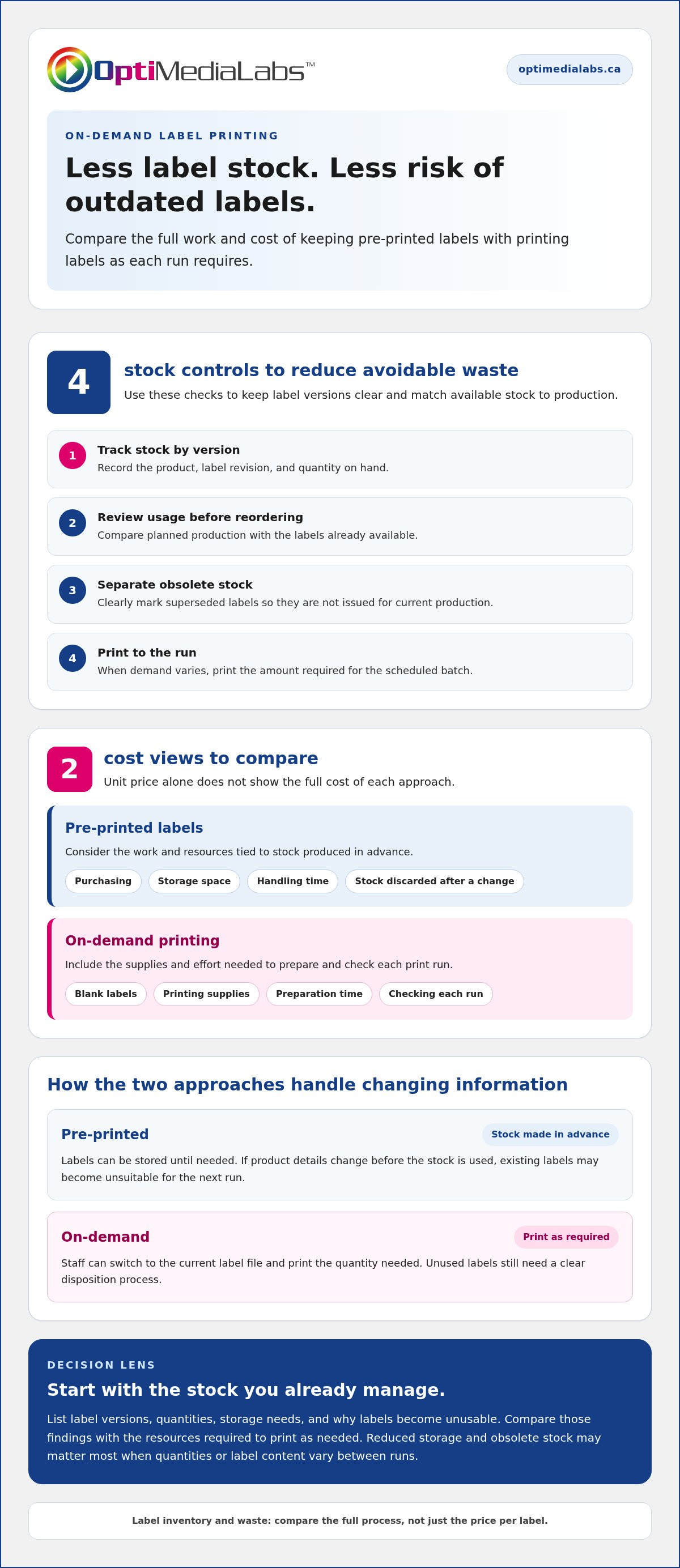
Pre-printed labels are produced in advance with predetermined information. They’re typically printed off-site, shipped to a facility, and stored until needed. This can leave a business holding labels for products with changing details, seasonal demand, or uncertain production schedules. On-demand printing lets staff print labels as required, reducing the need to keep large inventories of pre-printed stock.
Storage is only part of the comparison. Inventory also needs to be received, organized, counted, and matched to the right product. A facility that handles several package sizes, for example, may need separate label stock for each size and version. If teams can’t distinguish current stock from outdated stock, they may overlook usable labels or select the wrong version.
Waste becomes more likely when label information changes before stored stock is used. A revised ingredient statement, barcode, product name, or instruction can make an existing batch unsuitable for the next run. With on-demand printing, staff can switch to the current label file and print the quantity needed. This can limit the buildup of old stock, though unused labels still need a clear disposition process.
- Track stock by version: Record each label’s product, revision, and quantity on hand.
- Review usage: Compare planned production with available labels before placing another print order.
- Separate obsolete stock: Mark superseded labels clearly so they aren’t issued for current production.
- Print to the run: For variable demand, produce the amount required for the scheduled batch.
Compare total costs rather than unit prices alone. Include purchasing, storage space, handling time, and the value of stock discarded after a change. For on-demand printing, include blank labels and printing supplies, as well as the time spent preparing and checking each run. These categories show where reducing inventory could matter most for your operation.
For example, a company launching revised packaging may still have rolls bearing the previous product details. Pre-printed stock is less flexible in this situation because the old information is already on every label. Printing as needed can limit the amount of obsolete stock, especially when quantities or label content vary between runs.
Start with a stock review: list label versions, quantities, storage requirements, and the reasons labels become unusable. Compare those findings with the resources required to print labels as needed. This gives your team a practical basis for deciding whether reduced storage and obsolete stock outweigh the work of managing in-house printing.
Savings compared with pre-printed safety labels
Safety labels can carry hazard information that needs to remain accurate and visible. Under the Globally Harmonized System of Classification and Labelling of Chemicals (GHS), labels for hazardous materials require coloured pictograms. If a product’s hazard information or workplace instructions change, pre-printed stock with earlier details may no longer suit the next production run.
On-demand printing can reduce obsolete safety-label stock by letting staff print current versions as required. Consider a facility that labels several chemical products. If one product’s handling instructions change, the team can update that label file without replacing stock for every other product. Savings depend on how often information changes and how much unused stock would otherwise remain.
Compare the full workflow, not just the printed label. Pre-printed safety labels may simplify repeat production when wording and quantities stay stable. On-demand printing adds in-house tasks, including file control, printing, and sample review. It can be more useful when product versions, workplace-specific instructions, or language needs vary between batches.
- Review change frequency: Identify which hazard details or instructions are revised and how often.
- Separate versions: Keep each product’s current safety label distinct from superseded files and stock.
- Estimate obsolete stock: Record what becomes unusable after a revision or product change.
- Check each print: Compare the sample with the approved file, including wording and GHS pictograms.
These steps also help reveal compliance risks. A label can be printed quickly yet still contain an old instruction, an incorrect symbol, or hard-to-read text. An approval step and a clear file-naming method help operators select the correct version. Checking a sample before a run gives the team a chance to catch errors before labels reach containers.
In-house label printing involves maintenance, training, and operating costs. These include printer upkeep, labels and printing supplies, staff time for setup and quality checks, and training on approved files. Downtime can also affect production if the printer needs attention when a safety-label run is due.
For a useful comparison, list each safety-label version, its print quantity, revision frequency, and the stock discarded after changes. Then add the in-house tasks required for printing and approval. This shows whether avoiding obsolete pre-printed labels offsets the labour, supplies, and equipment upkeep involved. Stable wording and predictable quantities can favour pre-printed stock; frequent revisions and small batches can strengthen the case for printing as needed.
Cost-effectiveness for large orders
Large, stable orders can favour pre-printed labels because the cost per label can be lower. Compare that advantage with the flexibility and setup costs of on-demand printing.
Outsourcing Versus On-Demand Printing
Outsourcing means ordering labels printed in advance, while on-demand printing produces labels at your facility. Pre-printed labels can be cost-effective for large orders with consistent content; on-demand printing typically costs more per label for small runs. A recurring batch with unchanged product details, for example, may suit outsourcing better than frequent short runs.
Outsourcing is more cost-effective when predictable volume and stable label details support a large order, and avoiding in-house equipment and printing tasks matters. Businesses that prefer working with professional commercial design and printing providers—such as azuri.co.ke—can delegate production while maintaining consistent branding standards. On-demand printing can better suit variable quantities or changing label content, when a large batch could leave you with unusable stock.
Volume matters, but label size and colour also shape the comparison. Larger labels use more material, while colour requirements can affect printing supplies and production choices. Compare the same label dimensions, colour coverage, and order quantity across both methods to ensure you’re comparing like with like.
- Order volume: Compare the total run size and cost per usable label.
- Label format: Use the same dimensions and material assumptions for each option.
- Colour needs: Include the required colour content in both cost estimates.
- Change risk: Account for stock that could become unusable after a revision.
Break-Even Point and Return on Investment
The break-even point is the production volume at which savings from printing in-house offset its fixed and operating costs. Rather than comparing unit costs alone, include equipment, supplies, maintenance, staff time, and the value of avoided waste. Return on investment (ROI) compares the net benefit with the investment required.
To calculate break-even, divide fixed in-house costs by the per-label savings compared with outsourcing. First, estimate the cost per usable label for each method, including supplies, labour, and wasted stock. Then subtract the in-house variable cost from the outsourced cost. If the difference is zero or negative, there are no per-label savings to offset fixed costs.
To estimate ROI, subtract total in-house costs from savings and avoided waste, then compare the net benefit with the investment. Use the same production period and label specifications for both estimates. A business producing large, consistent runs may reach break-even sooner than one printing occasional batches, but frequent label revisions can change the waste calculation.
Record actual quantities, rejected labels, staff time, and supply use during a representative production cycle. Recalculate when order volume, label dimensions, colour requirements, or content changes. Choose outsourcing for large, predictable runs when its per-label advantage outweighs inventory risk; choose on-demand printing when flexibility and avoided waste are more valuable.
On-demand colour label printing
On-demand colour printing brings label production in-house and supports versions with changing information. Its value depends on your need for colour and variable content, and how much control you need over each print run.
Equipment Upfront Costs
Upfront equipment costs include the printer and the setup required to produce your colour labels. The right configuration depends on label dimensions, material, colour coverage, and expected production volume. A business printing small batches with photos and barcodes has different requirements from one printing a consistent colour logo.
Plan for more than the printer purchase. Include compatible label stock, ink or other printing supplies, software, staff time for setup, and sample checks. Each affects the total investment, while the range of label formats determines how you’ll use the equipment.
For a Canadian cost comparison, list the equipment and operating requirements for your actual labels. Use the same dimensions, materials, and colour content across options. This avoids comparing a basic black-and-white label with a full-colour label containing a product photo.
On-Demand Printing Process
On-demand label printing means producing labels at your facility as needed, instead of ordering finished labels in advance. Staff select an approved label file, set the required quantity, load the label stock, and print a sample before running the batch.
Colour adds practical options. A label can combine a logo or symbol with variable details such as a barcode or product photo. Each version can also include different languages or workplace-specific instructions. For example, a company packaging several product variations can print the matching information for each run.
Control matters. Pre-printed labels provide consistent messaging and graphics across a batch. On-demand printing offers flexibility, but an operator may select the wrong file or change a brand element. Use approved templates, restrict editing, and check the first printed label against the intended version.
- Compare like for like: Use the same size, material, colour elements, and information.
- Include variable content: Account for barcodes, photos, language versions, and symbols.
- Protect brand consistency: Use approved files and review a sample before production.
On-demand colour printing is most useful when colour and changing information serve a clear production need. If every label carries identical content, pre-printed stock may offer simpler consistency. To discuss colour label printing requirements, contact the team about your application.
The choice comes down to whether label information needs to change. Printing at your facility avoids ordering and waiting for pre-printed materials to arrive, and lets you produce labels as needed. Teams can tailor each label’s design and information, including barcodes, photos, multiple languages, workplace-specific messages and instructions, logos, and symbols.
Pre-printed labels provide consistent messaging and graphics. On-demand printing offers flexibility, but an unfamiliar user may produce inconsistent branding or messaging. Keep this distinction in mind when choosing the approach that best fits your label content and consistency needs.
OptiMediaLabs Canada: Afinia Color Label Printers
OptiMediaLabs Canada offers Afinia Color Label Printers for businesses considering in-house colour label production. They’re a relevant option when changing label content, short runs, or colour requirements make printing as needed worth evaluating against pre-printed stock.
Compare expected label volume, formats, colour needs, and workflow before choosing equipment. If your operation also uses RFID labels or needs label finishing, consider RFID Label Printers and Afinia Label Cutters & Finishers. Thermal Transfer Ribbons are available for workflows that use ribbon-based printing.
Use these requirements to narrow the equipment category that fits your labelling process. Contact OptiMediaLabs Canada to discuss your application.
Plan your next label-printing decision
Turn your assessment into a practical equipment plan. Choose a representative label and document its dimensions, material, colour requirements, variable fields, and expected production pattern. This gives your team a clear basis for evaluating equipment, supplies, and workflow needs before choosing an approach.
A cost benefit analysis of on-demand label printing is most useful when it reflects your actual label specifications and production process. Define who prepares and approves print files, how operators check output, and what your team will measure during a trial. A focused evaluation helps identify the requirements that matter to your operation.
OptiMediaLabs Canada offers Afinia Color Label Printers, compatible ink cartridges, and RFID Label Printers. These offerings support businesses assessing colour label production, printing supplies, or RFID labelling needs.
Contact OptiMediaLabs Canada to discuss your label-printing requirements. A clear set of requirements is a strong place to start.
Frequently Asked Questions
What are the per-label costs for on-demand printing versus outsourcing or preprinting?
Per-label cost depends on the label specification, order quantity, and production method. A cost benefit analysis of on-demand label printing compares the full cost of in-house production with outsourced or pre-printed orders. Include label stock, ink or ribbon, operator time, and misprints for in-house runs. For pre-printed labels, compare the order total with usable labels received, including delivery charges. Keep dimensions, materials, colours, and content consistent across the comparison.
How much can businesses save by switching to on-demand label printing?
Savings depend on unused labels, how often details change, and the resources required for in-house production. A cost benefit analysis of on-demand label printing can draw on purchasing records, discarded stock, storage and handling time, and printing supplies to estimate the difference. For example, compare the full cost of a product-label revision under each method. This gives you an operation-specific estimate rather than relying on a general savings claim.
What label printers, materials, and software are needed, and what do they cost in Canada?
Equipment depends on the label format, colour requirements, and production process. A setup may include a suitable label printer, compatible blank label stock, ink or ribbon, and software for preparing print jobs. Barcode applications may also require barcode software. For Canadian budgeting, compare prices in C$ for the same equipment and supplies, then account for recurring consumables, maintenance, and staff time.
What are the advantages and disadvantages of on-demand label printing?
On-demand printing gives you control over when labels are produced and supports changing product details or variable information. It can reduce reliance on stored, pre-printed stock. Trade-offs include equipment and supply requirements, operator time, upkeep, and approved-file management. A printer interruption can affect production, while inconsistent file controls can lead to different versions being printed. Weigh these factors against your production schedule and label-change needs.