
Primera LX3000 Tank Ink System vs. Cartridge Label Printers: How to Choose
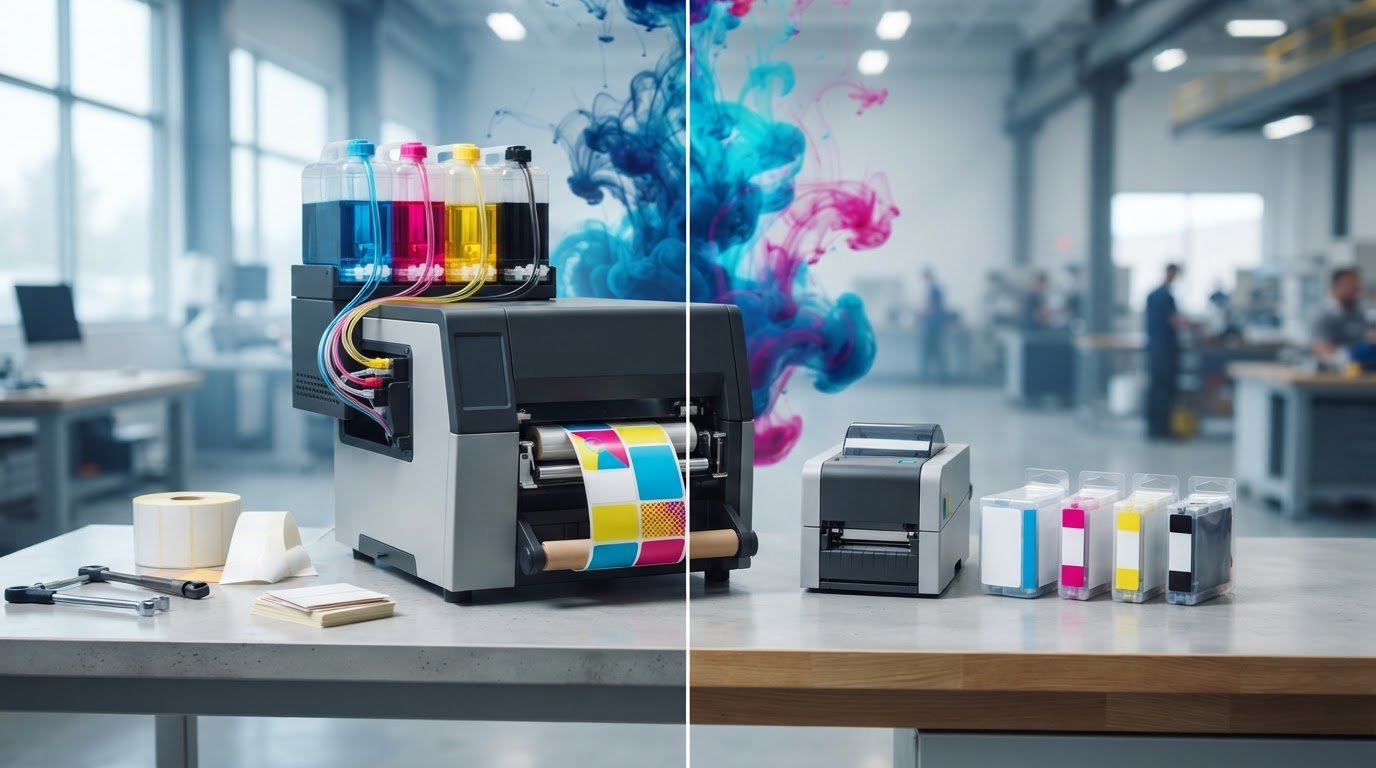
A tank-based printer isn’t automatically the right choice just because it may use a different replenishment routine. The Primera LX3000 tank ink system vs cartridge label printers comparison is most useful when you match each ink workflow to the volume, artwork and pattern of labels you actually produce.
If you’re comparing printers, look beyond the hardware. Replenishment, colour use, media compatibility and production demands all affect day-to-day fit. Without comparable usage information, it’s difficult to make a reliable operating-cost comparison.
This guide explains the practical differences between tank-based and cartridge-based ink systems, then shows how to assess printer fit against your workload and operating requirements. You’ll also find the model specifications and consumable details to confirm before requesting a product recommendation, so your choice reflects your production needs rather than the ink system alone.
Key Takeaways
- Compare the Primera LX3000 tank ink system vs cartridge label printers by looking at your actual production pattern, not the ink format alone.
- Compare replenishment routines and consumable types with your team’s handling, storage and purchasing preferences.
- Separate printer purchase price from ongoing ink costs, and use verified usage information before drawing cost conclusions.
- Check that each printer supports your label stock, dimensions, finish and required print output.
- Gather your workload and media requirements before asking OptiMediaLabs Canada to help compare Primera printer and consumable fit.
Primera LX3000 tank ink system vs. cartridge label printers: what is being compared?
This comparison is about how ink is stored and replenished, not a guarantee of print quality or production performance. A tank-based system holds ink in separate reservoirs, while a cartridge-based system supplies ink through replaceable cartridges. Here, the Primera LX3000 is the tank-system example. Its Big Ink configuration uses separate cyan, magenta and yellow tanks with a reusable printhead. The cartridge-based LX910 uses a single tri-colour cartridge.
Tank systems are a form of continuous ink system (CIS), where reservoirs supply ink instead of relying solely on a conventional cartridge. This explains the basic difference, but the practical choice depends on the specific printer, its ink configuration and the label media you need to use. Primera printers are available through Primera label printers.
Don’t choose by system name alone. Start with your repeatable workload and verify the consumable details for each model. Compare expected label volume and print patterns with current manufacturer information on compatible ink, media, output requirements and replenishment procedures. Don’t assume a tank needs attention less often or costs less without usage information and model-specific evidence.
What does a tank ink system change in the printing workflow?
With the LX3000, ink is held in separate colour tanks rather than in one tri-colour cartridge. Each colour is supplied separately, and the printhead is a distinct, reusable component. Check current Primera documentation for the exact procedure to replenish or replace the tanks and for compatible consumables. Don’t assume a refill method, service interval or yield. Actual use depends on the job and ink coverage.
The reservoir design describes ink delivery only. It doesn’t, by itself, establish print speed, resolution, durability or overall printer performance. Check those specifications separately against the labels and production requirements in your workflow.
How do cartridge-based label printers handle ink?
In a cartridge-based printer, ink is supplied through replaceable cartridges. The format varies by model: the LX910 uses a single tri-colour cartridge, while other Primera printers may use different cartridge designs and ink configurations. Confirm the exact cartridge type and compatible ink for the model you’re considering. For model-specific consumable information, see Primera ink cartridges.
Compare what your team needs to replace, which colours are grouped together and how often replenishment occurs under your actual workload. Check these details alongside media compatibility before deciding whether the Primera LX3000 tank ink system vs cartridge label printers comparison favours a particular workflow for your operation.
How tank and cartridge systems affect replenishment, consumables, and label production
The ink system affects what you order and replace, but it doesn’t determine the full operating cost. The LX3000 uses separate cyan, magenta and yellow tanks, while the LX910 uses a single tri-colour cartridge. Confirm each model’s current configuration and compatible consumables before comparing them.
| Comparison point | LX3000 tank system | Cartridge-based printer | What to verify |
|---|---|---|---|
| Replenishment | Replace or replenish individual colour tanks according to manufacturer instructions. | Replace cartridges according to the printer’s design. | Procedure, alerts and compatible supplies for the exact model. |
| Consumable type | Separate CMY tanks and a distinct printhead. | Cartridge format and colour grouping vary by model. | Ink type, part numbers and whether items are sold individually or in sets. |
| Workflow implications | Track tank levels and plan for the colours used in production. | Keep the correct replacement cartridge format available. | How your team will monitor stock, order supplies and handle changeovers. |
| Cost comparison | Assess ink use against the price and format of compatible tanks. | Assess ink use against the price and format of compatible cartridges. | Compare equivalent jobs using current product information and actual usage. |
A fair ink-cost comparison uses current consumable prices and verified ink-use information for the same label artwork, dimensions, media and production quantity. Keep the printer purchase price separate from ongoing ink costs. Don’t assume a tank system guarantees savings. Coverage, colour balance and print volume can all affect consumption, so a lightly printed label and a dense, full-colour design may use ink differently.
Which ink and consumable details should buyers compare?
For each shortlisted printer, check compatible ink types, part numbers and configuration in current manufacturer information. Confirm whether supplies are sold individually or in sets, and include the required consumables in your comparison. For current tank information, review LX3000 and LX4000 ink tanks. For broader printer-selection considerations, PCMag offers guidance on how to pick the right labeler.
How should you estimate ink use for your labels?
Base an estimate on representative artwork, actual label dimensions and the quantities you expect to print. Ask suppliers what documented method supports any ink-use estimate, and treat the result as specific to your workload. Keep ink consumption separate from media waste, maintenance and labour. Combining them can obscure what the ink system itself contributes to operating costs.
To check model and consumable requirements, you can discuss your printer requirements with OptiMediaLabs Canada. Share your workload and label details to make the comparison more relevant to your production.
When does the Primera LX3000 tank system make sense versus a cartridge printer?
The better fit depends on how regularly you print, how much ink your artwork uses and how your team wants to manage supplies. The LX3000 is positioned for medium-to-high-volume production, while the cartridge-based LX910 is aimed at lower-to-mid-volume work. Treat those positions as a starting point, then confirm the current specifications and recommended duty cycle for your intended use.
For occasional jobs, a cartridge printer may fit a workflow where replacing a designated consumable is simpler than monitoring separate tanks. For moderate, recurring production, compare both systems against your actual label designs and replenishment preferences. For frequent, predictable runs, separate tanks may make it easier to track colour use and replace a specific colour as needed. That benefit depends on your team following the model’s documented maintenance and replenishment procedures.
Explore the range of Primera label printers, then compare shortlisted models against your production needs. Ink-system choice is one factor, not a substitute for checking media support, print output and operating requirements.
Which workflow factors favour a tank-based printer?
A tank-based workflow may suit teams that want to monitor individual colour levels and plan replenishment around recurring jobs. That planning is most useful when artwork and production patterns are consistent enough to track ink use over time. Before choosing, check the specific model’s tank handling, replenishment instructions, maintenance needs and storage requirements in current manufacturer documentation. Don’t assume a refill routine or interval without verifying it.
Consider how your team will prevent supply interruptions. Decide how to identify low supplies, keep compatible consumables on hand and handle replenishment without disrupting production. Ink coverage matters: designs with larger areas of colour may use ink differently from simpler artwork, so base planning on representative labels.
When might a cartridge-based printer be the better fit?
Cartridges may suit teams that prefer replacing a designated consumable rather than managing tank replenishment. The practical advantage depends on the printer’s cartridge format and your team’s supply process. Check that the correct cartridges are compatible with the selected model, and confirm purchasing options and supply continuity before relying on them for scheduled production. Review current Primera ink cartridge options when comparing models.
For the Primera LX3000 tank ink system vs cartridge label printers decision, weigh artwork coverage, replenishment preferences and tolerance for interruptions alongside workload. Choose the system your team can manage reliably using verified printer and consumable information.
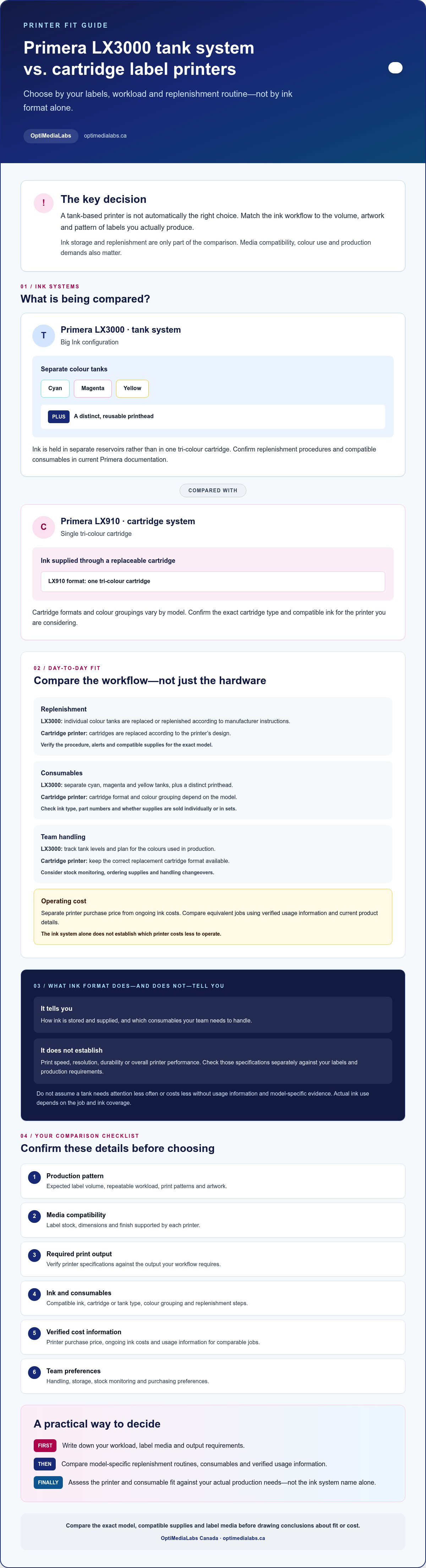
Use this checklist to compare the LX3000 with cartridge label printers
A reliable comparison uses the same job and operating assumptions for every printer. Use this checklist to identify what’s confirmed, what still needs verification and where a model may not meet your production requirements.
What should you verify before comparing specifications?
- 1. Workload: Record how often you print, typical batch sizes, peak demand and how much interruption your schedule can tolerate. Check each model’s recommended duty cycle against current manufacturer documentation.
- 2. Model and ink configuration: Confirm the exact printer model, ink type and configuration. Don’t rely on a general description of a model family. Check current documentation for the specific printer under consideration.
- 3. Label media: Confirm that your label stock is compatible with each printer. Check the material, dimensions and finish, then test with representative artwork where possible.
- 4. Required output: Identify the print quality, colour requirements and production speed your labels need. Compare documented specifications under relevant conditions rather than assuming similar ink systems deliver equivalent output.
- 5. Consumables and continuity: Confirm compatible ink part numbers and purchasing formats. Decide how your team will monitor supplies, replenish them and maintain production if a consumable runs low.
Keep the comparison specific to the label you intend to print. A small, lightly covered label and a larger design with substantial colour coverage may place different demands on ink use and output. Use the same artwork, media and expected quantities when asking for comparable consumable information.
How can you compare total operating requirements fairly?
Separate the printer purchase price from ongoing operating requirements. Assess ink and label consumption alongside maintenance tasks, operator time, media waste and potential downtime. Use documented figures wherever available, and flag assumptions that still need confirmation. Headline yield or cost-per-label claims aren’t useful for a direct decision unless the test conditions match your artwork, label dimensions, media and print quantity.
Specifications to confirm:
- Supported label materials, dimensions and finishes
- Ink type, configuration and compatible consumables
- Print speed, resolution and recommended duty cycle
- Maintenance and replenishment procedures
- Conditions behind any ink-use or yield estimate
Use these checks to make the Primera LX3000 tank ink system vs cartridge label printers comparison reflect your real workflow, not a generalized claim. Prepare your model shortlist, sample artwork, media details and expected production pattern, then contact OptiMediaLabs Canada to discuss printer and consumable requirements.
Choose your Primera label printer and confirm the next steps with OptiMediaLabs Canada
The right printer fits your verified workload, label media and preferred ink workflow. The Primera LX3000 tank ink system may suit a different production routine than a cartridge-based model, but tank versus cartridge alone doesn’t settle the decision. Confirm current specifications and compatible consumables for each model before choosing.
What information helps confirm the right printer configuration?
Prepare a clear summary of your production needs before requesting guidance. Include expected label quantities and production frequency, plus representative artwork or a description of its colour coverage. These details make consumable comparisons more relevant to your actual jobs than general estimates.
Also list the media types you plan to use, label dimensions and required finish. Note the printer models you’re considering, any current equipment, and whether your team prefers replacing cartridges or managing separate tanks. Mark uncertain specifications for confirmation rather than treating estimates as facts.
- Expected label quantities, batch patterns and production frequency
- Representative artwork and approximate colour coverage
- Label stock, dimensions and finish requirements
- Shortlisted printer models and current ink configuration
- Preferred replenishment workflow and supply-planning needs
How can OptiMediaLabs Canada support your comparison?
OptiMediaLabs Canada distributes Primera label printers and Primera ink cartridges. Sharing your workload, media requirements and model shortlist can help focus a product discussion on printer fit and compatible consumables. Ask which details need to be checked against current manufacturer information, including media support, ink configuration, print output and recommended duty cycle.
Use the same job assumptions for each model. Match the artwork, label dimensions, media and expected production pattern, then check what’s documented and what still needs verification. This keeps the comparison grounded in your operation instead of relying on unverified yield or savings claims.
Have your requirements ready? Contact OptiMediaLabs Canada to discuss your label printer requirements. Ask which configuration and consumables align with your planned production before settling on a model.
Make your next printer decision with confidence
The Primera LX3000 tank ink system vs cartridge label printers decision comes down to how each option fits your production needs. Match the printer to your label volume, artwork coverage and media requirements, then verify compatible consumables and model specifications. Compare ink costs only with documented usage assumptions, not headline estimates that may not reflect your labels.
OptiMediaLabs distributes Primera label printers and Primera ink cartridges to customers nationally across Canada. Have your expected quantities, sample artwork, label dimensions and preferred replenishment workflow ready to support a focused comparison.
Contact OptiMediaLabs to compare Primera printer and ink requirements. Share your production details to discuss printer fit and compatible consumables.
Frequently Asked Questions
What is the difference between the Primera LX3000 tank system and a cartridge label printer?
The main difference is how ink is stored and replenished. A tank system holds ink in reservoirs, while a cartridge printer uses replaceable cartridges. The exact format depends on the model. This distinction doesn’t establish which printer is faster or produces better labels. Compare each model’s compatible ink, supported media, maintenance requirements and fit for your workload before deciding.
Is the Primera LX3000 less expensive to operate than a cartridge printer?
Not necessarily. Operating cost depends on ink consumption, label coverage, consumable pricing, maintenance and print volume. A fair comparison uses current, documented consumable information for equivalent print conditions, including the same artwork and label dimensions. Ask how any usage estimate was calculated, and make the assumptions clear. Without comparable evidence, don’t treat a general savings claim or cost-per-label figure as a reliable forecast for your operation.
Can the Primera LX3000 print on the same labels as cartridge-based Primera printers?
Not automatically. Label compatibility depends on the specific printer model. Check current manufacturer specifications for the intended media, including its material, dimensions and finish, as well as any performance requirements for the finished label. Don’t assume stock supported by one Primera printer will work in another. Before ordering, confirm the exact label media with the manufacturer or supplier for each model you’re considering.
How do I choose between a tank ink system and cartridges for label printing?
Start with your production frequency, artwork coverage, preferred replenishment routine, label media and supply continuity needs. Then compare exact printer models, not tank and cartridge systems in isolation. Use representative labels and ask for comparable consumable information based on your expected workload. For the Primera LX3000 tank ink system vs cartridge label printers decision, choose the model whose verified capabilities and ink workflow match how your team prints.
Does the Primera LX3000 include ink tanks or ink when purchased?
Included contents can depend on the current product configuration and sales listing. Before ordering, ask the seller to confirm exactly what’s in the package, including whether ink tanks or ink are included, which ink type is supplied and whether additional consumables are needed to begin printing. Check the specific listing for the configuration you plan to buy rather than relying on general descriptions or older product information.
Where can I buy Primera LX3000 ink tanks or Primera cartridges in Canada?
Confirm your exact printer model and compatible consumable before ordering. OptiMediaLabs distributes Primera label printers and Primera ink cartridges to customers nationally across Canada. Contact the company with your model details to discuss compatibility and supply requirements. Ask for current product information before placing an order, since stock, delivery timing and pricing depend on the specific consumable and current availability.