
Printing CFIA-Compliant Labels In-House: What to Include
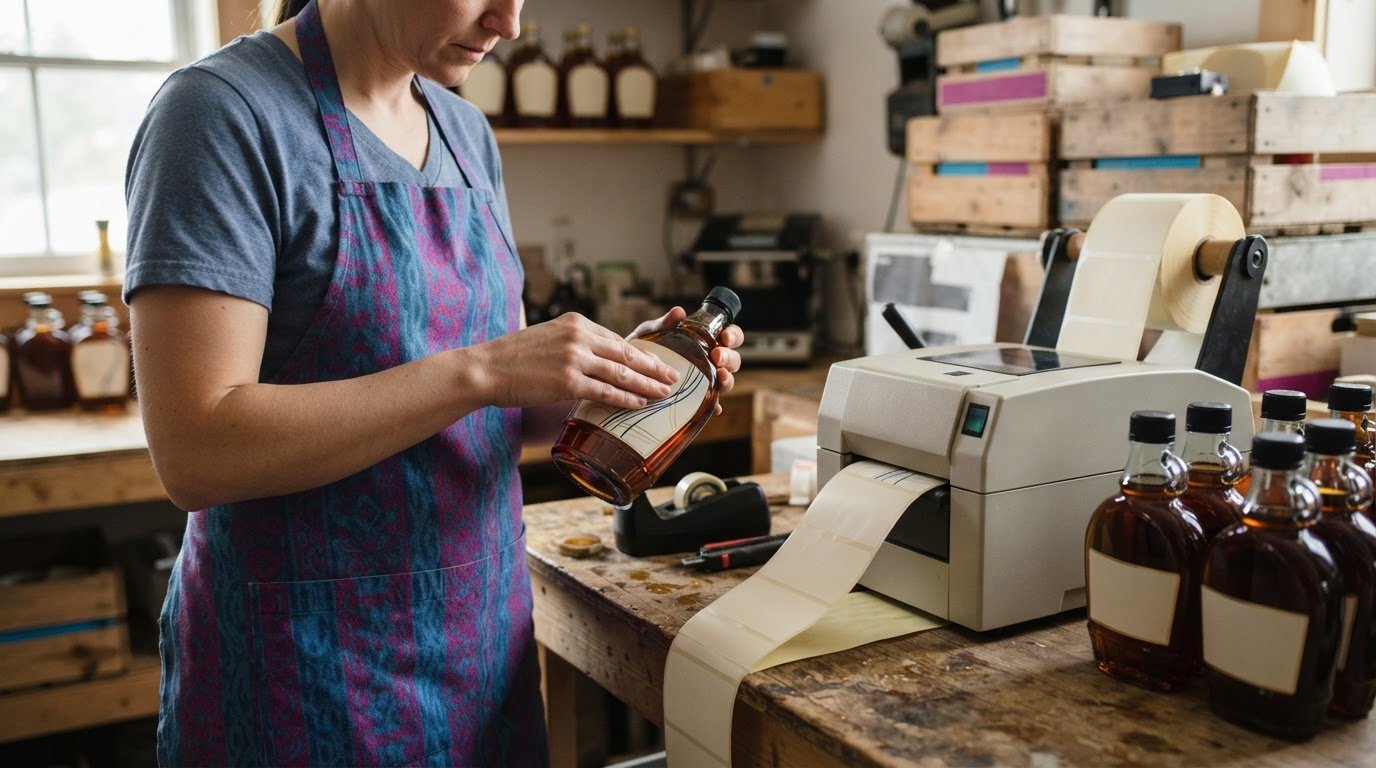
The printer is the easy part; getting every declaration right is what makes printing CFIA compliant labels in-house a careful process. Canadian food labels generally need mandatory information in English and French, subject to specific exemptions, and the common name and net quantity must be formatted correctly. As of January 1, 2026, many prepackaged foods also require a front-of-package nutrition symbol.
It’s easy to focus first on label stock, the printer, and the barcode. But these tools can only reproduce the information you provide. They can’t determine which rules apply to a product or whether its label content is accurate.
This guide explains which Canadian requirements to review, how to format common-name and net-quantity declarations, and how to prepare label layouts and barcodes for in-house printing. It also explains why changes to a product’s formula, serving size, package size, or nutrition data may require a label review. Use the checks below to build a practical workflow before printing.
Key Takeaways
- Use the product category and package details to identify which Canadian labelling requirements apply before preparing artwork.
- Place the common name and net quantity clearly, and format each declaration to meet its specific requirements.
- Build label layouts that account for bilingual information, legibility and any applicable front-of-package nutrition symbol.
- Use barcode software to prepare and manage barcode content, then assess the workflow when product or package details change.
- Compare in-house printing and print-shop workflows by considering equipment, supplies, production volume and how often labels need updates.
Canadian food labelling regulations and the CFIA Industry Labelling Tool
In Canada, food labels are governed by the Food and Drugs Act and the Safe Food for Canadians Act. The Food and Drug Regulations set labelling requirements, while the Safe Food for Canadians Regulations (SFCR) cover requirements affecting food production and the supply chain. Start by identifying the product, how it is packaged, and where it will be sold. These details help determine which federal requirements apply.
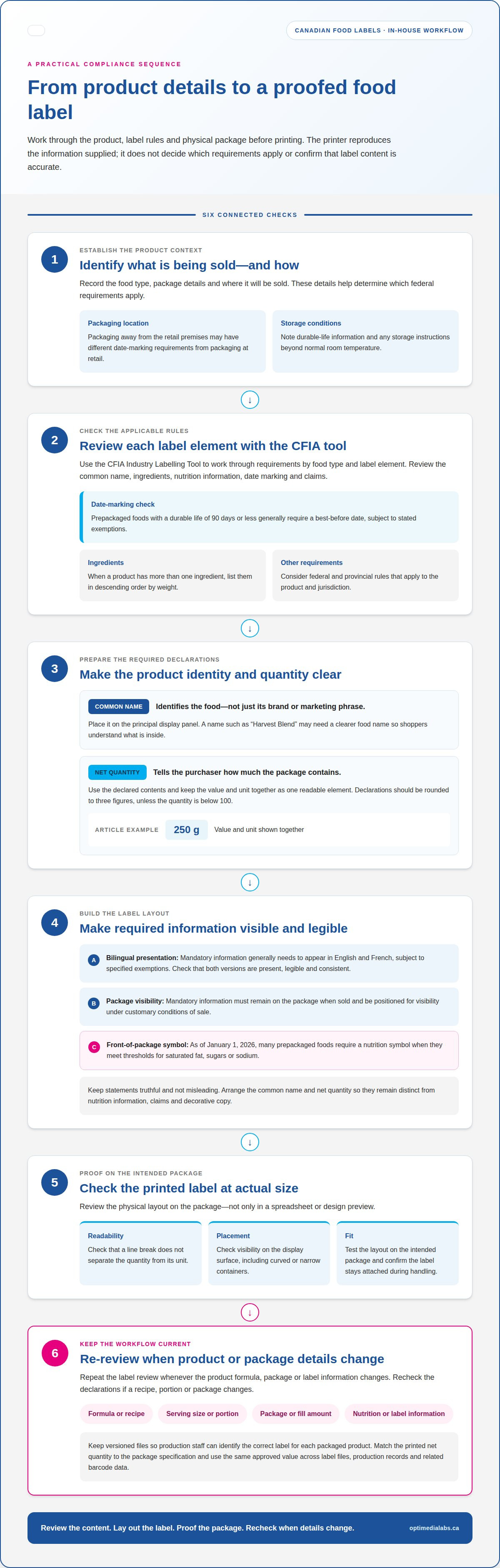
Use the CFIA Industry Labelling Tool to work through requirements by food type and label element. Check the applicable rules for the common name, ingredients, nutrition information, date marking, and claims. Canadian prepackaged foods with a durable life of 90 days or less generally require a best-before date, subject to stated exemptions, according to the Canadian Food Inspection Agency.
Packaging conditions matter. A product packaged away from the retail premises where it will be sold may have different date-marking requirements from one packaged at retail. Note the product’s durable-life information and storage conditions when reviewing the applicable date rules. If the product needs storage instructions beyond normal room temperature, assess those instructions alongside the date declaration.
Review bilingual presentation before laying out the artwork. Mandatory information on Canadian food labels generally needs to appear in English and French, subject to specified exemptions. Check that both language versions are present, legible, and consistent. Ensure statements are truthful and not misleading, and review any federal and provincial requirements that apply to the product.
- Check the nutrition symbol: As of January 1, 2026, many prepackaged foods require a front-of-package nutrition symbol when they meet thresholds for saturated fat, sugars, or sodium.
- Review the ingredients: Products with more than one ingredient list them in descending order by weight.
- Check the package itself: Mandatory information must remain on the package when sold and be positioned for visibility under customary conditions of sale.
To review compliance and catch common labelling errors, use the CFIA Industry Labelling Tool to assess each label element against the product and package. Then proof the label on the actual package. Repeat the review whenever the product formula, package, or label information changes.
Provincial requirements may apply in addition to federal rules, depending on the product and jurisdiction. Municipal requirements may affect local food-business operations, so consider the activity and location separately from the federal label review.
Once the content review is complete, test the physical layout on the intended package and confirm that the label stays attached during handling. Stock selection is a separate production decision; Afinia labels are one option to consider within an in-house printing workflow.
Common-name and net-quantity declarations
Give the common name and net quantity distinct roles on the label. The common name identifies the food; the net quantity tells the purchaser how much the package contains. A jar’s product name, for example, may be descriptive, while its common name clarifies the food category. Keep both declarations consistent with the product and package information used to prepare the label.
Start with the common name. Choose wording that identifies the food rather than relying on a brand name, flavour, or marketing phrase alone. A product called “Harvest Blend,” for example, may need a clearer food name so shoppers understand what is inside. Don’t let promotional language obscure the product identity. The common name must appear on the principal display panel, so reserve space for it before arranging decorative elements.
Next, prepare the net-quantity declaration from the product’s declared contents. Keep the value and unit together as one readable element. Canadian net quantity declarations should be rounded to three figures, unless the quantity is below 100. For example, a declaration such as “250 g” uses three figures. Use the same approved value across the label file, production records, and any related barcode data to prevent mismatched package information.
Check the declaration in the final label format, not just in a spreadsheet or design preview. A line break can separate a value from its unit, and a nearby graphic can make the quantity harder to notice. Print a proof at actual size and place it on the intended package. Confirm that the common name and quantity are easy to find on the display surface, including on curved or narrow containers.
- Confirm the product identity: Make sure the common name describes the food, not only its brand or a promotional phrase.
- Validate the declared quantity: Match the printed value and unit to the package specification.
- Check the hierarchy: Keep the common name and net quantity visually distinct from nutrition information, saturated-fat or sugars claims, and decorative copy.
- Proof the physical label: Review the printed format on the package before approving a production file.
When a recipe, portion, or package changes, review both declarations before reusing existing artwork. A new product name may affect the common-name wording, while a revised fill amount can make the net-quantity value inaccurate. Keep versioned files so production staff can identify the correct label for each packaged product.
For an in-house workflow, accurate declarations depend on clean source information and a legible printed result. If you're planning the equipment side of that workflow, discuss your label-printing setup.
Common-name placement and type height
The common name needs a clear position and readable type on a Canadian food label. It must appear on the principal display panel, the part of the package most likely to be seen under customary conditions of sale. Keep it distinct from a brand name, flavour description, or graphic. Shoppers should be able to identify the food without interpreting promotional wording.
For Canadian food labels, the common name generally must use characters at least 1.6 mm high, according to the Canadian Food Inspection Agency. For a Canadian food label with a principal display surface of 10 cm2 or less, the common name must have a minimum type height of 0.8 mm, according to the Canadian Food Inspection Agency. Measure the printed characters, not the font size shown in your design software.
Other specified core labelling requirements set minimum character heights based on principal display surface area. The applicable thresholds are:
- 32 cm2 or less: 1.6 mm minimum character height.
- Over 32 cm2 and up to 258 cm2: 3.2 mm.
- Over 258 cm2 and up to 645 cm2: 6.4 mm.
- Over 645 cm2 and up to 2 580 cm2: 9.5 mm.
- Over 2 580 cm2: 12.7 mm.
These size bands apply to specified core information, so don’t treat them as a substitute for checking the rules for each declaration. Measure the principal display surface, then set the type height for the required information. Record the measurement and corresponding artwork version. This gives production staff a practical reference if the container shape or label size changes.
Proof the common name on the actual package. A curved bottle, narrow pouch, or small retail container can distort spacing or reduce apparent legibility. Print at final size, apply the label, and check it at normal viewing distance. Make sure nearby product graphics don’t compete with the name. Inspect other required copy, including ingredient and allergen information, without shrinking the common name to make everything fit.
Health Canada identifies the Industry Labelling Tool as a primary resource for food labelling questions, including front-of-package requirements. Use its relevant guidance alongside the official type-height rules when planning a complete layout. If package dimensions leave limited room, revise the layout hierarchy rather than placing the common name where it is difficult to find. Discuss label-printing requirements when you’re planning an in-house setup.
In-house label design and barcode software
A controlled workflow for printing CFIA compliant labels in-house starts with approved product information, then moves through artwork, barcode preparation, proofing, and revision control. Tie each step to the correct product record to prevent outdated text or barcode data from carrying into a new print run.
Use one product record as the source for label fields. Include the approved product name, ingredients, net quantity, nutrition information, claims, and barcode data. Store English and French text in clearly labelled fields so it’s easier to spot a missing translation or outdated value before laying out the label. Keep decorative copy separate from required information.
- Assess the symbol: Determine whether the prepackaged product meets the front-of-package nutrition symbol thresholds for saturated fat, sugars, or sodium. Many prepackaged foods require a symbol as of January 1, 2026.
- Build the layout: Use a reusable template for fixed elements, then assign product-specific fields to each item or variant. Keep required copy distinct from graphics.
- Prepare barcode content: Connect the barcode data to the correct product record. A barcode can encode data, but it can’t validate label claims or regulatory content.
- Proof the output: Print at actual size, apply the label to the intended container, and inspect its text, symbol, barcode, and placement.
Barcode software can help manage encoded data and repeatable layouts. Limit access to approved templates so production users don’t overwrite master files, and keep a revision history with each product record. When barcode data or label content changes, identify which package versions use the old information before printing replacements.
Reassess the front-of-package symbol decision and artwork when a product’s formula, serving size, package size, or nutrition data changes. A recipe update may affect nutrition information, while a package change may call for a different layout. Don’t assume an older label remains suitable after product details change. A documented review connects new artwork to current product information.
Separate content approval from print approval. Content approval confirms product data, bilingual text, and claims; print approval checks the physical output. Record the approved version and the product it covers. This helps prevent staff from selecting obsolete artwork during a production run.
For every revision, retain the final artwork, barcode data, approval record, and physical proof. These records provide a traceable reference when staff need to reproduce a label or identify the version used for a packaged product. A repeatable process makes printing CFIA compliant labels in-house easier to manage as product information evolves.
What are the startup and ongoing costs of printing food labels in-house versus using a print shop?
There’s no single cost figure that fits every Canadian food business. In-house printing requires an initial equipment and setup budget, followed by recurring supply and operating costs. A print shop usually shifts more of the production expense to each order. Compare both options using the same label size, material, colour requirements, order quantity, and review period.
For in-house production, list everything needed to make a usable label, not just the printer. A colour food label workflow may require compatible label stock, ink, design or barcode software, and staff time for artwork preparation, proofing, printing, and quality checks. If packages need finishing, include the relevant finishing equipment and its upkeep. The right setup depends on the label format and production process.
- Startup items: Printer, compatible materials, software, setup time, and any finishing equipment.
- Recurring items: Labels, ink or ribbons, maintenance, software costs, staff time, and waste from test prints or errors.
- Production factors: Number of label versions, colour coverage, print frequency, package sizes, and how often artwork changes.
Compare the full print-shop order cost, not just the quoted label price. Include setup charges, minimum order quantities, shipping, and the cost of storing unused labels. Consider how a formula or packaging change could affect existing stock. For example, a revised nutrition panel can make already printed labels unusable, while short in-house runs may reduce the amount of obsolete stock held.
Estimate in-house cost by adding equipment and setup to recurring materials, labour, maintenance, and waste over the period you’re comparing. Divide that total by the number of usable labels produced. For print-shop orders, add setup, label, shipping, storage, and obsolescence costs, then divide by the usable labels received. Use actual quotes and internal records. Compare like with like, not a small in-house run against a large print-shop order.
Volume and change frequency shape the decision. Frequent runs, multiple products, and changing artwork can make control over print timing valuable. Stable artwork and larger planned orders may suit outsourced production more naturally. Include proofing in the comparison: an error caught before printing costs less than one discovered after a large batch is produced.
Build a comparison table with one row per cost category and use your own expected quantities and supplier quotes. For equipment and workflow planning, discuss your in-house label-printing requirements.
OptiMediaLabs Canada
OptiMediaLabs Canada helps food businesses equip an in-house label-printing workflow with suitable hardware and supplies. If you’re assessing equipment for colour product labels, compare Afinia Color Label Printers against your label formats and production needs. Afinia Label Cutters & Finishers and Thermal Transfer Ribbons may also fit workflows that require label finishing or thermal transfer printing.
The printer and materials produce the label, but they don’t determine whether its content meets Canadian requirements. Keep regulatory review, artwork approval, and printed proofs as separate steps. This distinction matters when choosing equipment for an established label workflow or preparing for in-house production.
For help considering label-printing equipment and supplies for your workflow, contact OptiMediaLabs Canada.
Set up a label workflow you can maintain
Make your next step a practical production plan. Decide who owns label files, how revisions are recorded, and how obsolete artwork is kept out of active use. A repeatable process connects approved label information with the right package and print run. It also gives your team a clear starting point when product details change.
Printing CFIA-compliant labels in-house involves more than selecting a printer. Match the equipment and supplies to your label workflow, and keep regulatory review separate from production decisions. OptiMediaLabs offers Afinia Color Label Printers, Epson Ink Cartridges, and RFID Label Printers as part of its product range.
To discuss equipment and supplies for your in-house setup, contact OptiMediaLabs Canada. A well-organized workflow can help your team move forward with confidence.
Frequently Asked Questions
Need help choosing labels or printers?
OptiMediaLabs Canada offers label printers, label materials, and related supplies for in-house workflows. The range includes Afinia Color Label Printers, colour label printers, blank inkjet labels, and blank thermal labels. Start by defining the package shape, label dimensions, print method, and expected production volume. Those requirements help narrow the equipment and material categories that fit your process. OptiMediaLabs Canada can help you explore its product range for your setup.
What are CFIA-compliant labels, and why do they matter in 2026?
CFIA-compliant labels meet the Canadian food labelling requirements that apply to the product and its package. They matter because a label communicates product identity and other required information to purchasers. As of January 1, 2026, many prepackaged foods require a front-of-package nutrition symbol when they meet thresholds for saturated fat, sugars, or sodium. Whether a symbol applies depends on the product’s nutrition information and the relevant criteria.
What must be included on a Canadian food label?
Required information depends on the food, package, and applicable exemptions. Review the common name, net quantity, ingredient list, nutrition information, date marking, and required business identification. Some foods also need a front-of-package nutrition symbol. Date-marking rules, for example, depend partly on the food’s durable life and packaging circumstances. Assess each product separately rather than copying every field from another item’s label.
What information must appear on food labels under Canadian CFIA regulations?
Canadian food labels are subject to the Food and Drugs Act, the Safe Food for Canadians Act, and applicable regulations. Required declarations vary by product, so use the CFIA Industry Labelling Tool to review the relevant categories and label elements. A packaged soup and a confection, for example, may have different product-specific details to address. Keep the product specification and final label version together to support accurate production.
When are bilingual English and French labels required in Canada?
Mandatory information on Canadian food labels generally needs to appear in English and French, subject to specified exemptions. Review the complete label, not just the product name, for bilingual presentation. Check that translated declarations remain consistent and readable in the final layout. Date markings also have language rules: consumer package month references must appear in both languages or use prescribed bilingual symbols.
What are the Canadian rules for ingredient lists, allergens, and precautionary statements?
For a food with more than one ingredient, list the ingredients in descending order by weight. Allergen and precautionary wording should reflect the actual product and applicable Canadian labelling requirements. Use current formulation information to prepare the ingredient declaration, and link the approved text to the correct product version. A recipe or supplier change can affect label details, so review the text before reprinting.
Can businesses print compliant food labels in-house, and what equipment and software are needed?
Yes. Businesses can print labels in-house using a printer, compatible label stock, and software to prepare label layouts or barcode data. The equipment reproduces the file’s content, but it doesn’t determine whether that content complies with Canadian rules. Set up an approval process for label text, barcode data, and print proofs. Keep controlled master files so staff can reproduce the correct version for each product.
Which label printers and materials are suitable for food packaging, refrigeration, and freezer use?
Suitability depends on the package surface, label material, printing method, and storage conditions. A label designed for a dry retail package may perform differently when exposed to refrigeration, moisture, or freezing. Match the printer to compatible materials, then test a printed sample on the actual package under expected handling and storage conditions. Check adhesion and readability before adopting the stock for ongoing production.