
Short Run Color Label Printing for Startups
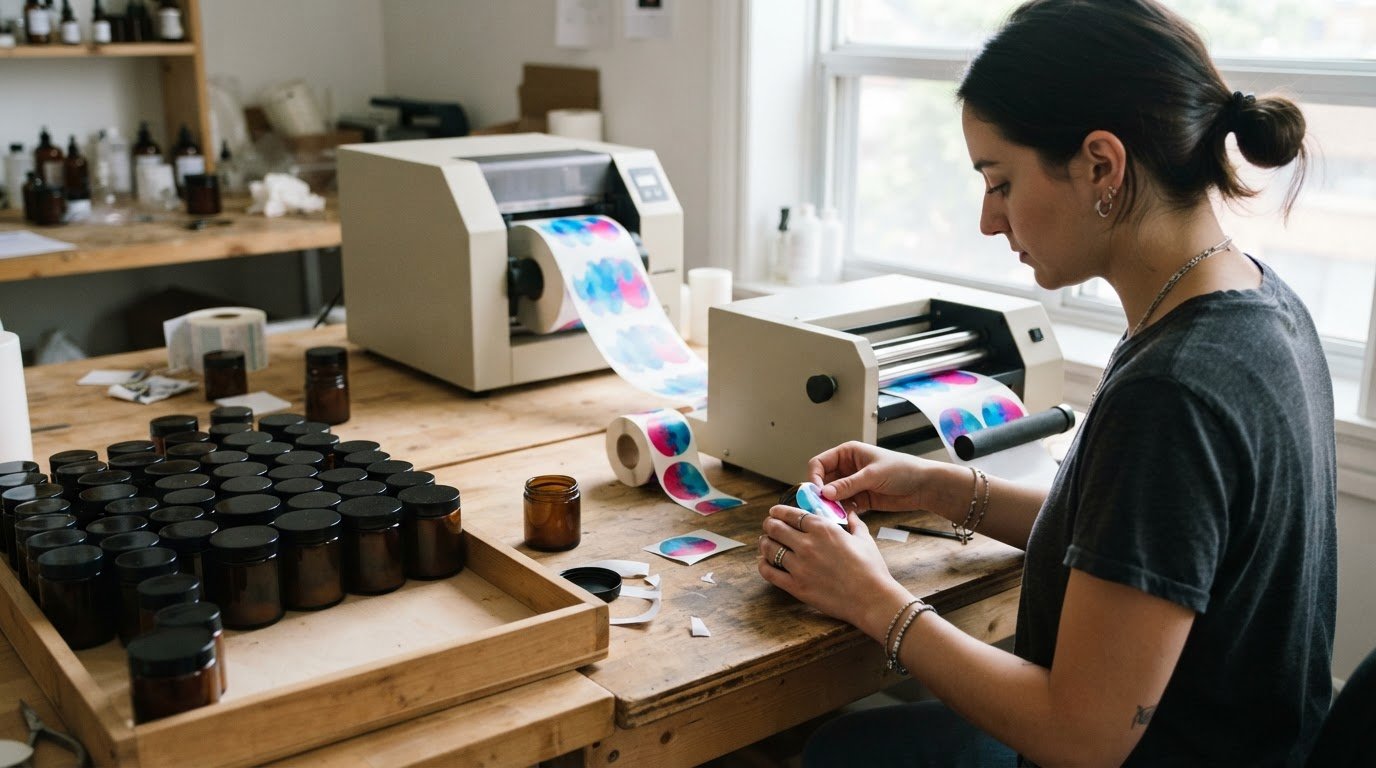
A short-run label order can start at one piece, while short runs are usually under 10,000 labels. A short-run colour label printer for startups can support small production batches, product trials and changing label designs without committing to a large inventory.
Keeping early print runs small can make sense when you’re testing a product, preparing a promotion or updating packaging. A short run color label printer for startups can bring that flexibility in-house. To choose one, compare the printing method, workflow, label format and stock with the labels you need to produce.
This guide explains how digital printing works for short runs, what to consider when choosing a production system, and how label shapes, sizes and materials suit different needs. It also outlines how printing and finishing equipment can fit an in-house setup.
Key Takeaways
- Short-run label orders can start at one piece, while runs are usually under 10,000 labels. Match the quantity to your production needs and how often your packaging may change.
- Digital printing avoids plates and can combine fixed details with variable data, making it useful for testing designs and producing smaller batches.
- Choose a production setup by considering the full workflow, including printing, label application and finishing.
- For labels used outdoors or in humid environments, consider film substrates such as PET, PE or PP.
- Explore colour label printers and finishing equipment to build an in-house setup that fits your startup’s label requirements.
Affordable all-in-one label production systems
For short-run production, orders can start at one label, while runs are usually under 10,000. An in-house setup brings printing, compatible label stock and finishing into one workflow, so teams can produce only what a launch, promotion or regional batch requires.
Printer Technology Comparisons
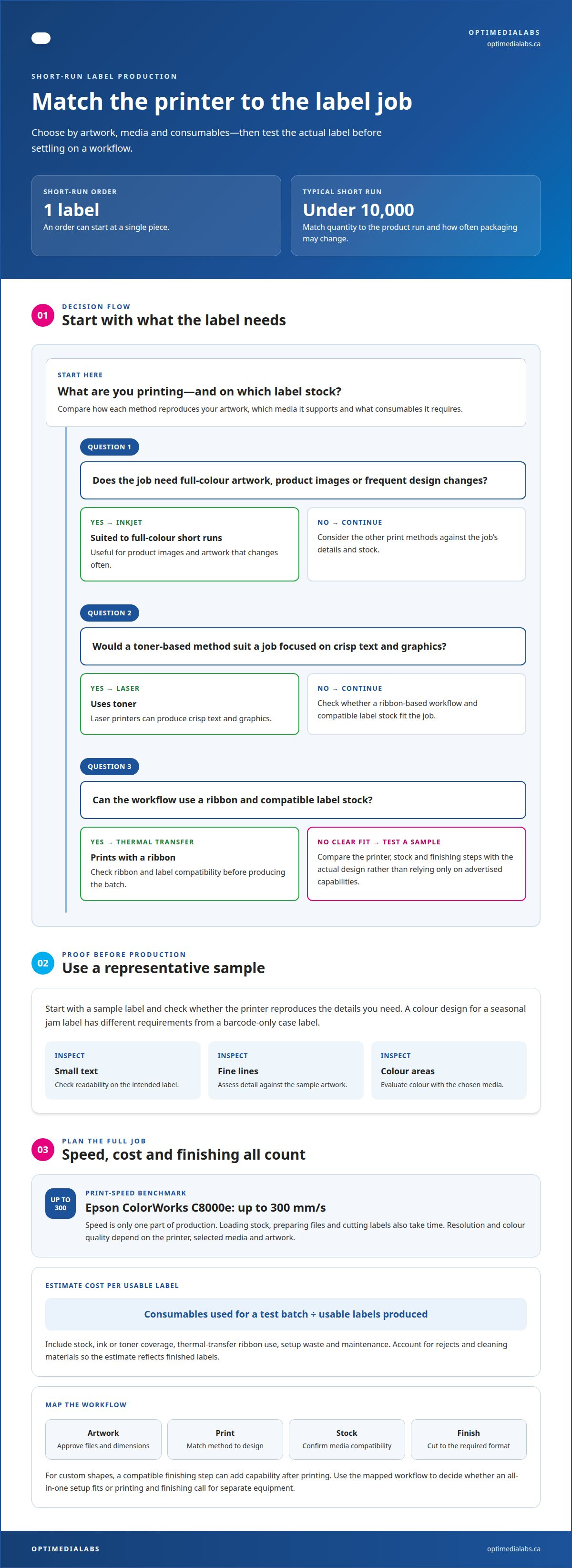
Inkjet printers suit short runs that need full-colour artwork, product images or frequent design changes. Laser printers use toner and can produce crisp text and graphics, while thermal-transfer printers use a ribbon to print on compatible label stock. Compare how each method reproduces your artwork, which media it supports and what consumables it requires.
Start with a sample label and choose a printer that can reproduce its details. A colour design for a seasonal jam label has different requirements from a barcode-only case label. Match the printer, stock and finishing steps to the actual job, rather than relying only on advertised capabilities.
Print Speed and Colour Quality
Speed and resolution affect different parts of the decision. The Epson ColorWorks C8000e prints at up to 300 mm/s, a concrete benchmark for production planning. Resolution and colour quality still depend on the printer, selected media and artwork, so assess small text, fine lines and colour areas on a sample before committing to a workflow.
Consider the complete production cycle, not print speed alone. Loading stock, preparing files and cutting labels also take time. If labels need custom shapes, a compatible finishing step can add capability after printing. Compare colour label printer options by the formats and output your products require.
Per-Label Costs and Upkeep
Per-label cost depends on the stock, ink or toner coverage, thermal-transfer ribbon use, setup waste and maintenance. Estimate it by adding the consumables used for a test batch, then dividing that total by the usable labels produced. Account for rejects and cleaning materials too, or the estimate will miss costs that affect each finished label.
Plan routine cleaning and consumable replacement around production. Inkjet systems may need printhead cleaning; thermal-transfer systems depend on compatible ribbons and labels. Keep the required supplies on hand and monitor print quality during each batch. A clogged printhead, depleted cartridge or mismatched ribbon can interrupt a limited production window.
Small batches make it easier to produce seasonal and special-edition labels. You can print a limited design for a holiday product, then switch the artwork for the next release without holding a large stock of outdated packaging. Separate label versions by destination or market when needed, and keep each batch aligned with its product run.
Before choosing equipment, map the workflow from artwork approval to finished roll or cut label. Record the required label size, material, colours and finishing format, then test a representative design. This helps you decide whether an all-in-one setup fits the job or whether printing and finishing call for separate equipment.
Why Choose Digital Printing For Custom Short Run Labels?
Digital printing suits small batches because it avoids plates and the setup processes typically associated with flexographic printing. A digital workflow can combine fixed information, such as a brand name, with variable details, such as batch information. This lets you update artwork without rebuilding a plate for each version.
Short-run orders can be as small as one piece. That can help you assess a design on a container, prepare a product sample or make a limited release. Rather than print a large quantity before getting feedback, you can produce a smaller batch and adjust the next run.
Digital printing can also support seasonal and regional versions. For example, you could prepare one artwork file for a winter promotion and another for a local event. Separate files help keep each label aligned with its product, destination or campaign, and can reduce unused stock when designs change.
For in-house printing, establish a repeatable artwork process before the first batch. Set the finished label dimensions in a template, keep text and graphics within the printable area, and distinguish variable fields from fixed artwork. Use a consistent colour-management process, then print and inspect a sample against the intended design before producing the batch.
Digital cutting can create custom label shapes without a physical die for each design. A laser die-cutting system can cut short-run labels to different shapes, making it practical to test a rounded, oval or product-contour outline. Check the cut path against the artwork and label dimensions before printing the batch.
Lamination adds a clear layer over printed artwork. Consider it when a label needs an additional surface layer, while ensuring the choice suits the label material and how the product will be handled. Test laminated and unlaminated samples side by side to compare appearance, flexibility and fit on the package.
Digital printing is useful when artwork changes often or labels need different information. It also gives small teams a way to produce samples and short batches without plate-making. The trade-off is managing the printer, stock, ink and cutting workflow in-house. Plan these steps around the actual label design rather than treating printing as a standalone task.
To refine an in-house workflow, prepare one representative artwork file and identify the stock, finish and cut shape it needs. Discuss your label production requirements as you compare equipment and process needs.
Label printing for small businesses and startups
Labels connect a product’s identity with practical information on its package. A small-batch food maker, for example, may need different labels for jars, sample packs and gift sets. Match the artwork, material and dimensions to each container. Mapping these requirements by product helps prevent one generic label from fitting several formats poorly.
Choose equipment for your ongoing label needs, not only the first product launch. An in-house printer may suit a business that frequently changes product details or produces small batches. Online ordering or local print production may suit a business that prints infrequently and prefers not to manage equipment, stock and upkeep. Compare the workflow, revision frequency and level of production control each option requires.
Short runs can help manage product changes. A small skincare brand might update an ingredient panel or package design, then print labels for current inventory instead of holding a large supply of outdated artwork. Short-run production can also help limit excess stock for low-volume products and reduce waste when label information changes.
Label variations can help small businesses test product ideas. A bakery could prepare distinct labels for a new flavour, seasonal assortment and sample box, then compare customer response before expanding production. Tie each artwork file to its product name and material. Clear file names and version control help staff choose the right label during packing.
A printer may support several label tasks within a business. You might produce colour product labels for retail packaging and separate identification labels for internal stock handling. Before choosing a system, list the products, label formats and artwork changes it must handle. Then decide which steps, including printing, cutting and application, need to happen in-house.
Use this decision sequence: estimate how often the artwork changes, identify the formats and materials each product needs, then compare in-house production with ordering finished labels. If runs are regular and revisions frequent, controlling files and printing in-house can be useful. If production is occasional, ordering labels avoids adding equipment and consumables to your workflow.
For a growing brand, flexibility across product lines is valuable. You can introduce a limited product, test different package presentations or create regional versions without making every label a permanent design. Keep the artwork, material and product record aligned so the correct version reaches the right package as the range develops.
Short-run, on-demand colour label printing
On-demand colour printing lets a business produce labels in quantities that track current demand. Short runs are usually under 10,000 labels, and 50 labels is generally where an order starts to be worthwhile. That range can suit a limited product release, a small retailer trial or packaging for a seasonal promotion. Match the batch size to expected sales and the time a design will remain current.
Full-colour digital printing uses a four-colour process to reproduce artwork. For a small run, it can bring brand colours, product images and changing text together without plate preparation. Create separate files for different flavours or package sizes, then print the quantity needed for each version. Keep the product name, label dimensions and artwork version organized together to avoid mixing files.
Choose ink to suit the printing process and product. Food and cosmetics labels must use low-migration, non-toxic inks. For other products, compare how colours look on the chosen stock, especially when artwork includes small text, pale tones or large solid areas. Print a sample on the intended material and inspect it under the lighting in which customers will see the package.
Protective coatings and laminates add a surface layer over printed colour. A coating can help preserve the label’s finish during handling, while a laminate creates a separate layer over the artwork. Choose based on the label material, package surface and intended appearance. Compare coated and uncoated samples on the actual container before establishing a repeat production process.
CMYK+W describes a process that adds white to the usual cyan, magenta, yellow and black inks. White can provide an opaque base beneath colour artwork on clear or dark label material. This makes a fifth-colour workflow worth considering when transparent packaging needs a visible, high-contrast design. Check the artwork layers and print method together, since white placement affects the final appearance.
For a practical setup, prepare a label file, select the material and finish, then print a sample. Review the colour, fine text, white areas and coating before producing the batch. A limited-edition beverage label, for example, can have its own artwork while retaining the core brand layout. Save approved files with clear version names so changing demand does not lead to an outdated design being printed.
Small quantities support controlled product changes, but every added version needs its own file and production check. Keep a record of label quantities, material, ink requirements and approval status for each product. This helps with replenishment planning, seasonal artwork and consistent full-colour labels as the range grows.
Label shapes, sizes and substrates
Start with the package and set label dimensions to fit its available surface. A narrow bottle, flat carton and curved jar each need different placement and proportions. Measure the usable area, including edges or seams the label must avoid. This helps keep essential text and artwork visible after application and makes the label a better fit for the product.
Shape affects appearance and finishing. Rectangles and circles suit many straightforward layouts, while a custom outline can reflect a product’s visual identity. Laser die-cutting can produce short-run labels in different shapes. For example, a small maker could use a leaf-shaped label for a seasonal product. Include the cut path in the artwork and compare a finished sample with the package before production.
Choose a substrate based on where the product will be stored and handled. Labels intended for outdoor use or humid environments require film made from PET, PE or PP. These materials differ from paper, so match the substrate to both the package and printing process. Test a sample on the actual container to see how it sits across curves, corners and seams.
For a paper-based option, sheet-fed cardboard stock is available from 100 gsm to 300 gsm. That range supports different stock weights for printed applications, but the intended use should guide selection. A product card or package insert, for example, may call for a different thickness than a flexible label applied around a jar. Confirm the format and printer compatibility before setting up artwork.
Surface finish changes how a label looks. Varnish can finish printed artwork, while a laminate adds a separate layer. Compare the chosen finish on a printed sample, checking colour, text legibility and how the material sits on the product. Gloss can look different from an uncoated surface, so assess the sample under the lighting where customers will view it.
Use this selection sequence: measure the package, choose a shape, select a substrate, then test the print and finish. Keep an approved sample with the artwork file and material details. If you sell a cylindrical bottle and a flat box, record separate dimensions and test each application independently. This makes it easier to reproduce labels consistently when a design is reordered.
For help matching label equipment to formats and finishing needs, discuss your label production requirements.
OptiMediaLabs Canada: Afinia Color Label Printers
OptiMediaLabs Canada offers Afinia Color Label Printers for businesses planning in-house colour label production. They can be relevant when you need to produce product labels in smaller batches and manage artwork changes internally. Choose label stock and ink that suit the printer and the package.
Consider the entire workflow, not just the printer. Reliable replacement cartridges support continuous printing needs, while Afinia Label Cutters & Finishers handle label cutting and finishing. RFID Label Printers meet a different identification need, so match equipment to the intended label use. Review your formats, materials, artwork and finishing steps before choosing a setup.
Contact OptiMediaLabs Canada to discuss your label production requirements.
Plan your next label production step
Turn your label requirements into a practical equipment plan. Note the products you expect to label, anticipated artwork changes, and the materials and finishing steps your workflow needs. This gives you a clear basis for discussing an in-house setup. A short run color label printer for startups should fit the work you expect to produce, not just its specifications.
OptiMediaLabs Canada offers Afinia Color Label Printers, Epson Ink Cartridges and RFID Label Printers. These offerings address different printing and identification requirements, so define the intended application before selecting equipment. Share your label formats, materials and production goals as you consider whether a short-run colour label printer for startups fits your plans.
Contact OptiMediaLabs Canada to discuss your label production needs. A clear plan can help you move forward with confidence as your products and packaging develop.
Frequently Asked Questions
How Small Can a Label Run Be?
A short-run label order can be as small as one piece. Short runs are usually under 10,000 labels at a time, so a startup can produce a trial label or a limited batch rather than stocking a long production run. For example, print a sample label for a new jar size, check how it fits, then decide how many finished labels the next product batch needs.
Is it worth getting started with label printing in short runs?
A short-run setup can be worthwhile when you need to test a product, manage frequent artwork changes or avoid holding excess labels. Small batches let you align label production with demand and revise packaging as the product develops. Before investing in equipment, compare how often you print, how much control you need over revisions, and whether managing stock and maintenance suits your operation.
What is Short Run Label Printing and Why Does it Matter for Manufacturers?
Short-run label printing means producing limited quantities rather than committing to a large batch. It matters to manufacturers managing several product versions, since each SKU can have different artwork or information. For example, a company launching a regional variant can print labels for that version without ordering the same quantity as for its main product. Smaller, timely batches can also limit obsolete stock when packaging changes.
What are the best short-run colour label printers for startups in Canada?
The right choice depends on the label material, colour requirements, output volume and whether labels need cutting after printing. Consider a colour inkjet printer for full-colour product artwork, then compare compatible stock and ink availability. OptiMediaLabs offers Afinia, Primera, Epson and VIPColor colour label printer options in Canada. Test a sample of your actual label design before settling on a production workflow.
Which Canadian suppliers sell or lease colour label printers and provide service?
OptiMediaLabs sells professional colour label printers and related supplies in Canada, including Afinia Color Label Printers and Epson Ink Cartridges. The company focuses on product sales and does not provide printer leasing or on-site repair. When comparing options, distinguish equipment and consumables from leasing or repair services, then choose the arrangement that fits how you plan to operate your printer.
What label sizes, materials, finishes, and adhesives can short-run printers handle?
Supported formats depend on the printer and label stock. Outdoor or humid applications call for film materials such as PET, PE or PP; sheet-fed cardboard stock is available from 100 gsm to 300 gsm. Shapes can include custom-cut outlines. For adhesive selection, consider the package surface and application conditions, then test a label sample. Compare finishes such as varnish or lamination against the desired appearance and handling needs.
How do print speed, resolution, and color quality compare across popular models?
The Epson ColorWorks C8000e prints at up to 300 mm/s. Resolution and colour quality vary by printer, media and artwork, so assess small text, fine lines and colour areas on a sample; the article does not provide comparisons across models.
What are the purchase prices and ongoing costs of color label printers in Canada?
Ongoing per-label costs depend on stock, ink or toner coverage, ribbon use, setup waste and maintenance. Estimate them by dividing the consumables used for a test batch by the usable labels produced.