
Toshiba Thermal Transfer Ribbons Canada: The 2026 Industrial Procurement Guide
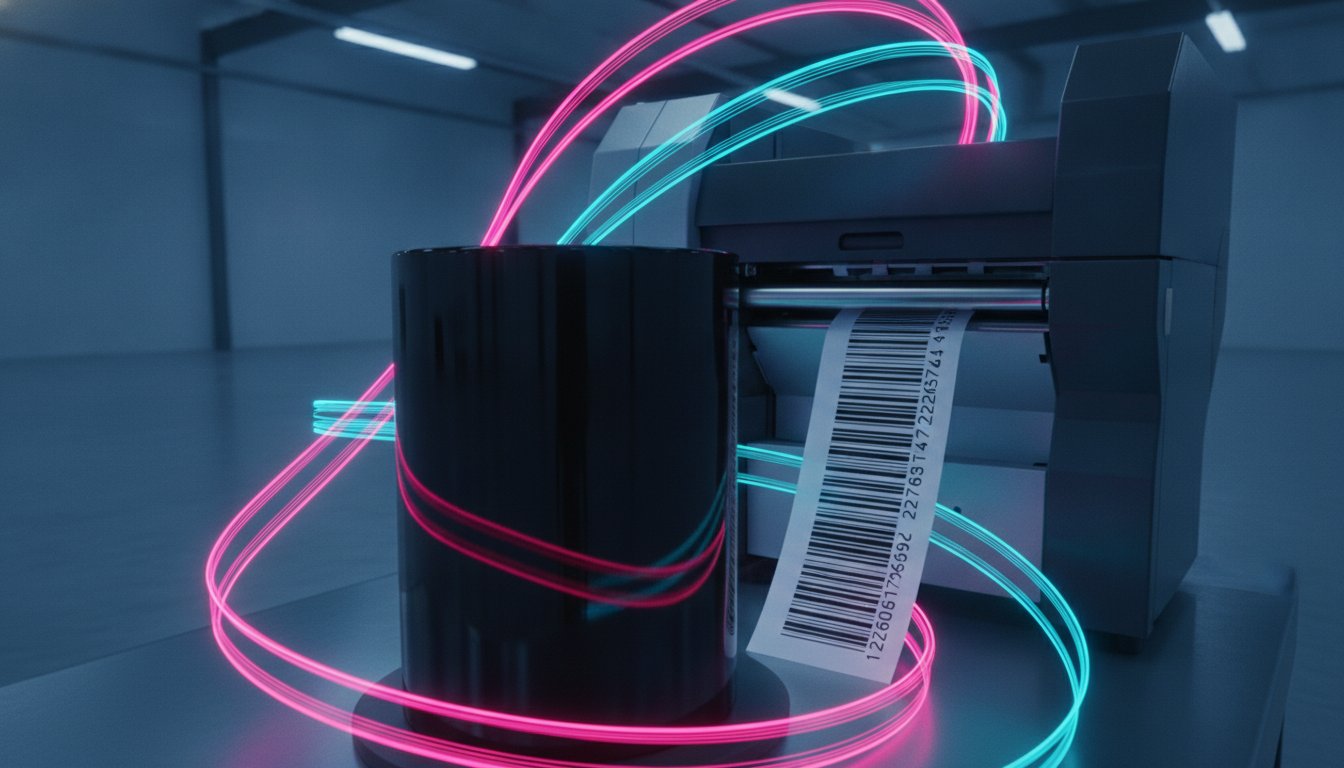
A single barcode rejection at a major Canadian distribution centre often costs more in vendor chargebacks than an entire year's supply of premium consumables. If you've dealt with faded labels or premature printhead failure, you realize that your choice of Toshiba thermal transfer ribbons Canada is a technical decision, not just a simple procurement line item. Inconsistent print quality leads to scanner errors that stall your operations and damage your reputation with partners.
We understand that maintaining 100% scan rates across harsh industrial environments is your top priority. This 2026 guide provides the technical expertise needed to select the exact ribbon formulation for your specific label stocks. You'll master the differences between Wax, Resin, and Wax-Resin ribbons to ensure your barcodes remain legible from the warehouse floor to the final destination. We also detail how to maintain 100% compatibility with Toshiba Near Edge technology to protect your hardware investment. By the end of this guide, you'll have a clear path to securing a reliable Canadian supplier for your high-volume industrial labelling needs.
Key Takeaways
- Identify the technical differences between Wax, Resin, and Near Edge formulations to ensure your labels withstand specific industrial environments.
- Secure the optimal Toshiba thermal transfer ribbons Canada for your TEC printer series to maintain high-speed throughput without compromising barcode clarity.
- Protect your hardware investment by selecting 1-inch core ribbons with widths that exceed your label dimensions to prevent premature printhead wear.
- Ensure long-term legibility in harsh Canadian climates by choosing specialized formulations resistant to extreme temperature fluctuations and chemical exposure.
- Streamline your procurement process and inventory control by integrating professional labelling software like BarTender or NiceLabel into your workflow.
Understanding Toshiba Thermal Transfer Technology in 2026
Modern industrial labelling relies on the precision of thermal transfer printing technology. This process involves a thermal printhead that applies heat to a thin ribbon, melting a specialized coating directly onto a label substrate. In the Canadian manufacturing sector, the shift toward high-speed, on-demand labelling has made the quality of your consumables more critical than ever. Using high-performance Toshiba thermal transfer ribbons Canada ensures that your production lines remain efficient and your barcodes stay compliant across the entire supply chain.
The Mechanics of Thermal Transfer Printing
The success of a print job depends on the precise interaction between the thermal printhead, the ribbon, and the label material. When the printhead elements energize, they must release the ink from the ribbon carrier with absolute consistency. High-quality ribbons are engineered with specific "ink release" properties that produce crisp, high-density barcodes even at extreme speeds. Without this precision, you'll see "burn-through" on the printer hardware, where excessive heat or friction damages the delicate ceramic surface of the printhead.
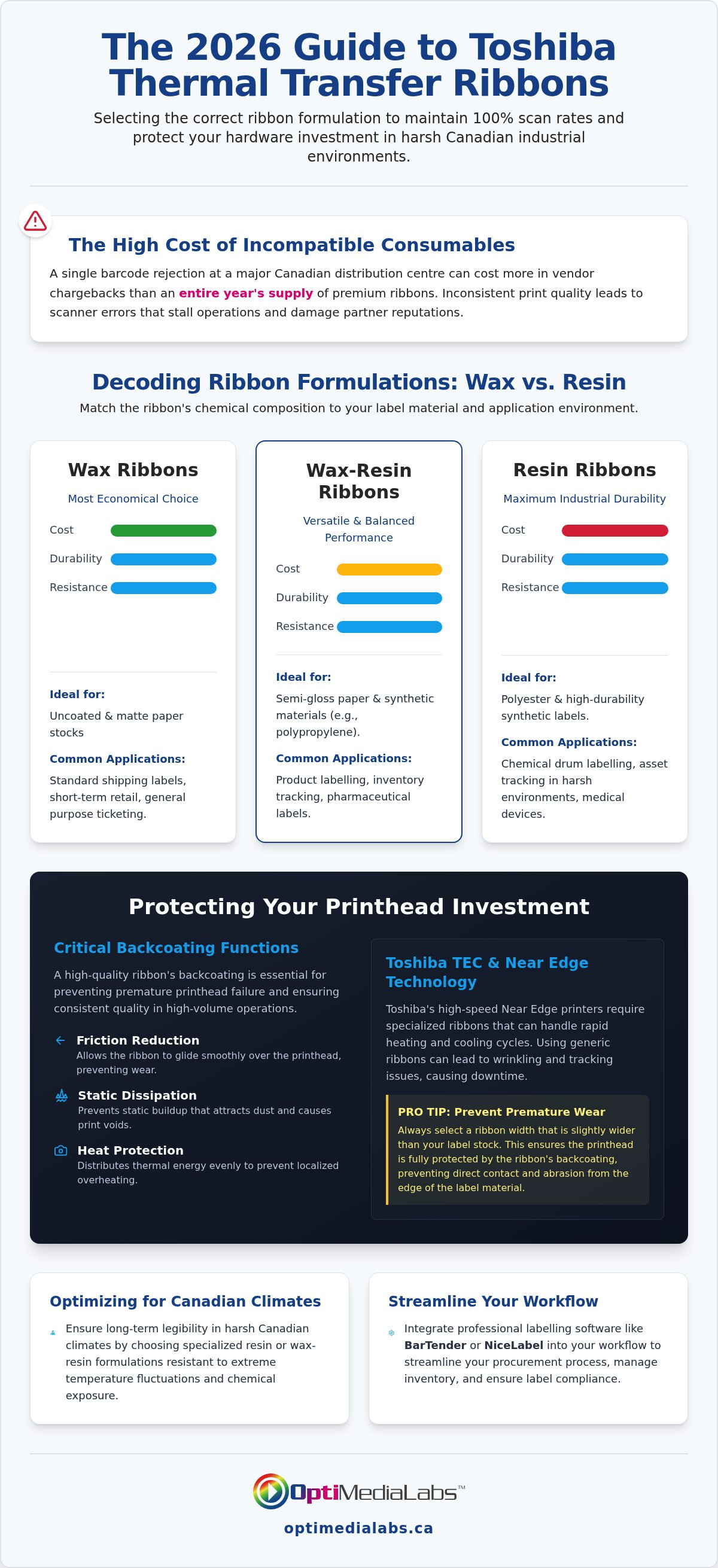
A vital but often overlooked component is the backcoating of the ribbon. This layer sits between the printhead and the ribbon's polyester base. It serves several critical roles in a busy distribution centre:
- Friction Reduction: It allows the ribbon to glide smoothly over the printhead surface.
- Static Dissipation: It prevents the buildup of electrical charges that attract dust and debris.
- Heat Protection: It helps distribute thermal energy evenly to prevent localized overheating.
In high-volume Canadian warehouses, static buildup can lead to "voids" in your barcodes and eventually causes permanent damage to the printhead's heating elements. Reliable backcoating ensures the longevity of your equipment.
Why Toshiba TEC Systems Require Specialized Consumables
Toshiba TEC industrial printers are known for their high-speed throughput and Near Edge technology. These systems operate differently than standard flat-head printers, requiring ribbons that can keep up with rapid cooling and heating cycles. Procuring the correct Toshiba thermal transfer ribbons Canada is essential because these machines have specific tension requirements. Using a generic or low-quality ribbon often results in ribbon wrinkling or "tracking" issues, which leads to wasted stock and unexpected downtime.
Industrial environments across Canada demand reliability. If you use incorrect formulations, you risk premature printhead failure. Replacing a printhead is a significant capital expense. This can be avoided by matching your thermal transfer label printers with the consumables they were designed to use. Selecting the right ribbon isn't just about the ink; it's about protecting the longevity of your hardware investment.
Decoding Toshiba Ribbon Formulations: Wax, Resin, and Near Edge
Selecting the right formulation is the foundation of a successful labelling strategy. While generic options exist, specific Toshiba thermal transfer ribbons Canada are engineered to match the heat profile of your printer. This ensures that the ink bonds correctly to the substrate without requiring excessive energy from the printhead heating elements. A deep understanding of thermal-transfer printing technology is essential when choosing between the three primary ink types.
Wax vs. Resin: Finding the Right Balance
Formulation choice determines the longevity of your printed data. You must match the ribbon's chemical composition to your specific label material to avoid smudging or total ink failure. Consider these three standard categories:
- Wax Ribbons: These are your most economical choice. They work best on uncoated or matte paper stocks, making them ideal for standard shipping labels and short-term retail applications.
- Wax-Resin Ribbons: This hybrid formulation offers a versatile balance. It provides improved smudge and scratch resistance for semi-gloss labels or synthetic materials like polypropylene.
- Resin Ribbons: These are the gold standard for industrial durability. Use resin on polyester labels where resistance to chemicals, solvents, or extreme temperatures is non-negotiable.
Matching these to your substrate is critical. For example, a resin ribbon used on a standard paper label will often require too much heat, potentially damaging the printhead or causing the ink to bleed. Conversely, a wax ribbon on a polyester label will simply wipe off.
The Technical Advantage of Toshiba Near Edge Ribbons
Toshiba's Near Edge technology represents a significant departure from standard flat-head printing. In a Near Edge system, the printhead sits at an angle. This allows the ribbon to pull away from the label almost immediately after the ink transfers. This "floating head" design enables much faster print speeds, often exceeding 10 inches per second in high-volume environments.
Because the cooling time is so short, these systems require specialized ink formulations that release instantly. Standard ribbons are not compatible with this technology; they often stick to the substrate or result in blurred, low-density images. Near Edge ribbons are specifically designed for high-performance models like the Toshiba B-EX4T1 and B-SX series. If you're unsure which formulation matches your specific hardware, you can consult our technical team for a compatibility check. Using the correct Toshiba thermal transfer ribbons Canada ensures your high-speed lines never face downtime due to consumable failure.
Selecting the Right Ribbon for Your Toshiba TEC Printer Model
Procuring the correct Toshiba thermal transfer ribbons Canada starts with a precise audit of your current hardware fleet. Canadian warehouses often operate a mix of legacy and modern units, each with specific mechanical constraints. Failure to match the ribbon to the printer's winding direction or core size causes immediate downtime and potential sensor errors. You don't want to realize your stock is incompatible during a high-volume shift.
Compatible Printer Series: B-EX, B-FV, and B-SA
The Toshiba B-EX4T1 and B-EX4T2 industrial series are the workhorses of the Canadian logistics sector. These machines utilize Near Edge technology, requiring ribbons that can handle high-speed data transfer and rapid cooling. For smaller operations, the B-FV4T desktop series offers a compact footprint but still demands high-quality wax or wax-resin ribbons to maintain barcode clarity. Large-scale manufacturing often employs wide-web printers like the B-SX8 series, which accommodate ribbons up to 8 inches wide for pallet labelling and compliance signage.
Hardware Specifications for Ribbon Procurement
You must verify the physical dimensions and winding of the ribbon before placing a bulk order. Most industrial Toshiba models utilize a standard 1-inch core, but desktop models may vary. Winding direction is equally critical. You'll encounter "Ink Side Out" (CSO) and "Ink Side In" (CSI) configurations. Using the wrong winding direction results in no ink transfer and a messy cleanup of your rollers, as the ink side will face the wrong way.
Measuring the maximum ribbon length your printer can hold is a simple way to boost productivity. Longer rolls mean fewer changeovers during a shift. The ribbon-to-label ratio requires the ribbon to be slightly wider than the label stock to protect the printhead from abrasive contact with the label edges. This practice extends the life of your equipment significantly.
Before finalizing your procurement, use this compatibility checklist:
- Printer Model: Confirm if it's a desktop, industrial, or wide-web unit.
- Printhead Type: Verify if the unit uses flat-head or specialized Near Edge technology.
- Winding Direction: Check the printer manual to see if it requires CSO or CSI ribbons.
- Core Size: Standardize on 1-inch cores for industrial fleets to simplify inventory management.
- Ribbon Width: Ensure the ribbon is at least 3mm to 5mm wider than your widest label stock.
Following these steps ensures your Toshiba thermal transfer ribbons Canada perform reliably under heavy workloads and maintain the high-speed throughput your facility requires.
Optimizing Print Quality in Harsh Canadian Environments
Canadian winters present a unique challenge for barcode legibility. Temperature fluctuations can cause standard wax ribbons to become brittle or lose adhesion when moving from a heated facility to a frozen shipping yard. When you source Toshiba thermal transfer ribbons Canada, you're selecting consumables that must perform across a range of -30°C to +30°C. Moisture, oils, and industrial solvents further complicate the bond between the ink and the substrate, making environmental optimization a technical necessity rather than an afterthought.
Outdoor applications and high-friction environments demand resin-based formulations. These ribbons provide a near-permanent bond that resists UV exposure and physical abrasion. In Canadian chemical facilities, GHS-compliant labelling ensures that safety data remains readable even after exposure to hazardous substances. If your labels face industrial solvents or heavy handling, resin is the only way to prevent supply chain rejections and maintain safety standards.
Labelling for Cold Storage and Logistics
Logistics centres across the country rely on consistent scanning for accurate inventory tracking. In cold storage environments, condensation often forms on labels as they move between temperature zones. You need a ribbon that maintains its integrity in sub-zero conditions. Smudge resistance is non-negotiable. Using the wrong Toshiba thermal transfer ribbons Canada in these settings leads to unreadable barcodes and manual data entry errors. For more details on these specific requirements, consult our Industrial Labeling Solutions Canada: The 2026 Reference Guide.
Chemical and Solvent Resistance for Industrial Assets
Industrial assets often face exposure to harsh cleaners or friction. Specialized resin ribbons are the only reliable option for these high-stakes applications. They offer the highest level of durability for asset tags and safety warning labels that must last the entire life cycle of the equipment. We recommend verifying your ribbon's performance using the "scratch and rub" method. To do this, use a standard pencil eraser or a solvent-soaked cloth to simulate heavy wear on a printed sample. This test reveals if the ink-to-substrate bond is sufficient for your specific facility. If you're seeing failures during testing, request a durability consultation to find a more resilient formulation.
Inventory Control: Integrating Toshiba Ribbons with Advanced Software
Effective inventory control relies on the synergy between high-quality consumables and the software that drives them. When you deploy Toshiba thermal transfer ribbons Canada, your labelling software dictates the precise heat and speed settings required for a perfect transfer. Professional platforms ensure that your barcodes remain consistent across thousands of prints, reducing the risk of human error and hardware strain. On-demand labelling allows your team to print exactly what is needed for each shipment, which drastically reduces material waste and improves overall warehouse efficiency.
Managing a complex barcode catalogue requires more than just a printer; it requires a centralized system that can handle variable data and compliance requirements. By integrating your Toshiba TEC printers with robust software, you can automate your inventory tracking and ensure that every label meets the strict standards of your industry partners. This level of technical control is what separates a basic shipping operation from a high-performance logistics hub.
Maximizing Efficiency with BarTender and NiceLabel
Utilizing BarTender Software Canada allows you to create driver-level optimizations specifically for Toshiba’s Near Edge technology. These settings manage thermal pulses with micro-precision, preventing the printhead damage discussed earlier in this guide. For a deeper look at how to select the right platform for your facility, read The Professional Guide to Barcode Labeling Software in Canada for 2026.
Integrating variable data from your ERP system into these templates enables real-time inventory tracking. This ensures that every pallet leaving your facility is accurately documented with high-density barcodes that won't fail during the scanning process. NiceLabel and BarTender both offer specialized drivers that recognize the unique tension and heat requirements of Toshiba hardware, allowing your Toshiba thermal transfer ribbons Canada to perform at their maximum rated speed without losing clarity.
Sourcing Quality Consumables from a National Distributor
Procuring your supplies from a professional label printer distributor in Canada provides more than just a product; it offers a partnership in operational reliability. OptiMediaLabs Canada maintains a robust national supply chain, ensuring that your stock of Toshiba ribbons is always replenished before your production lines stall. We understand the technical nuances of matching ribbon formulations to specific Toshiba TEC models, helping you avoid the costly mistakes of generic procurement.
Organizing a reliable supply chain for your consumables is a strategic advantage. Our team provides the technical expertise to bridge the gap between hardware maintenance and software configuration, ensuring your labelling workflow remains frictionless. Contact the OptiMediaLabs Canada team to find the perfect ribbon for your Toshiba TEC printer and secure your industrial labelling workflow for the years ahead. We realize that in high-volume environments, every second of uptime counts.
Securing Your Industrial Labelling Future
Mastering your procurement strategy ensures that your supply chain remains resilient against harsh Canadian environmental challenges and costly hardware downtime. By selecting the correct Toshiba thermal transfer ribbons Canada, you protect your delicate printheads and guarantee 100% scan rates for every shipment leaving your facility. Whether you're managing complex cold storage logistics or high-speed manufacturing lines, the technical precision of your consumables determines your long-term operational success.
OptiMediaLabs Canada serves as your dependable national partner for industrial barcode systems. We combine specialized technical support for both Toshiba Near Edge and Flat Head technology with authorized expertise in BarTender and NiceLabel software integration, alongside support for other leading labelling platforms. Our specialists are ready to help you synchronize your hardware and software to eliminate waste and boost throughput. Request a technical consultation for your Toshiba ribbon requirements today to streamline your facility's labelling workflow. We look forward to helping you realize a more efficient and reliable production environment.
Frequently Asked Questions
Are Toshiba thermal transfer ribbons compatible with other printer brands like Zebra?
Yes, many Toshiba thermal transfer ribbons Canada are compatible with Zebra printers if the physical specifications match. You must verify the core size, which is typically 1 inch for industrial models, and the winding direction. Zebra printers usually require Coated Side Out (CSO) ribbons. However, specialized Near Edge ribbons designed for Toshiba TEC systems won't work on standard Zebra flat-head printers. Always match the ink formulation to your specific printhead technology.
What is the difference between Toshiba Near Edge and Flat Head ribbons?
The primary difference lies in the printhead angle and ink release speed. Flat head technology applies heat over a longer contact area, while Near Edge technology uses a floating head that makes contact at the very edge of the ribbon. This allows for much faster print speeds, often exceeding 10 inches per second. Near Edge systems require specialized ribbons with instant-release ink to maintain barcode density during high-speed production cycles.
How do I determine the correct ribbon width for my Toshiba label printer?
You should always select a ribbon that is slightly wider than your label stock. For instance, if you're using 4-inch wide labels, a 4.33-inch (110mm) ribbon is the standard choice. This extra width ensures the ribbon's backcoating completely covers the label edges. This practice prevents the abrasive label material from making direct contact with the thermal printhead heating elements, which significantly extends the life of your hardware investment.
Can I use wax ribbons for labels that will be exposed to moisture?
No, wax ribbons aren't suitable for environments where moisture is present. Wax ink is economical but stays on the surface of the label, making it prone to smudging or washing away when wet. For labels exposed to condensation in cold storage or humidity, you should choose a wax-resin or full resin formulation. These types bond more deeply with synthetic substrates to ensure your barcodes remain legible throughout the Canadian supply chain.
Why are my barcodes smudging even though I am using a Toshiba OEM-compatible ribbon?
Smudging usually indicates that your heat or speed settings aren't optimized for the specific substrate. Even with high-quality Toshiba thermal transfer ribbons Canada, incorrect energy levels can lead to incomplete ink bonding. Use your labelling software to adjust the darkness or temperature settings. If the issue persists, your ribbon formulation might be a mismatch for your label material, such as using a standard wax ribbon on a high-gloss synthetic surface.
What is the typical shelf life of a thermal transfer ribbon in a Canadian warehouse?
The typical shelf life for thermal transfer ribbons is approximately 12 to 24 months. To maintain the integrity of the ink and backcoating, store your rolls in a climate-controlled area away from direct sunlight. High humidity or extreme temperature fluctuations in a warehouse can cause the ribbon layers to stick together, a problem known as blocking. Keeping them in their original packaging at the centre of your facility ensures the best performance.
How do I verify if my Toshiba printer requires Ink Side Out (CSO) or Ink Side In (CSI) ribbons?
You can verify the winding requirement by checking the ribbon path diagram inside your printer's media compartment. Most Toshiba industrial printers are designed for Coated Side Out (CSO) ribbons, meaning the ink is on the exterior of the roll. If you're unsure, perform a tape test by pressing a piece of adhesive tape against the outer layer. If ink pulls off, it's CSO. Using the wrong winding direction will result in no ink transfer.
Where can I find BarTender software support for my Toshiba printing system in Canada?
OptiMediaLabs provides comprehensive BarTender and NiceLabel support for businesses across the country. As an authorized provider, we help you configure specialized drivers that recognize the unique requirements of Toshiba TEC hardware. Our technical team assists with template design and variable data integration to ensure your printing system remains efficient. We realize that software configuration is just as critical as the consumables you use to maintain high-volume industrial reliability.