
Variable Data Printing for Food Packaging: A Guide
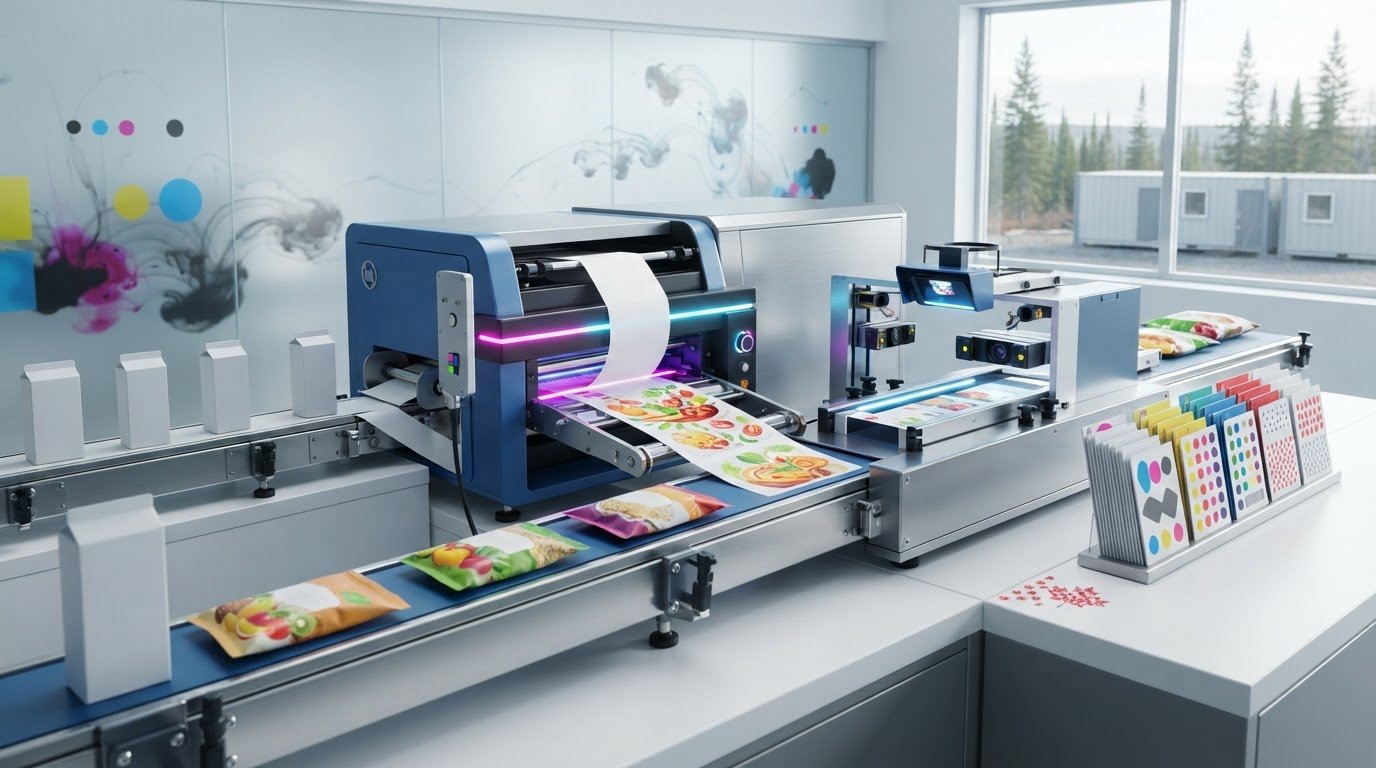
What if the biggest risk in variable food-package printing isn’t the printer, but the data feeding it? A dependable workflow for printing variable data on food packaging starts with accurate product, batch and date records, then keeps those details controlled as they move into label templates and production. Even a capable printer can’t prevent errors caused by inconsistent source information or manual changes.
It’s understandable to focus first on printing equipment. But reliable results also depend on deciding which label elements stay fixed, which change for each product or run, and how every version is approved before printing.
This guide maps the process from source data to finished labels. You’ll learn how to organize records, separate fixed and variable content, prepare templates, proof variable fields, select a printing setup and apply quality checks. The aim is a repeatable workflow that helps reduce preventable data and print errors while fitting your label format and production needs. We’ll also explain where labelling software, printers and compatible supplies fit into the process for food producers across Canada.
Key Takeaways
- Build a workflow for printing variable data on food packaging around clean, approved source records, not manual edits at the printer.
- Separate fixed label content from fields that change, such as batch or date information, to keep each version consistent.
- Use a defined approval sequence: validate the data, map fields to the template, review a proof, then release the job.
- Choose colour label printing or a code-focused setup based on the content, label material, run pattern and how often information changes.
- Assess the printer, label stock, ink or ribbon, software and inspection process as one compatible workflow.
What variable data printing means for food-package labels
Variable data printing (VDP) changes selected label elements using data while keeping the fixed design consistent. On a jar of pasta sauce, for example, the brand artwork and product name can stay the same while the batch identifier or date field changes between production runs. The package doesn’t need new artwork for every batch.
This guide focuses on printed labels applied to food packaging, not printing directly onto the package itself. In a VDP label, the template holds the stable design and identifies the fields that can change. Variable content might include text, numbers or a code. The approach is part of a broader printing method described in Variable Data Printing Explained.
Keep the distinction clear: brand artwork, product identity and approved label copy are fixed unless they go through the appropriate review and approval process. A batch field is different. It receives changing information from production records. Treating those elements separately gives the workflow for printing variable data on food packaging a controlled starting point, rather than relying on repeated edits to the full label.
Which food-label details can change from print to print?
Variable fields may include a lot identifier, a date field or a unique QR code. A producer might use the same approved label template for successive batches, changing only the designated fields. Whether a particular detail belongs on a label depends on the product, approved artwork and applicable requirements. These examples are illustrative, not legal advice. For Canadian requirements, verify current guidance from the Canadian Food Inspection Agency and Health Canada.
When does a food producer benefit from VDP?
VDP can suit production with multiple product variants or records that change from run to run. For example, a producer may use a shared label layout for related products while keeping each product’s approved identity and copy distinct, then update a batch field for each run. One controlled template can reduce the need to make repeated manual artwork edits. It doesn’t replace data review, label approval or checks on the printed result.
Consider VDP when the changing information is predictable, can be tied to a defined field and needs to appear on a printed label. If the design, product identity or approved copy changes, treat that as a separate label revision rather than simply another data value. This distinction helps teams decide what belongs in the data-driven printing process and what requires artwork and content approval.
How the VDP workflow connects food-label data, templates, and printing
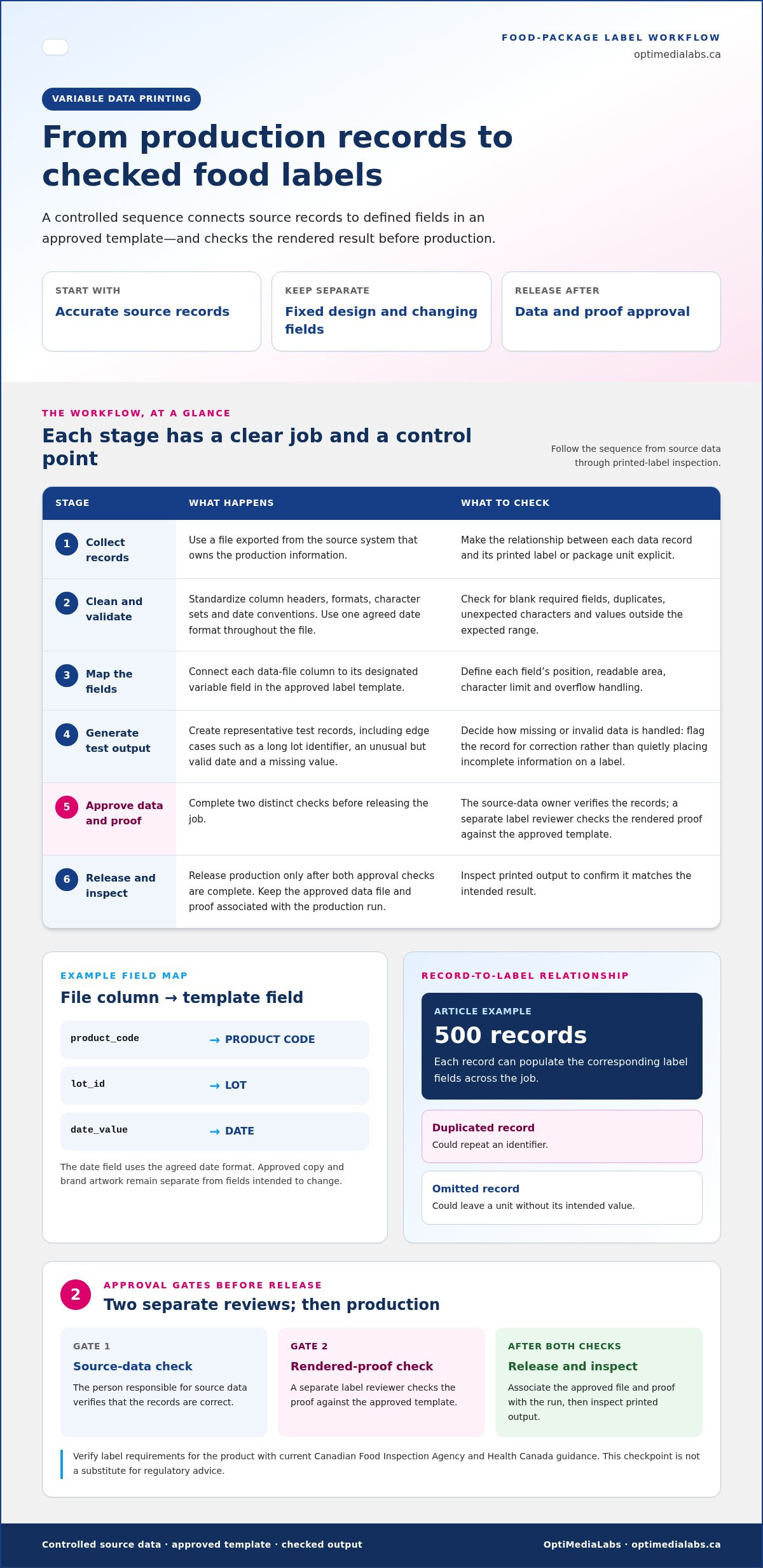
A reliable workflow connects production records to defined fields in an approved label template, then checks the rendered result before the job runs. The sequence is straightforward: collect source records, clean and validate the data, map fields, generate test output, approve the data and proof, release production, and inspect printed labels.
In a typical setup, one dataset record supplies values for one printed label or package unit. If a file contains 500 records, the system can use each record to populate the corresponding label fields across the job. Make the record-to-label relationship explicit: a duplicated record could repeat an identifier, while an omitted record could leave a unit without the intended value. For wider industry context, see Trends in Variable Data Printing for Food Packaging.
Prepare and validate the variable-data file
Start with a file exported from the source system that owns the production information. Set consistent column headers, formats, character sets and date conventions. For example, agree on one date format, such as YYYY-MM-DD, and use it throughout the file so values aren’t interpreted differently between systems.
Before importing, check for blank required job fields, duplicate records, unexpected characters and values outside the expected range. Create representative test records, including edge cases: a long lot identifier, an unusual but valid date, and a missing value. Decide how the workflow should respond to missing or invalid data. It should flag the record for correction rather than quietly placing incomplete information on a label.
Map data fields to an approved label template
Keep approved copy and brand artwork separate from fields intended to change. The template should identify each variable field and define its position, readable area, character limit and overflow handling. If a barcode or QR code is used, reserve a clear placement area and test the rendered output at the intended label size.
A compact field map could look like this:
- Product code: “product_code” in the file maps to “PRODUCT CODE” in the template.
- Lot field: “lot_id” maps to “LOT” and receives the batch identifier.
- Date field: “date_value” maps to “DATE” and uses the agreed date format.
For the workflow for printing variable data on food packaging, use two distinct approval gates. The person responsible for source data verifies that the records are correct; a separate label reviewer checks the rendered proof against the approved template. Verify label requirements for the product with current Canadian Food Inspection Agency and Health Canada guidance. This is a checkpoint, not a substitute for regulatory advice.
Release the job only after both checks are complete. Keep the approved data file and proof associated with the production run, then inspect printed output to confirm the fields are present, legible and correctly placed. Once the field structure and checks are defined, reviewing printer and supply requirements can help connect the workflow to relevant equipment and consumables.
Compare printing approaches for variable food-packaging labels
Choose a printing approach around the finished label job, not the variable field alone. A label combining full-colour brand artwork with a changing lot field has different demands from one that mainly carries a barcode or identifier. Consider the content, label material, run volume, how often data changes, and what happens to labels after printing. No single approach fits every food-packaging workflow.
The table compares two common setups at a planning level. Actual results depend on the printer, media, software and production process used together.
| Job factor | Colour label printing | Variable-code-focused workflow |
|---|---|---|
| Content type | Full-colour artwork with designated changing text or codes. | Primarily changing identifiers, dates or barcodes, with limited fixed artwork. |
| Label material | Choose stock intended for the colour printing process and label application. | Choose stock suited to the printer and the code’s required readability. |
| Expected job volume | Assess output quantity alongside artwork, setup and the number of product versions. | Assess the number of labels and records, including how they’ll be sequenced and handled. |
| Change frequency | Useful to assess when both label design variations and data fields may change. | Consider when identifiers or other fields change frequently while the main label stays consistent. |
| Downstream handling | Plan for label application, finishing and inspection of the complete printed design. | Plan for code verification, sorting or matching labels to production records. |
When the job needs colour artwork and changing text
A colour label workflow can suit products that need brand graphics and product information alongside a changing field, such as a date or lot value. Explore colour label printers as one part of that setup. Compare expected print quality, label stock, output quantity and change frequency. The media is part of the decision too: blank labels for colour printing should be assessed for fit with the intended printer and package application. Test the finished label, not only the screen proof.
When variable codes are the main requirement
If the key change is a barcode, lot identifier or other code, focus on how records become printed fields and how output will be checked or handled. Barcode hardware produces the printed label; barcode labelling software can structure label content and manage field setup. Confirm the complete workflow through a representative test, including whether the printed code can be read in its intended use. For practical examples of variable-data applications, see Applications of VDP in Food Packaging.
Use the workflow for printing variable data on food packaging to compare the whole job: data changes, label stock, print output and downstream checks. The right choice is the setup that meets those combined requirements, not a technology selected in isolation.
Running Food-Package VDP: Data Check to Inspection
Use a documented release sequence for each job. Separate responsibility for the source records from the review of the printed label: the data owner confirms the information, while a label approver checks how it appears in the template and on the stock. This gives the team clear hold points before production and during inspection.
- Freeze approved copy. Confirm the current label artwork and copy are approved. Record the template version so an outdated file isn’t used by mistake.
- Validate source records. Have the responsible data owner check required fields, formats, duplicates and values against the production source.
- Map the fields. Confirm each source column feeds the intended template placeholder, including the correct lot, date or code field.
- Generate a proof. Render representative records, including long values and other edge cases, for review.
- Test the output. Print a sample on the intended label stock and inspect it under the conditions used for review and application.
- Release the job. Proceed only after the data owner and separate label approver have completed their checks and recorded approval.
- Inspect production. Check output at a cadence set for the operation and its risk, then record the findings.
Proof and test before releasing the print run
Compare each rendered field with its source record, not just the overall appearance. Confirm the lot or date value is correct, in the right position and fully visible. Check legibility, clipping and colour consistency against the approved sample. If the label includes a barcode or QR code, verify that it can be read using the intended checking method. Retain an approved sample with the data-file and template versions, along with relevant job settings.
A proof that looks correct on screen may still reveal issues on printed stock. Review the actual test label at its intended size, and include a sample with the longest expected field value. Don’t release production until the rendered content and physical output have both passed review.
Inspect production output and manage exceptions
Set a sampling cadence that fits the run, equipment, label application and consequences of an error; there is no universal interval for every operation. Compare sampled values with the intended records and check that fields remain legible after application. Record what was inspected, when, and the result.
If a value is missing or mismatched, or the output is unreadable, stop the job and place potentially affected labels on hold. Identify the last confirmed acceptable sample, isolate output produced since that point, and investigate the data, template or print setup. Correct the cause, generate and approve a new test, then document the affected output’s disposition and the restart approval. Keep the approved file, template version, settings and inspection record together so the job history is traceable.
Build a clearer workflow for printing variable data on food packaging with a defined release and exception process. Explore printer and supply options for your variable-label workflow.
Build a repeatable workflow with the right printer, media, and supplies
Once the data and approval steps are defined, use them to specify the equipment and supplies the job requires. Start with the label itself: what content changes, whether the design needs colour, what stock will be printed, how often jobs run, and what inspection or finishing follows. This keeps the equipment decision tied to production needs, rather than treating the printer as a standalone purchase.
Before comparing printer categories, write a short job specification covering:
- Variable content: Identify the changing text, dates, identifiers or codes, along with their format and frequency.
- Colour requirements: Note whether the label includes full-colour brand artwork or mainly fixed text and variable codes.
- Label stock: Record the material, size and intended package application so the media can be assessed with the printing method.
- Run pattern: Describe typical quantities, product variants and how often records or label versions change.
- Software and controls: Specify how data fields are populated, proofs are approved and job versions are managed.
- Finishing and inspection: Include any cutting or finishing needs and how printed values, legibility and codes will be checked.
Evaluate the printer, ink or ribbon, label stock and software as one compatible workflow. Packaging materials matter just as much—for operations selecting food containers from sustainable wholesale providers like Goodies Distribution, assessing label adhesion and legibility on eco-friendly packaging is essential before standardizing production.
Match equipment and supplies to the label job
For in-house colour production, Afinia colour label printers are one category to consider alongside the job’s artwork, variable fields, output volume and label stock. Check that the planned media and consumables suit the selected printer. For example, Afinia ink cartridges should be considered as part of the printer-and-supply combination, not as a separate afterthought.
Use the specification to compare requirements, not assumed capabilities. A label with colour graphics and frequent product changes may call for different priorities than a job focused on identifiers. Include any finishing equipment in the review if labels need an additional finishing step after printing. For teams coordinating broader brand assets or promotional inserts alongside packaging, commercial print resources from printitza.co.za provide helpful guidance on standard print dimensions and design specifications.
Make the process repeatable across future runs
Standardize field names, approved templates, data checks, proof sign-off and exception records. Assign clear ownership: a data owner verifies source records, a label approver checks the rendered label, a designated person releases the job, and production staff complete inspection. Keep the approved file, template version, settings and inspection result together for each run.
That structure makes the workflow for printing variable data on food packaging easier to repeat and review as production needs change. It also gives teams a practical reference when updating a template, changing media or reviewing a print issue.
With the requirements documented, review relevant label printers, media, consumables and software for your workflow.
Make your next production run more predictable
Treat each new product, label revision or production run as a chance to strengthen your process. Set a clear change-control routine: identify what changed, update the approved records or template, and route the revision through the right checks before it reaches production. Over time, this gives your team a dependable reference for maintaining the workflow for printing variable data on food packaging as requirements evolve.
The equipment decision should follow that process. Match the printer, media, consumables and labelling software to the work you need to produce, then use a representative job to assess the complete setup. OptiMediaLabs Canada is a Canadian distributor of professional label printers and supplies, with product categories including colour label printers, labels, ink, barcode hardware and labelling software.
Ready to define the right equipment and supply requirements for your operation? Discuss your food-label printing requirements with OptiMediaLabs Canada and take a practical next step toward a repeatable production workflow.
Frequently Asked Questions
Can variable data printing put a unique QR code on every food package?
Yes, variable data printing can place a different QR code on each package if each label record contains the intended code value. Decide where uniqueness must apply, such as within a production run or across a wider product range, and check for repeats at that scope. After printing, scan sample labels and compare the decoded information with the assigned records. A unique code alone doesn’t ensure its destination or associated information is correct.
What happens if a variable-data file has missing or duplicate values?
The job should be held until the affected records are reviewed and corrected. Missing values can produce incomplete fields; duplicates matter when the field is meant to be unique, but repeated product codes may be normal. Define which columns require unique values, then validate those columns before printing. After correction, reconcile the revised record count with the intended label quantity and retain the approved replacement file so the job doesn’t revert to the faulty data.
Can one food-label template support multiple product variants?
Yes, a shared template can support variants if it handles their differences deliberately. Keep a reliable product identifier in each record and use it to select the correct approved variant content. For example, a flavour-specific product name should not be populated from a generic field that could carry another variant’s value. Test records from each variant, including a changeover between them, to catch stale text or content carried forward from the previous label.
Is variable data printing the same as batch coding?
No. Batch coding usually refers to adding production-specific information, such as a lot value or date, while variable data printing is a broader approach for changing selected content from record to record. Batch details can be part of a VDP job, but VDP may also change other fields, such as a code or product-specific text. The key distinction is the scope: batch coding describes the information being marked, while VDP describes data-driven variation in printed output.
Does variable data printing require a database, or can a spreadsheet work?
A spreadsheet can work for a controlled job if it has a clear structure and is saved in a format the label workflow can use. Keep one record per label, use stable column names, and format identifiers as text if leading zeros must remain, such as “00482.” For a repeatable workflow for printing variable data on food packaging, control who edits the file and which approved version is sent to production.
Can variable-data printing support multiple languages on food labels?
Yes, variable data can populate language-specific text, provided the template has room for each version and the print setup can render the required characters. Decide whether languages appear together on one label or on separate variant labels, then test the longest translated wording for fit and legibility. Have the relevant language copy reviewed and approved before use. Verify applicable Canadian food-label requirements with current CFIA and Health Canada guidance.
How can I check that a printed barcode or QR code is readable?
Test the printed code, not just its on-screen preview. Scan samples from the production output with a reader suited to the code and compare the decoded value with the intended record. Test labels after application as well, since placement or handling can affect scanning. For barcode quality assessment, use a barcode verifier against the applicable acceptance criteria; a successful scan alone confirms only that the test reader could read that sample.