
When to Stop Outsourcing Label Production to Control Costs
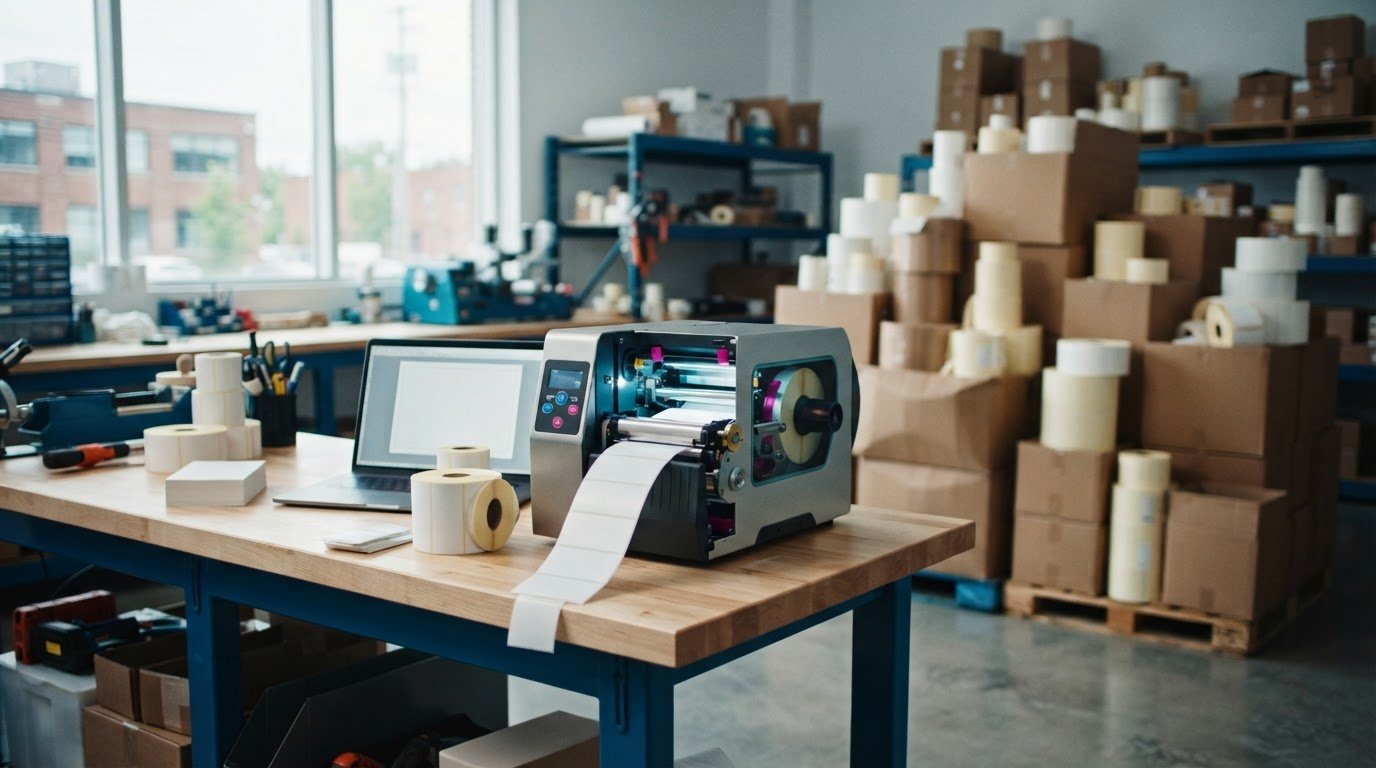
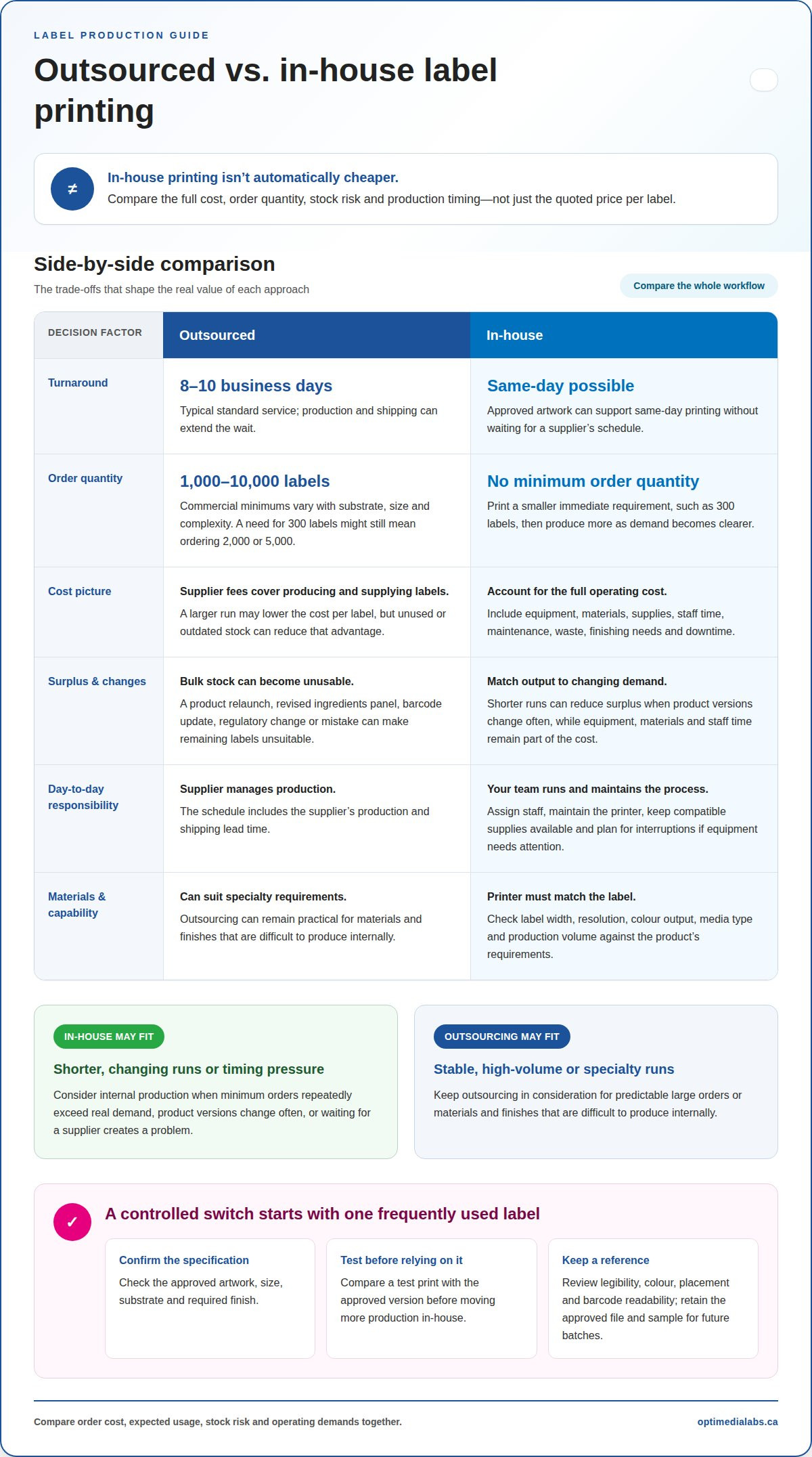
In-house label printing isn't always cheaper, but the right point to stop outsourcing label production comes when shorter runs, changing requirements or turnaround delays make producing labels internally more practical. Outsourced orders typically take 8-10 business days under standard service, while printing in-house from approved artwork can allow same-day turnaround. The decision depends on more than the price per label.
It makes sense to compare costs before changing a process that works. But order quantities, leftover stock and time spent waiting for labels all affect the real value of outsourcing, especially when product needs change.
This article explains how to weigh equipment and material costs against minimum order quantities, brand control and production speed. You’ll also learn when outsourcing still makes sense, so you can choose an approach that fits your label volumes and operational needs.
Key Takeaways
- Compare outsourcing fees with the full cost of in-house production, including equipment, supplies, labour, waste and finishing needs.
- Commercial print-run minimums can range from 1,000 to 10,000 labels, so changing demand may leave you with surplus stock.
- Include access to label files, approval steps and version control in your security and compliance assessment.
- Use approved artwork and consistent review steps to help catch labelling errors and protect brand presentation.
- Keep outsourcing for stable, high-volume runs or specialty materials and finishes; consider in-house printing for needs that call for more control over production timing.
Is in-house label printing always cheaper than outsourcing?
No. In-house printing can reduce waste and waiting, but equipment, supplies, labour and downtime all affect its total cost. Compare these ongoing demands with supplier fees and the quantity your business uses.
Supplier lead times and fees
Third-party printing fees cover producing and supplying labels, while lead times determine when they’re ready for use. Standard outsourced orders typically take 8-10 business days, and the wait can extend through production and shipping. Minimum quantities also affect the order total: commercial print runs commonly range from 1,000 to 10,000 labels, depending on substrate, size and complexity. Smaller quantities may cost more per label and leave unused stock.
Staffing, maintenance and downtime risks
In-house production puts daily operation and upkeep in your hands. That means assigning staff, maintaining the printer, keeping compatible supplies available and managing interruptions when equipment needs attention. If a printer is unavailable during a production run, labels may not be ready when packaging needs them. Include staff time and maintenance alongside equipment and material costs, rather than comparing a supplier’s invoice with the printer purchase alone.
Transitioning production in-house
Moving production in-house means transferring approved label work from a supplier to your own printing process. Start with a frequently used label and confirm its artwork, size, substrate and required finish. Compare a test print with the approved version before relying on internal production. This controlled transition shows whether the printer, materials and workflow meet the label’s needs without moving every order at once.
There’s no single equipment price for Canadian businesses. The investment depends on printer capabilities, compatible materials, finishing equipment and expected production volume. Include supplies and staff time in your comparison. A digital label printer should match the required label width, print resolution, colour output, media type and production volume. These specifications determine whether it can reproduce the artwork and handle the materials your products require.
Print-on-demand can reduce surplus when quantities change. With approved artwork ready, in-house printing can support same-day turnaround without waiting for a supplier’s schedule. Proofing still matters: review a printed sample for legibility, colour, placement and barcode readability before a full run. Keep the approved file and sample as references for future batches.
Variable data printing adds unique information, such as a changing lot code or product identifier, to a label design. It can suit batches where each label needs different content. Confirm the data source and sample output before production, since a misplaced or incorrect variable field can affect an entire batch. This capability is useful only when the printer and workflow meet the label’s requirements.
In-house production isn’t automatically the lower-cost choice. It makes more sense when smaller, changing runs and turnaround demands outweigh equipment, staffing and maintenance needs. Outsourcing can remain practical for large, stable orders or materials and finishes that are difficult to produce internally.
Minimum order quantities and excess inventory
Minimum order quantities determine how many labels a supplier requires per print run. Commercial suppliers typically set minimums between 1,000 and 10,000 units, depending on substrate, label size and complexity. That threshold matters when demand is uncertain: a business needing 300 labels might have to order 2,000 or 5,000. The remaining labels occupy storage and tie up budget before they’re needed.
Compare the quantity ordered with the labels actually used, not just the quoted unit cost. A larger print run can lower the cost per label, but that advantage shrinks if designs change before the stock is used. For example, a product relaunch may replace the logo, ingredients panel or barcode. The remaining labels may then be unusable, even if the product remains in production.
Design changes aren’t the only source of waste. Labels may be discarded after updates, regulatory changes or labelling mistakes. A typo, incorrect product detail or outdated version can make an entire batch unsuitable. Track write-offs alongside purchasing records. This comparison shows whether apparent bulk-order savings are offset by labels that never reach packaging.
In-house digital label printing has no minimum order quantity. That allows production to match a smaller immediate requirement, such as printing 300 labels for a limited run, then producing more as demand becomes clearer. It can reduce excess inventory when product versions change often. However, printing internally still requires suitable equipment, materials and staff time, which belong in the cost comparison.
Demand patterns help determine which method suits each label. A stable product with predictable, repeated volume may justify ordering a larger batch. A seasonal item, trial product or frequently revised package creates more risk if labels must be ordered far ahead. Separate labels by product and version, then compare historical usage with remaining stock before each new print run.
When testing limited runs or localized marketing initiatives, businesses often combine custom packaging with direct print promotion. For teams exploring targeted door-to-door campaigns to support regional launches, leafletprouk.com illustrates how GPS-tracked distribution can ensure print collateral reaches target areas effectively.
Unit costs can vary significantly with outsourced order quantities. A smaller order may cost more per label, while a larger run may leave surplus inventory. Evaluate both outcomes together: total order cost, expected usage, storage requirements and the likelihood of changes. The lowest unit price isn’t necessarily the lowest overall cost if some labels become obsolete.
Consider in-house production when minimum orders repeatedly exceed real demand or changing versions make surplus costly. Keep outsourcing for stable runs where larger quantities will be used as planned. Deciding label by label can help control inventory without moving every product to internal printing.
Security and compliance risks
Outsourcing sends label files and product information beyond your production team. Each transfer adds an access point to manage, from sharing artwork to receiving proofs and production files. A label may contain a product name, ingredient details, lot code or barcode. Decide who can access these files, which version is approved, and how outdated copies are removed from active use.
Label compliance risk centres on the accuracy and suitability of printed information. Requirements can differ by product and market, so a label prepared for one product may not suit another. A changed ingredient list, incorrect product identifier or outdated instruction can create an operational problem. Assign someone to review content changes before approving a new label version.
Use a controlled approval process whether printing is outsourced or in-house. Keep one approved master file, clearly mark superseded versions, and record who approved each revision. For example, distinguish a current package label from an earlier proof with a changed barcode. Before production, compare the proof with the master artwork and confirm the product, text and variable fields match.
In-house printing can reduce external file transfers, but it doesn’t eliminate the need for safeguards. Staff need access to the correct artwork and instructions, and the printer workflow must prevent accidental use of an old version. If several employees prepare labels, use a shared, controlled location instead of personal desktop copies. Restrict editing rights to those responsible for label changes.
Outsourcing can still work for sensitive or controlled files when the process is managed carefully. Share only what production requires, separate approved artwork from working drafts, and document each change sent for printing. For example, send a revised ingredient panel with its matching product identifier, not an unlabelled folder of drafts. Confirm the returned proof reflects the intended revision before production proceeds.
Assess security and compliance alongside cost and volume. Map the file path from artwork creation through approval, transfer, proofing, printing and storage. Identify who owns each step and how staff recognize the current version. If internal production gives your team clearer control over approvals and access, it may support a move in-house. If the supplier workflow handles versions reliably, outsourcing may remain suitable.
The deciding factor is control, not simply where the printer sits. Documented approval, accurate product content and clear file-access rules matter in either model. Review a representative label, such as one with a barcode and changing lot information, to identify where errors could enter. Then address the weak point before changing the production arrangement.
Brand consistency and control
Every label is a customer-facing part of your brand, from the product name to the colour palette. High-quality labels that meet applicable requirements can strengthen brand reputation, while poor print quality or labelling errors can damage it. Compare a finished label with approved artwork to assess colour, alignment, readability and material appearance before a production run.
Outsourcing can support consistent results when the supplier receives complete, approved files. But each revision creates a risk that an older version will be printed. For example, a packaging update may change a logo while leaving the product name unchanged. Clearly identify the approved artwork, then confirm the production file matches it.
In-house printing keeps a business’s messaging on brand 100% of the time. Internal control can make small updates easier to manage, such as changing a promotion date or product description. It also lets staff review a proof close to production. That control depends on using approved artwork and consistent print settings, rather than allowing each operator to adjust files independently.
Set a repeatable review process for each label type. Compare the printed sample with the approved design, checking details customers notice first: logo placement, colour, font size and spacing. Then verify product information, including ingredient text or directions. A short checklist helps employees assess each label against the same criteria.
- Artwork: Use the current approved file for each product and version.
- Print appearance: Compare colour, alignment and legibility with the accepted sample.
- Content: Check names, descriptions and other label information against the approved copy.
- Release: Record approval before printing the production quantity.
These checks matter whether labels are printed in-house or outsourced. A supplier can produce a technically sharp label that still misses the brand standard if the artwork, colour reference or revision instructions are unclear. Internal production can also drift when staff use different settings or substitute materials without reviewing the output. Use one approved reference sample to make comparisons more consistent across batches.
Consider the level of control your brand needs. Frequent packaging updates, limited-run promotions or several product variations may favour a process with quick access to approved files and proofs. A stable design with predictable production needs may remain well suited to outsourcing. In either case, documented artwork and review steps help protect presentation and reduce avoidable errors.
Bring production in-house when it improves control over the work that matters most, not simply because labels carry your logo. Compare recent samples, identify recurring corrections and assess how reliably the current process follows approved artwork. These practical signs show whether the production method supports the brand standard customers see on every package.
For organizations looking to extend that same visual standard beyond packaging to physical premises or retail displays, commercial signage specialists like First Stop Signs Print provide bespoke dimensional elements such as acrylic lettering to help maintain consistent branding across all physical touchpoints.
Outsourced versus in-house turnaround times
Compare production timelines by separating elapsed calendar time from hands-on work. An outsourced label job can pass through order entry, artwork approval, a production queue, dispatch and receiving. Each handoff can shift the schedule. Track the milestones for a recent product launch to see which stage caused the longest wait.
Supplier schedules also depend on when an order enters the queue. A file approved after a production cutoff may not move forward until the next available slot. Shipping adds another dependency, especially when labels must arrive before packaging starts. Map the timeline against your production calendar, including when packaging materials and staff are scheduled.
In-house production removes some external handoffs but creates an internal queue. Label work must compete with other tasks for operator time, printer access and finishing capacity. A launch with several package versions, for example, may require separate runs and changeovers. Check how these jobs fit around existing production instead of assuming a printer can start immediately.
To assess when to stop outsourcing label production, identify the timing constraint for each label type. Is the main issue order approval, supplier scheduling, shipment coordination or internal workload? The answer may vary by product. A standard package and a promotional label can have different deadlines, even when they use the same production line.
Build a schedule around milestones that reflect your workflow. Record when the final file is released, when production begins, when labels are available at the work area and when packaging uses them. Include internal review and finishing tasks where relevant. This makes the comparison useful for planning instead of relying on a single delivery estimate.
- Record: Note each handoff and milestone for outsourced orders.
- Compare: Measure elapsed time separately from staff production time.
- Schedule: Match label availability to packaging dates and line plans.
- Review: Identify internal queues, changeovers and competing production tasks.
Businesses evaluating when to stop outsourcing label production should compare the full schedule, not just print duration. Outsourcing can suit work that fits a planned supplier queue and delivery window. Internal production can help when a team needs more control over job priority, provided staff and finishing capacity are available. Some operations may use different methods for different label categories.
To discuss how label production timing fits your operation, review your label-printing workflow.
OptiMediaLabs Canada: Afinia Color Label Printers
OptiMediaLabs Canada offers Afinia Color Label Printers for businesses assessing whether to bring colour label production in-house. They can be a relevant option when changing demand, shorter runs or production scheduling make internal printing worth evaluating. Compare the labels you need, the materials involved and the print workflow before deciding.
For other production requirements, OptiMediaLabs Canada also offers RFID Label Printers, Thermal Transfer Ribbons and Barcode Software. These offerings address distinct label and identification needs, so match them to your operation rather than treating them as interchangeable options.
If you’re weighing equipment against continued outsourcing, identify the label types and workflow you want to bring in-house. Contact OptiMediaLabs Canada to discuss your label-printing requirements.
Set a clear review point for your label workflow
Deciding when to stop outsourcing label production doesn't mean moving every label run in-house. Treat it as an operational choice to revisit as product demand, artwork changes and scheduling needs evolve. Choose a label type to assess first, then compare how well your current process meets its actual production needs.
Set a review point around a real business change, such as a packaging refresh or a new product run. Consider whether internal printing would improve control without adding complexity for staff. Keep the decision practical: retain the production model that fits each label's requirements, and adjust only when the workflow gives you a clear reason.
For businesses planning in-house colour label production, OptiMediaLabs Canada offers Afinia Color Label Printers and high-performance ink supplies. Contact OptiMediaLabs Canada to discuss your label requirements and consider the options for your workflow. A measured decision can help you build a production approach that supports your next stage of growth.
Frequently Asked Questions
What signs indicate it’s time to bring label production in-house?
A practical signal for when to stop outsourcing label production is recurring disruption that internal printing could directly address. For example, if packaging staff regularly pause because a small label revision is still in transit, review that label’s workflow. Also consider whether demand varies across product lines, rush orders are common, and your team can take responsibility for file approval and print quality.
How much does outsourcing label production cost in Canada?
Outsourcing costs in Canada depend on the label’s material, dimensions, print complexity, order quantity, finishing requirements and delivery arrangements. Compare complete invoices for similar jobs, not just the per-label amount. Include setup or revision charges where applicable, along with unused stock and any production delays. For a fair comparison, use the same label specification and expected usable quantity when assessing internal production.
At what label volume does in-house production become more cost-effective than outsourcing?
There isn’t one volume that makes in-house printing more cost-effective for every operation. A business that prints small batches often may value reduced waste, while a large, stable run may favour outsourced production. Compare your actual label mix over a representative planning period. Account for how often designs change, how many labels remain usable, and whether staff and equipment would be used consistently between runs.
How do you calculate the break-even point for in-house versus outsourced label production?
Compare internal fixed costs with the difference between outsourced and internal variable costs per usable label. Include equipment, setup, labour, maintenance, consumables, waste and finishing in the internal estimate. Then divide fixed costs by the per-label savings from printing in-house. If that difference is small or negative, there may be no practical break-even volume. Recalculate when label specifications, order patterns or labour requirements change.
What label printers, software, and finishing equipment are needed for in-house production?
Choose equipment based on the label’s intended use, print method, materials, required image quality and production volume. A colour product label may need different capabilities from a barcode or RFID label. Printing software manages artwork and variable information, while finishing equipment may be needed for cutting or winding. Confirm that the printer, software, label stock and finishing steps work together using a representative sample before planning regular production.
How do in-house and outsourced label production compare in quality, turnaround time, and flexibility?
Quality depends on suitable materials, approved files, print settings and inspection, regardless of where production takes place. Internal printing can make short-run changes easier to schedule, while outsourcing can suit established specifications and production plans. Compare a sample from each method for legibility, colour and finishing. Also assess how each process handles a last-minute artwork revision, a repeat order and an unexpected change in quantity.
How should you evaluate label suppliers before deciding to stop outsourcing?
Review supplier performance using your own order records. Compare quoted and actual delivery dates, proof corrections, quality issues, quantity accuracy and how revisions were handled. Check whether invoices clearly identify setup, printing, finishing and delivery charges. Consider how easily your team can retrieve approved artwork and production specifications. This evidence helps distinguish supplier issues from delays caused by internal approvals or incomplete files.