
Zebra Label Printer: The 2026 Canadian Buyer’s Guide for Industrial Reliability
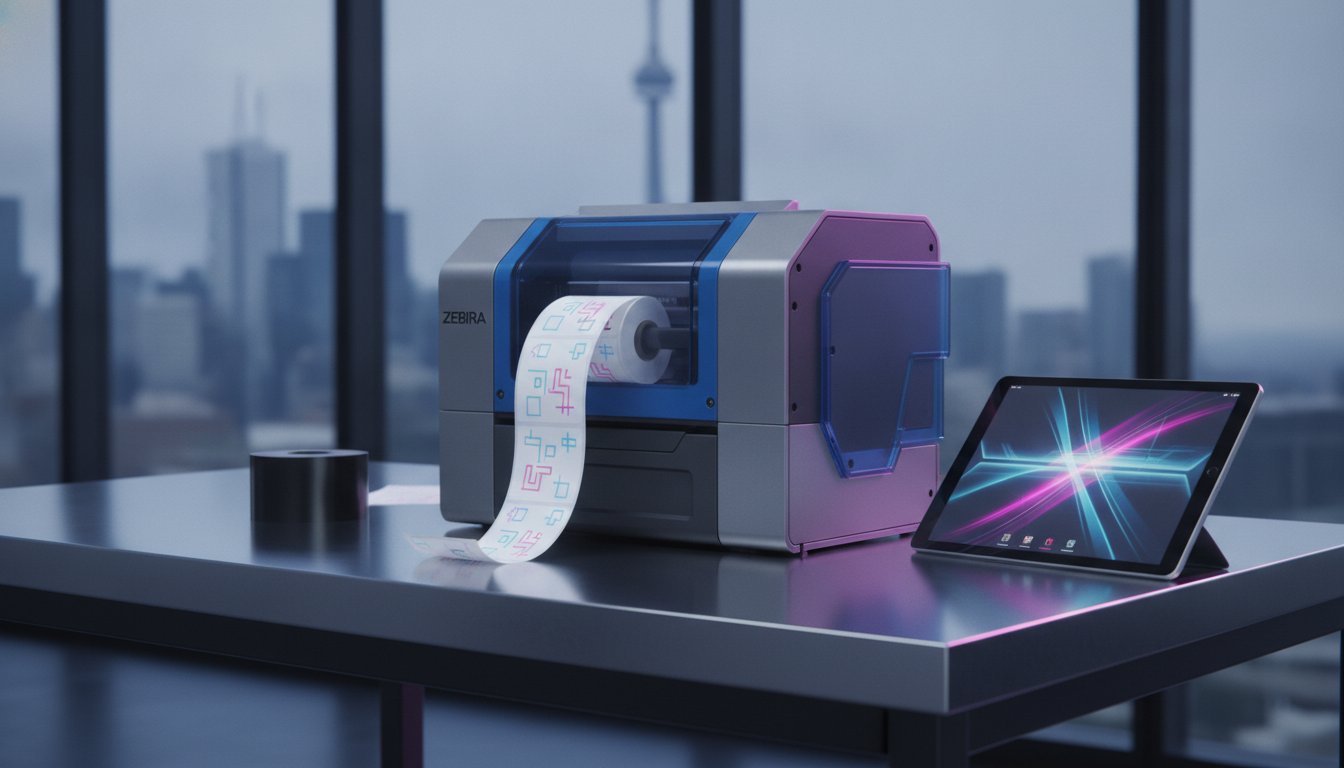
How much does a single hour of warehouse downtime actually cost your Canadian operation? You already know that an unreliable printer is more than just a minor annoyance. It's a bottleneck that stalls shipments, triggers errors, and frustrates your team. Selecting the right zebra label printer for your specific volume requirements shouldn't feel like a guessing game, especially when you're also trying to source compatible ribbons and labels from a dependable Canadian distributor like OptiMediaLabs Canada.
We'll help you eliminate that uncertainty and build a high-speed labelling station that integrates seamlessly with BarTender or NiceLabel software. This guide breaks down the latest Zebra series and print technologies to ensure your hardware choice supports a lower long-term total cost of ownership. You will learn how to match your industrial reliability needs with the perfect combination of hardware and consumables to keep your production lines moving efficiently. We'll examine everything from compact desktop models to heavy-duty industrial units so you can realize the best return on your investment while meeting the latest 2026 Canadian regulatory standards.
Key Takeaways
- Identify the correct print technology, such as direct thermal or thermal transfer, to balance label durability with operational cost.
- Select the ideal zebra label printer series based on your specific daily print volume and the physical demands of your workspace.
- Streamline your workflow by integrating Zebra hardware with professional barcode software for accurate, high-speed label production.
- Protect your investment by using high-performance ribbons and labels that minimize hardware downtime and printhead maintenance.
- Simplify your Canadian logistics by sourcing all hardware and consumables from a reliable national distributor.
What is a Zebra Label Printer and Why is it the Industrial Standard?
A zebra label printer is a high-durability thermal printing device specifically engineered for barcode and shipping label production. Unlike standard inkjet printers that rely on liquid ink and complex paper paths, these units utilize specialized thermal technology to produce smudge-proof, long-lasting labels. This design choice is intentional; industrial labels must survive the rigours of transit and storage without losing legibility.
The Zebra Technologies Corporation has built its global reputation by creating hardware that thrives where consumer-grade equipment fails. Zebra printers serve as the definitive benchmark for thermal transfer and direct thermal technology in 2026, setting the industry standard for precision and reliability. The brand's rugged chassis designs are particularly valued in Canada, where warehouse equipment must perform consistently across diverse environmental conditions.
The Advantages of Thermal Printing Technology
Thermal printing offers a significant mechanical advantage because it has very few moving parts. Traditional office printers use rollers, ink carriages, and complex drums that are prone to jam or fail under heavy use. A zebra label printer simplifies this by applying heat directly to the media or a ribbon. This simplicity reduces mechanical failure rates and ensures consistent output during high-volume shifts.
Thermal labels are also essential for Canadian logistics. They maintain perfect legibility even under the extreme temperature fluctuations common in our warehouses and during cross-country transport. Because the image is essentially baked into the surface, you don't have to worry about smearing or fading. On-demand printing also eliminates material waste. You only print the exact number of labels you need, which effectively lowers your total cost of ownership over time.
Durability in Demanding Environments
Reliability also extends to the printhead. While printheads are consumable items, Zebra engineering ensures they have a long operational life when paired with high-quality thermal transfer ribbons. This durability is critical for Canadian businesses that cannot afford the downtime associated with frequent hardware repairs. By choosing a brand that prioritizes structural integrity, you secure a labelling station that remains functional for years, not just months.
Desktop vs. Industrial: Selecting the Right Zebra Printer Series
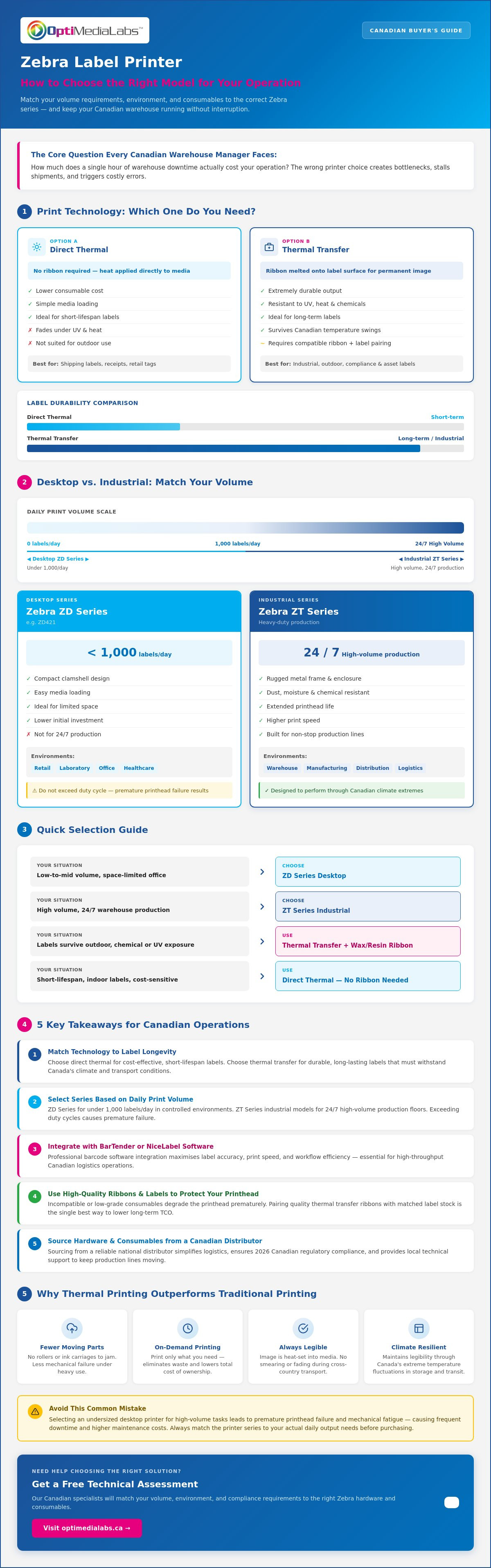
Selecting the right hardware depends primarily on your daily print volume and the physical environment of your facility. A desktop zebra label printer provides a compact footprint for low-to-mid volume tasks, typically under 1,000 labels per day. These units are highly efficient for environments where space is limited but professional output is required. Conversely, industrial models are engineered for 24/7 high-volume production lines where durability and speed are non-negotiable.
Avoid the common mistake of selecting an undersized printer for high-volume tasks. While the initial investment for a desktop unit is lower, pushing it beyond its intended duty cycle leads to premature printhead failure and mechanical fatigue. This results in frequent downtime and higher maintenance expenses. Matching the printer series to your actual output needs ensures a lower total cost of ownership and consistent performance throughout the rigours of your shift. If you need help determining your volume requirements, contact our support specialists for a technical assessment.
The Zebra ZD Series: Compact Efficiency
The Zebra ZD421 and similar desktop units are built for space-saving efficiency in controlled environments. These models feature a clamshell design that allows for simple media loading and intuitive interfaces. They are ideal for retail centres, laboratory sample tracking, and small-scale shipping operations. Staff can manage these devices with minimal training; the clear status icons provide immediate feedback on printer health and media levels.
The Zebra ZT Series: High-Volume Powerhouses
For heavy-duty manufacturing and distribution, the ZT411 and ZT610 models offer unmatched power. These industrial units feature all-metal frames designed to withstand dust, vibration, and temperature fluctuations. Advanced connectivity options, including Ethernet and industrial-grade Wi-Fi, ensure stable network links across large warehouse floors. A significant benefit of the ZT series is the larger ribbon capacity, which supports lengths up to 450 metres. This minimizes downtime by significantly reducing the frequency of media changes during high-speed labelling runs. Using a zebra label printer from the ZT series allows your team to focus on logistics rather than hardware maintenance.
Choosing Between Direct Thermal and Thermal Transfer Technology
Selecting the appropriate printing method for your zebra label printer is a critical operational decision. This choice is dictated by the environment where the label will reside and the required lifespan of the printed data. If your labels will face exposure to high heat, direct sunlight, or industrial chemicals, the technology you choose determines whether your barcodes remain scannable or become unreadable. Thermal transfer is the preferred choice for long-term asset tracking because it ensures the information remains intact for years.
Understanding the mechanical differences between these two methods helps you balance supply costs with performance. Direct thermal printing is a streamlined, inkless process that utilizes heat-sensitive media. In contrast, thermal transfer printing uses a heated printhead to melt a ribbon onto the label surface, creating a permanent bond. Both methods are supported by the Zebra ecosystem, but they serve very different industrial applications.
When to Use Direct Thermal
The Power of Thermal Transfer
Thermal transfer printing is the gold standard for durability. During the process, the printhead transfers ink from a ribbon onto the label material, resulting in a crisp image that resists fading and abrasion. This technology is essential when using thermal transfer label printers for GHS compliance or chemical drum labelling where legibility is a legal requirement. You can choose from several ribbon types to match your specific material:
- Wax Ribbons: Ideal for standard paper labels and general shipping needs.
- Wax-Resin Ribbons: Provide increased resistance to chemicals and smudging on synthetic materials.
- Resin Ribbons: Offer the highest level of durability for extreme temperatures and harsh chemical exposure.
By matching the ribbon type to your label material, you ensure that your zebra label printer produces high-contrast, permanent results that withstand the most demanding Canadian industrial environments.
Essential Consumables and Software for Your Zebra Ecosystem
Hardware is only the foundation of your labelling strategy. A zebra label printer performs at its peak only when paired with high-quality consumables and robust software. Neglecting these components leads to poor barcode scannability and increased printhead wear. It's a technical reality that the wrong ribbon can act like sandpaper on your equipment. To protect your investment, always match your ribbon width to your label width. Ideally, the ribbon should be slightly wider than the label liner to provide a protective barrier between the printhead and the abrasive label surface.
Professional software completes the ecosystem by allowing for variable data printing and seamless database integration. These tools ensure that your labels are not just printed, but are accurate, compliant, and integrated into your broader logistics workflow. If you aren't sure which supplies match your hardware, speak with our experts to receive a customized consumables list for your operation.
Selecting the Correct Zebra Ribbons
Choosing between Zebra wax ribbons and high-durability resin options depends on your label material and its environment. Wax ribbons are the industry standard for paper labels used in general shipping. For synthetic materials requiring chemical or abrasion resistance, resin ribbons are necessary. Some high-speed industrial models utilize "near edge" technology. This allows the printhead to stay cool while printing at extreme speeds, but it requires specific near-edge ribbons to function correctly.
Always verify the ink-side compatibility of your media. Zebra units typically utilize Coated Side Out (CSO) ribbons. Attempting to use a Coated Side In (CSI) ribbon will result in the ink transferring to the printhead instead of the label, causing immediate hardware failure and significant cleaning time. Check your printer specifications or ribbon packaging before installation to avoid this common error.
Professional Label Design Software
Modern industrial labelling requires more than static text. Leading label design software solutions are essential for complex industrial automation, allowing you to pull data directly from ERP systems. For businesses requiring cloud-based label management across multiple Canadian sites, advanced platforms provide a centralized solution that reduces local IT requirements. These tools simplify GS1 barcode compliance and RFID encoding, ensuring your zebra label printer meets the strict requirements of major retailers and healthcare providers. By utilizing professional design software, you eliminate manual entry errors and ensure every label meets your quality standards.
Why Canadian Businesses Source Zebra Solutions from OptiMediaLabs
Canadian businesses require more than just hardware; they need a logistics partner that understands the domestic market. Sourcing your zebra label printer and all associated consumables from a single Canadian distributor like OptiMediaLabs eliminates the friction of international procurement. We provide a streamlined path to obtaining industrial resources, ensuring your production lines remain operational without the threat of supply chain interruptions. Our role is to act as a dependable facilitator for your labelling needs.
A single-source supplier model offers significant advantages for your total cost of ownership. By centralizing your procurement, you ensure that every ribbon, label, and software license is verified for compatibility with your specific printer series. This precision reduces the risk of hardware damage and ensures consistent print quality across your entire facility. We prioritize transparency and ease of use in every transaction, allowing you to focus on your core operations.
National Distribution and Supply Reliability
Relying on cross-border shipping often introduces unpredictable delays and complex duty calculations. OptiMediaLabs maintains national distribution across Canada, providing reliable access to the hardware and supplies you need. We prioritize maintaining a deep inventory of critical consumables, such as Zebra-compatible ribbons and blank labels, to support high-volume industrial environments. This local presence means your orders are processed and shipped within the country, bypassing the logistical hurdles of international trade.
Whether you are operating a distribution centre in Ontario or a manufacturing plant in British Columbia, our infrastructure supports your need for speed and reliability. We specialize in the demands of high-output facilities that cannot afford to wait for components to clear customs. Our team understands the specific pressures of the Canadian market, from regulatory compliance to the environmental challenges of local warehouses. We ensure your supply chain remains resilient.
Expert Guidance for Your Labelling Strategy
Our technical expertise extends beyond hardware sales to encompass the entire labelling ecosystem. We help you navigate the complexities of hardware-software-media compatibility to ensure a stable installation. This includes guidance on choosing between specialized Afinia colour systems for product branding and rugged Zebra hardware for industrial barcodes. Our specialists are proficient in professional software solutions like Loftware and BarTender. We ensure your software configuration matches your hardware capabilities for maximum efficiency.
Consult with our specialists to confirm that your chosen combination of zebra label printer, media, and software will perform as expected. We provide a secure, professional path to optimizing your labelling workflow. To secure a personalized hardware recommendation based on your specific volume and environmental needs, contact our Canadian team. We provide the technical authority and logistical support required to keep your business moving forward.
Optimize Your Industrial Labelling Infrastructure
Choosing a zebra label printer is a strategic decision that directly impacts your warehouse efficiency and shipping accuracy. By matching your hardware series to your specific volume requirements and selecting the right thermal technology, you eliminate the bottlenecks caused by unreliable equipment. You now understand that a complete ecosystem requires high-performance consumables and professional software integration to ensure long-term reliability and lower total cost of ownership.
As an authorized Canadian distributor of Zebra ribbons and hardware, OptiMediaLabs provides the technical authority you need to stay compliant with 2026 standards. We are specialists in BarTender and NiceLabel software integration; we ensure your new hardware works seamlessly with your existing databases. With national shipping across Canada, we provide the stability and speed your operation demands. Our team is ready to help you navigate technical specifications to find the perfect fit for your facility.
Contact OptiMediaLabs today for expert guidance on Zebra label printers and supplies. Let's work together to build a robust labelling station that supports your business growth and operational success.
Frequently Asked Questions
How long does a Zebra label printer typically last?
A Zebra label printer typically lasts between five and ten years, depending on the specific model and the intensity of its operational environment. Industrial series like the ZT411 are engineered for 24/7 use and generally have a longer mechanical lifespan than entry-level desktop units. Regular maintenance and the use of high-quality consumables are critical factors in extending the life of your hardware.
Can I use any brand of ribbon in my Zebra thermal transfer printer?
You can use third-party ribbons, but they must be Coated Side Out (CSO) to be compatible with Zebra hardware. Using generic or low-quality ribbons often leads to poor print quality and can cause premature wear on the printhead. We recommend using verified Zebra-compatible ribbons to ensure consistent scannability and to protect your equipment's internal components from unnecessary friction.
What is the difference between the Zebra ZD421 and the older ZD420?
The Zebra ZD421 is the advanced successor to the ZD420, offering 30% more processing power and enhanced security features. It includes a new intuitive interface and more flexible connectivity options, such as field-installable wireless kits. This model is designed to handle future software updates more efficiently, making it a more secure long-term investment for your facility compared to the discontinued ZD420 series.
Do Zebra printers work with Mac and Windows operating systems?
Zebra printers are fully compatible with both Windows and macOS operating systems. While Windows remains the industrial standard for barcode software, Zebra provides CUPS drivers for Mac users to ensure seamless printing from various desktop applications. Most professional design tools like BarTender are optimized for Windows environments, so verify your software requirements before finalizing your workstation setup.
How often should I clean the printhead on my industrial Zebra printer?
You should clean the printhead every time you replace a roll of labels or a thermal transfer ribbon. Regular cleaning with 99% isopropyl alcohol prevents the buildup of adhesive and dust, which are the primary causes of "blown pixels" and failed barcode scans. This simple preventative maintenance step significantly extends the operational life of your zebra label printer and ensures consistent output quality.
What software is best for designing barcodes for Zebra printers?
BarTender and NiceLabel are the premier software options for designing complex, compliant barcodes. BarTender is ideal for automated, server-based environments, while NiceLabel offers excellent cloud-based management for businesses with multiple Canadian locations. Both platforms provide native drivers for Zebra hardware, which ensures high-speed data transmission and accurate GS1 compliance for your logistics operations.
Does Zebra offer RFID printing capabilities for logistics?
Zebra provides extensive RFID printing capabilities across both its industrial and desktop series. Models like the ZT411 RFID allow you to print and encode tracking tags simultaneously, which is essential for modern inventory management and high-accuracy logistics. These units support a wide range of transponders and are fully compatible with the major RFID encoding standards utilized across North American supply chains.
How do I know if I need a 203 dpi or 300 dpi Zebra printer?
Your choice between 203 dpi and 300 dpi depends on the size and complexity of your labels. A 203 dpi model is the standard for most shipping labels and large barcodes. If your application requires small fonts, dense 2D barcodes, or detailed graphics, a 300 dpi zebra label printer is necessary to ensure the output remains sharp and scannable by industrial readers.